
3D Molecular viewer in the terminal

Project description
About Timol
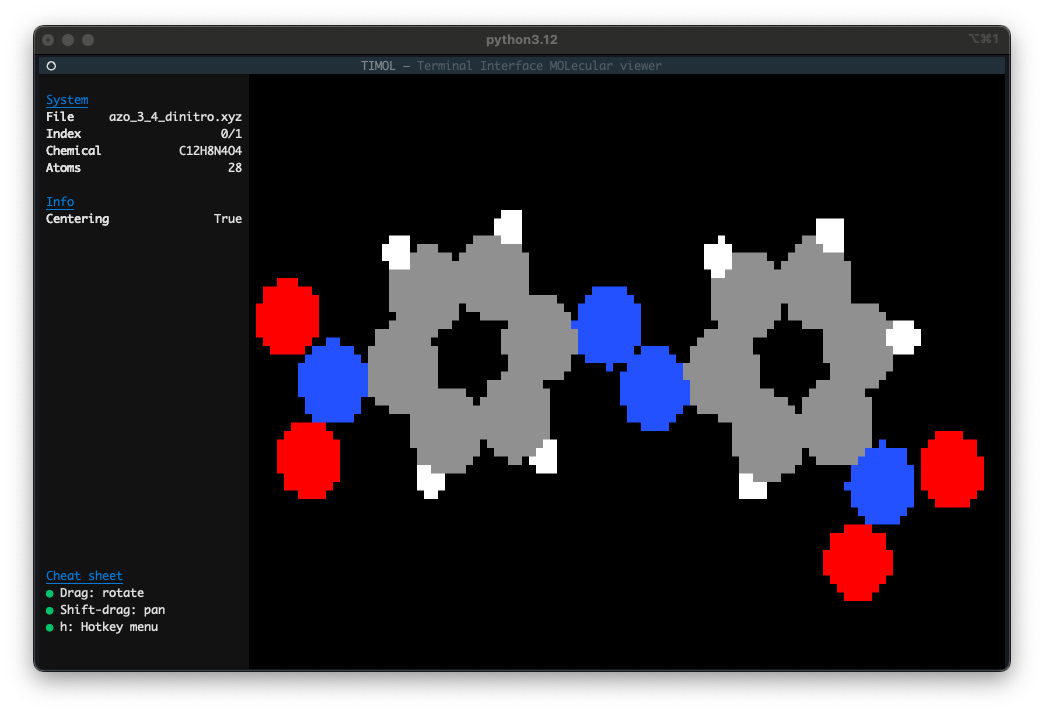
Timol is a molecular visualiser inside of the terminal. It relies on ASE to read a molecular file (e.g. xyz) and displays it within a Textual app.
Installation
Timol is installable via pip (see PyPI page) using pip install timol. The minimum python version is 3.9.
Usage
In order to visualise a file of interest, simply call timol <file_path>. An optional argument (-i) can be provided to index the file in case only specific frames are of interest (note that this can also be done from within the app using the i hotkey). This is particularly recommended for large (xyz) files to prevent excessive loading times.
In order to test the app without a molecular file at hand, use timol test.
Note that the first time timol is launched, longer loading times are expected to initialise the package.
Functionalities
Timol provides a set of tools to conveniently manipulate the camera and more:
- Help: Press
hto view available hotkeys from within the app - Rotate/tilt: Drag the mouse or press
a/dandw/s - Spin: Press
z/x - Pan: Hold shift/alt and drag the mouse or press
shift+a/d - Zoom: Scroll or press
q/e - Change index/frame: Press
sift+q/eorleft/right(up/down) to go to the previous/next (or first/last) frame, pressgto manually input the index
MacOS Disclaimer
The default MacOS terminal app does not play nice with Textual apps and might make the rendering choppy. For more information and a solution to some of the issues, see the Textual FAQ


Download files
Download the file for your platform. If you're not sure which to choose, learn more about installing packages.
Source Distribution
Built Distribution
Filter files by name, interpreter, ABI, and platform.
If you're not sure about the file name format, learn more about wheel file names.
Copy a direct link to the current filters
File details
Details for the file timol-1.1.2.tar.gz.
File metadata
- Download URL: timol-1.1.2.tar.gz
- Upload date:
- Size: 13.9 kB
- Tags: Source
- Uploaded using Trusted Publishing? No
- Uploaded via: twine/6.1.0 CPython/3.9.21
File hashes
| Algorithm | Hash digest | |
|---|---|---|
| SHA256 |
754f59172cff8a7fc2b74a0022c712f479214b970175e9e59a86201561e8d397
|
|
| MD5 |
0ce5435602e7e0402c9df87d88d2b611
|
|
| BLAKE2b-256 |
0e0f13778d457dbf24599e8e6dc8c2819a07f3f893f838882e95271a484b835e
|
File details
Details for the file timol-1.1.2-py3-none-any.whl.
File metadata
- Download URL: timol-1.1.2-py3-none-any.whl
- Upload date:
- Size: 16.6 kB
- Tags: Python 3
- Uploaded using Trusted Publishing? No
- Uploaded via: twine/6.1.0 CPython/3.9.21
File hashes
| Algorithm | Hash digest | |
|---|---|---|
| SHA256 |
37920904434a34b662ae7894083161b641cf555c61634d9f5b2f780c4bc00f83
|
|
| MD5 |
45d53b41588789f70ac60a48c819803f
|
|
| BLAKE2b-256 |
8440dcc9f289370cb3ac5dd93ed4092044e41e18979a5f67c4ab04f608166a2a
|






