

A lightweight PostGIS based dynamic vector tile server.




Documentation: https://developmentseed.org/timvt/
Source Code: https://github.com/developmentseed/timvt
TiMVT, pronounced tee-MVT, is a python package which helps creating lightweight Vector Tiles service from PostGIS Database.
Built on top of the modern and fast FastAPI framework, timvt is written in Python using async/await asynchronous code to improve the performances and handle heavy loads.
TiMVT is mostly inspired from the awesome urbica/martin and CrunchyData/pg_tileserv projects.
Features
- Multiple TileMatrixSets via morecantile. Default is set to WebMercatorQuad which is the usual Web Mercator projection used in most of Wep Map libraries.)
- Built with FastAPI
- Table and Function layers
- Async API using asyncpg
Install
Install TiMVT from pypi
# update pip (optional)
python -m pip install pip -U

# install timvt
python -m pip install timvt
or install from source:
$ git clone https://github.com/developmentseed/timvt.git
$ cd timvt
$ python -m pip install -e .
PostGIS/Postgres
TiMVT rely mostly on ST_AsMVT function and will need PostGIS >= 2.5.
If you want more info about ST_AsMVT function or on the subject of creating Vector Tile from PostGIS, please read this great article from Paul Ramsey: https://info.crunchydata.com/blog/dynamic-vector-tiles-from-postgis
Configuration
To be able to create Vector Tile, the application will need access to the PostGIS database. TiMVT uses pydantic's configuration pattern which make use of environment variable and/or .env file to pass variable to the application.
Example of .env file can be found in .env.example
POSTGRES_USER=username
POSTGRES_PASS=password
POSTGRES_DBNAME=postgis
POSTGRES_HOST=0.0.0.0
POSTGRES_PORT=5432

# Or you can also define the DATABASE_URL directly
DATABASE_URL=postgresql://username:password@0.0.0.0:5432/postgis
Minimal Application
from timvt.db import close_db_connection, connect_to_db
from timvt.factory import VectorTilerFactory
from timvt.layer import FunctionRegistry
from fastapi import FastAPI, Request

# Create Application.
app = FastAPI()

# Add Function registry to the application state
app.state.function_catalog = FunctionRegistry()

# Register Start/Stop application event handler to setup/stop the database connection
# and populate `app.state.table_catalog`
@app.on_event("startup")
async def startup_event():
    """Application startup: register the database connection and create table list."""
    await connect_to_db(app)


@app.on_event("shutdown")
async def shutdown_event():
    """Application shutdown: de-register the database connection."""
    await close_db_connection(app)

# Register endpoints.
mvt_tiler = VectorTilerFactory(
    with_tables_metadata=True,
    with_functions_metadata=True,  # add Functions metadata endpoints (/functions.json, /{function_name}.json)
    with_viewer=True,
)
app.include_router(mvt_tiler.router, tags=["Tiles"])
Default Application
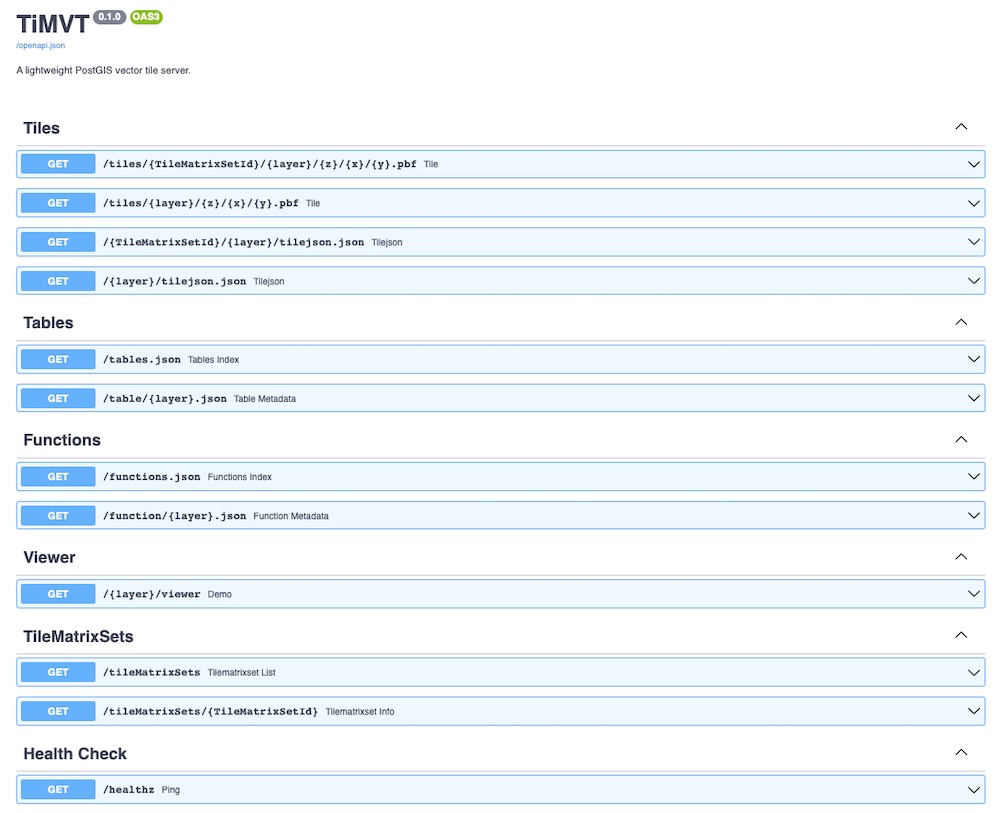
While we encourage users to write their own application using TiMVT package, we also provide a default production ready application:
# Install timvt dependencies and Uvicorn (a lightning-fast ASGI server)
$ pip install timvt 'uvicorn[standard]>=0.12.0,<0.14.0'

# Set Database URL environment variable so TiMVT can access it
$ export DATABASE_URL=postgresql://username:password@0.0.0.0:5432/postgis

# Launch Demo Application
$ uvicorn timvt.main:app --reload
You can also use the official docker image
$ docker run \
    -p 8081:8081 \
    -e PORT=8081 \
    -e DATABASE_URL=postgresql://username:password@0.0.0.0:5432/postgis \
    ghcr.io/developmentseed/timvt:latest
:endpoint:/docs
Contribution & Development
See CONTRIBUTING.md
License
See LICENSE
Authors
Created by Development Seed
Changes
See CHANGES.md.
Metadata
Release files for timvt 0.7.0
For a detailed explanation of source distributions (sdists) and built distributions (wheels), please see the package formats documentation.
Source distribution (sdist)
| File | Size | Uploaded | Provenance | Actions |
|---|---|---|---|---|
| timvt-0.7.0.tar.gz | 24.6 kB | Without provenance | Details for timvt-0.7.0.tar.gz |
Built distribution (wheel)
| File | Interpreter | ABI | Platform | Actions Reset |
|---|---|---|---|---|
| timvt-0.7.0-py3-none-any.whl | Python 3 | none | any | Details for timvt-0.7.0-py3-none-any.whl |
Total release size: 49.4 kB
Release files / timvt-0.7.0.tar.gz
| Download URL | timvt-0.7.0.tar.gz |
|---|---|
| Size | 24.6 kB |
| Tags | Source |
|
SHA-256 checksum How to use checksums |
ebd251d4df217e840f9f36271e91b0d48a1c94763d6982429edce01bc8a6d304
|
|
BLAKE2b-256 checksum How to use checksums |
a9550558dc40bcb80c03d23b91ea6812f2a5cd78f831d04eec7ce0388ddb58f3
|
| Upload date | |
|
Uploaded using Trusted Publishing? What is trusted publishing? |
No |
| Uploaded via |
python-requests/2.27.1
|
Release files / timvt-0.7.0-py3-none-any.whl
| Download URL | timvt-0.7.0-py3-none-any.whl |
|---|---|
| Size | 24.8 kB |
| Tags | Python 3 |
|
SHA-256 checksum How to use checksums |
d7f04b7e797ff2888559748ab1148fe532767069624c7f8b4a466c6bc7bbf090
|
|
BLAKE2b-256 checksum How to use checksums |
c4b780c68b9648498dad12e4d01e00cbba7bd60bcbad6ccef8804dfc41da9eb9
|
| Upload date | |
|
Uploaded using Trusted Publishing? What is trusted publishing? |
No |
| Uploaded via |
python-requests/2.27.1
|
Security for timvt 0.7.0
Provenance
Provenance describes where a file came from. On PyPI, provenance is shared via attestations, which provide a verifiable record of the build or publishing details. View details, limitations and caveats.
No provenance found
None of the files in this release were uploaded with provenance metadata.
A note on package security
PyPI is a repository for distributing packages, not a service for auditing them. While third-party security researchers and our staff do their best to detect and remove malicious packages, PyPI cannot guarantee the quality, security or suitability of any given package.
To learn more about protecting yourself from malicious actors, visit our package security documentation.














