
Tinta

Tinta is a magical console output tool with support for printing in beautiful colors and with rich formatting, like bold and underline, using static, chain-able methods. It's so pretty, it's almost like a unicorn!






Features and Tinta Basics
Tinta takes a statically typed approach to handling rich-color console output.
In the past you might have fiddled with ANSI colors codes, or passed strings to a generic class, only to discover you typo'd one of them! (Yes, we've all been there).
But with Tinta, you can create your own colors.ini file, which dynamically generates builder pattern methods for Tinta. If you add a color for wine to your colors file, you can then use:
from tinta import Tinta
Tinta.load_colors('colors.ini')
Tinta().wine('sip')
For mypy/pyright support of custom colors, generate a typed subclass with python -m tinta codegen (see below).
You can make a really simple drop-in print() replacement:
Tinta('Our neural pathways have become accustomed '\
      'to your sensory input patterns.').print()
Or you can create a variable to make things easier to read (or use control flows):
from tinta import Tinta

children = True

t = Tinta().mint('Fate.')
t.dark_gray('It protects')
t.underline().red('fools')

if children:
    t.normal().pink('little children')
else:
    t.normal().yellow('spotted cats')

t.dark_gray(', and ships named')
t.mint("Enterprise.").print()
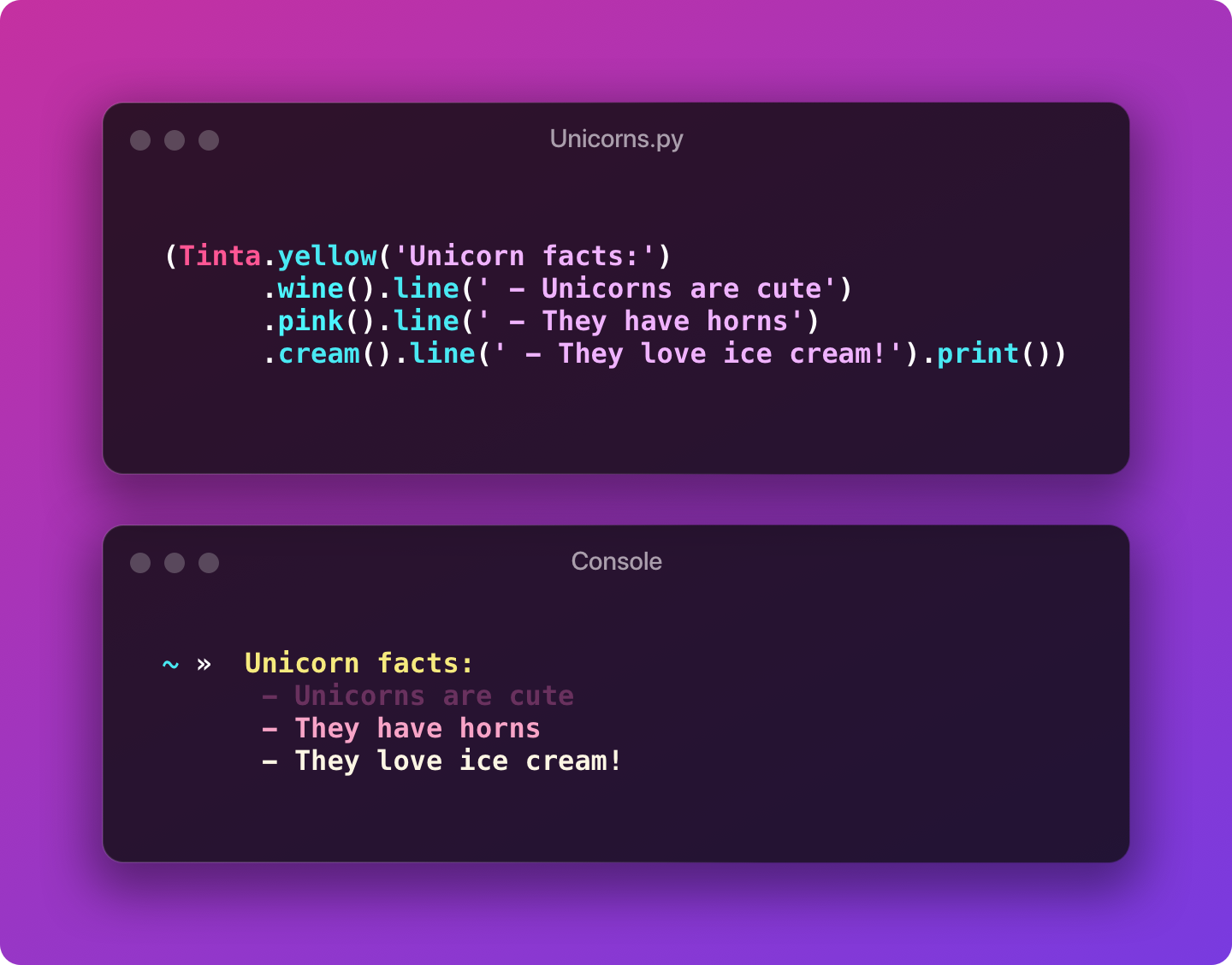
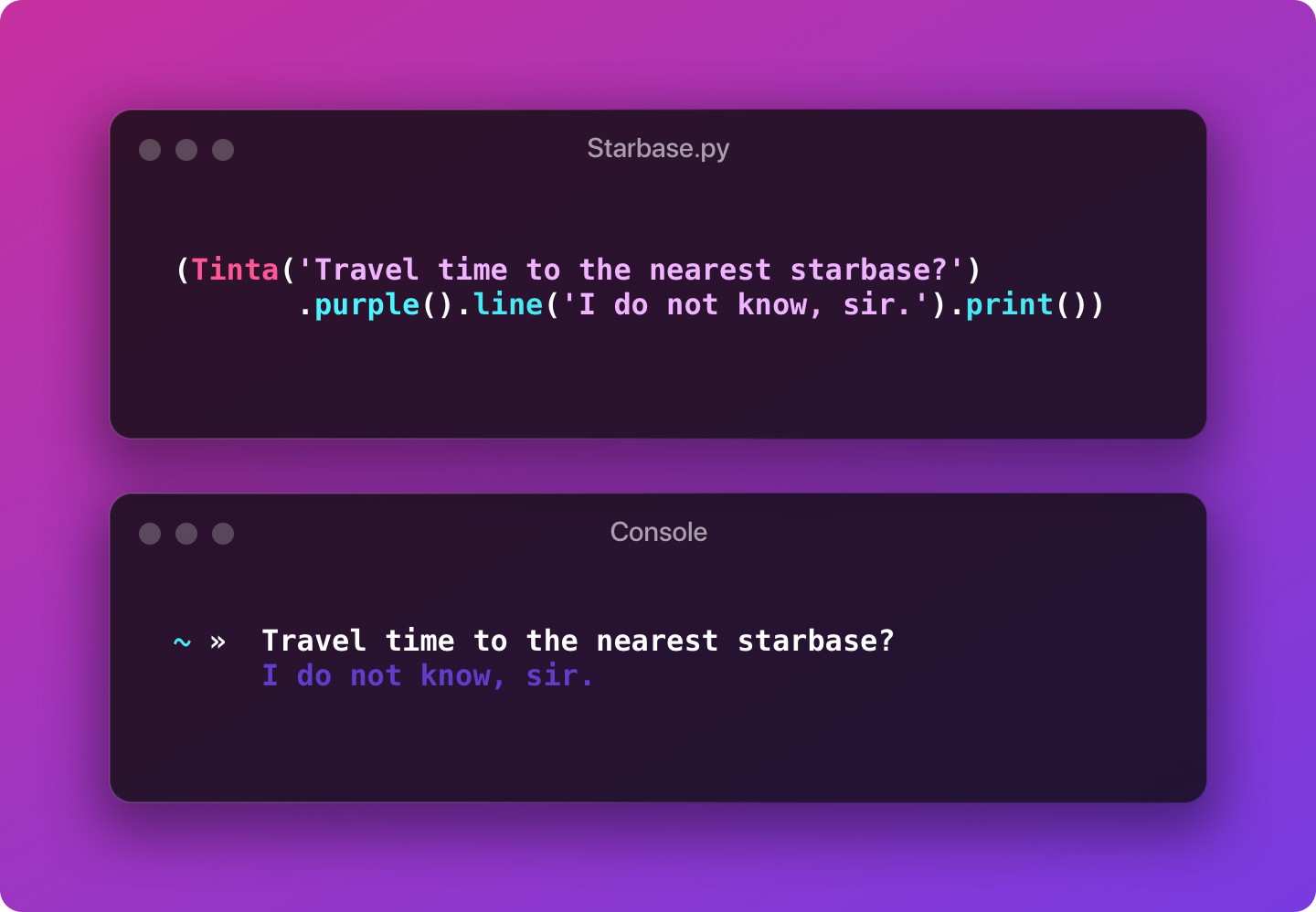
OK, neat, so how is that like unicorns?
Glad you asked! Here are some pretty pictures:
Installation and Getting Started
Requires Python 3.10 or later.
Install Tinta
pip install tinta
(Or visit https://pypi.org/project/tinta/)
Add Tinta to your project
from tinta import Tinta

Tinta('Elementary, my dear!').print()
Create a colors.ini file
An example colors.ini file might look like:
# A list of ansi colors for your console.
[colors]
green = 35
red = 1
blue = 32
yellow = 214
viridian = 42
Or modify the Tinta colors.ini from here.
You can configure a path to your colors.ini file. This path can be relative, or absolute; the best way to make a path is using pathlib.Path(). Tinta will try and find the file in the current working directory, or you can specify a path:
from pathlib import Path
from tinta import Tinta
Tinta.load_colors(Path().cwd() / 'config/colors.ini')
Note:
Tinta.load_colors()replaces the active color map (it does not merge with the defaults). If your project ini only definesblue,mint, andviridian, only those color methods are available after loading.
Typed custom colors (mypy / pyright)
Default colors from Tinta's bundled colors.ini are typed out of the box (Tinta().mint(...) type-checks).
For custom colors in your own colors.ini, generate a typed subclass so editors and type checkers recognize methods like .viridian() without # type: ignore:
python -m tinta codegen path/to/colors.ini -o path/to/tinta_colors.py
from path.to.tinta_colors import Tinta  # generated subclass

Tinta.load_colors("path/to/colors.ini")
Tinta().viridian("hello").print()
You can also write the typed module when loading colors:
Tinta.load_colors("path/to/colors.ini", typings_out="path/to/tinta_colors.py")
Regenerate the typed module whenever you add or rename colors in your ini.
Customizing your colors
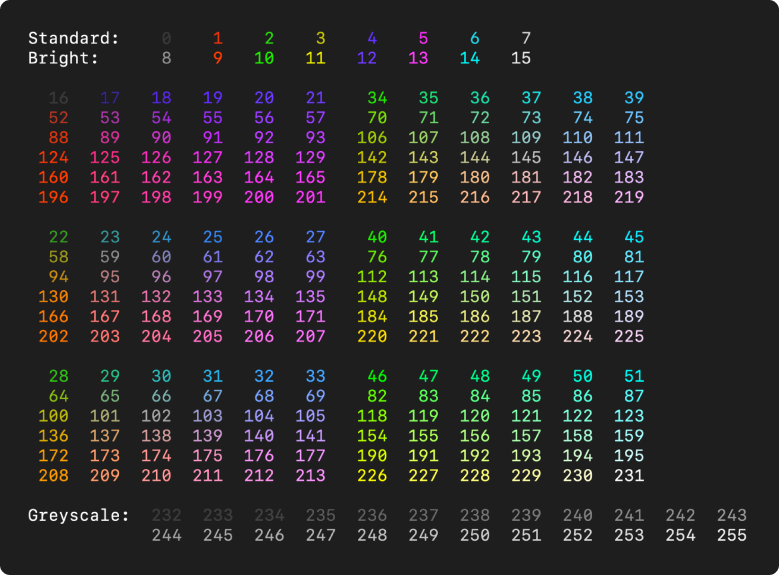
You can use Tinta.discover() to discover what colors are available on your console.
Tinta.discover()
# or to show the colors in the background
Tinta.discover(background=True)
Tinta Basics
from tinta import Tinta

Tinta('Unicorns are soft').print()
# prints: Unicorns are soft in plain text

Tinta('Unicorns are soft').pink().print()
# prints: Unicorns are soft in pink

Tinta('Unicorns are soft').pink().bold().print()
# prints: Unicorns are soft in bold pink

# You can chain as many methods as you want, and you can instantiate a single Tinta object
t = Tinta()
t.pink('Unicorns are soft, and').bold('very').normal('kind.')
t.print()
Tinta().pink('Unicorns are soft, and').bold('very').normal('kind.').print()
# prints: Unicorns are soft, and very kind.
#         [--------pink--------][bold][normal]

# Notice how spaces are preserved between segments?
# You can change this with the sep arg:
Tinta().pink('Unicorns are soft, and', sep="").bold('very', sep="").normal('kind.').print()
# prints: Unicorns are soft,andvery kind.
# or...
Tinta().pink('Unicorns are soft, and').bold('very').normal('kind.').print(sep="")
# prints: Unicorns are soft, andverykind.

# Tinta will also try and automatically fix common punctuation issues that can occur when segments are joined together:
Tinta().pink('Unicorns are soft, and').purple(", you know,").bold('very').normal(', very, kind.').print()
# With smart fixing disabled, this would normally print:
# > Unicorns are soft, and , you know, very , very, kind.

# But with smart fixing enabled, it prints correctly:
# > Unicorns are soft, and, you know, very, very, kind.

# This is turned on by default, but you can disable this by setting TINTA_SMART_FIX_PUNCTUATION to `false` in your environment.
You can run the examples in the examples/ directory to see more:
# check out the repo
git clone https://github.com/brandonscript/tinta.git
cd tinta
python examples/basic_example.py
API Reference
Tinta (+ color methods)
Dynamic methods
These methods are loaded dynamically from your colors.ini file at runtime:
Tinta().green()
Tinta().red()
Tinta().blue()
Tinta().wine()
Tinta().my_color()
# etc.
Default bundled colors are declared on Tinta for type checkers. For custom project colors, generate a typed subclass with python -m tinta codegen (see Typed custom colors above). You can always use Tinta.tint(<color>) as a non-dynamic alternative.
Common Args
All "add" methods (each color and style method, Tinta(), push(), and tint) take the following common args:
s (str)– A sequence of one or more text strings, to be joined together.sep (str)– Used to join segment strings. Defaults to' '.Note:
sepbehavior has been changed in v0.1.7 - if passing asepargument inprint(), it will overwrite any segment's individualsepargument.
For example:
Tinta('A set', 'of strings', 'joined', 'with', 'semicolons', sep=';').print()
~ » A set;of strings;joined;with;semicolons
(or)
Tinta('A set', 'of strings', 'joined', 'with', 'double spaces').print(sep=' ')
~ » A set of strings joined with double spaces
Attributes
All Tinta and dynamic color methods will make available the following attributes:
color (str)— A color string or ANSI color code (int), e.g. 'white' or 42.style (str)— A style string, e.g. 'bold', 'dim', 'underline'. Multiple styles are joined with a +.parts (list)— A list ofTinta.Partsegments, which each have afmt,pln, andescattribute.parts_plaintext (list)— A list of unstyled text segments.
Built-in Methods
See below for detailed usage and arguments.
(Note: breaking changes in v0.1.7 - several methods have been renamed for better semantics).
print()– Prints to the console.to_str() -> str– Returns a joined text string.discover()– Prints a list of available colors to the console.
Remember, all of the following methods return the current Tinta instance -> self so you can chain styles together:
-
()orpush()– Adds another segment using the previous style. Replacesadd(). -
pop()– Removes the last segment. This is useful if you want to remove a segment that was added withpush(). -
tint()– Behaves like.push(), but adds segments using the specified color string or ANSI code. Replacescode(). -
nl()– Appends the contents preceded by a newline char (\n). Renamed fromline(). -
clear()– Clears all styling for the next segment so it uses terminal default styling. Replacesreset(). -
b()orbold()– Adds a bold segment. -
_()oru()orunderline()– Adds anunderlinedsegment. -
dim()– Adds a darker, dimmed segment. -
normal()– Resets the style, but retains any active color.
print()
Prints to the console. Probably the most important method, because if you don't print, you don't see anything at all!
A good first step in troubleshooting is checking that you remembered to print() (ask me how I know...)
This supports all the built-in Python 3 print() methods, too (sep, end, file, flush), as well as:
sep (str)– Used to join segment strings. Defaults to' '.plaintext (bool)– Returns a compiled plaintext stringescape_ansi (bool)– If True, escapes ANSI codes with a double \. Defaults toFalse.fix_punctuation (bool)– If True, fixes common punctuation issues. Defaults toTrue, or the value of'env::TINTA_SMART_FIX_PUNCTUATION'. ands* (str)– You can also pass any arbitrary sequence of strings toprint()to push additional segments.
# Prints in plaintext
Tinta().purple("Is it a bird?").print("No, maybe it's a...", plaintext=True)

# Always prints, even if 'env::TINTA_STEALTH' is set)
Tinta().green('Plane?').print(force=True)
It's also important to note that print() doesn't make a variable unusable, but it will reset and remove all styles and previous segments. This means you can do:
t = Tinta()

t.blue('A cloud').print()
t.green('An old, wise, and very small alien').print()
to_str()
Previously
text()
Constructs the string that would be sent to print(), but returns it instead of printing it. Accepts all the same arguments as print() except file and flush.
() or push()
Previously
add()
Sometimes you want the convenience of readability without changing styles, or you might want to use control flow to set a variable. For these, you can directly chain any Tinta object via its __call__ method, or via push():
t = Tinta().gray('I am a bear')
if you_love_bears:
    t.pink('and I love bears!')
else:
    t('but I am sad.')
    # or
    t.push('but I am sad.')
t.print()

Tinta().brown('I')('am a brown bear').black(', and I am a')('black bear.').print()
nl()
Adds a text segment preceded by a newline.
Tinta('A cat').line('scratches').print()
# A cat
# scratches
tint()
Sometimes you might want to use a color by string name, or one that wasn't defined in your colors.ini. For that, you can use tint().
Note: some of this functionality was previously in
code(), which is now combined intotint().
Just set the color kwarg to specify an ANSI color code or string name:
Tinta().tint('A bear who knows all the answers', color=42).print()
Tinta().tint('A brown bear', color='brown').print()
If you don't pass a color kwarg, the first argument will be used as the color:
Tinta().tint(42, 'A bear who knows all the answers').print()
Tinta().tint('brown', 'A brown bear').print()
Environment Variables
Sometimes it's useful to globally configure Tinta on a system where you might want it to behave differently, without changing your source code. If these Environment variables are present on the system, they will be considered True.
TINTA_STEALTH – Disables console output globally
TINTA_PLAINTEXT – Disables rich console output, only printing plain text.
TINTA_SEPARATOR – Changes the default separator (' ') to this value.
TINTA_SMART_FIX_PUNCTUATION – Controls smart punctuation fixing (default: true)
Development Setup
Install all dev dependencies with Poetry:
poetry install
Then run tests, lint, etc.:
poetry run pytest          # run tests
poetry run lint-check      # ruff lint check
poetry run lint-fix        # ruff lint fix
Builds use Hatchling (not poetry build):
hatchling build
Contributing
Contributions are welcome! Please send in a PR with a clear explanation of what you're adding and why, and where applicable, add tests to validate. Please read our code of conduct before contributing.
Acknowledgements
Special thanks to @katherinecodes for readme.so, @jessicaspacekat for rikeripsum.com, and ansicolors.
License
Tinta is licensed under the MIT License.
We encourage users to abide by the spirit of the Hippocratic License and not use this software in a way that directly or indirectly causes harm. This is a request, not a license condition.
1 maintainer

Metadata
1 maintainer
Release files for tinta 1.1.0
For a detailed explanation of source distributions (sdists) and built distributions (wheels), please see the package formats documentation.
Source distribution (sdist)
| File | Size | Uploaded | Provenance | |
|---|---|---|---|---|
| tinta-1.1.0.tar.gz | 264.0 kB | With provenance | Details |
Built distribution (wheel)
| File | Interpreter | ABI | Platform | Reset |
|---|---|---|---|---|
| tinta-1.1.0-py3-none-any.whl | Python 3 | none | any | Details |
Total release size: 294.5 kB
Release files / tinta-1.1.0.tar.gz
| Download URL | tinta-1.1.0.tar.gz |
|---|---|
| Size | 264.0 kB |
| Tags | Source |
|
SHA-256 checksum How to use checksums |
b97faff37f4f735c101e6b39aaf5cdbf87330b4cae77f8de8f7ccd01ff862e1a
|
|
BLAKE2b-256 checksum How to use checksums |
84ee58160bcc17dc77f4ec379d80cf3cc8d6cb9c22f4e7c0c6e9f3833c8dc16d
|
| Upload date | |
|
Uploaded using Trusted Publishing? What is trusted publishing? |
Yes |
| Uploaded via |
twine/7.0.0 CPython/3.13.14
|
Provenance
Provenance describes where a file came from. On PyPI, provenance is shared via attestations, which provide a verifiable record of the build or publishing details. View details, limitations and caveats.


PyPI Publish Attestation
PyPI verified that this artifact, at this checksum, originated from the publisher listed below.
Signed by GitHub Actions, verified by PyPI on Aug 3, 2026.
Transparency logRelease files / tinta-1.1.0-py3-none-any.whl
| Download URL | tinta-1.1.0-py3-none-any.whl |
|---|---|
| Size | 30.5 kB |
| Tags | Python 3 |
|
SHA-256 checksum How to use checksums |
92542202dded571c15418238a69ad7fabc696a583934b5d7ae8544074c6452fb
|
|
BLAKE2b-256 checksum How to use checksums |
8b7614f42e073e5c4cfb1e52209a4c0a407bbb7408964b35498f11cb27394070
|
| Upload date | |
|
Uploaded using Trusted Publishing? What is trusted publishing? |
Yes |
| Uploaded via |
twine/7.0.0 CPython/3.13.14
|
Provenance
Provenance describes where a file came from. On PyPI, provenance is shared via attestations, which provide a verifiable record of the build or publishing details. View details, limitations and caveats.
PyPI Publish Attestation
PyPI verified that this artifact, at this checksum, originated from the publisher listed below.
Signed by GitHub Actions, verified by PyPI on Aug 3, 2026.
Transparency logSecurity for tinta 1.1.0
Provenance
Provenance describes where a file came from. On PyPI, provenance is shared via attestations, which provide a verifiable record of the build or publishing details. View details, limitations and caveats.
Full provenance
All 2 files in this release have been uploaded with provenance metadata.
Attestation for tinta-1.1.0.tar.gz
PyPI Publish Attestation
PyPI verified that this artifact, at this checksum, originated from the publisher listed below.
Signed by GitHub Actions, verified by PyPI on Aug 3, 2026.
Transparency logA note on package security
PyPI is a repository for distributing packages, not a service for auditing them. While third-party security researchers and our staff do their best to detect and remove malicious packages, PyPI cannot guarantee the quality, security or suitability of any given package.














