
A small, themeable Tkinter widget kit — a dark/light photo-tool look with one live theme.

Project description
TintKit
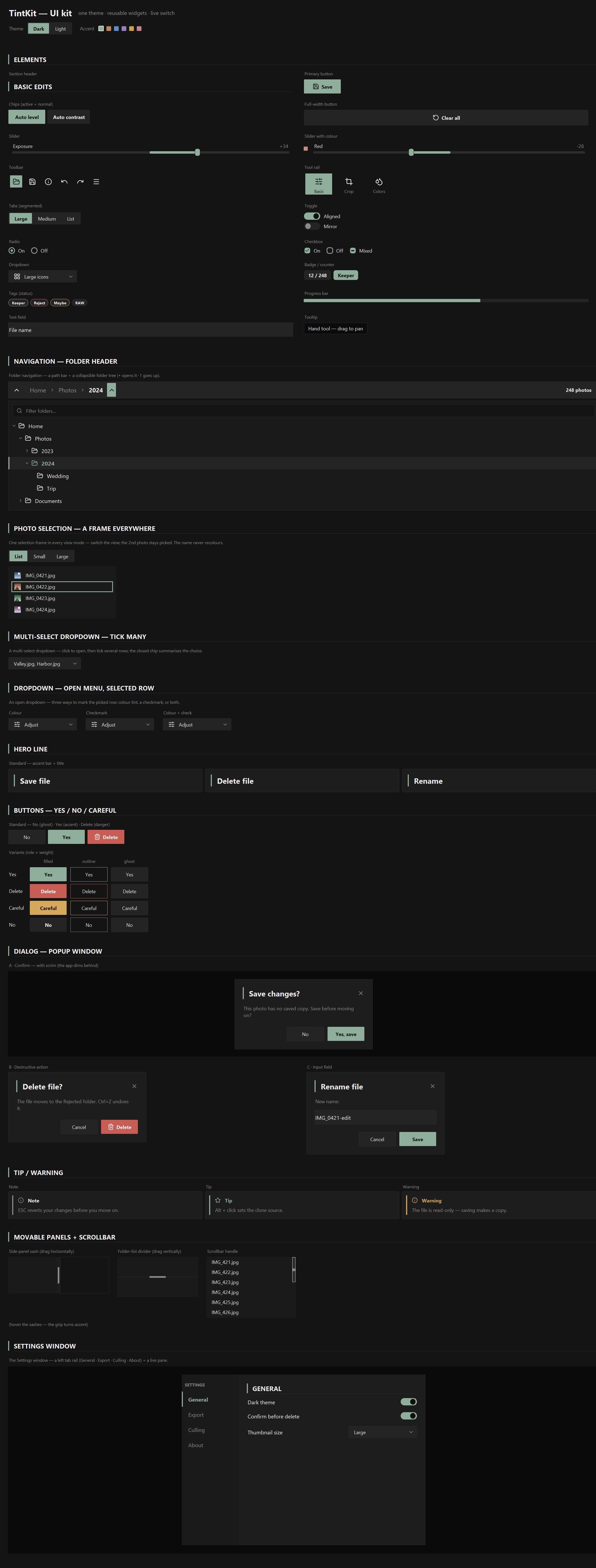
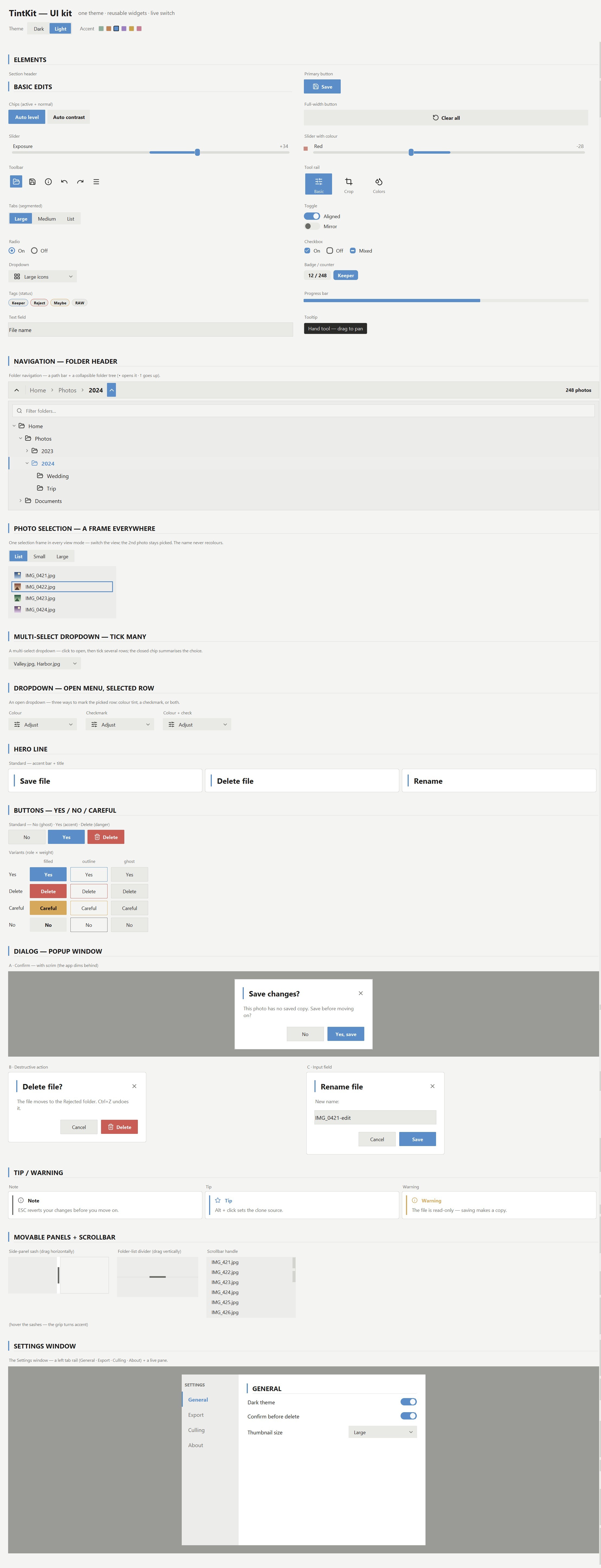
A small, themeable tkinter UI kit — a dark/light photo-tool look as reusable controls. One theme drives every colour, widgets reuse each other, and the look switches live with no restart.


Run the gallery
python gallery.py
Every component in one scrollable window, with a live Dark / Light + accent switcher at the top — the whole window repaints instantly. (The handlers are demos; the controls themselves are genuinely interactive.)
Install
pip install tintkit            # the kit — zero required dependencies
pip install "tintkit[icons]"   # + Pillow, to recolour the Lucide icons
Pure-stdlib tkinter — no required dependencies. The [icons] extra adds
Pillow to recolour the bundled
Lucide icons; without it widgets still work and shapes
stay anti-aliased (drawn in pure Tk) — only the glyphs are skipped. Point at your
own icons with set_icon_dir("…/my_icons").
Use it
import tkinter as tk
from tintkit import Theme, setup_dpi, Button, Toggle

root = tk.Tk()
setup_dpi(root)                       # crisp icons on high-DPI screens
theme = Theme(scheme="dark", accent="#8fae9b")

Button(root, theme, "Save", icon="save", command=lambda: print("saved")).pack()
Toggle(root, theme, value=True, command=lambda on: print(on)).pack()
root.mainloop()
Every widget takes the same first two args — the parent and the shared theme —
and returns an object you .pack() / .grid() like any tk widget. One theme is
the single source of truth; change it and the whole tree repaints:
theme.set(scheme="light")             # dark <-> light
theme.set(accent="#c08457")           # any accent; shades derived for you
theme.toggle_scheme()
Read any token anywhere with theme["accent"], theme["panel"],
theme["r_control"] …
What's inside
| module | what it holds |
|---|---|
tintkit/theme.py |
dark/light schemes, accent + danger/warn derivation, repaint observer |
tintkit/icons.py |
the Lucide icon loader (recoloured per theme) |
tintkit/primitives.py |
rounded_rect, the CanvasControl base, themed Surface / Label |
tintkit/controls.py |
Button, Slider, Toggle, Radio, Checkbox, SegmentedTabs, Dropdown, Badge, Tag, ProgressBar, Tooltip, TextField |
tintkit/containers.py |
Card, dialog, callout, section header, drag sashes, scrollbar |
tintkit/composites.py |
toolbar, tool rail, folder nav + tree, selection views, settings window |
gallery.py |
the style guide window + live switcher |
Design rules: no widget hard-codes a colour (each reads theme[...] and
repaints on change); one radius scale — r_control / r_pill / r_card, no
magic numbers; widgets reuse widgets; all glyphs are
Lucide PNGs (ISC) recoloured at load.
License
MIT — see LICENSE.


Download files
Download the file for your platform. If you're not sure which to choose, learn more about installing packages.
Source Distribution
Built Distribution
Filter files by name, interpreter, ABI, and platform.
If you're not sure about the file name format, learn more about wheel file names.
Copy a direct link to the current filters
File details
Details for the file tintkit-0.2.0.tar.gz.
File metadata
- Download URL: tintkit-0.2.0.tar.gz
- Upload date:
- Size: 69.3 kB
- Tags: Source
- Uploaded using Trusted Publishing? No
- Uploaded via: twine/6.2.0 CPython/3.14.4
File hashes
| Algorithm | Hash digest | |
|---|---|---|
| SHA256 |
2c181dce3ac1cd1fe02f76a8d9f22f0e3b09d21d46c7f818dc51e5a3b1b6ed7a
|
|
| MD5 |
24eb722c5facd0742b164cb863583ff7
|
|
| BLAKE2b-256 |
807416575f2593e3966e27c86e233b01af52a07d68a4e68662f11efd5b11ac5a
|
File details
Details for the file tintkit-0.2.0-py3-none-any.whl.
File metadata
- Download URL: tintkit-0.2.0-py3-none-any.whl
- Upload date:
- Size: 73.3 kB
- Tags: Python 3
- Uploaded using Trusted Publishing? No
- Uploaded via: twine/6.2.0 CPython/3.14.4
File hashes
| Algorithm | Hash digest | |
|---|---|---|
| SHA256 |
6dba903be829b4030bdc2fc5a542304c0762eaf491517d41b69e5dcaca5559d4
|
|
| MD5 |
d7d7da6d004ac9daf8b7bbe002a418b2
|
|
| BLAKE2b-256 |
4ae69f306f9dd02f8671de9470f45babd1a3c1fa4240c9a5d678acd02ab4067d
|






