
Tools to work with the 4X video game Terra Invicta.
Verified details
These details have been verified by PyPIProject links
GitHub Statistics
Maintainers

Project description
tinvictatools

Tools for the 4X video game Terra Invicta.
Features
Current
- Site Report — a command that reads your save file and writes an Excel spreadsheet listing every prospected hab site with its resources and a customizable score.
Future
- Exporting / Importing template sets for Hab, Ships, and National Priorities into save games with intelligent technology checking (planned).
- Watch the save file and alert on new orgs or councilors matching specific trait criteria
- Automatic Hab Naming according to rules parsed by user-specified strings in a custom Domain Specific Language (DSL) built with Abstract Syntax Trees according to rules based on resource, location, module data, etc.
- Assistance of drive analysis using parsed game data.
- New player hints and warnings based on save game analysis with a customizable extensible modular ruleset.
- A GUI or web app — contributions welcome, especially from those with frontend experience.
Installation
Step 1 — Install Python
-
Go to python.org/downloads and click Download Python 3.x.x (the big yellow button).
-
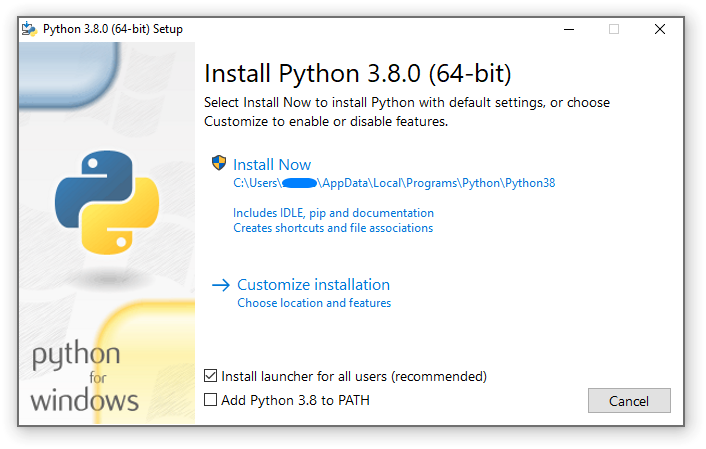
Run the installer.
-
Important: On the first screen, check the box that says "Add python.exe to PATH" before clicking Install Now.
-
Click Install Now and let it finish.
To confirm it worked, open a terminal:
- Windows 11: Right-click the Start button and select Terminal
- Older Windows: Press
Win + R, typecmd, and press Enter
Then run:
python --version
You should see something like Python 3.12.4.
Windows 11 only: If running
pythonopens the Microsoft Store instead, go to Settings → Apps → Advanced app settings → App execution aliases and turn off the two python toggles. Then close and reopen the terminal and try again.
If you get an error, close and reopen the terminal and try again.
Step 2 — Install tinvictatools
In the same terminal window, run:
pip install tinvictatools
You'll see a stream of text as it downloads. When the prompt returns you're done.
Generating a Site Report
Open a terminal (Windows 11: right-click Start → Terminal; older Windows: Win + R → cmd) and run:
tinvictatools-site-report
That's it. The tool finds your most recent autosave automatically
(Documents\My Games\TerraInvicta\Saves\Autosave.gz) and writes
SiteReport.xlsx in whatever folder the terminal is currently in.
Open it in Excel or LibreOffice Calc.
What's in the spreadsheet
The Sites sheet has one row per prospected hab site:
| Column | Description |
|---|---|
| Name | Hab site name |
| Site | The body it's on (e.g. Mars, Ceres) |
| Location | Region of the solar system |
| Water / Vols / Metal / Nobles / Fissiles | Monthly resource income |
| Score | Weighted sum of resources (adjustable — see below) |
| Most | Which resource contributes most to the score |
| Settled | Whether a hab has been built here |
| Faction | Which faction built it |
The Weights sheet controls the score formula. Change the numbers in row 2 and the Score column updates automatically — no need to re-run the tool.
Options
Save a different filename or location
tinvictatools-site-report --output C:\Users\YourName\Desktop\MyReport.xlsx
Use a different save file
tinvictatools-site-report "C:\Users\YourName\Documents\My Games\TerraInvicta\Saves\Quicksave.gz"
Show daily income instead of monthly
tinvictatools-site-report --daily
Include all hab sites, not just prospected ones
tinvictatools-site-report --all-sites
Combine options
tinvictatools-site-report --all-sites --output report.xlsx "C:\path\to\save.gz"
Customising the default weights
Create a file called config.yaml at C:\Users\YourName\.config\tinvictatools\config.yaml
with content like:
weights:
  Water: 1.0
  Vols: 1.0
  Metal: 1.0
  Nobles: 5.0
  Fissiles: 10.0
Adjust the numbers to match your priorities. The tool loads this file automatically on every run.
Troubleshooting
tinvictatools-site-report is not recognized**
Python's Scripts folder isn't on your PATH. Try closing and reopening the terminal. If that doesn't help, reinstall Python and make sure to check "Add python.exe to PATH". On Windows 11, also check that the Python App execution aliases are disabled (see the note in Step 1).
No such file or directory for the save file**
The tool looks for the autosave at the default location. If you moved your saves folder, pass the path explicitly:
tinvictatools-site-report "C:\path\to\your\Autosave.gz"
The spreadsheet opens but columns look wrong
Make sure to open the file in Excel or LibreOffice Calc, not a text editor.
For developers
See the API documentation for library usage and contributing information.
Project details
Verified details
These details have been verified by PyPIProject links
GitHub Statistics
Maintainers
Release history Release notifications | RSS feed

Download files
Download the file for your platform. If you're not sure which to choose, learn more about installing packages.
Source Distribution
Built Distribution
Filter files by name, interpreter, ABI, and platform.
If you're not sure about the file name format, learn more about wheel file names.
Copy a direct link to the current filters
File details
Details for the file tinvictatools-0.1.0.tar.gz.
File metadata
- Download URL: tinvictatools-0.1.0.tar.gz
- Upload date:
- Size: 21.9 kB
- Tags: Source
- Uploaded using Trusted Publishing? Yes
- Uploaded via: twine/6.1.0 CPython/3.13.12
File hashes
| Algorithm | Hash digest | |
|---|---|---|
| SHA256 |
c515082c17ab0d575f2a8326c0028d6ada260a22e193b72687e51a0b11037c18
|
|
| MD5 |
f6cb2bfac0d8897177d1e380a003c516
|
|
| BLAKE2b-256 |
eba2ea09acf85f8f4052ed11b44cbf27e6248a3f31e03eece623d3cbea575194
|
Provenance
The following attestation bundles were made for tinvictatools-0.1.0.tar.gz:
Publisher:
publish.yml on veogam/tinvictatools
-
Statement:
-
Statement type:
https://in-toto.io/Statement/v1 -
Predicate type:
https://docs.pypi.org/attestations/publish/v1 -
Subject name:
tinvictatools-0.1.0.tar.gz -
Subject digest:
c515082c17ab0d575f2a8326c0028d6ada260a22e193b72687e51a0b11037c18 - Sigstore transparency entry: 1607921361
- Sigstore integration time:
-
Permalink:
veogam/tinvictatools@a388ae4ba607e559bf938ac65973cf76e3a766cb -
Branch / Tag:
refs/tags/v0.1.0 - Owner: https://github.com/veogam
-
Access:
public
-
Token Issuer:
https://token.actions.githubusercontent.com -
Runner Environment:
github-hosted -
Publication workflow:
publish.yml@a388ae4ba607e559bf938ac65973cf76e3a766cb -
Trigger Event:
workflow_dispatch
-
Statement type:
File details
Details for the file tinvictatools-0.1.0-py3-none-any.whl.
File metadata
- Download URL: tinvictatools-0.1.0-py3-none-any.whl
- Upload date:
- Size: 20.8 kB
- Tags: Python 3
- Uploaded using Trusted Publishing? Yes
- Uploaded via: twine/6.1.0 CPython/3.13.12
File hashes
| Algorithm | Hash digest | |
|---|---|---|
| SHA256 |
a3941963d192bbffe4efe6b7d3bc5ac58134f818b85b23576a65b5e5b43ae08f
|
|
| MD5 |
80162948294c8e8dd7100673eea0ac59
|
|
| BLAKE2b-256 |
d66c2b7f37d37c4596398b4fb47c91395696e0fd6efa8b873475f3ed99068301
|
Provenance
The following attestation bundles were made for tinvictatools-0.1.0-py3-none-any.whl:
Publisher:
publish.yml on veogam/tinvictatools
-
Statement:
-
Statement type:
https://in-toto.io/Statement/v1 -
Predicate type:
https://docs.pypi.org/attestations/publish/v1 -
Subject name:
tinvictatools-0.1.0-py3-none-any.whl -
Subject digest:
a3941963d192bbffe4efe6b7d3bc5ac58134f818b85b23576a65b5e5b43ae08f - Sigstore transparency entry: 1607921459
- Sigstore integration time:
-
Permalink:
veogam/tinvictatools@a388ae4ba607e559bf938ac65973cf76e3a766cb -
Branch / Tag:
refs/tags/v0.1.0 - Owner: https://github.com/veogam
-
Access:
public
-
Token Issuer:
https://token.actions.githubusercontent.com -
Runner Environment:
github-hosted -
Publication workflow:
publish.yml@a388ae4ba607e559bf938ac65973cf76e3a766cb -
Trigger Event:
workflow_dispatch
-
Statement type:






