
Tiny Activation Dashboard
A tiny easily hackable implementation of a feature dashboard.
Installation
pip install tiny-dashboard
Overview
This repository provides minimal implementations of activations visualization with:
- An online feature dashboard, where you compute and display activations on some custom text
- An offline feature dashboard, which can display precomputed activation examples.
To get an overview of all the features you can check the demo on colab!
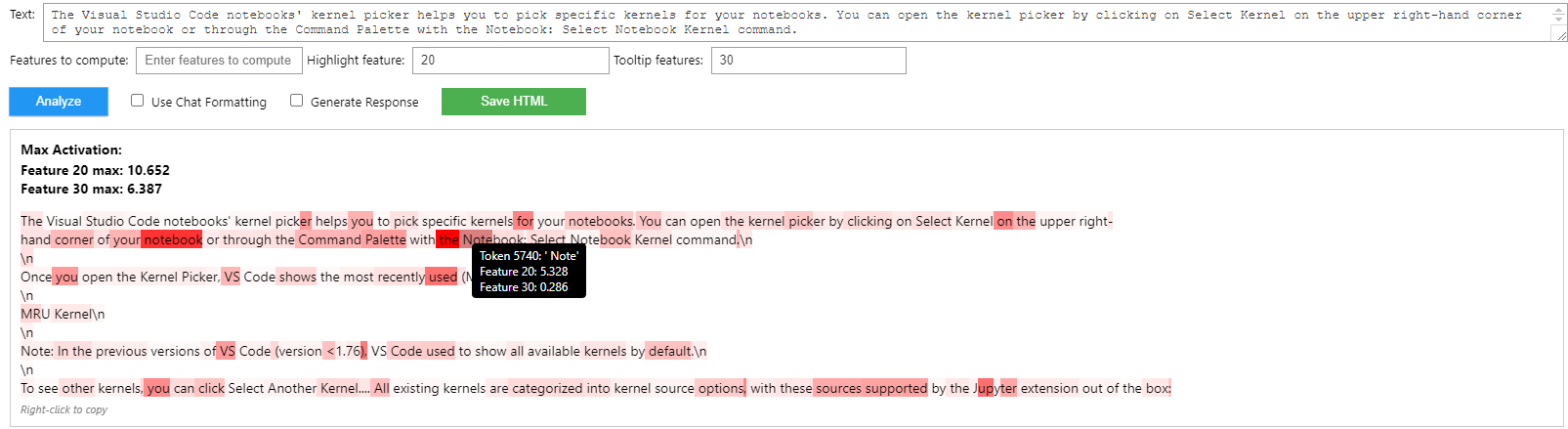
Online dashboard demo:
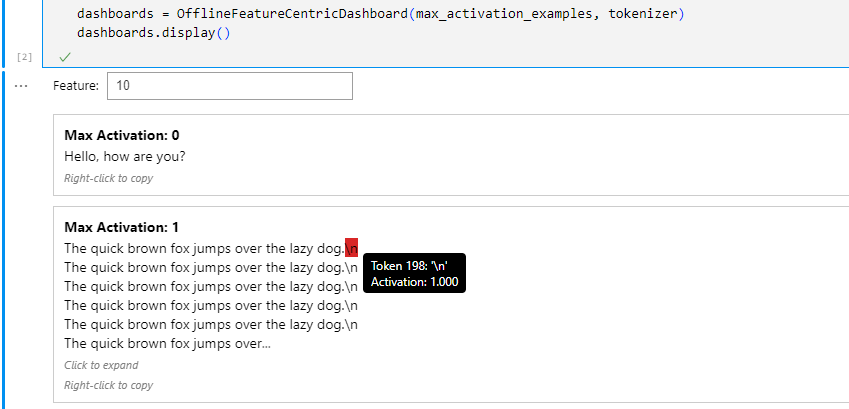
Offline dashboard demo:
Motivation
There are some other good feature activations dashboard tools out there, but I found them very hard to hack on when I wanted to add support for Crosscoders. This implementation is not as complete as https://github.com/jbloomAus/SAEDashboard or even the simplier https://github.com/callummcdougall/sae_vis but in my honest non-biased-at-all opinion, this implementation seems easier to hack on?
If you're looking for a quick and easy to setup tool for feature analysis, this might be the one for you.
Key Features
Both the offline and online dashboards include:
- Token-level activation highlighting
- Hover tooltips showing token details
- Responsive design
- Save HTML reports
1. Offline Feature Exploration
- Analyze pre-computed feature activations
- Visualize max activation examples for specific features
- Expandable text views
- Generate interactive HTML reports
You can either store the max activation examples in a database file, or in a python dictionary.
A. Using a python dictionary
from tiny_dashboard.feature_centric_dashboards import OfflineFeatureCentricDashboard

# Create dashboard with pre-computed activations
max_activation_examples: dict[int, list[tuple[float, list[str], list[float]]]] = ...
# max_activation_examples is a dictionary where the keys are feature indices and the values are lists of tuples. Each tuple contains a float (max activation value), a list of strings (the text of the example), and a list of floats (the activation values for each token in the example).

dashboard = OfflineFeatureCentricDashboard(max_activation_examples, tokenizer)
dashboard.display()

# Export to HTML for sharing
feature_to_export = 0
dashboard.export_to_html("feature_analysis.html", feature_to_export)
B. Using a database file
For larger datasets, you can store your max activation examples in a sqlite3 database. This allows you to avoid loading all the examples into memory.
The database should contain a table with:
- A primary key column of type INTEGER
- A column storing lists of examples as a JSON string, where each example is a tuple containing:
- max_activation_value (
float): The highest activation value - tokens (
list[str]): The sequence of tokens - activation_values (
list[float]): The activation value for each token
- max_activation_value (
dashboard = OfflineFeatureCentricDashboard.from_db("path/to/db.db", tokenizer, column_name="column_name_of_examples")
dashboard.display()
Check demo.ipynb for an example on how to build such a database from a python dictionary.
2. Online Feature Exploration
The online dashboard allows you to analyze the activations of a model in real-time. This is useful for quickly exploring the activations of a model on your custom prompts.
The online dashboard supports chat_template formatting: just include <eot> in your input text to separate your chat turns. E.g:
What is the capital of France?<eot>The capital of France is Paris.<eot>Good bing
will be interpreted as:
[
    {"role": "user", "content": "What is the capital of France?"},
    {"role": "assistant", "content": "The capital of France is Paris."},
    {"role": "user", "content": "Good bing"}
]
and formated using the tokenizer's chat template.
Two approaches to build your real-time feature analysis dashboard:
A. Class-based Method
Create a class that implements the AbstractOnlineFeatureCentricDashboard class and implements the get_feature_activation function. This function should take a string and a tuple of feature indices and return a tensor of activation values of shape (seq_len, num_features) containing the activations of the specified features for the input text.
from tiny_dashboard.feature_centric_dashboards import AbstractOnlineFeatureCentricDashboard
class DummyOnlineFeatureCentricDashboard(AbstractOnlineFeatureCentricDashboard):
    def get_feature_activation(self, text: str, feature_indices: tuple[int, ...]) -> th.Tensor:
        # Custom activation computation logic
        tok_len = len(self.tokenizer.encode(text))
        activations = th.randn((tok_len, len(feature_indices))).exp()
        return activations

    # Optional: override generate_model_response to change the model's response generation

online_dashboards = DummyOnlineFeatureCentricDashboard(tokenizer)
online_dashboards.display()
B. Function-based Method
If you hate classes for some reason, you can also use the function-based method:
from tiny_dashboard.feature_centric_dashboards import OnlineFeatureCentricDashboard
def get_feature_activation(text, feature_indices):
    return th.randn((len(tokenizer.encode(text)), len(feature_indices))).exp()

online_dashboards = OnlineFeatureCentricDashboard(
    get_feature_activation,
    tokenizer,
    generate_model_response = None,  # Optional: override the model's response generation function
    model = None,  # Optional: pass in a model to use the model's response generation function
    call_with_self = False,  # Whether to call the functions with self as the first argument, defaults to Falses
)
online_dashboards.display()
Specialized Implementations
The package includes several specialized dashboard implementations in dashboard_implementations.py:
CrosscoderOnlineFeatureDashboard
For analyzing features using a crosscoder model that combines base and instruct model activations:
from tiny_dashboard.dashboard_implementations import CrosscoderOnlineFeatureDashboard

base_model, instruct_model, crosscoder = ...
collect_layer = 12

dashboard = CrosscoderOnlineFeatureDashboard(
    base_model=base_model,
    instruct_model=instruct_model,
    crosscoder=crosscoder,
    collect_layer=collect_layer,
    crosscoder_device="cuda"  # optional, use it if the crosscoder is on a different device than the base and instruct models
)
dashboard.display()
Additional specialized implementations can be found in the dashboard_implementations.py file. Feel free to contribute new implementations!
Repository Structure
The repository is organized as follows:
demo.ipynb: A Jupyter notebook containing minimal examples demonstrating how to use both offline and online dashboardssrc/: Main package directoryfeature_centric_dashboards.py: Core implementation of the dashboard classes (OfflineFeatureCentricDashboard, OnlineFeatureCentricDashboard, and AbstractOnlineFeatureCentricDashboard)dashboard_implementations.py: Collection of specialized dashboard implementations (e.g., CrosscoderOnlineFeatureDashboard)visualization_utils.py: Utility functions for visualizing activations, without the need to use the dashboard classeshtml_utils.py: Utility functions for generating HTML elements using templatesutils.py: General utility functions for text processing and HTML sanitizationtemplates/: HTML, CSS, and JavaScript templates- HTML templates for different components (base layout, feature sections, examples, etc.)
styles.css: CSS styling for the dashboardlisteners.js: JavaScript for interactive features (tooltips, expandable text)
Contributing
Contributions are welcome! Please feel free to improve the minimal design and add some usage examples.
1 maintainer

Metadata
1 maintainer
Release files for tiny-dashboard 0.7.3
For a detailed explanation of source distributions (sdists) and built distributions (wheels), please see the package formats documentation.
Source distribution (sdist)
| File | Size | Uploaded | Provenance | Actions |
|---|---|---|---|---|
| tiny_dashboard-0.7.3.tar.gz | 58.3 kB | Without provenance | Details for tiny_dashboard-0.7.3.tar.gz |
Built distribution (wheel)
| File | Interpreter | ABI | Platform | Actions Reset |
|---|---|---|---|---|
| tiny_dashboard-0.7.3-py3-none-any.whl | Python 3 | none | any | Details for tiny_dashboard-0.7.3-py3-none-any.whl |
Total release size: 79.8 kB
Release files / tiny_dashboard-0.7.3.tar.gz
| Download URL | tiny_dashboard-0.7.3.tar.gz |
|---|---|
| Size | 58.3 kB |
| Tags | Source |
|
SHA-256 checksum How to use checksums |
5e0bb027418d0b21f97e0f48cfe26db36874d55e4b6b7353def821dba39fc4e7
|
|
BLAKE2b-256 checksum How to use checksums |
66c5e3df9808347be05900484140c7839943a16ef09f874a33782fab97af116c
|
| Upload date | |
|
Uploaded using Trusted Publishing? What is trusted publishing? |
No |
| Uploaded via |
twine/5.1.1 CPython/3.12.4
|
Release files / tiny_dashboard-0.7.3-py3-none-any.whl
| Download URL | tiny_dashboard-0.7.3-py3-none-any.whl |
|---|---|
| Size | 21.6 kB |
| Tags | Python 3 |
|
SHA-256 checksum How to use checksums |
0e810e5e447bbb12e92defe90f67011ef8299f45d68821993af122c12d661a7f
|
|
BLAKE2b-256 checksum How to use checksums |
d21e6d2018a259f4ccf796b769b1a06a3e76f95f4be899af84cbdee5ffb04042
|
| Upload date | |
|
Uploaded using Trusted Publishing? What is trusted publishing? |
No |
| Uploaded via |
twine/5.1.1 CPython/3.12.4
|
Security for tiny-dashboard 0.7.3
Provenance
Provenance describes where a file came from. On PyPI, provenance is shared via attestations, which provide a verifiable record of the build or publishing details. View details, limitations and caveats.
No provenance found
None of the files in this release were uploaded with provenance metadata.
A note on package security
PyPI is a repository for distributing packages, not a service for auditing them. While third-party security researchers and our staff do their best to detect and remove malicious packages, PyPI cannot guarantee the quality, security or suitability of any given package.
To learn more about protecting yourself from malicious actors, visit our package security documentation.














