
tinyapps
An extremely minimal, self-hosted, stateful app builder your agents can use.
Ask your agent for a tool. It writes one HTML file, and if the app needs to remember things, a SQLite database next to it. The page is live at a URL on your own machine as soon as the file exists. No framework, no build step, no deploy: one Python file (standard library only) and a skill that teaches your agent the rules.
- Apps at
/apps/<name>: an HTML page with its own SQLite database. - Artifacts at
/artifacts/<name>: a static page (report, chart, mockup).
Alternatives
There are plenty, and most do far more. Pick tinyapps only if you want it small, on your own hardware, and driven by your own agent.
- Claude Artifacts / ChatGPT Canvas: pages and small apps the assistant builds inside a chat. Hosted by the vendor and tied to their chat product.
- Lovable, Bolt.new, v0, Replit Agent: describe an app and get a complete full-stack project, built and hosted on their cloud.
- Val Town: a hosted platform that instantly deploys small TypeScript apps and APIs, with built-in SQLite. Made for people and their agents.
- PocketBase: an open-source backend in one file (database, auth, file storage, admin UI) that you self-host. You or your agent still build and serve the frontend.
How it works
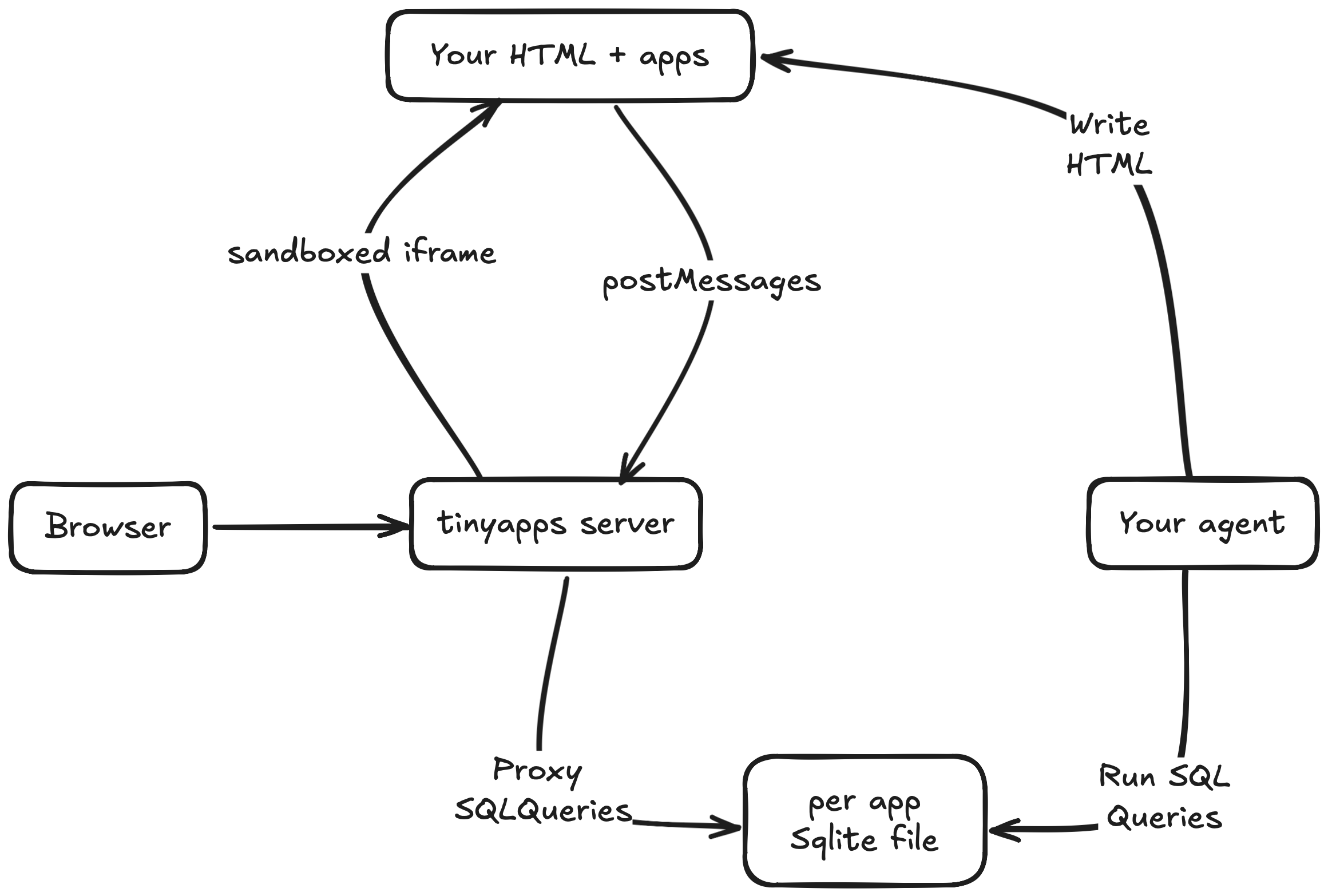
- Your agent writes
~/tinyapps/web/apps/<name>.htmland creates the database~/tinyapps/data/<name>.sqlitedirectly withsqlite3. - The browser loads a host page that runs your HTML in a sandboxed iframe. App
code can't make network requests; its only way out is
await app.sql(sql, params), which the host relays to the server. - The server picks the database from the app name in the URL, never from the request. Databases are never served over HTTP.
- Code and content are separate: this repo is the server; your pages and data
live in
~/tinyapps/and never end up in git.
Run it
Requires Python 3.10+.
pipx install tinyapps
tinyapps        # serves ~/tinyapps on :8080
Then give your agent the skill, printed by tinyapps skill. For Hermes:
f=~/.hermes/skills/productivity/tinyapps/SKILL.md
mkdir -p "${f%/*}" && [ -e "$f" ] || tinyapps skill > "$f"
The agent asks for your base URL on first use. It refines its copy of the
skill over time, so the command above never overwrites it. After
pipx upgrade tinyapps, compare it with tinyapps skill and merge any
changes by hand.
The skill is plain Markdown, so any agent that can write files can use it.
tinyapps has no login. Anyone who can reach it can open every page and read or change every app's data. Keep it on a trusted network or behind an authenticating proxy.
How I use it
This is my setup, not a requirement. Any agent, machine or proxy works.
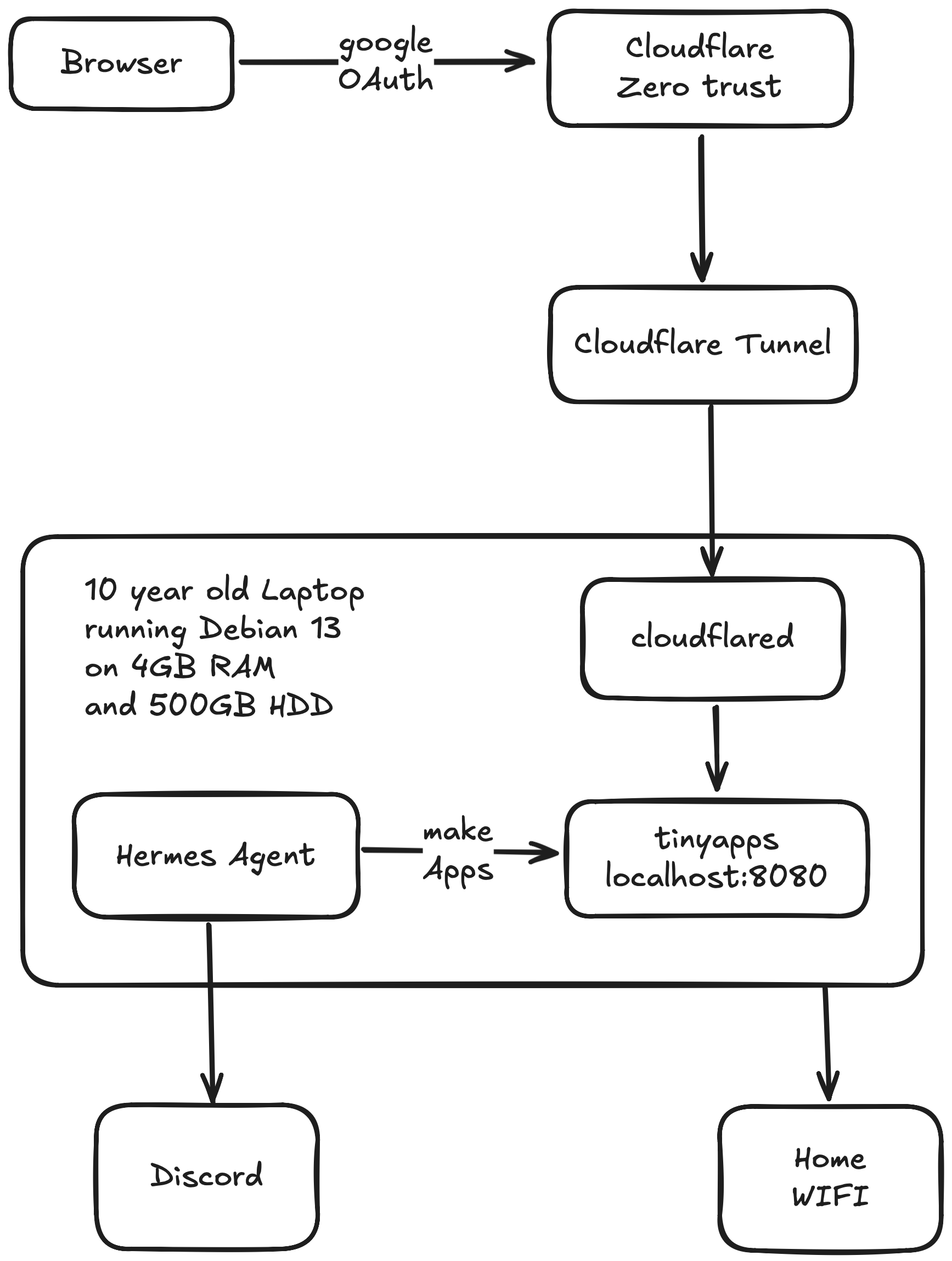
- Machine: a 10-year-old Dell Inspiron 3541 laptop (AMD A6-6310, 4 GB RAM, spinning 500 GB disk) running Debian 13.
- Agent: Hermes Agent. I ask it for apps from chat; it writes them and replies with the link.
- Service: a systemd user unit tied to Hermes, so it starts and stops with the agent.
- Remote access: a Cloudflare Tunnel publishes it on a subdomain, with Cloudflare Access (Google login, my email only) in front. At home I also reach it directly over the LAN.
1 maintainer

Metadata
1 maintainer
Release files for tinyapps 0.1.0
For a detailed explanation of source distributions (sdists) and built distributions (wheels), please see the package formats documentation.
Source distribution (sdist)
| File | Size | Uploaded | Provenance | Actions |
|---|---|---|---|---|
| tinyapps-0.1.0.tar.gz | 8.0 kB | Without provenance | Details for tinyapps-0.1.0.tar.gz |
Built distribution (wheel)
| File | Interpreter | ABI | Platform | Actions Reset |
|---|---|---|---|---|
| tinyapps-0.1.0-py3-none-any.whl | Python 3 | none | any | Details for tinyapps-0.1.0-py3-none-any.whl |
Total release size: 16.6 kB
Release files / tinyapps-0.1.0.tar.gz
| Download URL | tinyapps-0.1.0.tar.gz |
|---|---|
| Size | 8.0 kB |
| Tags | Source |
|
SHA-256 checksum How to use checksums |
5073de3fde0e6f0815d9f34eca71df1c0cb7f9b0865aefe97163b4b94919db1c
|
|
BLAKE2b-256 checksum How to use checksums |
edf435057817d5cc5cb5aa5a8183b3bb39cfb7eae92bb9f73f46a77f6efbcb3b
|
| Upload date | |
|
Uploaded using Trusted Publishing? What is trusted publishing? |
No |
| Uploaded via |
twine/7.0.0 CPython/3.13.5
|
Release files / tinyapps-0.1.0-py3-none-any.whl
| Download URL | tinyapps-0.1.0-py3-none-any.whl |
|---|---|
| Size | 8.6 kB |
| Tags | Python 3 |
|
SHA-256 checksum How to use checksums |
66820c33b93b3414fbeca09511e2403b177f050ca613912833fc3f667d66a5ae
|
|
BLAKE2b-256 checksum How to use checksums |
dd2f21aa147571fa0cd0878d298cf1e6bfa0e8de93a35d1e2c774591bc4b6b00
|
| Upload date | |
|
Uploaded using Trusted Publishing? What is trusted publishing? |
No |
| Uploaded via |
twine/7.0.0 CPython/3.13.5
|
Security for tinyapps 0.1.0
Provenance
Provenance describes where a file came from. On PyPI, provenance is shared via attestations, which provide a verifiable record of the build or publishing details. View details, limitations and caveats.
No provenance found
None of the files in this release were uploaded with provenance metadata.
A note on package security
PyPI is a repository for distributing packages, not a service for auditing them. While third-party security researchers and our staff do their best to detect and remove malicious packages, PyPI cannot guarantee the quality, security or suitability of any given package.
To learn more about protecting yourself from malicious actors, visit our package security documentation.













