
TinyDB is a tiny, document oriented database optimized for your happiness :)

Project description


TinyDB is a tiny, document oriented database optimized for your happiness :) It’s written in pure Python and has no external requirements. The target are small apps that would be blown away by a SQL-DB or an external database server.
TinyDB is:
tiny: The current source code has 800 lines of code (+ 500 lines tests) what makes about 100 KB. For comparison: Buzhug has about 2000 lines of code (w/o tests), CodernityDB has about 8000 lines of code (w/o tests).
document oriented: Like MongoDB, you can store any document (represented as dict) in TinyDB.
optimized for your happiness: TinyDB is designed to be simple and fun to use. It’s not bloated and has a simple and clean API.
written in pure Python: TinyDB neither needs an external server (as e.g. PyMongo) nor any packages from PyPI. Just install TinyDB and you’re ready to go.
easily extensible: You can easily extend TinyDB by writing new storages or modify the behaviour of storages with Middlewares. TinyDB provides Middlewares for caching and concurrency handling.
nearly 100% code coverage: If you don’t count that __repr__ methods and some abstract methods are not tested, TinyDB has a code coverage of 100%.
Example Code
>>> from tinydb import TinyDB, where
>>> db = TinyDB('/path/to/db.json')
>>> db.insert({'int': 1, 'char': 'a'})
>>> db.insert({'int': 1, 'char': 'b'})
Query Language
>>> # Search for a field value
>>> db.search(where('int') == 1)
[{'int': 1, 'char': 'a'}, {'int': 1, 'char': 'b'}]

>>> # Combine two queries with logical and
>>> db.search((where('int') == 1) & (where('char') == 'b'))
[{'int': 1, 'char': 'b'}]

>>> # Combine two queries with logical or
>>> db.search((where('char') == 'a') | (where('char') == 'b'))
[{'int': 1, 'char': 'a'}, {'int': 1, 'char': 'b'}]

>>> # More possible comparisons:  !=  <  >  <=  >=
>>> # More possible checks: where(...).matches(regex), where(...).test(your_test_func)
Tables
>>> table = db.table('name')
>>> table.insert({'value': True})
>>> table.all()
[{'value': True}]
Using Middlewares
>>> from tinydb.storages import JSONStorage
>>> from tinydb.middlewares import CachingMiddleware
>>> db = TinyDB('/path/to/db.json', storage=CachingMiddleware(JSONStorage))
Documentation
The documentation for TinyDB is hosted at Read the Docs: https://tinydb.readthedocs.org/en/latest/
Supported Python Versions
TinyDB has been tested with Python 2.6, 2.7, 3.2, 3.3 and pypy.
Limitations
JSON Serialization
TinyDB serializes all data using the Python JSON module by default. It serializes most basic Python data types very well, but fails serializing classes. If you need a better serializer, you can write your own storage, that e.g. uses the more powerfull (but also slower) pickle or PyYAML.
Performance
TinyDB is NOT designed to be used in environments, where performance might be an issue. Altough you can improve the TinyDB performance as described below, you should consider using a DB that is optimized for speed like Buzhug or CodernityDB.
How to Improve TinyDB Performance
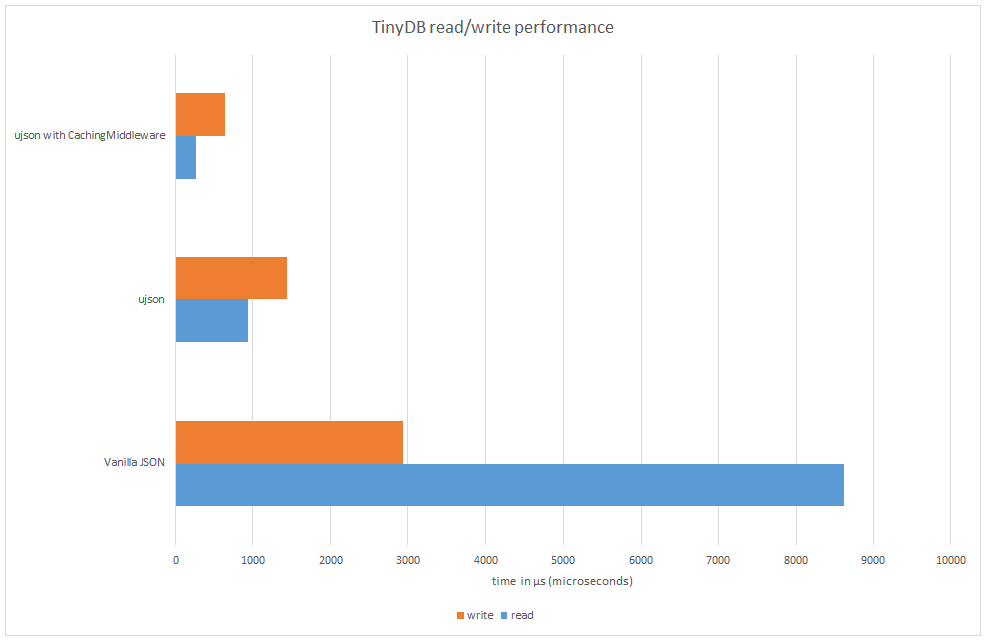
The default storage serializes the data using JSON. To improve performance, you can install ujson , a extremely fast JSON implementation. TinyDB will auto-detect and use it if possible.
In addition, you can wrap the storage with the CachingMiddleware which reduces disk I/O (see Using Middlewares)
Version Numbering
TinyDB follows the SemVer versioning guidelines. For more information, see semver.org
Changelog
v1.0.0 (2013-07-20)
First official release – consider TinyDB stable now.
Release history Release notifications | RSS feed


Download files
Download the file for your platform. If you're not sure which to choose, learn more about installing packages.
Source Distribution
Built Distribution
Filter files by name, interpreter, ABI, and platform.
If you're not sure about the file name format, learn more about wheel file names.
Copy a direct link to the current filters
File details
Details for the file tinydb-1.0.0.zip.
File metadata
- Download URL: tinydb-1.0.0.zip
- Upload date:
- Size: 18.9 kB
- Tags: Source
- Uploaded using Trusted Publishing? No
File hashes
| Algorithm | Hash digest | |
|---|---|---|
| SHA256 |
1a76fa22138b34f002387c784f5bd11947b9f81963be2c689ddb751528ca472f
|
|
| MD5 |
730f00e6cd763ba30e4bf12d3b1b2499
|
|
| BLAKE2b-256 |
12b58345e6efbe13397ea58c679e0eac48811f72c8e18952152122d6de4ac8e6
|
File details
Details for the file tinydb-1.0.0-py27-none-any.whl.
File metadata
- Download URL: tinydb-1.0.0-py27-none-any.whl
- Upload date:
- Size: 16.5 kB
- Tags: Python 2.7
- Uploaded using Trusted Publishing? No
File hashes
| Algorithm | Hash digest | |
|---|---|---|
| SHA256 |
6679bf582ad42c7175d7c7d5fa97a2d94e09137a2ea63b6049bea5ce8342bb9f
|
|
| MD5 |
3098cd06231b51914c0233239dd8b4ff
|
|
| BLAKE2b-256 |
5baecd1abdb13a47cbb7c21bfffe33d561b3930dba6c710c5dbbfe12bca011d8
|






