
tinyfilter is the computer vision equivalent to micrograd. It convert images into ASCII art using the principles of CNNs (convolutional neural networks).

Project description
tinyfilter



tinyfilter [^1] is the computer vision equivalent to Andrej Karpathy's micrograd. It convert images into ASCII art using the principles of CNNs (convolutional neural networks).
Unlike other tools of its type, which map pixel darkness to an ASCII character, tinyfilter uses filters and convolution to detect features in an image and prints ASCII characters that correspond to them. This leads to much better results compared to other libraries, especially for smaller images.
[^1]: For consistency, the first letter in "tinyfilter" is always lowercase, even when it begins a sentence.
Installation
To install tinyfilter locally run the command below. When installing python packages such as tinyfilter, I recommend using a virtual environment, but this is optional.
pip install tinyfilter
How to use tinyfilter
To print an image as ASCII characters using tinyfilter run the following command in your terminal. (Replace "image.png" with the name of your image.)
tinyfilter image.png
You can also import tinyfilter inside a python file or interpreter to do the same thing:
from tinyfilter import tiny_print
tiny_print('image.png')
NOTE: You do not need to specify how many columns wide you want your image to be. tinyfilter automatically prints the image with the exact amount of columns wide your terminal window was at the time the function was called.
Why tinyfilter wins
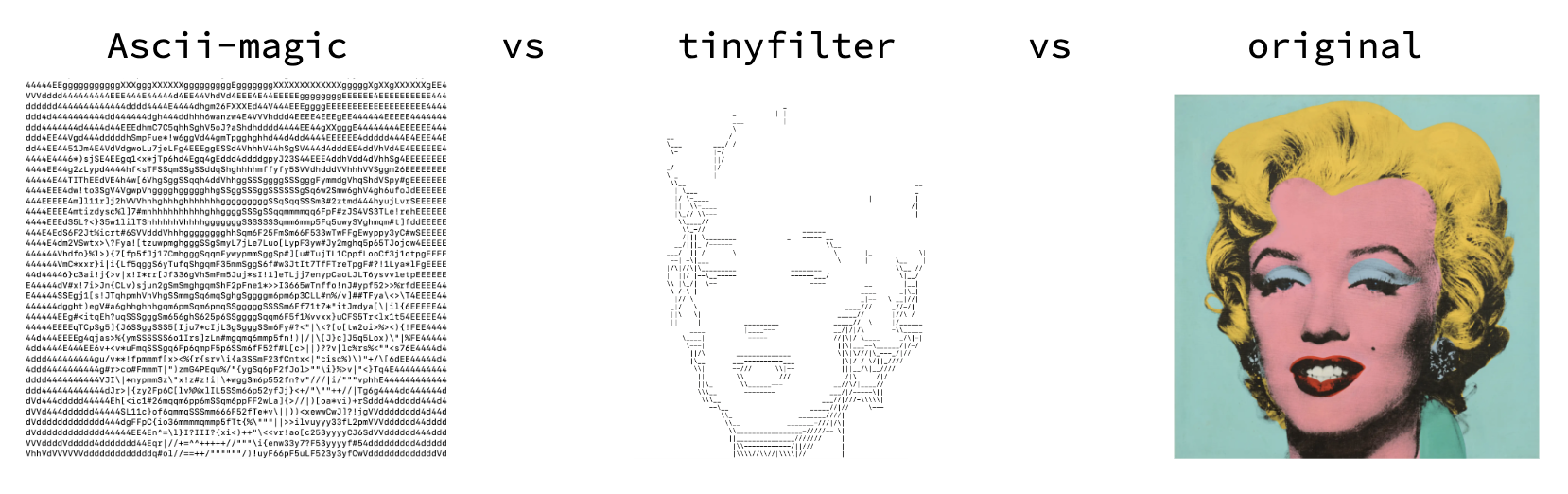
While other python packages have features that tinyfilter doesn't yet support, tinyfilter clearly does win at one thing: recognizing the important features in an image and focusing on those. In the example above tinyfilter and Ascii-magic bother print images that are 80 columns wide. The difference is that tinyfilter's output is based on where there are edges in the image while Ascii-magic only focuses on where the image is dark and where is it bright.
Examples of tinyfilter
Github logo:
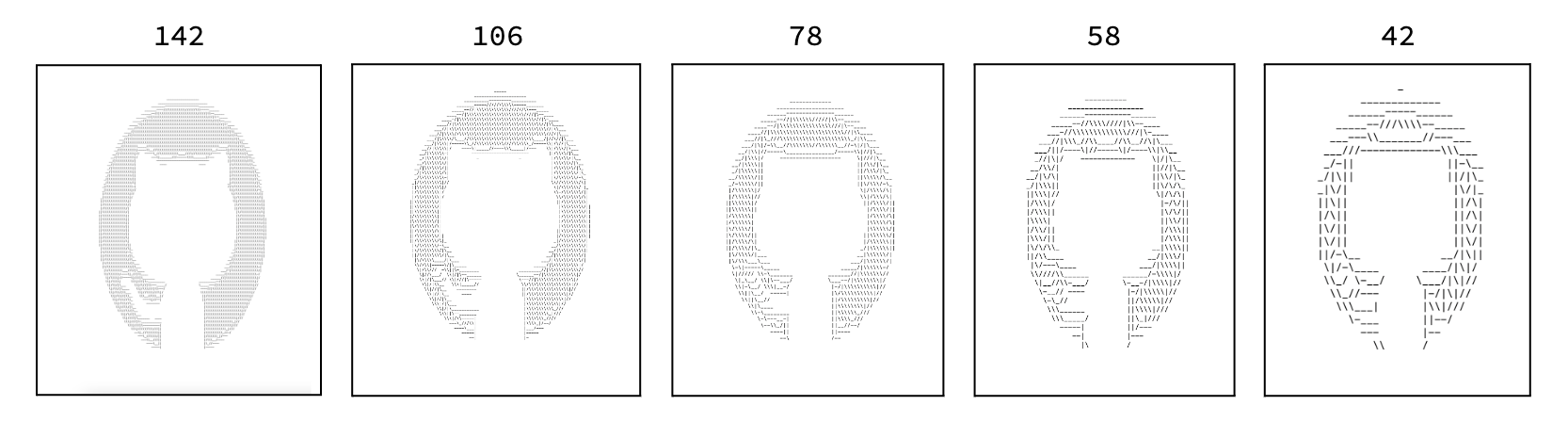
The numbers at the top of the images show how many columns the output is in ASCII characters. The example shows how depite losing large amounts of detail as the image gets smaller, tinyfilter is able to retain important elements of the orginal.
Balloon dog (110 columns):
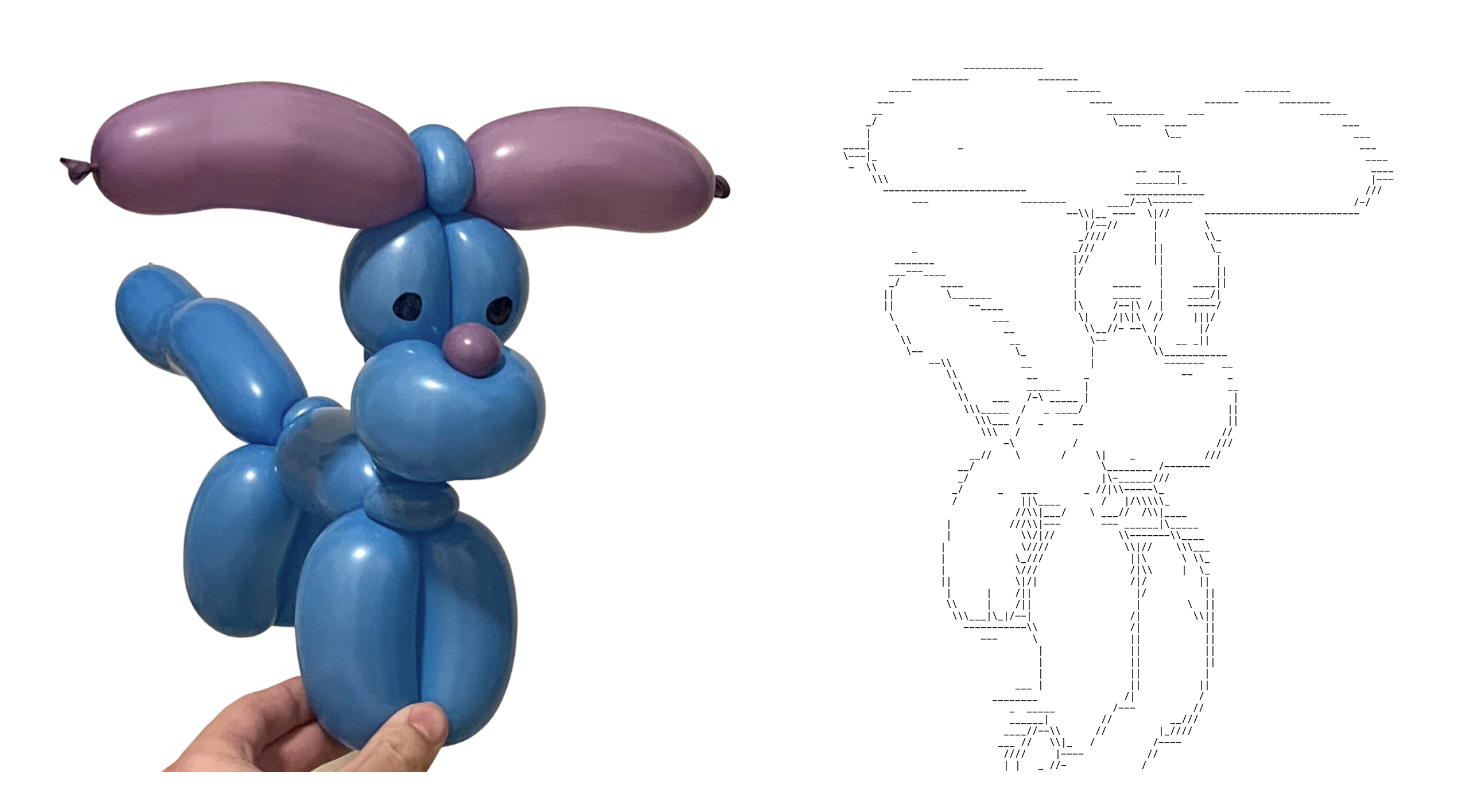
The balloon dog is a good example of edge detection (notice tinyfilter doesn't print anything when the balloon is solid purple but prints a line when the image transfers to white).
Einstein (271 columns):
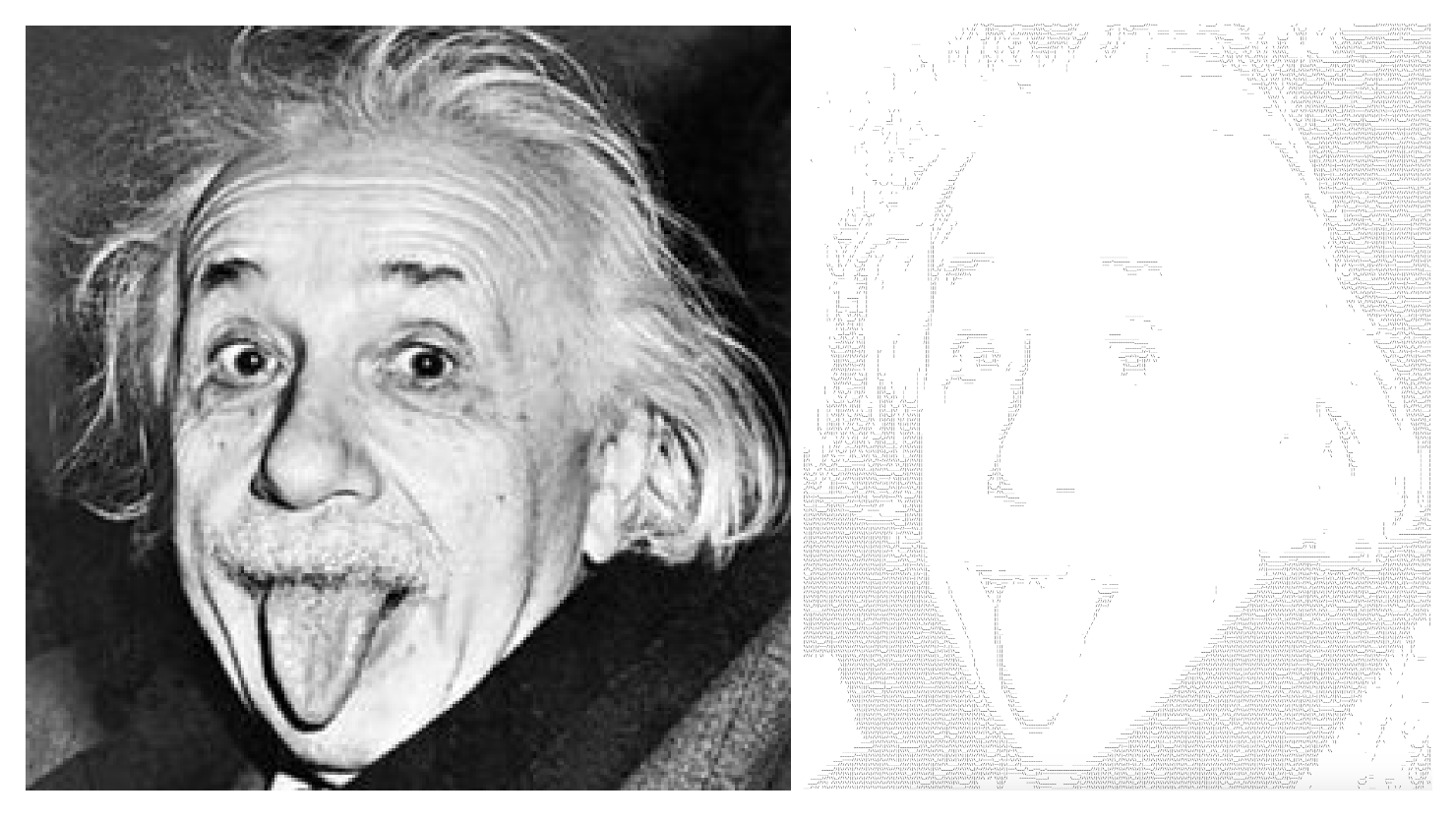
The Einstein image is a good example of how tinyfilter can scale to large images.
How tinyfilter works (it's simpler than you think)
To make sense of the terms in this section you will need a little background on CNNs (convolutional neural networks). The design of tinyfilter is based on the technique these networks use called convolution. Reading the first half of this source from IBM should get you up to speed.
The most important part of an image is the lines. Thats what tinyfilter detects using only 5 filters which I hardcoded as numpy arrays (shown below). When the filters are applied to an image, tinyfiler calculates if the feature the filter is detecting for is present. If it is, tinyfilter prints the ASCII character that corresponds to the feature.
BACKSLASH_FILTER = np.array([[3, -1, -1], [-1, 3, -1], [-1, -1, 3]], dtype="int32")
FORWARDSLASH_FILTER = np.array([[-1, -1, 3], [-1, 3, -1], [3, -1, -1]], dtype="int32")
VERTICAL_BAR_FILTER = np.array([[-1, 3, -1], [-1, 3, -1], [-1, 3, -1]], dtype="int32")
HYPEN_FILTER = np.array([[-1, -1, -1], [3, 4, 3], [-1, -1, -1]], dtype="int32")
UNDERSCORE_FILTER = np.array([[-1, -1, -1], [-1, -1, -1], [3, 4, 3]], dtype="int32")
Resources and sources
For more information about resources and their licenses, visit THANKS.txt under this repository.
- Pillow is a dependency for tinyfilter
- numpy is a dependency for tinyfilter
- mypy was used for type checking
- Black was used for python code formatting
- This MIT lecutre is a great resource for learning about CNNs and filters. I learned a lot from it and this project would not have been possible without it.
Release history Release notifications | RSS feed


Download files
Download the file for your platform. If you're not sure which to choose, learn more about installing packages.
Source Distribution
Built Distribution
Filter files by name, interpreter, ABI, and platform.
If you're not sure about the file name format, learn more about wheel file names.
Copy a direct link to the current filters
File details
Details for the file tinyfilter-1.0.0.tar.gz.
File metadata
- Download URL: tinyfilter-1.0.0.tar.gz
- Upload date:
- Size: 9.9 MB
- Tags: Source
- Uploaded using Trusted Publishing? No
- Uploaded via: twine/4.0.2 CPython/3.10.1
File hashes
| Algorithm | Hash digest | |
|---|---|---|
| SHA256 |
6f501c3713190d7b7c61c531b985fcd45bbfa8af9cc78587dfb7ce4ba17df2c6
|
|
| MD5 |
4e969bb6f645814668ab0744b4d18457
|
|
| BLAKE2b-256 |
abb5beae61ffaec524f93febb149023470e2510fa09512b472d40b102abfddb5
|
File details
Details for the file tinyfilter-1.0.0-py3-none-any.whl.
File metadata
- Download URL: tinyfilter-1.0.0-py3-none-any.whl
- Upload date:
- Size: 6.7 kB
- Tags: Python 3
- Uploaded using Trusted Publishing? No
- Uploaded via: twine/4.0.2 CPython/3.10.1
File hashes
| Algorithm | Hash digest | |
|---|---|---|
| SHA256 |
fa2bc6d60cf8648dc687982d38e875c3f4aa42c34a89e4e18dc6fcb0d1d3f880
|
|
| MD5 |
b88bc56708c46ea505e88972eff1f7eb
|
|
| BLAKE2b-256 |
fc2f468ff021a9743bb4d50b7251ab92d2ce02fb38a322f33b947f1d9a7e86c2
|






