
Model classes and pre-training utilities for a tiny version of Llama in PyTorch.

Project description
~ tinyllama ~
Model classes and pre-training utilities for a tiny version of Llama in PyTorch.
Installation
pip install tinyllama
Parsing
# ".txt" files
from tinyllama.readers import get_text
corpus = get_text("./txt_path")

# ".pdf" files
from tinyllama.readers import get_pdf_text
corpus = get_pdf_text("./pdf_path")
Pre-training a model
Initializing a tokenizer
With a simple character-level tokenizer:
from tinyllama.tokenizers import CharacterTokenizer
tokenizer = CharacterTokenizer()
To turn a corpus into tokens:
tokens = tokenizer.tokenize(corpus)
Initializing a Llama model
from tinyllama import Llama
model = Llama(context_window=500, emb_dim=10, n_heads=2, n_blocks=2, vocab_size=tokenizer.vocab_size)
Multi-Query attention
Multi-query attention allows for a reduction in the number of queries and keys inside a multi-head attention block, reducing the number of parameters in the process and having the heads share queries and keys instead.
model = Llama(context_window=500, emb_dim=10, n_heads=2, n_blocks=2, gq_ratio=1/2, vocab_size=tokenizer.vocab_size)
The parameter gq_ratio represents the ratio $\frac{number \ of \ queries/keys}{number \ of \ heads}$, 1/2 means dividing the number of queries and keys by 2. The default value is set to 1.
Launching a pre-training job
from tinyllama import TrainConfig, Trainer
TrainConfig = TrainConfig(batch_size=32, epochs=64, lr=1e-3, log_interval=50)
Trainer = Trainer(TrainConfig)
Trainer.run(model, tokens)
Logs are disabled by default, to activate set environment variable DISABLE_LOGS to 0 with DISABLE_LOGS=0 python3 file.py.
Insight
Insight class runs a training job on a clone model and returns information related to the training state.
To disable cloning, set tune_on_clone to False, you can set a custom training configuration for tuning with the argument TUNE_CONFIG = TrainConfig(..).
Gradients
Returns a histogram representing the distribution of the gradients with mean, standard deviation, and saturation.
A high saturation is an indication that the model is not learning, very low saturation ≈0% indicates that it's learning way too much (not very good).
Activations (SwiGLU layers)
Note that a training job is necessary, you don't want to keep those values in memory since you need to store the tensors at each forward pass. Before training, those values are hooked and then retrieved.
from tinyllama.insight import SwigluInsight, SwigluPath

SwigluInsight_ = SwigluInsight(track_direction=SwigluPath.BACKWARD)
SwigluInsight_.run(model, tokens)
If your model is learning correctly, saturation should stabilize as you go deeper into the layers. We've got only three SwiGLU activation functions for the moment, so such an effect will be difficult to notice.
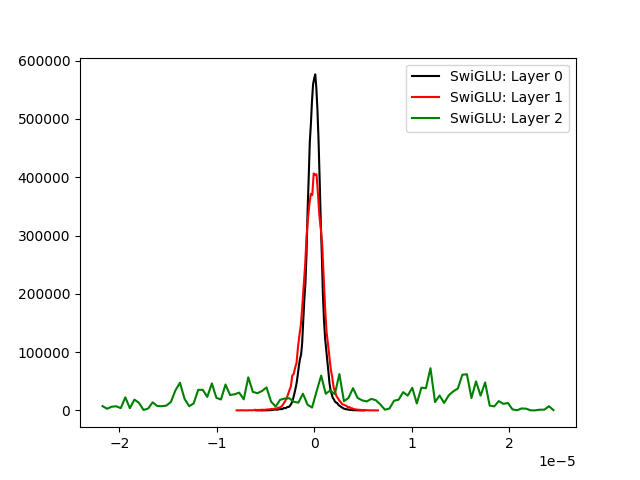

We could improve the above, the last activation layer is still saturated though.
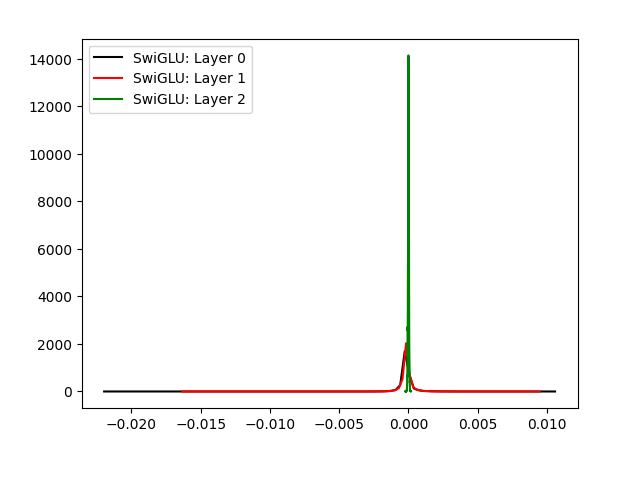

By default, track_direction is set to SwigluPath.BACKWARD. If you want to look at the forward activation, set it to SwigluPath.FORWARD.
Parameters
from tinyllama.insight import GradInsight
GradInsight_ = GradInsight(num_params_to_track=1500)
GradInsight_.run(model)
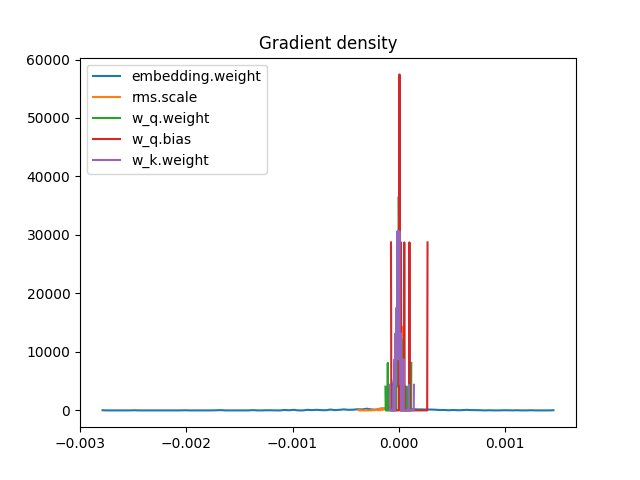

This is an example of a high saturation, also we don't see a well-rounded distribution.
What a good distribution of gradients should approximately be:


To avoid clutter, the legend is disabled. If you're tracking a small number of parameters, set argument show_params_name to True.
Gradient over data ratio $\frac{l_r \cdot grad}{data}$
Returns a plot representing the gradient/data ratio in each step of the training.
from tinyllama.insight import GdrInsight
GdrInsight = GdrInsight(num_params_to_track=50, num_iters=1500)
GdrInsight.run(model, tokens)
Ratios should stabilize as training goes, high values mean the network is learning way too fast (not good) while low values mean that it's learning way too slow (not good as well). Usually, you want to observe values in the 1e-2 ~ 1e-3 range.
Below is an example that shows a model hardly learning from the data:
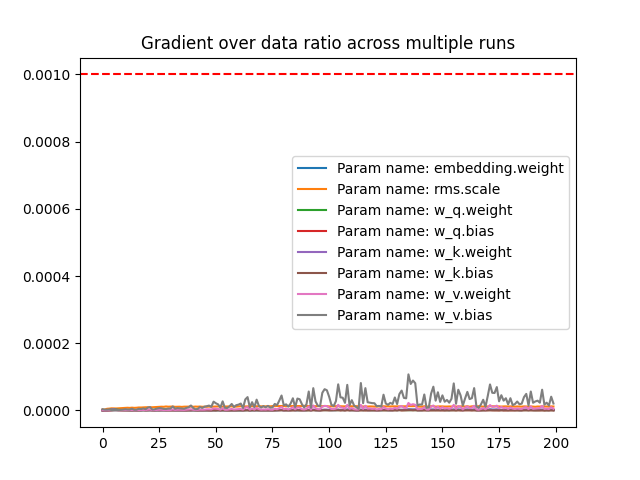
Through adjustments on some hyperparameters and increasing the volume of the data, we improved the learning quality of the model:

To avoid clutter, the legend is disabled. If you're tracking a small number of parameters, set argument show_params_name to True.
Learning rate
Returns a plot representing the loss for each learning rate, the scale for the argument start and end is logarithmic.
from tinyllama.insight import LrInsight
LrInsight_ = LrInsight(start=-5, end=0, n_lrs=50)
LrInsight_.run(model, tokens)

For each lr, we set an epoch of 1. Feel free to change it with the argument epochs_for_each.
Hyperparameter tuning
Plots and returns a tuple containing (1) training data points and the associated loss (evaluated with training) and (2) testing data points and their estimated loss (evaluated with a Gaussian process).
To disable plots, set the environment variable DISABLE_PLOT to 0.
from tinyllama.gptuner import GPTuneConfig, GPTune
GPTuneConfig = GPTuneConfig(max_num_training_samples=100, hyperparams_to_tune=["emb_dim", "n_heads"], l_bounds=[10, 2], u_bounds=[50, 5], max_num_evaluations=500)
GPTune = GPTune(GPTuneConfig)
XY_train, XY_test = GPTune.run(model, tokens, TrainConfig)
GPTune predicts the loss of different hyperparameter configurations without running full training cycles. It uses a Gaussian process model that learns from a small set of evaluated training samples to estimate performance across the entire hyperparameter space.
max_num_training_samples: sets the number of training samples, more training samples means better overall coverage of the space which will lead to better precision. The samples are extracted using a Latin hypercube, depending on how the space is constrained (intervals where hyperparameters lie), there'll be a maximum number of samples that can fit into the space.
l_bounds: sets the lower bounds of each hyperparameter, following the order of hyperparams_to_tune.
u_bounds: sets the upper bounds of each hyperparameter, following the order of hyperparams_to_tune.
hyperparams_to_tune: sets the hyperparameters to tune, the others are extracted from the model.
hyperparams_to_plot: sets the hyperparameters to plot, it must be of length <= 2 and a subset of hyperparams_to_tune.
max_num_evaluation_samples: sets the numbers of evaluations, the same observation concerning the constrained space in which the number of integer samples is finite.
The number of hyparameters needs to be <= 2 to get a plot, if you still want to get a plot of a subset, use hyperparams_to_plot argument to the list of hyperparameters that you want to plot.
from tinyllama.gptuner import GPTuneConfig, GPTune
GPTuneConfig = GPTuneConfig(max_num_training_samples=100, hyperparams_to_tune=[""emb_dim"", "n_heads", "context_window"], hyperparams_to_plot=["epochs", "n_heads"] l_bounds=[10, 2, 150], u_bounds=[50, 5, 250], max_num_evaluations=500)
GPTune = GPTune(GPTuneConfig)
GPTune.run(model, tokens, TrainConfig)
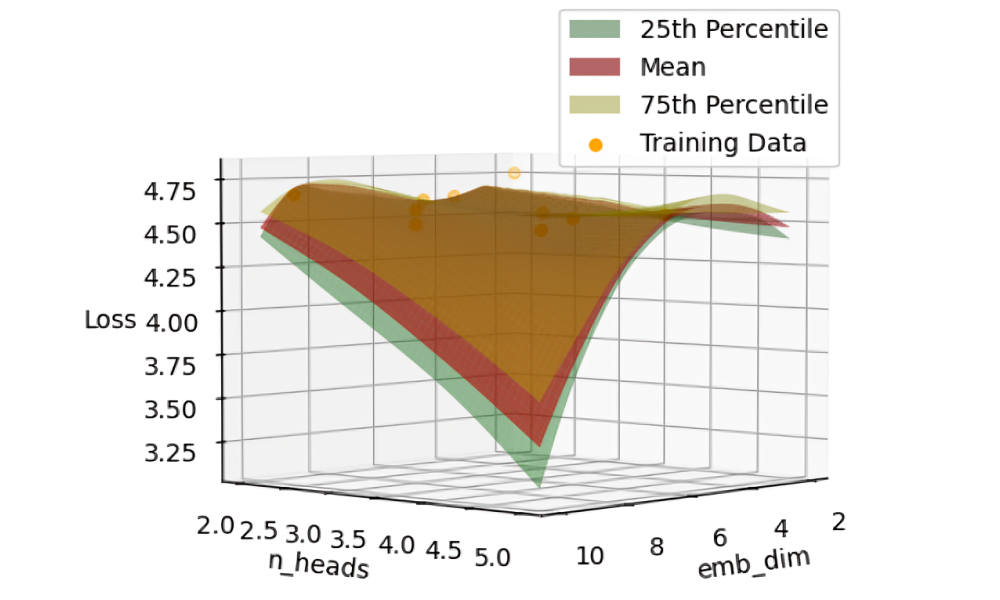
You can also have 1D plots.
from tinyllama.gptuner import GPTuneConfig, GPTune
GPTuneConfig = GPTuneConfig(max_num_training_samples=100, hyperparams_to_tune=["epochs", "n_heads", "context_window"], hyperparams_to_plot=["n_heads"] l_bounds=[10, 2, 150], u_bounds=[50, 5, 250], max_num_evaluations=500)
GPTune = GPTune(GPTuneConfig)
GPTune.run(model, tokens, TrainConfig)
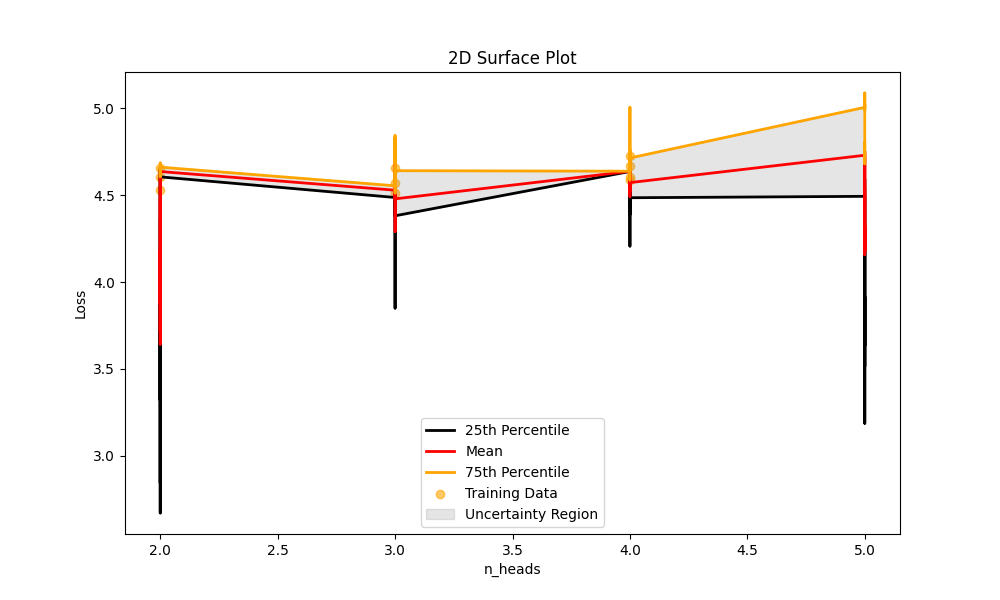
Generating
Generates a response to a prompt.
from tinyllama import generate
# kv_cache is set to True by default
generate(model, prompt, max_tokens=900, kv_cache=True)
Release history Release notifications | RSS feed


Download files
Download the file for your platform. If you're not sure which to choose, learn more about installing packages.
Source Distribution
Built Distribution
Filter files by name, interpreter, ABI, and platform.
If you're not sure about the file name format, learn more about wheel file names.
Copy a direct link to the current filters
File details
Details for the file tinyllama-0.0.2b0.tar.gz.
File metadata
- Download URL: tinyllama-0.0.2b0.tar.gz
- Upload date:
- Size: 21.7 kB
- Tags: Source
- Uploaded using Trusted Publishing? No
- Uploaded via: twine/6.0.1 CPython/3.12.4
File hashes
| Algorithm | Hash digest | |
|---|---|---|
| SHA256 |
f72d36e5e864a3158e0b0efdff3c71f5bed3cd5a43b805f0f46b7bd78b0da41a
|
|
| MD5 |
90ab49a3afa97622b321d0f532629980
|
|
| BLAKE2b-256 |
b647e5c34d4d0bf4ea7356f8dc0973c4c68db695b9f3574e166ec456a1439507
|
File details
Details for the file tinyllama-0.0.2b0-py3-none-any.whl.
File metadata
- Download URL: tinyllama-0.0.2b0-py3-none-any.whl
- Upload date:
- Size: 32.0 kB
- Tags: Python 3
- Uploaded using Trusted Publishing? No
- Uploaded via: twine/6.0.1 CPython/3.12.4
File hashes
| Algorithm | Hash digest | |
|---|---|---|
| SHA256 |
57adcc206ba8629b58a5fc106aa39a3cefe3207553d63bcef505c88d8436115d
|
|
| MD5 |
1ae74487454bd3320f7e8b0eeb33b6de
|
|
| BLAKE2b-256 |
5cde268751180ec6108f37f3218b421f37119226c0dd16f48ad425756fda3fc5
|






