
Tiny task manager for Linux, MacOS and Unix-like systems

Project description
Tiny task manager for Linux, MacOS and Unix-like systems.
Written as a single Python script.
Installation
Download the script directly (recommended):
curl https://raw.githubusercontent.com/yuriescl/tinytaskmanager/dev/tinytaskmanager.py -o tinytaskmanager
chmod +x tinytaskmanager
./tinytaskmanager
Alternative installation methods
Installing through pip
pip install tinytaskmanager
tinytaskmanager  # or python -m tinytaskmanager
Requirements:
python>=3.8ps(usually available by default)
Features:
- No root access required
- Daemon-less
- Easily start, watch, and stop tasks using very simple and direct CLI commands
- Written as a single script built using only the Python standard library - easy to audit and run
Comparison to other popular server task managers:
- systemctl
- Pros
- Sophisticated dependency management via
WantedBy - Works well with system services
- Usually installed by default in any modern server
- Many advanced options, useful for fine-grained control of system services
- Sophisticated dependency management via
- Cons
- Unit files are required every time you need to setup a simple background task
- Difficult to work with when you're not the root user (
systemctl --useris not so simple to use) - If not installed in the system, can be difficult to install and setup as a non-privileged user
- Difficult for beginners and non-sysadmins
- Pros
- supervisord
- Pros
- Very advanced and fine-grained control of tasks, similar to systemctl
- Cons
- Not usually installed by default in modern servers
- Even if installed, usually requires root access
- Difficult for beginners and non-sysadmins
- Pros
- pm2
- Pros
- Modern codebase (JavaScript)
- Can be easily installed via
npm install pm2 - Has advanced integration with Node.js programs (cluster mode, load balancing, etc)
- Widely known and used in Node.js ecosystem
- Cons
- Not usually installed by default in modern servers
- Might not work so well with non-Node.js software
- Requires
nodeandnpmto be installed - Might consume more RAM than intended since it's JavaScript
- Can be a bit difficult to setup and run simple tasks
- Pros
- docker
- Pros
- Quickly spin up a development/production instance given a properly configured Dockerfile
- Container/Dockerfile can be easily shared accross a development team so everyone can test in same OS environment
- Widely available and used across many different platforms
- All dependencies can be installed in the container
- Cons
- Requires root access
- Usually the processes run as the root user, which can lead to major security vulnerabilities
- Very hard for beginners and non-sysadmins
- Difficult to run simple tasks that don't need containers
- Pros
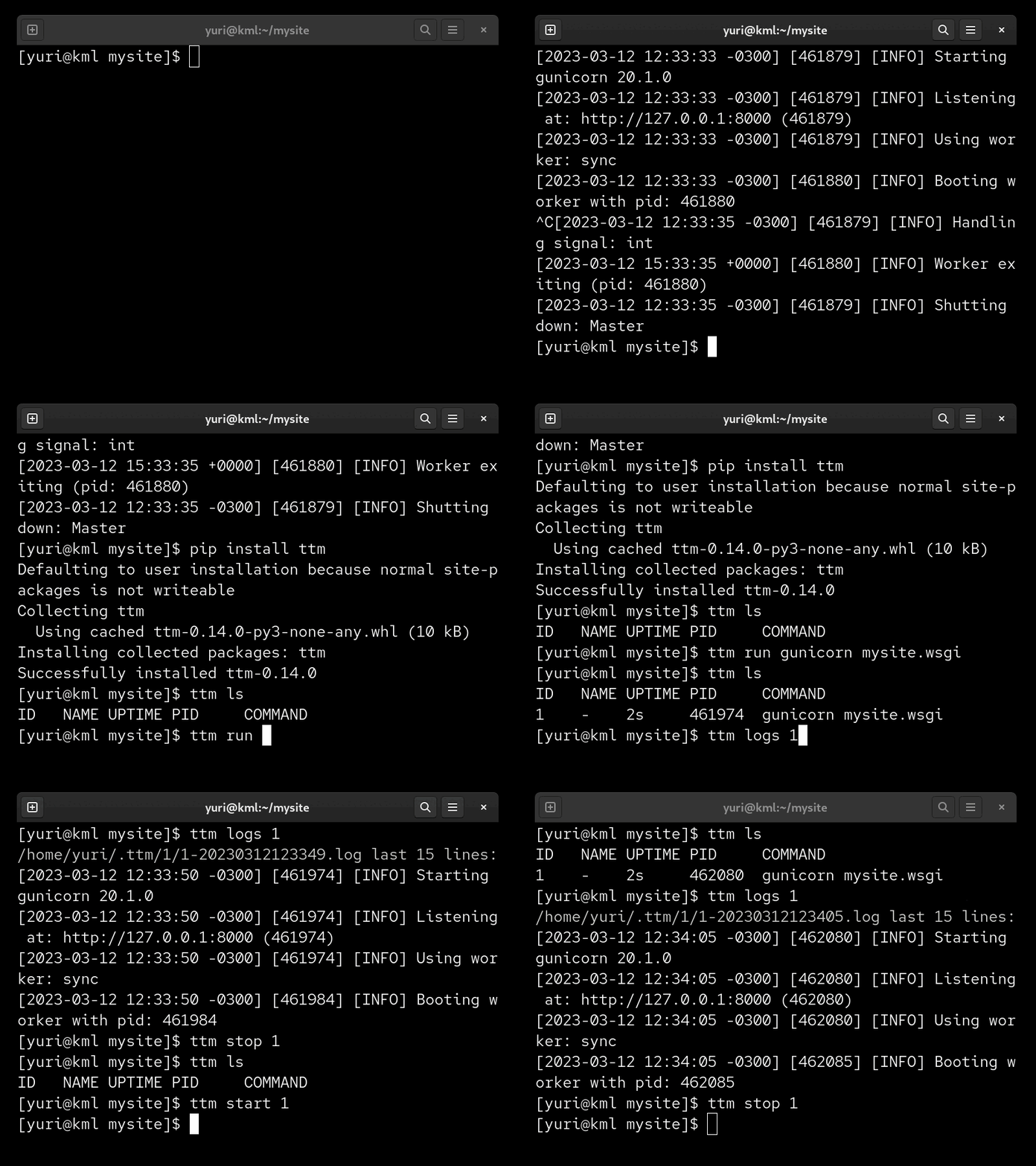
tinytaskmanager (previously named ttm) was initially an attempt (after painfully having to deal with the existing options like PM2, systemctl, etc) to have a script I could easily copy to a server and manage simple tasks like a gunicorn server, or a celery worker. After a while, tinytaskmanager became a very useful tool in day-to-day deployments, so it made sense to make it public.
Examples
Running a script:
$ tinytaskmanager run ./backup-database.sh --output /backups/database.sql
$ tinytaskmanager ls
ID   NAME COMMAND                                              UPTIME PID
1    -    ./backup-database.sh --output /backups/database.sql  2s     742537
$ tinytaskmanager stop 1
$ tinytaskmanager rm 1
Running Django server:
$ tinytaskmanager run --name mydjangoserver python manage.py runserver
$ tinytaskmanager rm mydjangoserver
Cannot remove task while it's running.
To stop it, run:
tinytaskmanager stop mydjangoserver
$ tinytaskmanager logs mydjangoserver
$ tinytaskmanager rm mydjangoserver
Development
Environment
poetry env use python3.8
poetry install
poetry shell
Release history Release notifications | RSS feed

Download files
Download the file for your platform. If you're not sure which to choose, learn more about installing packages.
Source Distribution
Built Distribution
Filter files by name, interpreter, ABI, and platform.
If you're not sure about the file name format, learn more about wheel file names.
Copy a direct link to the current filters
File details
Details for the file tinytaskmanager-1.0.0.tar.gz.
File metadata
- Download URL: tinytaskmanager-1.0.0.tar.gz
- Upload date:
- Size: 11.8 kB
- Tags: Source
- Uploaded using Trusted Publishing? No
- Uploaded via: uv/0.11.17 {"installer":{"name":"uv","version":"0.11.17","subcommand":["publish"]},"python":null,"implementation":{"name":null,"version":null},"distro":{"name":"Arch Linux","version":null,"id":null,"libc":null},"system":{"name":null,"release":null},"cpu":null,"openssl_version":null,"setuptools_version":null,"rustc_version":null,"ci":null}
File hashes
| Algorithm | Hash digest | |
|---|---|---|
| SHA256 |
5b915e06688aba5efe93fc30716daf005e2b19e9cfef16025e6ff9158c2ac769
|
|
| MD5 |
afc21b592538aa45ff8be5df1213b384
|
|
| BLAKE2b-256 |
dfc4c81bca0cbb0b6701943a2645ca1100d0e609044475de419e4bfcc853f772
|
File details
Details for the file tinytaskmanager-1.0.0-py3-none-any.whl.
File metadata
- Download URL: tinytaskmanager-1.0.0-py3-none-any.whl
- Upload date:
- Size: 12.8 kB
- Tags: Python 3
- Uploaded using Trusted Publishing? No
- Uploaded via: uv/0.11.17 {"installer":{"name":"uv","version":"0.11.17","subcommand":["publish"]},"python":null,"implementation":{"name":null,"version":null},"distro":{"name":"Arch Linux","version":null,"id":null,"libc":null},"system":{"name":null,"release":null},"cpu":null,"openssl_version":null,"setuptools_version":null,"rustc_version":null,"ci":null}
File hashes
| Algorithm | Hash digest | |
|---|---|---|
| SHA256 |
b4f9a4c59f406f5b47e8ebcb5c83250ef707000128e203b068f2750bb86aa5ed
|
|
| MD5 |
78fb690e56c2ce36085358ad93c70de4
|
|
| BLAKE2b-256 |
8c8f5067585fdfc61d6e677a519faff7f72acb96aaf3f3a0f8b7eea6c9ad424a
|






