
Markdown Tistory Uploader
Markdown 타입의 파일을 Github CSS를 적용한 HTML파일로 변환해서 Tistory로 업로드하는 모듈입니다.
Prerequisites
- VS Code
- Python >= 3
- Tistory github markdown style 설정
- css 파일은 여기에서 다운로드
- tistory 설정은 구글링 부탁드립니다.
Installation
pip install은 지원되지 않습니다.
$ git clone https://github.com/momentjin/tistory-uploader.git
$ cd tistory-uploader
Usage
Client Id, Secret Key 발급
티스토리 App 등록 페이지에서 아래와 같이 서비스URL과 CallBack 값을 설정해주세요.
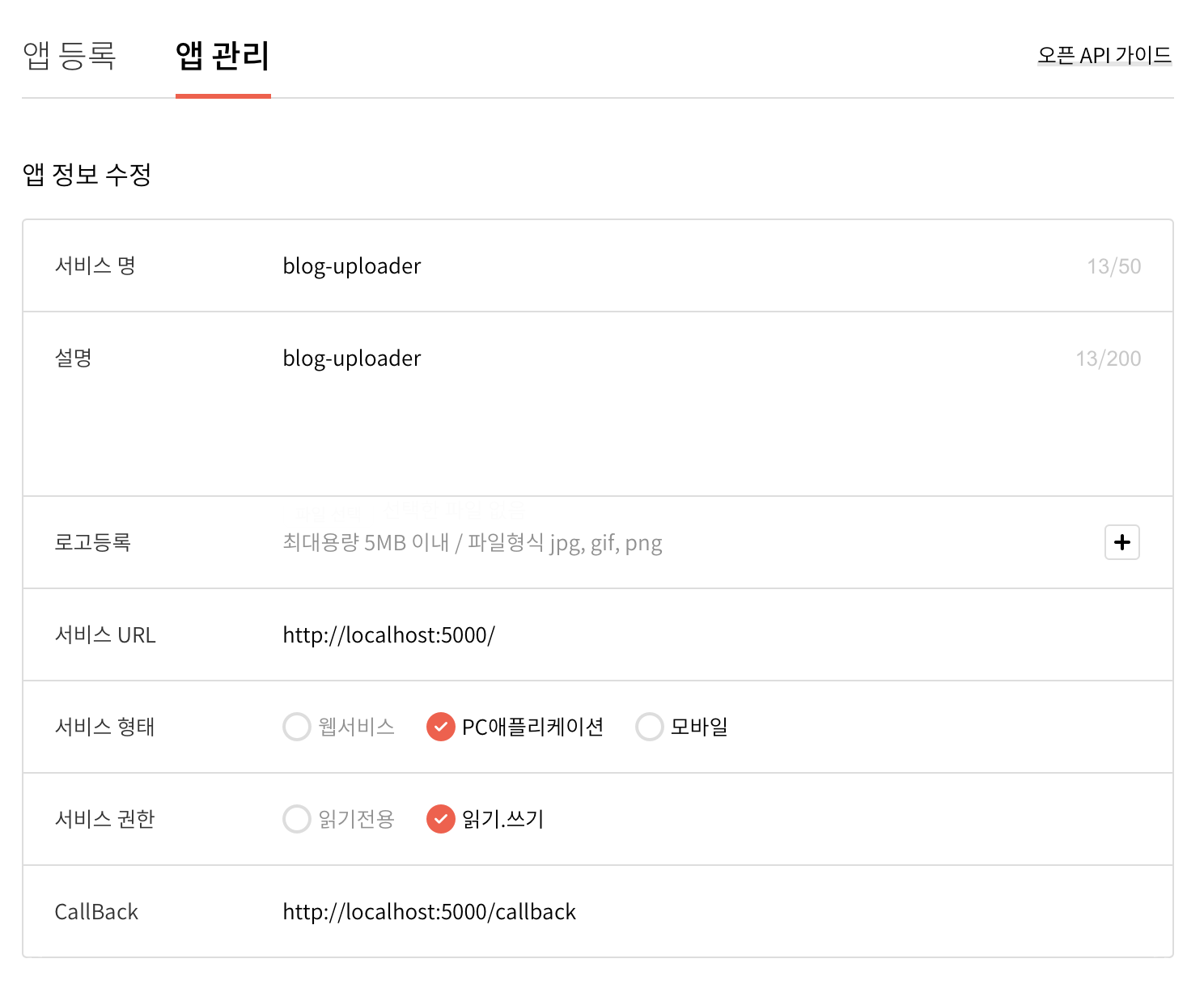
User Info 설정
- 아래와 같이 프로젝트 디렉토리에서 다음 명령어를 입력합니다.
$ ~/tistory-uploader python CommandConfig init
- user.json 파일이 열리면 아래 설명을 보고 내용을 입력합니다.
{
    "blog_name": "",
    "client_id": "",
    "client_secret": "",
    "access_token": "",
    "categories": []
}
- blog_name : 블로그 이름 입력. tistory 주소의 앞부분 (예를 들어 momentjin.tistory.com이면 'momentjin' 을 입력)
- client_id : Tistory 앱 등록 페이지의 App ID 입력
- client_secret : Tistory 앱 등록 페이지의 Secret Key 입력
- access_token과 categories는 명령어에 의해 입력됩니다.
Access Token 발급
- 아래 커맨드를 입력합니다.
$ ~/tistory-uploader python CommandConfig code
- 다음 화면에서 블로그 업로드 권한을 얻기 위해
허가하기버튼을 눌러주시면 됩니다.
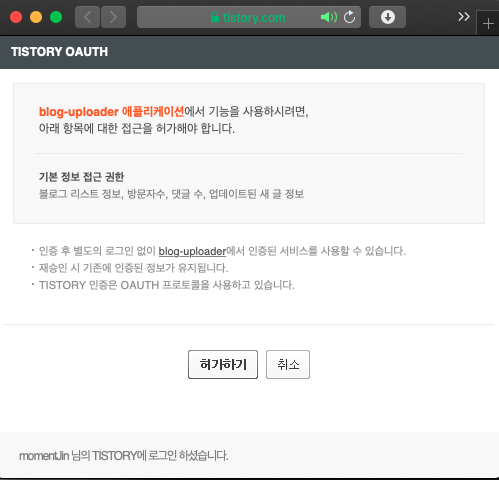
user.json에 access_token이 입력된 것을 확인합니다. (현재 문제가 있어 오류 메세지가 보일 수 있습니다. 무시하면 됩니다)
Category 정보 획득
게시글 쓰기 및 수정 작업시에 카테고리 정보를 포함시키려면, 카테고리 ID를 알아야 합니다. 카테고리 정보 없이 게시글 업로드 작업을 한다면 생략하시면 됩니다.
- 아래 커맨드를 입력합니다.
$ ~/tistory-uploader python CommandConfig category
user.json에 categories 데이터가 입력된 것을 확인합니다.
게시글 업로드시 카테고리는 카테고리 이름을 입력합니다. 카테고리 이름을 통해 user.json의 카테고리 정보에서 id를 획득한 뒤 이를 API로 전달하는 방식입니다.
글 쓰기
1-1. (카테고리 정보가 필요 없는 경우) 아래 커맨드를 입력합니다.
$ ~/tistory-uploader python CommandConfig write [file_path]
1-2. (카테고리 정보가 필요한 경우) 아래 커맨드를 입력합니다. category_name는 영문의 경우 대소문자를 명확히 구분해주세요.
$ ~/tistory-uploader python CommandConfig write [file_path] -cg [category_name]
- 출력 값에 포함된 url에 접속해서 게시글이 제대로 게시되었는지 확인합니다.
글 수정
1-1. (카테고리 정보가 필요 없는 경우) 아래 커맨드를 입력합니다.
$ ~/tistory-uploader python CommandConfig modify [category_name] [file_path]
1-2. (카테고리 정보가 필요한 경우) 아래 커맨드를 입력합니다. category_name는 영문의 경우 대소문자를 명확히 구분해주세요.
$ ~/tistory-uploader python CommandConfig modify [category_name] [file_path] -cg [category_name]
- 출력 값에 포함된 url에 접속해서 게시글이 제대로 수정되었는지 확인합니다.
Release History
v0.1
- 2020.03.08
- Work in progress
License
Distributed under the MIT License. See LICENSE for more information.
1 maintainer

Release files for tistory-uploader 0.11
For a detailed explanation of source distributions (sdists) and built distributions (wheels), please see the package formats documentation.
Built distribution (wheel)
| File | Interpreter | ABI | Platform | Reset |
|---|---|---|---|---|
| tistory_uploader-0.11-py2-none-any.whl | Python 2 | none | any | Details |
Release files / tistory_uploader-0.11-py2-none-any.whl
| Download URL | tistory_uploader-0.11-py2-none-any.whl |
|---|---|
| Size | 7.4 kB |
| Tags | Python 2 |
|
SHA-256 checksum How to use checksums |
dc449ff2e92e30d41413352333109078fd875a4dabd244fbc7d672646d3c0330
|
|
BLAKE2b-256 checksum How to use checksums |
4ae3adab9080e9e20a7db913fe77e4de650b4be72a51732ae8468e9f5046d817
|
| Upload date | |
|
Uploaded using Trusted Publishing? What is trusted publishing? |
No |
| Uploaded via |
twine/3.1.1 pkginfo/1.5.0.1 requests/2.20.1 setuptools/42.0.2 requests-toolbelt/0.9.1 tqdm/4.43.0 CPython/3.7.6
|














