
Connect titiler to STAC APIs.
Project description
titiler-stacapi
Connect titiler to STAC APIs




Documentation: https://developmentseed.org/titiler-stacapi/
Source Code: https://github.com/developmentseed/titiler-stacapi
Installation
To install from PyPI and run:
# Make sure you have pip up to date
python -m pip install -U pip
python -m pip  install titiler.stacapi
To install from sources and run for development:
We recommand using uv as project manager for development.
See https://docs.astral.sh/uv/getting-started/installation/ for installation
git clone https://github.com/developmentseed/titiler-stacapi.git
cd titiler-stacapi

uv sync
Launch
You'll need to have TITILER_STACAPI_STAC_API_URL variables set in your environment pointing to your STAC API service.
export TITILER_STACAPI_STAC_API_URL=https://api.stac

uv run --extra server uvicorn titiler.stacapi.main:app --port 8000
Using Docker
$ git clone https://github.com/developmentseed/titiler-stacapi.git
$ cd titiler-stacapi
$ export TITILER_STACAPI_STAC_API_URL=https://api.stac
$ docker-compose up --build api
It runs titiler.stacapi using Uvicorn web server.
How it works
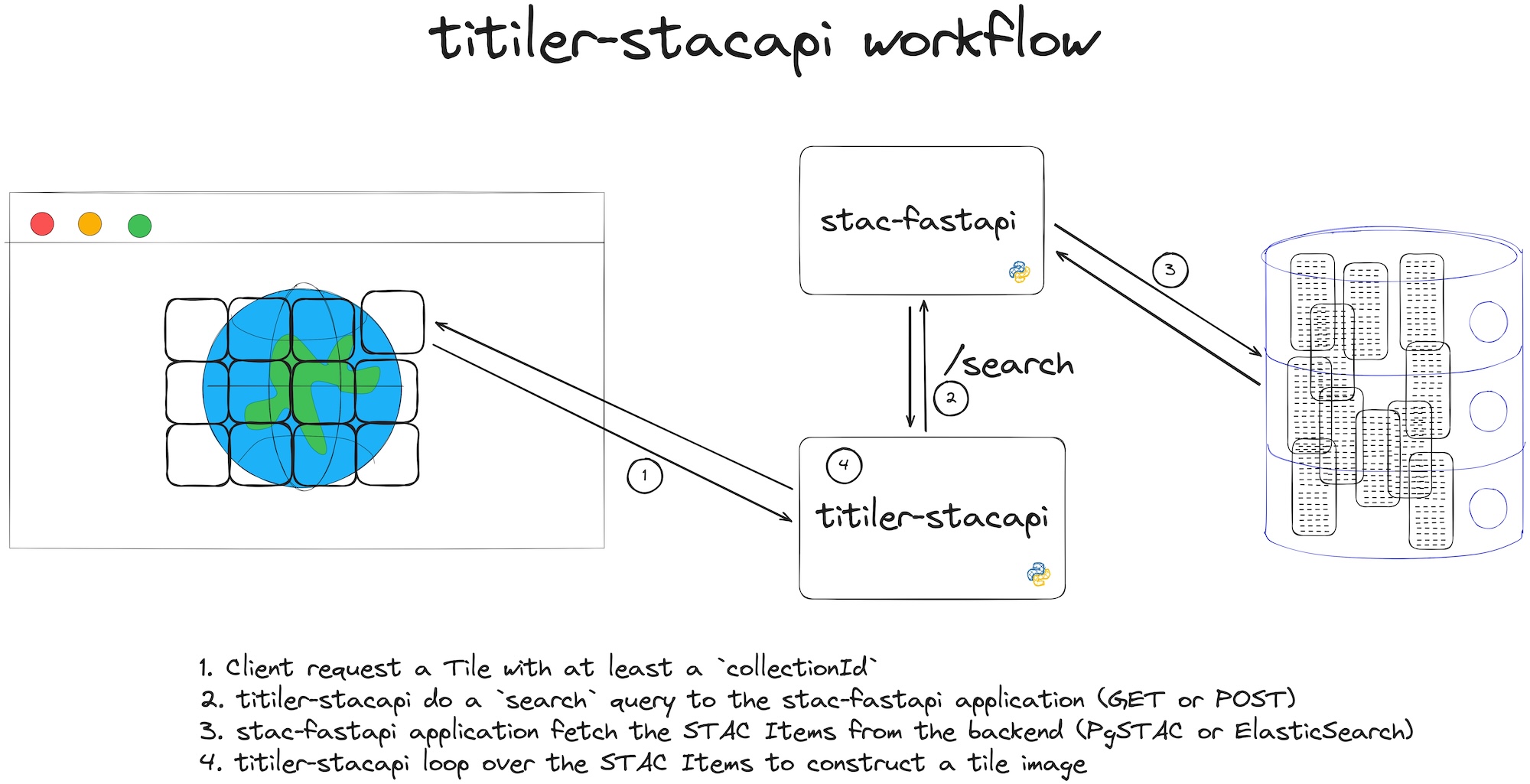
WMTS and the Render extension
titiler-stacapi makes extensive use of the Render extension, specifically at the Collection level.
By using the render's metadata, the /wmts endpoint (from the OGCEndpointsFactory factory) can populate a set of layers returned by the GetCapabilities service.
Contribution & Development
See CONTRIBUTING.md
License
See LICENSE
Authors
See contributors for a listing of individual contributors.
Changes
See CHANGES.md.
Project details
Release history Release notifications | RSS feed


Download files
Download the file for your platform. If you're not sure which to choose, learn more about installing packages.
Source Distribution
Built Distribution
Filter files by name, interpreter, ABI, and platform.
If you're not sure about the file name format, learn more about wheel file names.
Copy a direct link to the current filters
File details
Details for the file titiler_stacapi-1.1.2.tar.gz.
File metadata
- Download URL: titiler_stacapi-1.1.2.tar.gz
- Upload date:
- Size: 39.2 kB
- Tags: Source
- Uploaded using Trusted Publishing? No
- Uploaded via: uv/0.9.30 {"installer":{"name":"uv","version":"0.9.30","subcommand":["publish"]},"python":null,"implementation":{"name":null,"version":null},"distro":{"name":"Ubuntu","version":"24.04","id":"noble","libc":null},"system":{"name":null,"release":null},"cpu":null,"openssl_version":null,"setuptools_version":null,"rustc_version":null,"ci":true}
File hashes
| Algorithm | Hash digest | |
|---|---|---|
| SHA256 |
4cb3914bf6cee6ac717ad950d9ab7526cbcfb0d43d97f671f27c30ff60d0e3e6
|
|
| MD5 |
df56b64848d98da675b431faf9b67ab9
|
|
| BLAKE2b-256 |
edf6ea39e0bf34ede7d9746730e0cf29e056c6c894d4a17293678c05f4991db5
|
File details
Details for the file titiler_stacapi-1.1.2-py3-none-any.whl.
File metadata
- Download URL: titiler_stacapi-1.1.2-py3-none-any.whl
- Upload date:
- Size: 43.9 kB
- Tags: Python 3
- Uploaded using Trusted Publishing? No
- Uploaded via: uv/0.9.30 {"installer":{"name":"uv","version":"0.9.30","subcommand":["publish"]},"python":null,"implementation":{"name":null,"version":null},"distro":{"name":"Ubuntu","version":"24.04","id":"noble","libc":null},"system":{"name":null,"release":null},"cpu":null,"openssl_version":null,"setuptools_version":null,"rustc_version":null,"ci":true}
File hashes
| Algorithm | Hash digest | |
|---|---|---|
| SHA256 |
23a2e2cec15c84f0313d4f079bc015658f6cca2fc0ee81d9e2d17abe485bbd42
|
|
| MD5 |
f6daf49573dc1e5be6aaf4e2c40cbe70
|
|
| BLAKE2b-256 |
35f59b02c936d3a38db6d8216459fed2d031d8499c6bcb698f87e4e2b95b3819
|






