
A tkinter widget

Project description
DoubleScale
A tkinter widget that displays two cursors on a slider, to select two values.
Install
pip install tk-double-scale
Signature
DoubleScale.get_values()				# -> [float, float]
DoubleScale.set_values(a: float, b: float)
Arguments
master: tk.Widget
from_: float      	# value min
to: float         	# value max
length: int       	# widget length and thickness in pixels
thickness: int
cursor_width: int 	# cursor width
offset_x: int		# widget top left corner
offset_y: int
decimals: int		# values precision
bg_color: str		# color options
cursor_color: str
text_color: str
font: str			# font for the values displayed, can include any option
					# that a tkinter.font.Font would
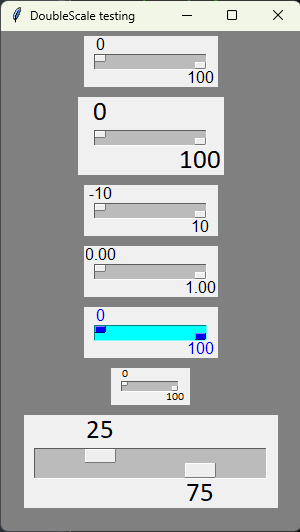
Demo
import tkinter as tk
from tk_double_scale import DoubleScale


root = tk.Tk()
root.title('DoubleScale testing')
root.geometry('300x500+1000+200')
root.configure(bg='grey')


# Demonstrating several possible arguments
DoubleScale(root).pack(pady=5)                      # Default parameters
DoubleScale(root, font='Calibri 20').pack(pady=5)   # Custom font
DoubleScale(root, from_=-10, to=10).pack(pady=5)    # Custom range
DoubleScale(root, to=1, decimals=-2).pack(pady=5)   # Custom decimals

# Custom colors
DoubleScale(root, cursor_color='blue', bg_color='#0ff',
            text_color='blue').pack(pady=5)

# Small size
DoubleScale(root, length=50, thickness=10, cursor_width=5,
            font='Calibri 8').pack(pady=5)

# Big size
scale = DoubleScale(root, length=200, thickness=30, cursor_width=30,
                    font='Calibri 20')
scale.pack(pady=5)


# Demonstrating getting and setting values
print(scale.get_values())   # > [0, 100]

# Values are clamped inside the range defined by from_ and to
scale.set_values(-10, -10)
print(scale.get_values())   # > [0, 0]

scale.set_values(200, 200)
print(scale.get_values())   # > [100, 100]

# Values are rounded according to decimals (default is 0 decimals)
scale.set_values(25.123, 75.123)
print(scale.get_values())   # > [25.0, 75.0]

root.mainloop()
Release history Release notifications | RSS feed


Download files
Download the file for your platform. If you're not sure which to choose, learn more about installing packages.
Source Distribution
tk_double_scale-0.0.1.tar.gz
(29.5 kB
view details)
Built Distribution
Filter files by name, interpreter, ABI, and platform.
If you're not sure about the file name format, learn more about wheel file names.
Copy a direct link to the current filters
File details
Details for the file tk_double_scale-0.0.1.tar.gz.
File metadata
- Download URL: tk_double_scale-0.0.1.tar.gz
- Upload date:
- Size: 29.5 kB
- Tags: Source
- Uploaded using Trusted Publishing? No
- Uploaded via: twine/6.1.0 CPython/3.13.3
File hashes
| Algorithm | Hash digest | |
|---|---|---|
| SHA256 |
4c4da79d24eac57271d9ee1c003a02e47012412920c606b3e0f6733bd71e57ce
|
|
| MD5 |
fce325652b57d76f3d769323edeeec31
|
|
| BLAKE2b-256 |
d10722a19d73d1546d833760b0d7d383fd504ad96a7176de8e13aa2b379124e5
|
File details
Details for the file tk_double_scale-0.0.1-py3-none-any.whl.
File metadata
- Download URL: tk_double_scale-0.0.1-py3-none-any.whl
- Upload date:
- Size: 17.0 kB
- Tags: Python 3
- Uploaded using Trusted Publishing? No
- Uploaded via: twine/6.1.0 CPython/3.13.3
File hashes
| Algorithm | Hash digest | |
|---|---|---|
| SHA256 |
55cfd16d674c33621777c9a4d715450f7c2abe47e4eadeaad82bdc4059879618
|
|
| MD5 |
7a936ebce1e4b504135c4295dbd23555
|
|
| BLAKE2b-256 |
cb4b3c03087a942504715817f4a2807241b81e051225ef835ec5ccd208803b49
|






