
tk-translate is a PySimpleGUI variant of PageTranslate. It provides a terse GUI to get some text translated using one of the various services from PT or Deep-Translator. It's mostly just meant for testing.
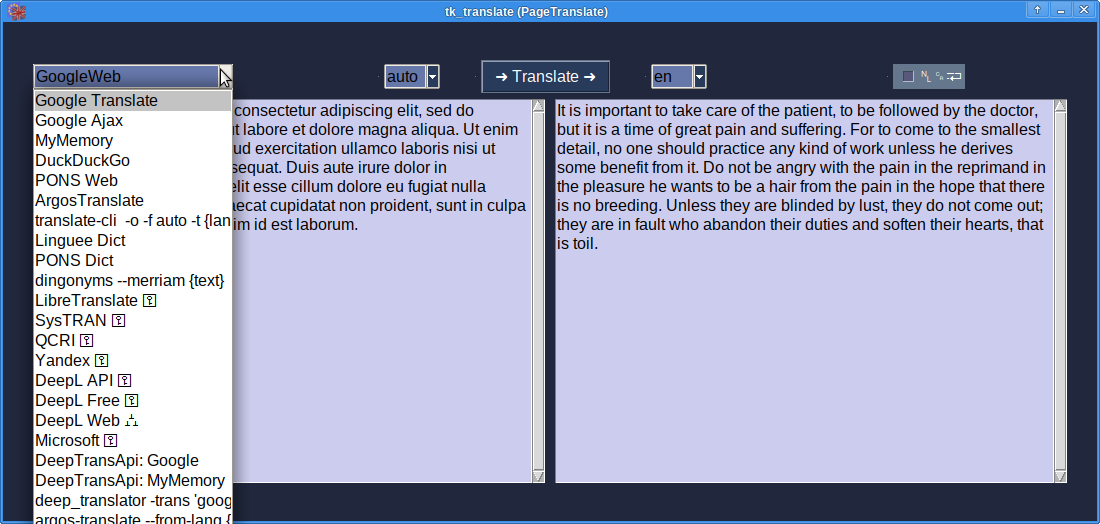
Presents two input boxes, some buttons, for plain text translations. Usage:
- Insert text into left input
- Select backend
- Change target language
- Hit translate
There's also a [File] mode which allows Office document / content.xml
(best with DeepL) or text file translations. The output target is implied
to be filename.LANG.ext.
Other CLI translation tools can be edited into the combobox here. (The
dingonyms output doesn't look quite as useful in a plain text field).
Defaults can now be set in the [⛭] settings dialog.
translationbackends usage
There's two options to instantiate the backends. The default
assign_service() expects a dictionary of parameters, one
of which decides on the instance used:
import tk_translate.translationbackends as tb
service = tb.assign_service({
    "backend": "DeepL Web",
    "from": "auto",
    "lang": "en",
    "quick": 1,
})
engl = service.translate("¿Donde esta la pizza?")
While the individual classes also would allow keyword arguments:
service = tb.GoogleAjax(lang="en")
text = service.linebreakwise(text)
Using from= does require a syntax workaround however:
service = tb.PonsWeb(lang="en", **{"from": "it"})
Which works as well for all arguments. (Most being optional.)
MyMemory benefits from an email=, while the commercial providers
want an api_key=.
deep-translator
With two exceptions, deep-translator
is the better option. translationbackends merely retains some
Python2 compatibility (for good old OpenOffice). Instantiating it
from tb.DeepTranslator(backend="Yandex") requires a second name
lookup in TB (backend= best prefixed with 'DT: LibreTranslate').
1 maintainer

Metadata
1 maintainer
Release files for tk_translate 0.5
For a detailed explanation of source distributions (sdists) and built distributions (wheels), please see the package formats documentation.
Built distribution (wheel)
| File | Interpreter | ABI | Platform | Reset |
|---|---|---|---|---|
| tk_translate-0.5-py3-none-any.whl | Python 3 | none | any | Details |
Release files / tk_translate-0.5-py3-none-any.whl
| Download URL | tk_translate-0.5-py3-none-any.whl |
|---|---|
| Size | 22.1 kB |
| Tags | Python 3 |
|
SHA-256 checksum How to use checksums |
634756acf61b41e7a59c27e64e9a2d73263c142ab6adf928f1cb991a20350dfe
|
|
BLAKE2b-256 checksum How to use checksums |
be28587b832d72250ed7df17c462b3e270759a84bd053045d67278bba9a4dfcd
|
| Upload date | |
|
Uploaded using Trusted Publishing? What is trusted publishing? |
No |
| Uploaded via |
python-requests/2.27.1
|
Security for tk_translate 0.5
Provenance
Provenance describes where a file came from. On PyPI, provenance is shared via attestations, which provide a verifiable record of the build or publishing details. View details, limitations and caveats.
No provenance found
None of the files in this release were uploaded with provenance metadata.
A note on package security
PyPI is a repository for distributing packages, not a service for auditing them. While third-party security researchers and our staff do their best to detect and remove malicious packages, PyPI cannot guarantee the quality, security or suitability of any given package.
To learn more about protecting yourself from malicious actors, visit our package security documentation.














