
Simple and beginner-friendly table widget for Tkinter

Project description



The simplest way to create tables in Tkinter for beginners :)
✨ Why Tkable?
- No complex setup
- No Treeview headaches
- Built for beginners
- Clean API
- Works out of the box
🧠 When should you use Tkable?
✔ Learning Tkinter
✔ Building simple apps
✔ Creating dashboards
✔ Managing data visually
📦 Installation
pip install tkable
🚀 Quick Example
from tkable import DataTable
import tkinter as tk

root = tk.Tk()

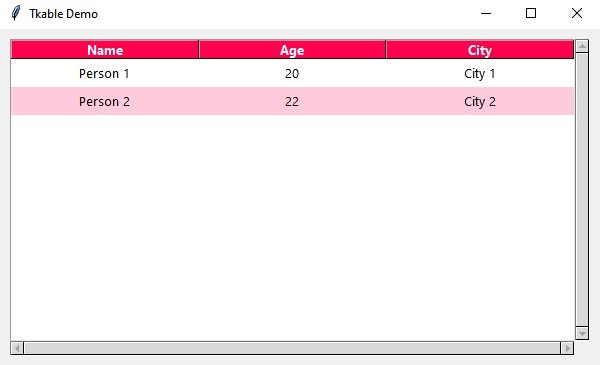
table = DataTable(root, ["Name", "Age", "City"], header_bg="#ff004c" , alternating_colors=("#ffffff", "#ffcadc"))

table.load_data([
    ["Person 1", 20, "City 1"],
    ["Person 2", 22, "City 2"]
])

root.mainloop()
📸 Screenshot
🔧 Customization Options
| Parameter | Type | Default | Description |
|---|---|---|---|
header_bg |
str | #2c3e50 |
Header background color |
header_fg |
str | white |
Header text color |
row_height |
int | 28 |
Height of each row |
font |
tuple | ("Segoe UI", 10) |
Font used in the table |
alternating_colors |
tuple | ("#ffffff", "#f5f5f5") |
Row background colors |
📦 API Reference
insert_row(*values)
Add a new row to the table.
table.insert_row("Person Name", 20, "City")
insert_dict(data: dict)
Insert a row using a dictionary.
table.insert_dict({
    "Name": "Person Name",
    "Age": 22,
    "City": "City"
})
load_data(data)
Load multiple rows.
table.load_data([
    ["Person 1", 20, "City 1"],
    ["Person 2", 22, "City 2"]
])
clear()
Remove all rows.
table.clear()
get_selected_row()
Return selected row as dictionary.
selected = table.get_selected_row()
💡 Tip: Use
insert_dict()when working with forms for cleaner code.
🤝 Contributing
Pull requests are welcome!
⭐ Support
If you like this project, give it a star ⭐
It helps a lot!
📄 License
MIT License © Abdullah Sameh
Release history Release notifications | RSS feed


Download files
Download the file for your platform. If you're not sure which to choose, learn more about installing packages.
Source Distribution
Built Distribution
Filter files by name, interpreter, ABI, and platform.
If you're not sure about the file name format, learn more about wheel file names.
Copy a direct link to the current filters
File details
Details for the file tkable-1.0.4.tar.gz.
File metadata
- Download URL: tkable-1.0.4.tar.gz
- Upload date:
- Size: 4.6 kB
- Tags: Source
- Uploaded using Trusted Publishing? No
- Uploaded via: twine/6.2.0 CPython/3.14.0
File hashes
| Algorithm | Hash digest | |
|---|---|---|
| SHA256 |
895afdaa3a6643dc860622beb8ff178c78c9e2f7562cf5820acfe0c96f7d4f70
|
|
| MD5 |
08f06c57e9301ddf530e573ddd9bbfaf
|
|
| BLAKE2b-256 |
3e18ca5ad53d4e7278d5a9c7923dfa3787bd9f27aba19145e00603b8a0b17cd1
|
File details
Details for the file tkable-1.0.4-py3-none-any.whl.
File metadata
- Download URL: tkable-1.0.4-py3-none-any.whl
- Upload date:
- Size: 5.0 kB
- Tags: Python 3
- Uploaded using Trusted Publishing? No
- Uploaded via: twine/6.2.0 CPython/3.14.0
File hashes
| Algorithm | Hash digest | |
|---|---|---|
| SHA256 |
8a23bf2497cd0b56530bc625362104c268e2850ae53adc7ab8ca41d164f3ea0e
|
|
| MD5 |
7137d608756a1a5e308ec06bcf44c530
|
|
| BLAKE2b-256 |
480ac38ae7a3d11f06eb21b45c14854114702b0a4275605cd9db4bf21596ce02
|






