
extra for tkinter

Project description
tkadw




使用tkinter.Canvas、tcltk扩展自绘技术实现的扩展界面
安装
安装使用的途径仅在pypi.org平台上,所以可以直接使用pip
python -m pip install -U tkadw
Requirement already satisfied: tkadw in $pythonpath\lib\site-packages (0.1.4)
对于windows平台,安装时需勾选tcl/tk选项安装tkinter
对于linux平台,需自行查询python3-tk的安装步骤
包树视图
TKADW 源目录
├─canvas Canvas包:集合基本的绘画组件及额外组件库
│  ├─adwite 使用Canvas包设计的UI组件库
│  ├─atomize 使用Canvas包设计的UI组件库
│  └─fluent 使用Canvas包设计的UI组件库
└─tkite 其他根据gtk设计的UI组件库
   └─gtk 使用Canvas包设计的UI组件库
GTk组件库
GTk组件库使用tkadw.canvas设计的UI组件库。我为每个组件都额外设计了Dark暗黑组件。
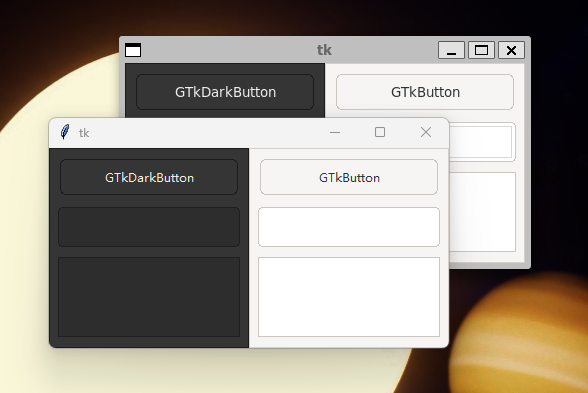
暂无macOS下的演示图,因为作者是个学生党,买不起苹果电脑
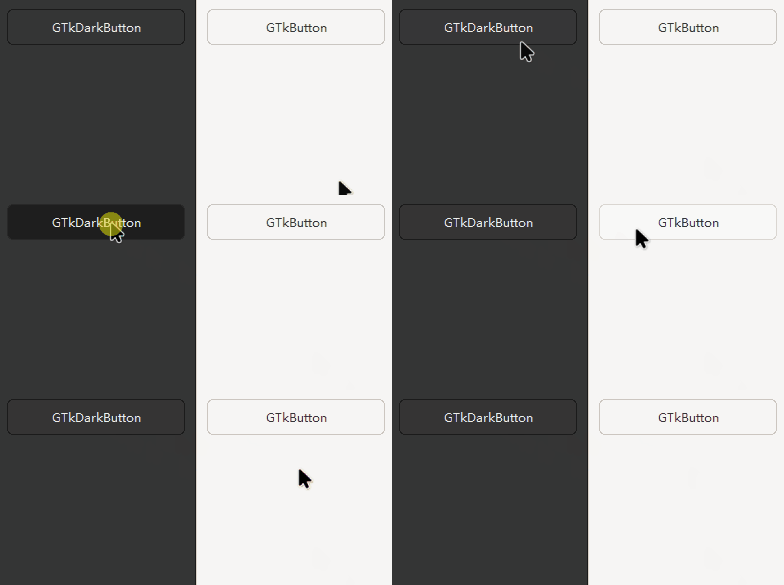
GTkButton 按钮组件
示例
from tkinter import Tk
from tkadw import GTkButton, GTkDarkButton, GTkFrame, GTkDarkFrame

root = Tk()
root.configure(background="#1e1e1e")

frame = GTkFrame(root)

button1 = GTkButton(frame.frame, text="GTkButton")
button1.pack(fill="x", ipadx=5, padx=5, pady=5)

frame.pack(fill="both", expand="yes", side="right")

frame2 = GTkDarkFrame(root)

button2 = GTkDarkButton(frame2.frame, text="GTkDarkButton")
button2.pack(fill="x", ipadx=5, padx=5, pady=5)

frame2.pack(fill="both", expand="yes", side="left")

root.mainloop()
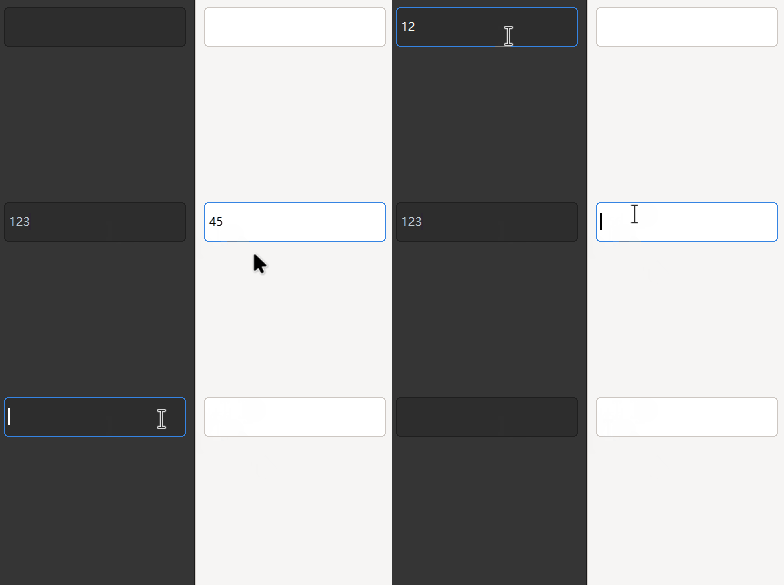
GTkEntry 输入框组件
示例
from tkinter import Tk
from tkadw import GTkEntry, GTkDarkEntry, GTkFrame, GTkDarkFrame

root = Tk()
root.configure(background="#1e1e1e")

frame = GTkFrame(root)

entry1 = GTkEntry(frame.frame)
entry1.pack(fill="x", ipadx=5, padx=5, pady=5)

frame.pack(fill="both", expand="yes", side="right")

frame2 = GTkDarkFrame(root)

entry2 = GTkDarkEntry(frame2.frame)
entry2.pack(fill="x", ipadx=5, padx=5, pady=5)

frame2.pack(fill="both", expand="yes", side="left")

root.mainloop()
Release history Release notifications | RSS feed


Download files
Download the file for your platform. If you're not sure which to choose, learn more about installing packages.
Source Distribution
tkadw-0.2.0.tar.gz
(476.3 kB
view details)
Built Distribution
Filter files by name, interpreter, ABI, and platform.
If you're not sure about the file name format, learn more about wheel file names.
Copy a direct link to the current filters
tkadw-0.2.0-py3-none-any.whl
(439.9 kB
view details)
File details
Details for the file tkadw-0.2.0.tar.gz.
File metadata
- Download URL: tkadw-0.2.0.tar.gz
- Upload date:
- Size: 476.3 kB
- Tags: Source
- Uploaded using Trusted Publishing? No
- Uploaded via: poetry/1.4.2 CPython/3.11.2 Windows/10
File hashes
| Algorithm | Hash digest | |
|---|---|---|
| SHA256 |
d6783f9c556d8936c370edb6bb2cadf4e3c6a5e1bce53b9fa12962529663c08b
|
|
| MD5 |
236f25fe059f05519b92bf1b1f4be07d
|
|
| BLAKE2b-256 |
5a788decf6b078a39cb7cccb6c7469f0b55bdf67e59cac2aed172b02dc73e163
|
File details
Details for the file tkadw-0.2.0-py3-none-any.whl.
File metadata
- Download URL: tkadw-0.2.0-py3-none-any.whl
- Upload date:
- Size: 439.9 kB
- Tags: Python 3
- Uploaded using Trusted Publishing? No
- Uploaded via: poetry/1.4.2 CPython/3.11.2 Windows/10
File hashes
| Algorithm | Hash digest | |
|---|---|---|
| SHA256 |
a460f37785eb3503771eeef82c73bba6b158a005754a30255f6f4ce567f4ec60
|
|
| MD5 |
4b4da56f85a9d28c34a77d2e8ef272ce
|
|
| BLAKE2b-256 |
22de70e258cac24c9a49d29ad6c9eb6e0260d415dfced01746125bfb2068eea6
|






