
tkextras
Enhancing tkinter development with streamlined rendering and DataFrame-powered Treeview.
tkextras is a lightweight Python library that extends tkinter functionality, making GUI development easier and more efficient. It introduces a simplified widget rendering system and an extended Treeview component that integrates seamlessly with pandas DataFrames.
Features
- WidgetsRender: Unified interface for rendering widgets with
grid(),pack(), andplace()methods. - TreeviewDataFrame: Extended
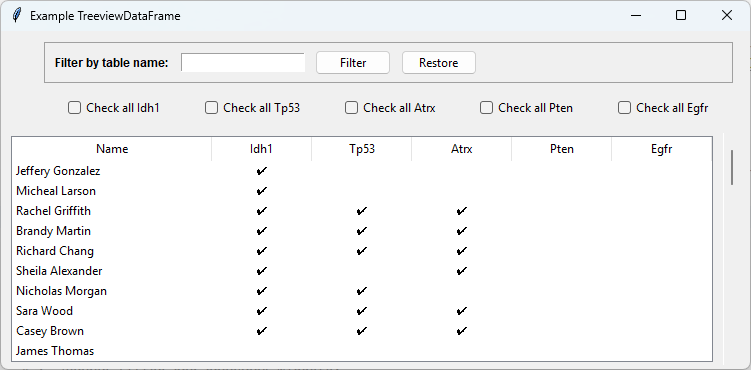
ttk.Treeviewthat synchronizes withpandas.DataFrame. - Built-in Filtering: Interactive filtering and flagging for table-based data.
- Event System Integration: Custom events for enhanced user interaction.
- Sphinx Documentation: Full API documentation and usage examples.
Installation
-
Install the module:
pip install tkextras
-
Clone the repository:
git clone https://github.com/whellcome/tkextras.git
cd tkextras
Usage
Rendering Widgets Easily
import tkinter as tk
from tkextras import WidgetsRender


class ExampleApp(WidgetsRender, tk.Tk, ):
  def __init__(self):
    super().__init__()
    lable = self.rgrid(tk.Label(self), dict(row=0, column=0))
    lable['text'] = "Hello, World!"

app = ExampleApp()
app.mainloop()
Advanced working example of WidgetsRender application
Working with Treeview and DataFrames
from tkextras import TreeviewDataFrame
import tkinter as tk

root = tk.Tk()
tree = TreeviewDataFrame(root, columns=["Name", "Married", "Employed"], show='headings')
tree.pack(fill="both", expand=True)

tree.insert("", "end", values=("Alice", " ", " "))  # Normal rows addition
tree.insert("", "end", values=("Bob", " ", " "))

tree.make_tree()  # Tree design, can include a Dataframe(transformed, with identical columns) to loading
tree.bind("<<TreeToggleCell>>", lambda x: print(tree.df))  # DataFrame synchronization

root.mainloop()
Advanced working example of TreeviewDataFrame application:
Documentation
Complete documentation is available at:
Examples
For real-world applications, see the examples/ folder, or check out:
- MS Access to SQL Export Tool (GitHub) - Uses tkextras for UI components.
Contributing
Contributions are welcome! Open an issue or submit a pull request if you have improvements or bug fixes.
Need support or have a suggestion? 🚀🔥
Please open an issue on GitHub.
License
This project is licensed under the MIT License.
рџљЂ Enhance your tkinter experience with tkextras!
1 maintainer

Metadata
1 maintainer
Release files for tkextras 1.1.0
For a detailed explanation of source distributions (sdists) and built distributions (wheels), please see the package formats documentation.
Source distribution (sdist)
| File | Size | Uploaded | |
|---|---|---|---|
| tkextras-1.1.0.tar.gz | 11.1 kB | Details |
Built distribution (wheel)
| File | Interpreter | ABI | Platform | Reset |
|---|---|---|---|---|
| tkextras-1.1.0-py3-none-any.whl | Python 3 | none | any | Details |
Total release size: 20.0 kB
Release files / tkextras-1.1.0.tar.gz
| Download URL | tkextras-1.1.0.tar.gz |
|---|---|
| Size | 11.1 kB |
| Tags | Source |
|
SHA-256 checksum How to use checksums |
3a794f038d0f664d25f7a4956b1d1dbc2833d1831adc5c844e5423ed17d5d3ea
|
|
BLAKE2b-256 checksum How to use checksums |
7e17dbba93975b56606f52708882f015ab7fd6402a984e91335962d8c17fa30e
|
| Upload date | |
|
Uploaded using Trusted Publishing? What is trusted publishing? |
No |
| Uploaded via |
twine/6.1.0 CPython/3.11.8
|
Release files / tkextras-1.1.0-py3-none-any.whl
| Download URL | tkextras-1.1.0-py3-none-any.whl |
|---|---|
| Size | 9.0 kB |
| Tags | Python 3 |
|
SHA-256 checksum How to use checksums |
37014db41a58997acf0b517d34fcad11d34b90267b093ddabb1cbf499b7d2fcb
|
|
BLAKE2b-256 checksum How to use checksums |
eaefe2fbc46a2b0a6adc59f9bd010dada47392779849d59d48da7e0b208a69a4
|
| Upload date | |
|
Uploaded using Trusted Publishing? What is trusted publishing? |
No |
| Uploaded via |
twine/6.1.0 CPython/3.11.8
|













