
An easy and customisable ToolTip implementation for Tkinter

Project description










tkinter-tooltip
What this is
This is a simple yet fully customisable tooltip/pop-up implementation for
tkinter widgets. It is capable of fully integrating with custom tkinter
themes both light and dark ones.

Features
- normal tooltips
- show tooltip with
ssecondsdelay - tooltip tracks mouse cursor
- tooltip displays strings and string returning functions
- fully customisable, tooltip inherits underlying theme style
Install
pip install tkinter-tooltip
Examples
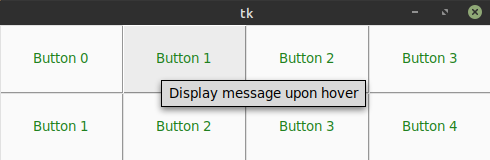
Normal tooltips
By default the tooltip activates when entering and/or moving in the widget are and deactivates when leaving and/or pressing any button.
import tkinter as tk
import tkinter.ttk as ttk
from tktooltip import ToolTip

app = tk.Tk()
b = ttk.Button(app, text="Button")
b.pack()
ToolTip(b, msg="Hover info")
app.mainloop()
Delayed tooltip
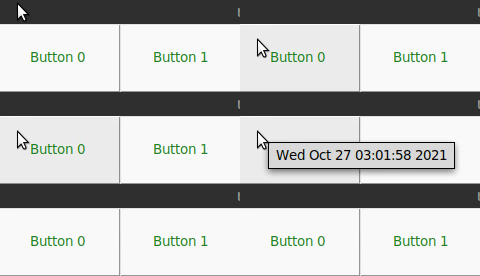
import tkinter as tk
import tkinter.ttk as ttk
from tktooltip import ToolTip

app = tk.Tk()
b = ttk.Button(app, text="Button")
b.pack()
ToolTip(b, msg="Hover info", delay=2.0)   # True by default
app.mainloop()
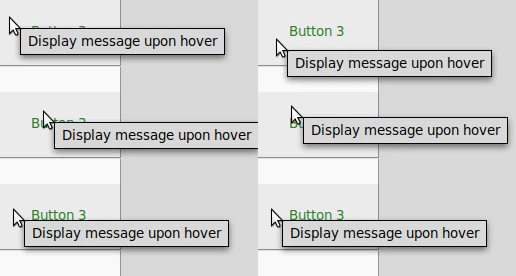
Tracking tooltip
Have the tooltip follow the mousse cursor around when moving.
import tkinter as tk
import tkinter.ttk as ttk
from tktooltip import ToolTip

app = tk.Tk()
b = ttk.Button(app, text="Button")
b.pack()
ToolTip(b, msg="Hover info", follow=True)   # True by default
app.mainloop()
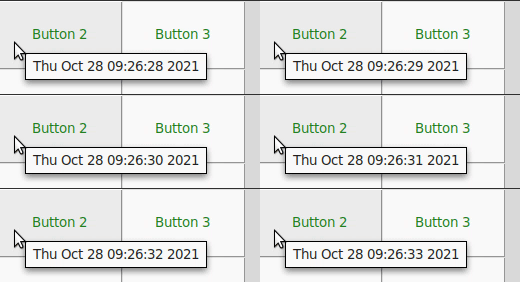
Function as tooltip
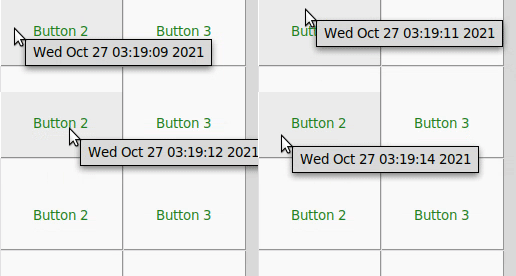
Here the tooltip returns the value of time.asctime() which updates with every
movement. You can control the refresh rate of the ToolTip through the refresh
argument by default it is set to 1s.
import time
import tkinter as tk
import tkinter.ttk as ttk
from tktooltip import ToolTip

app = tk.Tk()
b = ttk.Button(app, text="Button")
b.pack()
# NOTE: pass the function itself not the return value
ToolTip(b, msg=time.asctime, delay=0)
app.mainloop()
Themed tooltip
tkinter-tooltip is fully aware of the underlying theme (in this case a dark theme),
and can even be furher customised by passing tk styling arguments to the tooltip
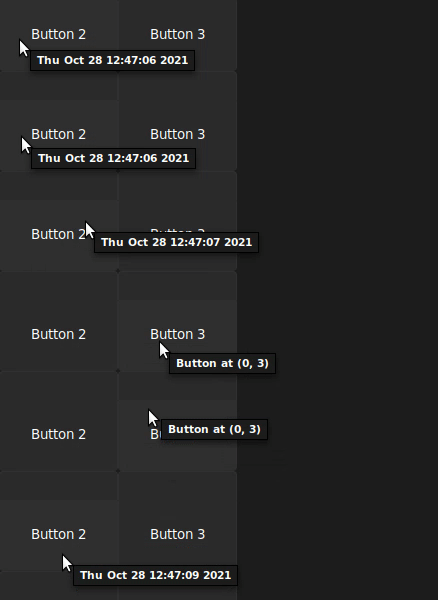
Style tooltip and underlying the button. If a full theme has been used then
the ToolTip will inherit the settings of the theme by default.
import tkinter as tk
import tkinter.ttk as ttk
from tktooltip import ToolTip

app = tk.Tk()
s = ttk.Style()
s.configure("custom.TButton", foreground="#ffffff", background="#1c1c1c")
b = ttk.Button(app, text="Button", style="custom.TButton")
b.pack()
ToolTip(b, msg="Hover info", delay=0,
        parent_kwargs={"bg": "black", "padx": 5, "pady": 5},
        fg="#ffffff", bg="#1c1c1c", padx=10, pady=10)
app.mainloop()
Acknowledgements
tkinter-tooltip is based on the original work performed by
Tucker Beck
licensed under an MIT License.
License
MIT License
Release history Release notifications | RSS feed


Download files
Download the file for your platform. If you're not sure which to choose, learn more about installing packages.
Source Distribution
Built Distribution
Filter files by name, interpreter, ABI, and platform.
If you're not sure about the file name format, learn more about wheel file names.
Copy a direct link to the current filters
File details
Details for the file tkinter-tooltip-2.1.0.tar.gz.
File metadata
- Download URL: tkinter-tooltip-2.1.0.tar.gz
- Upload date:
- Size: 530.6 kB
- Tags: Source
- Uploaded using Trusted Publishing? No
- Uploaded via: twine/4.0.0 CPython/3.9.12
File hashes
| Algorithm | Hash digest | |
|---|---|---|
| SHA256 |
4b3f93145a8c9cf3fd19bbedc5db2f94007b4d069f39a41468c0b3ccbda60de6
|
|
| MD5 |
6de244d84eba8a447153c1ec2b6d1c42
|
|
| BLAKE2b-256 |
afed4d236a87382ba0ac28a4dfd9551ffec8b2b76111fd416187680a3e352472
|
File details
Details for the file tkinter_tooltip-2.1.0-py3-none-any.whl.
File metadata
- Download URL: tkinter_tooltip-2.1.0-py3-none-any.whl
- Upload date:
- Size: 8.0 kB
- Tags: Python 3
- Uploaded using Trusted Publishing? No
- Uploaded via: twine/4.0.0 CPython/3.9.12
File hashes
| Algorithm | Hash digest | |
|---|---|---|
| SHA256 |
fbcef705c942791225f4491660d9eb96d720ff0ef3a55de76e4fe79f2684c626
|
|
| MD5 |
22b2a70c9169b11a0736855d901e60a3
|
|
| BLAKE2b-256 |
61304ff7beddf4ed4c6851b73fcf6a5b74ce2227bfa118ff7d4bfe60121b0a62
|






