
A python client for tldr: simplified and community-driven man pages.

Project description

Yet another python client for tldr.
Intro
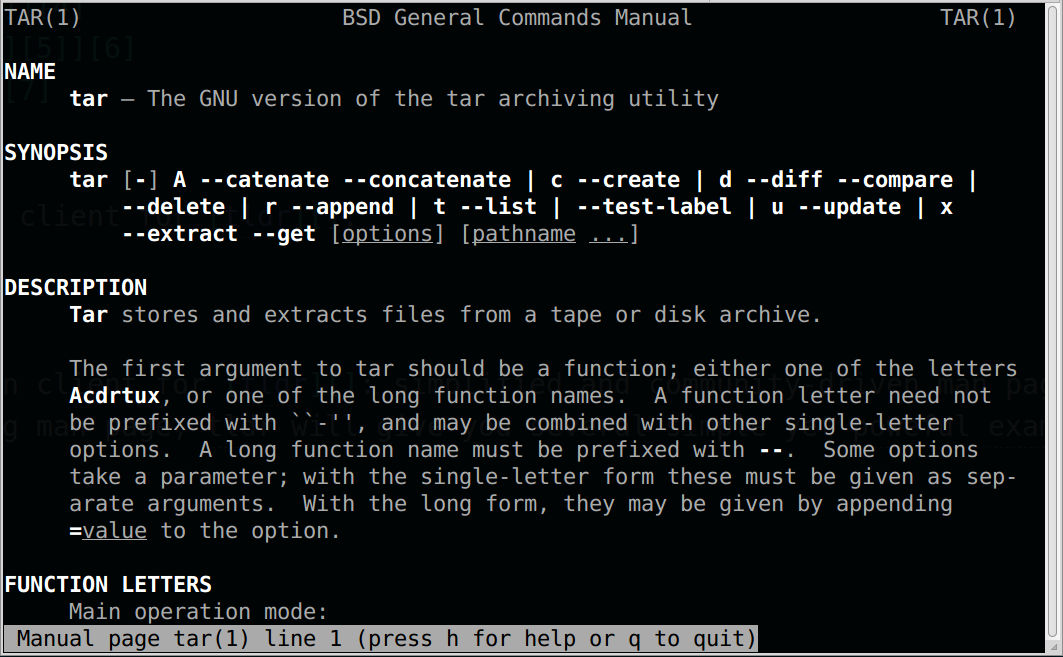
tldr.py is a python client for tldr: simplified and community-driven man pages. Instead of the long man pages:
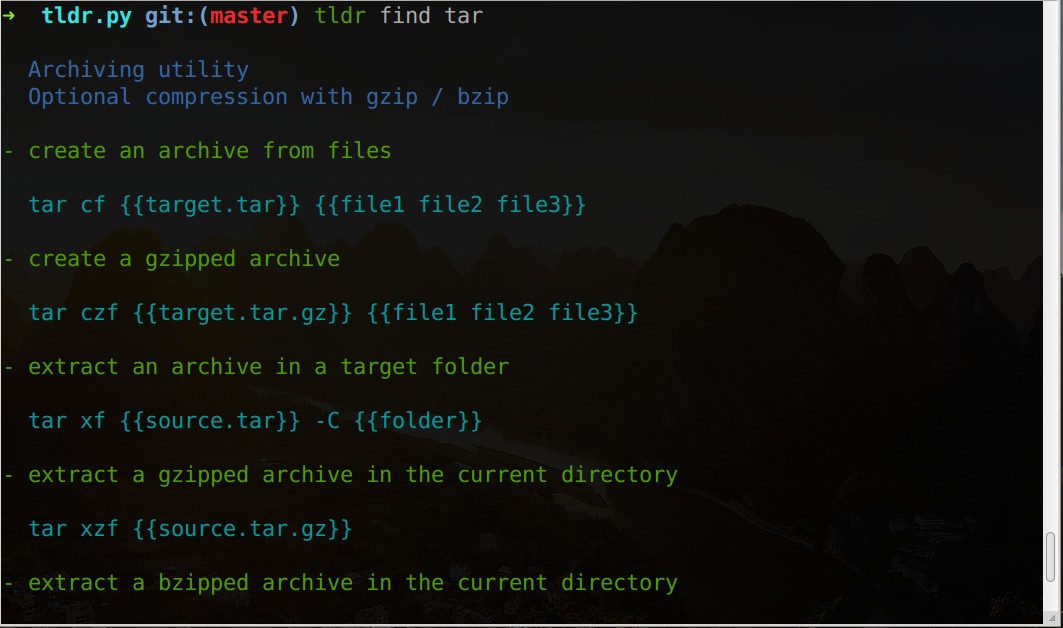
tldr will give you several simple yet powerful examples:
The command examples are not good? Don’t worry, you can set up your own ‘tldr’! They are just markdown files and you can modify them at your ease. Don’t forget to Share them with the community!
One more thing, tldr is just a simple version for the man page, it’s NOT an alternative. Sometimes, you should read the man pages patiently ;)
Features highlight
use local file, fast.
support custom the output color.
support fetch the latest tldr pages.
support rebuild the index.
Install
$ (sudo) pip install tldr.py
Usage
Initialize with script
$ curl -fsSL https://raw.githubusercontent.com/lord63/tldr.py/master/install.sh | bash
Or you can initialize by hand
firstly, clone the tldr repo to somewhere(e.g. ~/code/tldr). We will use it when we look for a command usage.
$ cd ~/code
$ git clone https://github.com/tldr-pages/tldr.git
then, init the configuration file, the default location for the configuration file is your home directory, you can use the TLDR_CONFIG_DIR environment variable to point it to another folder(e.g. $HOME/.config)
$ tldr init
Input the tldr repo path: (e.g. /home/lord63/code/tldr/)
Input your platform(linux, osx or sunos): (e.g. linux)
Initializing the config file at ~/.tldrrc
and your configuration file should look like this:
colors:
   command: cyan
   description: blue
   usage: green
platform: linux
repo_directory: /home/lord63/code/tldr
Don’t worry about the colors option, it is for the output when you look for a command, you can custom it by yourself.(Note that the color should be in [‘black’, ‘red’, ‘green’, ‘yellow’, ‘blue’, ‘magenta’, ‘cyan’, ‘white’])
finally, build the index. Tldr.py will find the command via the index.json. After a new fresh clone or when you add some new pages, remember to rebuild the index.
$ tldr reindex
Rebuild the index.
Use tldr
look for a command usage:
$ tldr find {{command}}
check for updates(so that we can get the latest man pages):
$ tldr update
rebuild the index.json after you add some new pages:
$ tldr reindex
locate the command man page:
$ tldr locate {{command}}
Or you can use tldr --help to get the help message.
FAQ
Q: I want to add some custom command usages to a command, how to do it?
A: Find the location of the command page; add the command usages; done.
Q: I want to add some custom command pages, how?
A: Add the command pages to the right folder(e.g. /tldrrepo/pages/linux); rebuild the index; done.
Q: I want a short command like tldr COMMAND, not tldr find COMMAND.
A: I’m afraid not, but you can add an alias: alias howto='tldr find', then use howto tar.
Q: I want fuzzy find command usage.
A : Option one: tldr list | grep KEYWORD, option two(suggested way): install fzf first, then use tldr list | fzf | xargs -I{} tldr find {}, you will love it.
Q: I don’t like the default color theme, how to change it?
A: Edit the tldr configuration file at ~/.tldrrc; modify the color until you’re happy with it.
Q: I failed to update the tldr pages, why?
A: Actually, tldr.py just tries to pull the latest tldr pages for you, no magic behind it. So the reason why you failed to update is that tldr.py failed to pull the latest upstream, check the failing output and you may know the reason, e.g. you make some changes and haven’t commit them yet. You can pull the pages by hand so you can have a better control on it.
Q: Why use the git repo instead of the assets packaged by the official?
A: In fact, you can use the official assets if you want, download the assets and extract it somewhere, but tldr.py don’t support update it using tldr update.
Use a git repo, you can:
do the version control, yeah, use git.
better for customization, just edit the pages and add new pages, they belong to you. You can even maintain your own ‘tldr’. If use the official assets, you’ll always get the latest pages.
Contributing
It sucks? Why not help me improve it? Let me know the bad things.
Want a new feature? Feel free to file an issue for a feature request.
Find a bug? Open an issue please, or it’s better if you can send me a pull request.
Contributions are always welcome at any time! :sparkles: :cake: :sparkles:
License
MIT.
Release history Release notifications | RSS feed


Download files
Download the file for your platform. If you're not sure which to choose, learn more about installing packages.
Source Distribution
Built Distribution
Filter files by name, interpreter, ABI, and platform.
If you're not sure about the file name format, learn more about wheel file names.
Copy a direct link to the current filters
File details
Details for the file tldr_py-0.9.0.tar.gz.
File metadata
- Download URL: tldr_py-0.9.0.tar.gz
- Upload date:
- Size: 36.2 kB
- Tags: Source
- Uploaded using Trusted Publishing? No
- Uploaded via: uv/0.10.4 {"installer":{"name":"uv","version":"0.10.4","subcommand":["publish"]},"python":null,"implementation":{"name":null,"version":null},"distro":{"name":"macOS","version":null,"id":null,"libc":null},"system":{"name":null,"release":null},"cpu":null,"openssl_version":null,"setuptools_version":null,"rustc_version":null,"ci":null}
File hashes
| Algorithm | Hash digest | |
|---|---|---|
| SHA256 |
7ad7a34ad69d110f78d56ac04b6ca7987898343635dc8994c3aed69a6239e4c6
|
|
| MD5 |
e7338c8ded1324e90830d13de3d8a847
|
|
| BLAKE2b-256 |
1dcb588758a3e905562d5458163ff8454ca5220b6a972bccd505e41a88c0f89b
|
File details
Details for the file tldr_py-0.9.0-py3-none-any.whl.
File metadata
- Download URL: tldr_py-0.9.0-py3-none-any.whl
- Upload date:
- Size: 8.3 kB
- Tags: Python 3
- Uploaded using Trusted Publishing? No
- Uploaded via: uv/0.10.4 {"installer":{"name":"uv","version":"0.10.4","subcommand":["publish"]},"python":null,"implementation":{"name":null,"version":null},"distro":{"name":"macOS","version":null,"id":null,"libc":null},"system":{"name":null,"release":null},"cpu":null,"openssl_version":null,"setuptools_version":null,"rustc_version":null,"ci":null}
File hashes
| Algorithm | Hash digest | |
|---|---|---|
| SHA256 |
c77c67eccd3932d70454bf55b0104f19658c14b5917df8f3b3857a8b9bc492d4
|
|
| MD5 |
80bfaadc3585c73f6859241f564901ed
|
|
| BLAKE2b-256 |
1d73fcb6c8aa02e9b3310b28e7dadf7edb0bc2702c23f8ad6befb1626bd18b5d
|






