
A lightweight Tkinter GUI to toggle TLP between normal and full-charge battery modes.

Project description
Battery Boost


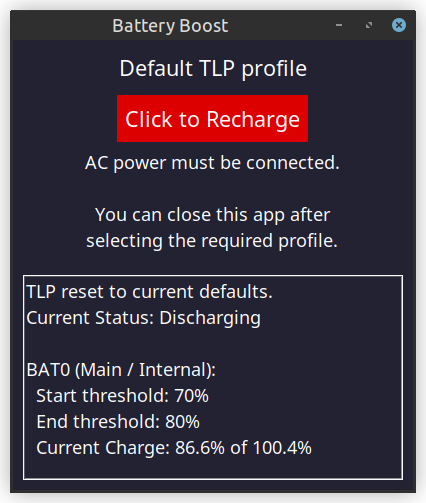
A lightweight Tkinter GUI to toggle TLP between normal battery optimisation mode and temporary full-charge mode ( tlp fullcharge ).
Overview
Battery Boost provides an easy-to-use interface for switching between normal and full-charge battery profiles using TLP. It is designed for users who want to extend their battery lifespan by maintaining optimal charge during everyday use, while still having convenient access to full charging when needed.
Note that full-charge mode requires AC power. If you attempt to enable it while on battery, the app will warn you.
Features
- Toggle Between Profiles: Switch between default TLP settings and full-charge mode.
- Automatic Authentication: Enter your password once - the app maintains sudo privileges while running.
- Battery Status Display: View current charge levels and threshold settings.
- Theme Support: Choose between light and dark themes.
- Adjustable Font Sizes: Scale the interface to your preference.
- Terminal Integration: When launched from a terminal, status messages are also printed to stdout.
Requirements
- Linux with TLP installed and configured
- Python 3.10+
- Tkinter (
python3-tk) - sudo privileges for TLP commands
Installation
Ensure TLP and Tkinter are installed on your system:
sudo apt install tlp tlp-rdw python3-tk  # For Debian/Ubuntu
# or
sudo dnf install tlp tlp-rdw python3-tkinter  # For Fedora
Installing with pipx (Recommended)
pipx install tlp-battery-boost
Optional Desktop Integration
If you’d like Battery Boost to appear in your system’s application menu or on your desktop:
- Most Linux desktop environments (such as GNOME, KDE, XFCE) allow you to add a custom launcher manually.
- Set the command to
battery_boostand (optionally) include options such asbattery_boost -t dark -f 2.
Example .desktop File
[Desktop Entry]
Name=Battery Boost
Exec=battery_boost
Icon=/usr/share/pixmaps/BatteryBoost.png
Type=Application
Categories=Utility;HardwareSettings;
Comment=Toggle TLP fullcharge mode
Terminal=false
Usage
To launch the graphical interface:
battery_boost
When launched the app will:
- Prompt for your sudo password.
- Initialise TLP to default settings.
- Show the current battery status.
- Provide a button to toggle between default and full-charge modes.
Command Line Options
You can view the full command-line options by running:
battery_boost --help
Example output:
battery_boost --help
usage: battery_boost [-h] [-v] [-f {1-5}] [-t {light,dark}]

A simple GUI to enable `tlp fullcharge`.

options:
  -h, --help            show this help message and exit
  -v, --version         show program's version number and exit
  -f {1-5}, --font-size {1-5}
                        Font size [1-5] (1=smallest, 5=largest) (default: 3)
  -t {light,dark}, --theme {light,dark}
                        Color theme (default: light)
Notes:
-fsets the font size (1=smallest, 5=largest; default=3).-tsets the colour theme (light or dark; default=light).-vprints the program version.-hshows this help message and exits.
Examples
Large font with dark theme
battery_boost -f 5 -t dark
Small font for compact displays
battery_boost --font-size 1
How It Works
- Default Mode: Uses TLP's standard battery preservation settings (typically 80% charge limit).
- Full Charge Mode: Temporarily disables charge limits to charge the battery to 100%.
- Authentication: Caches sudo credentials to avoid repeated password prompts.
- Status Monitoring: Uses
tlp-stat -bto display current battery thresholds and charge levels.
For more information about TLP, see https://linrunner.de/tlp/.
Security Notes
Authentication is managed by sudo, and the temporary variable holding the password is cleared
(reference removed) immediately after authentication.
- Your password is only used for initial sudo authentication.
- Your password is never logged, transmitted, or written to disk.
sudoprivileges are revoked on exit usingsudo --remove-timestamp.- No network connections are made - everything runs locally.
Troubleshooting
Tkinter not available / ImportError: No module named 'tkinter':
- Make sure Tkinter is installed (see the Installation section above).
- On Linux, this usually requires the system package
python3-tk(Debian/Ubuntu) orpython3-tkinter(Fedora).
TLP not found error:
- Ensure TLP is installed and in your PATH.
- Verify TLP is properly configured for your system.
# Verify TLP works as expected:
sudo tlp-stat -b
# Try starting tlp manually:
sudo tlp start
Authentication issues:
- Make sure you have sudo privileges.
- Check that your password is correct.
Battery status not showing:
- Verify your system's battery is detected by TLP.
- Check that
sudo tlp-stat -bworks from the command line.
Contributing
Contributions are welcome! Please feel free to submit pull requests or open issues for bugs and feature requests.
License
Licensed under the GNU General Public License v3.0.
Note: This application requires TLP to be properly configured for your specific hardware. Some battery conservation features may not be available on all systems.
Release history Release notifications | RSS feed


Download files
Download the file for your platform. If you're not sure which to choose, learn more about installing packages.
Source Distribution
Built Distribution
Filter files by name, interpreter, ABI, and platform.
If you're not sure about the file name format, learn more about wheel file names.
Copy a direct link to the current filters
File details
Details for the file tlp_battery_boost-1.1.0.tar.gz.
File metadata
- Download URL: tlp_battery_boost-1.1.0.tar.gz
- Upload date:
- Size: 26.3 kB
- Tags: Source
- Uploaded using Trusted Publishing? No
- Uploaded via: poetry/2.2.1 CPython/3.12.3 Linux/6.14.0-36-generic
File hashes
| Algorithm | Hash digest | |
|---|---|---|
| SHA256 |
3c94994a239eff9120d5604f722b68d0aee46be7ee3701cafba7be1d3b9c1b83
|
|
| MD5 |
319e7ffbfd7b529f3cc9ce0e4e161da5
|
|
| BLAKE2b-256 |
df7f988b8c3ddb0b8aac8765c733d43a443fbb72c85ae9a0aa4f414c8497a0b4
|
File details
Details for the file tlp_battery_boost-1.1.0-py3-none-any.whl.
File metadata
- Download URL: tlp_battery_boost-1.1.0-py3-none-any.whl
- Upload date:
- Size: 28.0 kB
- Tags: Python 3
- Uploaded using Trusted Publishing? No
- Uploaded via: poetry/2.2.1 CPython/3.12.3 Linux/6.14.0-36-generic
File hashes
| Algorithm | Hash digest | |
|---|---|---|
| SHA256 |
901a2867a1580f02b37af1dd7325f70200b24722425231cc3c03de955a4ed0d3
|
|
| MD5 |
013e7dfce2178cb573bd64329e261a11
|
|
| BLAKE2b-256 |
851ca6aba8f39cd518f8304c1b0cc21d8ca4c1b33d3e81b435a41abd980b251e
|






