
A comprehensive pipe thickness analysis tool for mechanical integrity engineering

Project description
TMIN: The Fast Pipe Thickness Analysis Tool






TMIN is an open source software designed to help engineers determine if corroded process piping in refineries and pertrochemical plants are safe and API-compliant — in seconds.
Many oil and gas companies are faced with maintaining thousands of miles of 100+ year old piping networks supporting multi-million dollar/year processing operations. There is rarely a simple solution to immediately shutdown a process pipe - as these shutdowns more often than not impact other units and cost companies millions in time and resources.
This is more than a python package, it is a comprehensive engineering decision support system for critical infrastructure safety and operational continuity.
Getting Started
Installation:
pip install tmin
Basic Example:
from tmin.core import PIPE

# Create pipe instance
pipe = PIPE(
    nps="2",
    schedule="40",
    pressure=50.0,
    pressure_class=150,
    metallurgy="Intermediate/Low CS",
    corrosion_rate=10.0
)

# Analyze thickness and generate report
results = pipe.analysis(measured_thickness=0.188)
report = pipe.report("TXT")  # Options: "CSV", "JSON", "TXT", "IPYNB"

print(f"Flag: {results['flag']}")
print(f"Status: {results['status']}")
print(f"Report saved: {report['file_path']}")
Suppose the following scenario:
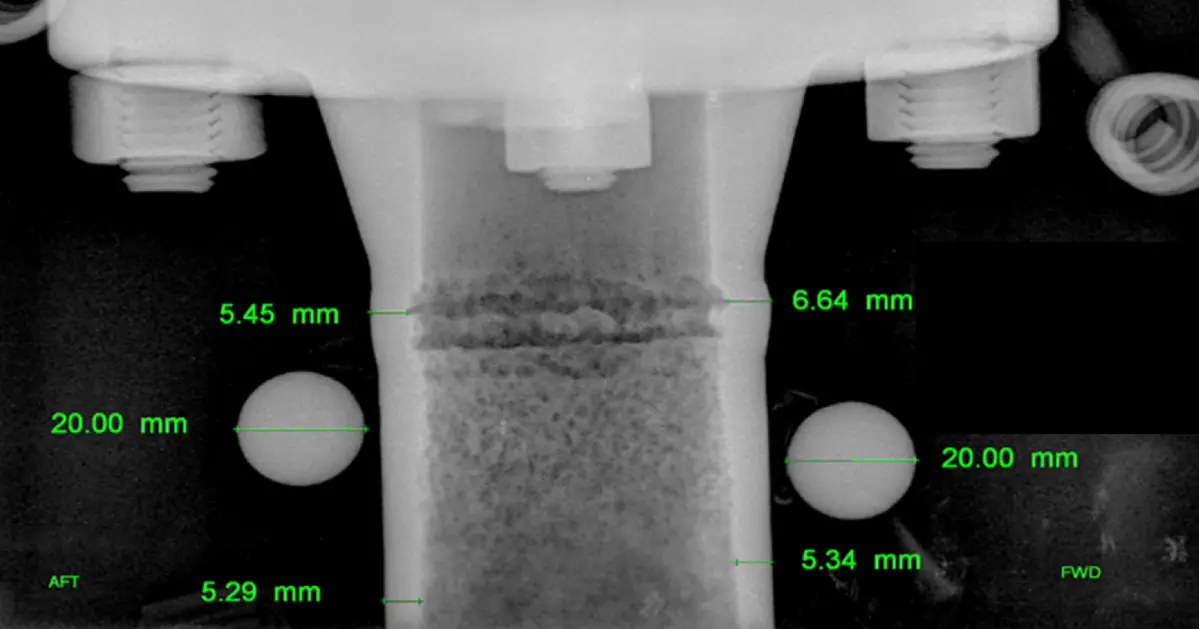
RT findings show your 2" Schedule 40 pipe has 0.060" wall thickness. You need to know if it's safe to operate and how much time remains before pipe retirement.
The Previous Way: time consuming handwritten calculations, tedious code book lookups, and hours of typing full assessment reports
With TMIN: One Python script, instant answers.
import tmin

# Create pipe instance
pipe = tmin.PIPE(
    schedule="40",
    nps="2",
    pressure=50.0,
    pressure_class=150,
    metallurgy="Intermediate/Low CS",
    allowable_stress=23333.0
)

# Analyze thickness
results = pipe.analysis(measured_thickness=0.060)
print(f"Safe to operate: {results['actual_thickness'] > results['governing_thickness']}")
print(f"Remaining life: {results['life_span']} years")
Result: Professional report with compliance status, remaining life, and visual analysis in under 30 seconds.
Why TMIN
Speed 30 seconds from inspection data to compliance report. No manual calculations or code book lookups. Instant visual analysis.
Accuracy Built on ASME B31.1 and API 574 standards. Automatic governing factor determination. Time-based corrosion adjustment.
Professional Output Auto-generated reports with timestamps. Visual thickness analysis charts. Compliance documentation for audits.
Real-World Ready Handles corrosion rates and inspection dates. Supports multiple metallurgies and pipe schedules. TOML configuration for batch analysis.
What TMIN Analyzes
Pressure Design (ASME B31.1) Minimum wall thickness for pressure containment. Temperature effects and material properties. Y-coefficient calculations.
Structural Requirements (API 574) Minimum thickness for structural integrity. Pipe deflection and weight loading. Table D.2 compliance.
Corrosion Analysis Time-based thickness adjustment. Remaining life prediction. Corrosion allowance calculations.
Compliance Reporting Governing factor identification. Safety margin analysis. Professional documentation.
Supported Specifications
| Schedules | NPS Sizes | Pressure Classes | Metallurgies |
|---|---|---|---|
| 10, 40, 80, 120, 160 | 0.5" to 24" | 150, 300, 600, 900, 1500, 2500 | Carbon Steel, Stainless Steel, Nickel Alloys |
Command Line Interface
Basic Analysis
tmin -s 40 -n "2" -p 50 -c 150 -m "Intermediate/Low CS" -a 23333 -t 0.060
With Corrosion Rate
tmin -s 40 -n "2" -p 50 -c 150 -m "Intermediate/Low CS" -a 23333 -t 0.060 -r 10 -y 2023
Using Configuration File
# Create pipe_config.toml with your parameters
tmin -f pipe_config.toml -t 0.060
Custom Output Directory
tmin -s 40 -n "2" -p 50 -c 150 -m "Intermediate/Low CS" -a 23333 -t 0.060 -o ./my_reports
Test It Yourself
# Install and test
pip install tmin
python -m pytest tests/test_core.py -v
Need Help?
Documentation: Built-in help with tmin --help
Examples: See tutorials/python_scripts/basic_example.py
Contact: andrew[dot]trepagnier[at]icloud[dot]com
Disclaimer
TMIN is a decision support tool for qualified engineers. Always use professional judgment and follow applicable codes and standards.
License: MIT


Download files
Download the file for your platform. If you're not sure which to choose, learn more about installing packages.
Source Distribution
Built Distribution
Filter files by name, interpreter, ABI, and platform.
If you're not sure about the file name format, learn more about wheel file names.
Copy a direct link to the current filters
File details
Details for the file tmin-1.0.0.tar.gz.
File metadata
- Download URL: tmin-1.0.0.tar.gz
- Upload date:
- Size: 28.9 kB
- Tags: Source
- Uploaded using Trusted Publishing? No
- Uploaded via: twine/6.1.0 CPython/3.13.5
File hashes
| Algorithm | Hash digest | |
|---|---|---|
| SHA256 |
22e62419936e4d8130e2c14d1cfa7c90c96e7ef24cd13c6b8180791726333c05
|
|
| MD5 |
0ed2eddca7a90369e5ad1a5e0a50c9bc
|
|
| BLAKE2b-256 |
528983c39bb18882f8f8f15f8d12ae511d2e0178b239740ef9bc70b094a0ec0a
|
File details
Details for the file tmin-1.0.0-py3-none-any.whl.
File metadata
- Download URL: tmin-1.0.0-py3-none-any.whl
- Upload date:
- Size: 28.1 kB
- Tags: Python 3
- Uploaded using Trusted Publishing? No
- Uploaded via: twine/6.1.0 CPython/3.13.5
File hashes
| Algorithm | Hash digest | |
|---|---|---|
| SHA256 |
ec76e876d52546ae1ad80f8c971899ce60ddb36429e20a9f0d9c077ef209294e
|
|
| MD5 |
1dccc75be3fcbf30d640b73c9c210cc8
|
|
| BLAKE2b-256 |
8999d210e54df7effbaddf3b211d3200140c4d01a163f88383f1859307679e6c
|






