
Composable tmux popup system with gum UI components

Project description
tmux-popup
Composable tmux popup system with gum UI components.
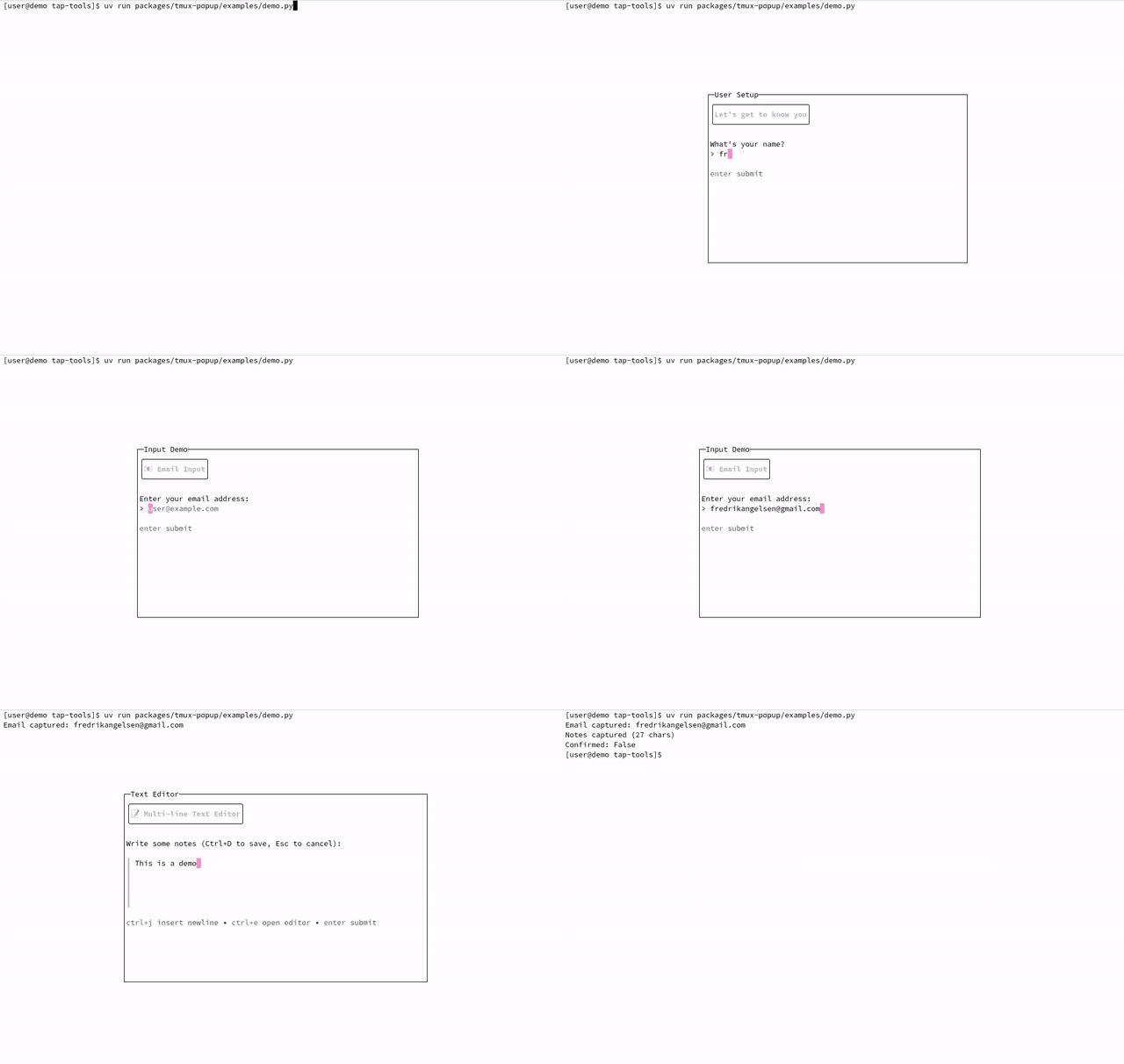
Interactive popup components in action
✨ Features
- 🎨 Rich Components - Styled text, inputs, selections, confirmations
- 🔧 Composable API - Chain commands for complex interactions
- 📦 Zero Dependencies - Pure Python, only needs tmux and gum
- 🎯 Type-Safe - Full type hints and result parsing
- 🚀 Lightweight - Simple, focused library
📋 Prerequisites
Required system tools:
- tmux - Terminal multiplexer for popups
- gum - Provides the UI components
# macOS
brew install tmux gum

# Arch Linux
sudo pacman -S tmux gum

# Ubuntu/Debian
sudo apt install tmux
# For gum: https://github.com/charmbracelet/gum#installation
📦 Installation
# Install from PyPI
uv add tmux-popup                  # Recommended
pip install tmux-popup             # Alternative

# Install from source
uv add git+https://github.com/angelsen/tap-tools.git#subdirectory=packages/tmux-popup
# Or with pip:
pip install git+https://github.com/angelsen/tap-tools.git#subdirectory=packages/tmux-popup
🚀 Quick Start
from tmux_popup import Popup
from tmux_popup.gum import GumStyle, GumInput, GumChoose

# Create a simple popup
popup = Popup(width="65", title="My App")
result = popup.add(
    GumStyle("Welcome!", header=True),
    GumInput(placeholder="Enter your name...")
).show()

print(f"Hello, {result}!")
🎮 Usage
Basic Input
popup = Popup(width="50")
name = popup.add(
    GumStyle("User Setup", header=True),
    "Please enter your details:",
    GumInput(placeholder="Name...", value="")
).show()
Confirmations
popup = Popup()
confirmed = popup.add(
    GumStyle("⚠️ Warning", warning=True),
    "This will delete all data.",
    GumConfirm("Are you sure?", default=False)
).show()

if confirmed:
    # Proceed with deletion
    pass
Selections
# Single choice
choice = popup.add(
    GumStyle("Select Action", header=True),
    GumChoose([
        ("new", "📝 New File"),
        ("open", "📂 Open File"),
        ("save", "💾 Save File"),
        ("quit", "❌ Quit")
    ])
).show()

# Multiple selection with fuzzy search
items = ["Python", "JavaScript", "Go", "Rust", "TypeScript"]
selected = popup.add(
    GumStyle("Select Languages", info=True),
    GumFilter(items, limit=0, fuzzy=True)
).show()  # Returns list of selected items
Tables
data = [
    ["Active", "Server 1", "192.168.1.10"],
    ["Idle", "Server 2", "192.168.1.11"],
    ["Active", "Server 3", "192.168.1.12"],
]

selected_ip = popup.add(
    GumStyle("Select Server", header=True),
    GumTable(
        data,
        headers=["Status", "Name", "IP"],
        return_column=2  # Return IP column
    )
).show()
📚 Components
Core
Popup- Main popup runner with tmux display-popupCommand- Base class for all UI commands
Input Components
GumInput- Single line text inputGumWrite- Multi-line text editorGumConfirm- Yes/no confirmation
Selection Components
GumChoose- Single choice from listGumFilter- Fuzzy search with multi-selectGumFile- File pickerGumTable- Table with row selection
Display Components
GumStyle- Styled text with presets (header, info, warning, error)GumFormat- Markdown/template formattingGumPager- Scrollable text viewerGumLog- Formatted log display
Utility Components
GumJoin- Layout multiple elementsGumSpin- Loading spinner for async operations
🏗️ Architecture
The library follows a simple pattern:
- Commands render themselves to shell script
- Popup combines commands and executes via tmux
- Results are parsed and returned to Python
# Commands know how to render
cmd = GumInput(value="default")
script_lines = cmd.render()  # Returns list of shell commands

# Popup handles execution
popup = Popup()
result = popup.add(cmd).show()  # Executes and returns parsed result
🛠️ Development
# Clone repository
git clone https://github.com/angelsen/tap-tools
cd tap-tools

# Install for development (recommended)
uv sync
uv run --package tmux-popup python examples/demo.py

# Or with pip:
cd packages/tmux-popup
pip install -e .
python examples/demo.py
📄 License
MIT - see LICENSE for details.
👤 Author
Fredrik Angelsen
🙏 Acknowledgments
Built on top of:


Download files
Download the file for your platform. If you're not sure which to choose, learn more about installing packages.
Source Distribution
tmux_popup-0.1.2.tar.gz
(12.5 kB
view details)
Built Distribution
Filter files by name, interpreter, ABI, and platform.
If you're not sure about the file name format, learn more about wheel file names.
Copy a direct link to the current filters
File details
Details for the file tmux_popup-0.1.2.tar.gz.
File metadata
- Download URL: tmux_popup-0.1.2.tar.gz
- Upload date:
- Size: 12.5 kB
- Tags: Source
- Uploaded using Trusted Publishing? No
- Uploaded via: uv/0.8.9
File hashes
| Algorithm | Hash digest | |
|---|---|---|
| SHA256 |
83b2134b7779cd605f110845d7edf702d0bd37a656d321f59788bcce6ad438d5
|
|
| MD5 |
1e87c4e0608462b660928fc9787e051a
|
|
| BLAKE2b-256 |
a5afd2f6ddb038aeeb582c53ce6dde331c1ab2442c96bdc588300257a9df7a08
|
File details
Details for the file tmux_popup-0.1.2-py3-none-any.whl.
File metadata
- Download URL: tmux_popup-0.1.2-py3-none-any.whl
- Upload date:
- Size: 17.9 kB
- Tags: Python 3
- Uploaded using Trusted Publishing? No
- Uploaded via: uv/0.8.9
File hashes
| Algorithm | Hash digest | |
|---|---|---|
| SHA256 |
37b2a98e4cd4099ca05ab0ce336e7dfa4adf9bf23a0aeda6f3e00ad9a6d1b8c6
|
|
| MD5 |
2f7aa5db8e75ce4cb0834374a085dde9
|
|
| BLAKE2b-256 |
dbf9e8145dd4becc2e183008544a1e835cf127597a376ed8d8825612fe077f67
|






