
Automatically add and delete modules to requirements.txt installing them using pip.

Project description
to-requirements.txt | Automatically update requirements.txt






to-requirements.txt allows to automatically manage dependencies in requirements.txt using pip as a package manager.
Benefits
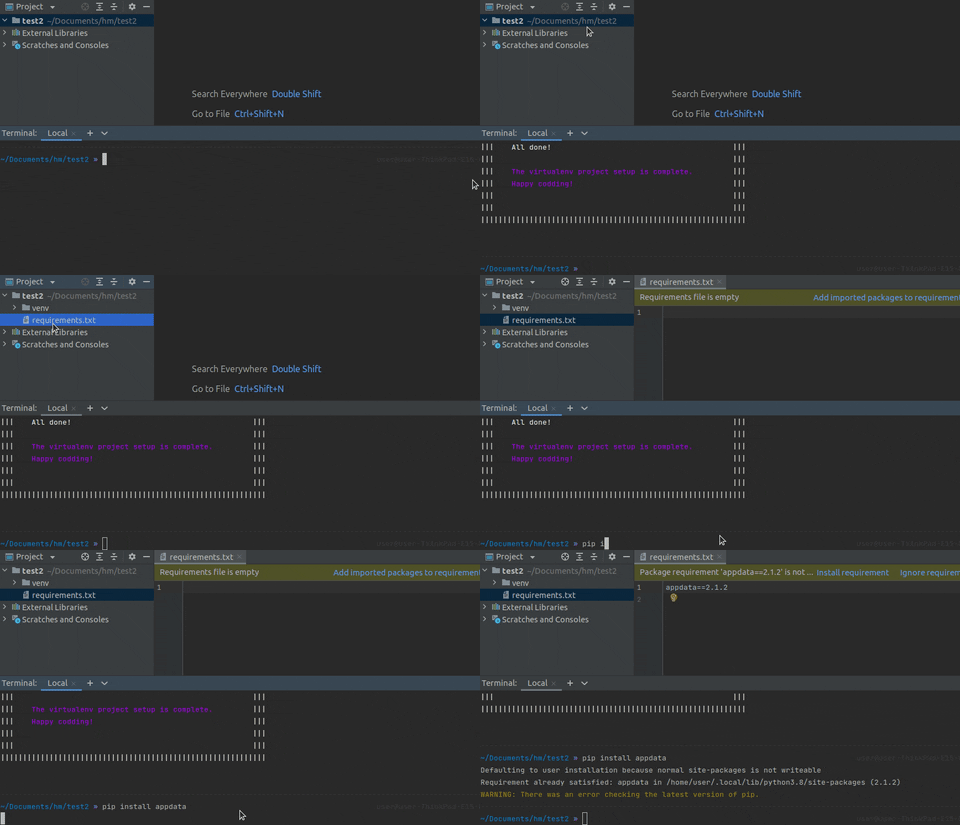
Easy to setup. The installation process include only two steps: install the package using pip and setup up it using script provided by the package. That's it.
Setup in one command. You can set up VirtualEnv-based project in one command. It will create virtual environment. And install to-requirements.txt automatically.
Customizable. Customize it the way you like: use it only in git repositories, allow or disallow automated requirements.txt file creation, enable or disable the package itself.
Easy to use. After installing the package, running setup command and (optionally) customizing it the package is ready. There is no additional conditions to use. Just install, uninstall or upgrade packages using pip as you usually do.
Always in sync. With to-requirements.txt the project's requirements.txt will always stay in sync with packages that you install using pip.
Installation
To install the package run the following command:
pip install to-requirements.txt
And after that run the command below to initialize the package:
requirements-txt install
It will update your current pip scripts to execute the functionality of this package.
The changes made to pip scripts will not affect ordinary pip workflow after uninstalling to-requirements.txt.
Setup project
To set up VirtualEnv based project just type:
requirements-txt init
The same effect could be achieved much easier with aliases:
rt i
Documentation
The detailed documentation is available on requirements-txt.readthedocs.io.
Contributing
Visit the file CONTRIBUTING.md.
License
Visit the file MIT.
Release history Release notifications | RSS feed


Download files
Download the file for your platform. If you're not sure which to choose, learn more about installing packages.
Source Distribution
Built Distribution
Filter files by name, interpreter, ABI, and platform.
If you're not sure about the file name format, learn more about wheel file names.
Copy a direct link to the current filters
File details
Details for the file to-requirements.txt-1.2.0.tar.gz.
File metadata
- Download URL: to-requirements.txt-1.2.0.tar.gz
- Upload date:
- Size: 10.9 kB
- Tags: Source
- Uploaded using Trusted Publishing? No
- Uploaded via: twine/4.0.1 CPython/3.9.13
File hashes
| Algorithm | Hash digest | |
|---|---|---|
| SHA256 |
02ebb7a7be17e80cb20d61aa1bef9320e0cb75b885315ba558599953857c838f
|
|
| MD5 |
33bc6f486d634cd95e32a008f4ae4c45
|
|
| BLAKE2b-256 |
0288ea00fd6786eae1bf322a05dc5887e03670db877598f6e22b632996c4d2fb
|
File details
Details for the file to_requirements.txt-1.2.0-py3-none-any.whl.
File metadata
- Download URL: to_requirements.txt-1.2.0-py3-none-any.whl
- Upload date:
- Size: 13.1 kB
- Tags: Python 3
- Uploaded using Trusted Publishing? No
- Uploaded via: twine/4.0.1 CPython/3.9.13
File hashes
| Algorithm | Hash digest | |
|---|---|---|
| SHA256 |
89d11c3a33e9be5b32a03b67fd5a3c5fb5749d195157d7ba883091a9a4787734
|
|
| MD5 |
1af863d86bb9b4e61e5b1563e3912f51
|
|
| BLAKE2b-256 |
b3a75365d4bd662816bc86c3b9a9388a44c1d6b965a498b32baa1e0a39b591f0
|






