
TOCinator



This python module parses your Markdown file and generates a Table of Content(TOC) for that file. It should be noted that this is still in development and may not always function as expected.
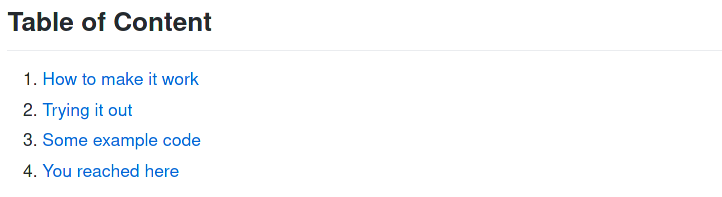
The TOC below was completely generated using this module.
Table of Content
- Features of this module
- Code Generated using tocinator
- Rendered Code
- Installation
- How to use this module
- General Layout
Features of this module
- Generate Markdown-ready code.
- Generated TOC has links to the actual headings and subheading. Which means you can just paste the generated code in your README file and click on any of the links to go to the desired heading.
Code Generated using tocinator
Below is an example of TOC generated using tocinator.
The README used in the below snippets is from my other repository.
Do check it out if you code in C, it might be of your interest.

Rendered Code
Installation
With pip
$ pip3 install tocinator
Without pip
- Clone this repository.
$ git clone git@github.com:Coder-RG/tocinator
- Change directory to cloned repository.
$ cd tocinator
- Run the file at command line:
$ python3 src/tocinator/tocinator.py <input-file> <output-file>
How to use this module
- Use
##for headings - Use
###for subheadings.
Example 1: (installed with pip)
$ python3 -m tocinator README.md OUT.md
Example 2: (installed without pip)
$ python3 src/tocinator/tocinator.py README.md OUT.md
If the .md file is in another folder, then use absolute path.
$ python3 src/tocinator/tocinator.py <path-to-folder>/README.md <path-to-folder>/TEST.md
Example 3: (installed without pip)
$ python3 src/tocinator/tocinator.py /home/username/project/README.md /home/username/project/OUT.md
What not to do
#and####are not used in the parsing yet and therefore won't be displayed in the TOC.- Only use alphanumeric for heading and subheadings. Otherwise, the links won't work.
General Layout
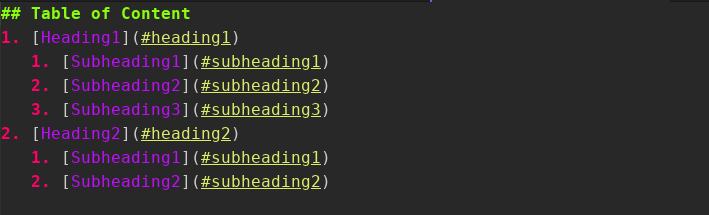
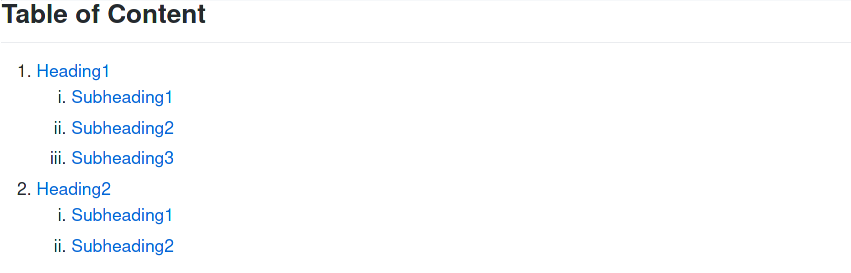
Code is rendered using grip module. Do check out grip if you want to render your markdown files in your browser.
1 maintainer

Metadata
1 maintainer
Release files for tocinator 1.0.2
For a detailed explanation of source distributions (sdists) and built distributions (wheels), please see the package formats documentation.
Source distribution (sdist)
| File | Size | Uploaded | |
|---|---|---|---|
| tocinator-1.0.2.tar.gz | 4.7 kB | Details |
Built distribution (wheel)
| File | Interpreter | ABI | Platform | Reset |
|---|---|---|---|---|
| tocinator-1.0.2-py3-none-any.whl | Python 3 | none | any | Details |
Total release size: 9.6 kB
Release files / tocinator-1.0.2.tar.gz
| Download URL | tocinator-1.0.2.tar.gz |
|---|---|
| Size | 4.7 kB |
| Tags | Source |
|
SHA-256 checksum How to use checksums |
3bc396a83c4bf5abbcc44f05d35678ae0a614d17abdba792273ad3dad2f2587f
|
|
BLAKE2b-256 checksum How to use checksums |
be393b063dfe41e7a1aa8bfcab79f20ce4d66849f0801cb6f5e1d4ad88011f82
|
| Upload date | |
|
Uploaded using Trusted Publishing? What is trusted publishing? |
No |
| Uploaded via |
twine/3.4.2 importlib_metadata/4.0.1 pkginfo/1.7.0 requests/2.22.0 requests-toolbelt/0.9.1 tqdm/4.60.0 CPython/3.8.10
|
Release files / tocinator-1.0.2-py3-none-any.whl
| Download URL | tocinator-1.0.2-py3-none-any.whl |
|---|---|
| Size | 4.9 kB |
| Tags | Python 3 |
|
SHA-256 checksum How to use checksums |
1a54801735e2185e8456ccca3857f72a23a32c9a0d8101a532ee94594296c89e
|
|
BLAKE2b-256 checksum How to use checksums |
12530556b988037ec2db8477dfb12e8afddb9b50402f8b367373b195ec3d22e1
|
| Upload date | |
|
Uploaded using Trusted Publishing? What is trusted publishing? |
No |
| Uploaded via |
twine/3.4.2 importlib_metadata/4.0.1 pkginfo/1.7.0 requests/2.22.0 requests-toolbelt/0.9.1 tqdm/4.60.0 CPython/3.8.10
|














