
Generate a Table of Content from Markdown files.

Project description
TOCinator



This python module parses your Markdown file and generates a Table of Content(TOC) for that file. It should be noted that this is still in development and may not always function as expected.
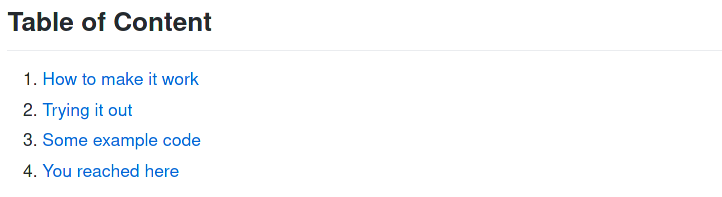
The TOC below was completely generated using this module.
Table of Content
- Features of this module
- Code Generated using tocinator
- Rendered Code
- Installation
- How to use this module
- General Layout
Features of this module
- Generate Markdown-ready code.
- Generated TOC has links to the actual headings and subheading. Which means you can just paste the generated code in your README file and click on any of the links to go to the desired heading.
Code Generated using tocinator
Below is an example of TOC generated using tocinator.
The README used in the below snippets is from my other repository.
Do check it out if you code in C, it might be of your interest.

Rendered Code
Installation
With pip
$ pip3 install tocinator
Without pip
- Clone this repository.
$ git clone git@github.com:Coder-RG/tocinator
- Change directory to cloned repository.
$ cd tocinator
- Run the file at command line:
$ python3 src/tocinator/tocinator.py <input-file> <output-file>
How to use this module
- Use
##for headings - Use
###for subheadings.
Example 1: (installed with pip)
$ python3 -m tocinator README.md OUT.md
Example 2: (installed without pip)
$ python3 src/tocinator/tocinator.py README.md OUT.md
If the .md file is in another folder, then use absolute path.
$ python3 src/tocinator/tocinator.py <path-to-folder>/README.md <path-to-folder>/TEST.md
Example 3: (installed without pip)
$ python3 src/tocinator/tocinator.py /home/username/project/README.md /home/username/project/OUT.md
What not to do
#and####are not used in the parsing yet and therefore won't be displayed in the TOC.- Only use alphanumeric for heading and subheadings. Otherwise, the links won't work.
General Layout
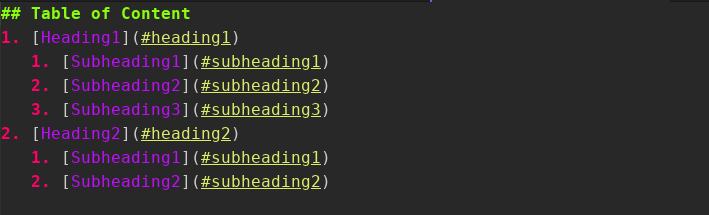
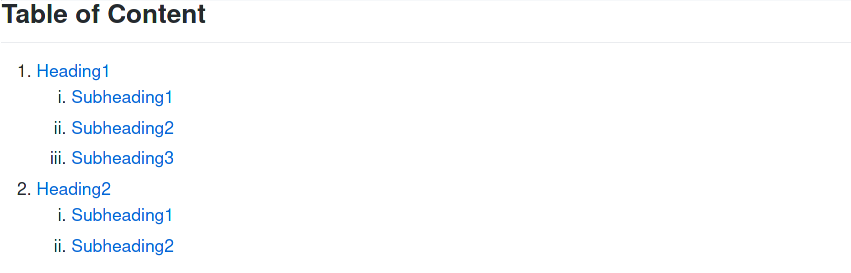
Code is rendered using grip module. Do check out grip if you want to render your markdown files in your browser.
Release history Release notifications | RSS feed


Download files
Download the file for your platform. If you're not sure which to choose, learn more about installing packages.
Source Distribution
Built Distribution
Filter files by name, interpreter, ABI, and platform.
If you're not sure about the file name format, learn more about wheel file names.
Copy a direct link to the current filters
File details
Details for the file tocinator-1.0.2.tar.gz.
File metadata
- Download URL: tocinator-1.0.2.tar.gz
- Upload date:
- Size: 4.7 kB
- Tags: Source
- Uploaded using Trusted Publishing? No
- Uploaded via: twine/3.4.2 importlib_metadata/4.0.1 pkginfo/1.7.0 requests/2.22.0 requests-toolbelt/0.9.1 tqdm/4.60.0 CPython/3.8.10
File hashes
| Algorithm | Hash digest | |
|---|---|---|
| SHA256 |
3bc396a83c4bf5abbcc44f05d35678ae0a614d17abdba792273ad3dad2f2587f
|
|
| MD5 |
eb0b0ea4f28efc5831ed74b2903b6836
|
|
| BLAKE2b-256 |
be393b063dfe41e7a1aa8bfcab79f20ce4d66849f0801cb6f5e1d4ad88011f82
|
File details
Details for the file tocinator-1.0.2-py3-none-any.whl.
File metadata
- Download URL: tocinator-1.0.2-py3-none-any.whl
- Upload date:
- Size: 4.9 kB
- Tags: Python 3
- Uploaded using Trusted Publishing? No
- Uploaded via: twine/3.4.2 importlib_metadata/4.0.1 pkginfo/1.7.0 requests/2.22.0 requests-toolbelt/0.9.1 tqdm/4.60.0 CPython/3.8.10
File hashes
| Algorithm | Hash digest | |
|---|---|---|
| SHA256 |
1a54801735e2185e8456ccca3857f72a23a32c9a0d8101a532ee94594296c89e
|
|
| MD5 |
dd22c50888bd15b4360ee3a63c53ac82
|
|
| BLAKE2b-256 |
12530556b988037ec2db8477dfb12e8afddb9b50402f8b367373b195ec3d22e1
|






