
Todo Tracker
A powerful git-styled CLI-based todo task tracker with versioning, attachments, and Kanban visualization.

Core package badges:







Quality and tooling:



Project/community:



Docs:

Features
- Task Management: Create, update, and manage tasks with descriptions, deadlines, and statuses.
- Task Storage: Tasks are stored locally in a git-like repository.
- Versioning: Every change to a task is versioned. You can view the full history of a task and revert to previous states (conceptually).
- Attachments: Attach files to tasks. Files are stored efficiently using content-addressable storage (deduplication).
- Aliases: Tasks are assigned human-readable aliases (e.g.,
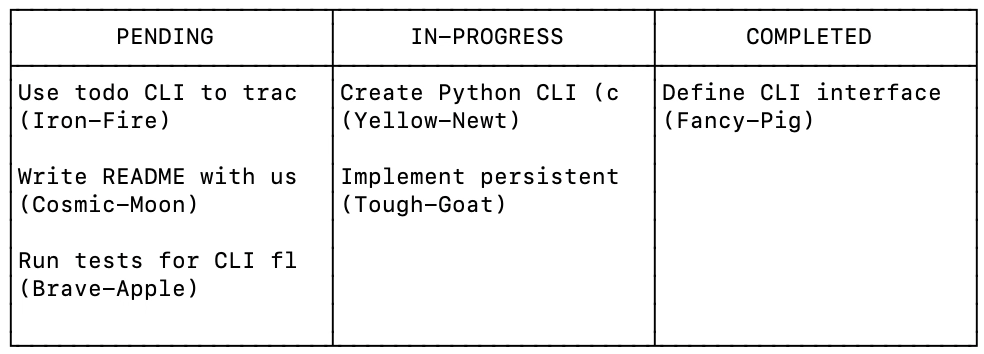
Misty-Rat) for easier reference than UUIDs. - Kanban Board: Visualize your tasks in a terminal-based Kanban board.
- Archiving: Archive completed or stale tasks to keep your active list clean.
- GPT Integration: Use in combination with GPT Agents to track progress and generate project summaries.
- JSON Dump: Export your data to JSON for backup or analysis.
Installation
Ensure you have Python 3.8+ installed.
-
Clone the repository:
git clone https://github.com/gwr3n/todo-tracker.git
cd todo-tracker
-
Install the package:
pip install .
-
Or install from PyPI:
pip install todo-tracker
Usage
The main command is todo.
Basic Operations
-
Add a task:
todo add "Buy groceries" --deadline 2023-12-31
-
List tasks:
todo list
todo list --all  # Include archived tasks
-
Show task details:
todo show <task_id_or_alias>
-
Update a task:
todo update <id> --status "in-progress" --desc "Buy organic groceries"

Attachments
-
Attach a file:
todo attach <id> ./path/to/file.txt
-
Extract an attachment:
todo extract <id> file.txt --output ./downloaded_file.txt
Organization & Visualization
-
Kanban View:
todo kanban pending in-progress done
-
Archive/Unarchive:
todo archive <id>
todo unarchive <id>
-
Delete:
todo delete <id>
Advanced
-
View History:
todo history <id>
-
Duplicate Task:
todo duplicate <id>
-
Dump Data:
todo dump --output backup.json
todo dump --history --all --output full_backup.json
Data Storage
Data is stored in a .todo_store directory in the current working directory. This directory contains:
objects/: Content-addressable storage for task versions and attachment blobs.refs/: References to the current version of each task.orchestrator.lock: Lock file to ensure data integrity during concurrent access.
Development
To run tests:
pytest
License
This project is licensed under the MIT License - see the LICENSE file for details.
1 maintainer

Release files for todo-tracker 0.1.2
For a detailed explanation of source distributions (sdists) and built distributions (wheels), please see the package formats documentation.
Source distribution (sdist)
| File | Size | Uploaded | |
|---|---|---|---|
| todo_tracker-0.1.2.tar.gz | 30.5 kB | Details |
Built distribution (wheel)
| File | Interpreter | ABI | Platform | Reset |
|---|---|---|---|---|
| todo_tracker-0.1.2-py3-none-any.whl | Python 3 | none | any | Details |
Total release size: 45.6 kB
Release files / todo_tracker-0.1.2.tar.gz
| Download URL | todo_tracker-0.1.2.tar.gz |
|---|---|
| Size | 30.5 kB |
| Tags | Source |
|
SHA-256 checksum How to use checksums |
c116ca3443e4f8e1ee08acde84d283ab7fd01dc83b05d5d1b280e61e660740da
|
|
BLAKE2b-256 checksum How to use checksums |
6c44f8d722c2f027181156acdfc883d8f440d828e1f00086fee30cf78705ccb9
|
| Upload date | |
|
Uploaded using Trusted Publishing? What is trusted publishing? |
No |
| Uploaded via |
twine/6.2.0 CPython/3.13.11
|
Release files / todo_tracker-0.1.2-py3-none-any.whl
| Download URL | todo_tracker-0.1.2-py3-none-any.whl |
|---|---|
| Size | 15.0 kB |
| Tags | Python 3 |
|
SHA-256 checksum How to use checksums |
19434f735f7ec0457db43af2fe00341ca7890208f2ea70a8bea76ded065f696d
|
|
BLAKE2b-256 checksum How to use checksums |
e618cf1badde43bb1859efb2b81d5e247bd06292f80eef275ee7f11635436245
|
| Upload date | |
|
Uploaded using Trusted Publishing? What is trusted publishing? |
No |
| Uploaded via |
twine/6.2.0 CPython/3.13.11
|














