
todoist-takeout



A command-line tool that keeps a complete, long-term readable local backup of a Todoist account, and lets you browse it in your web browser.
Why
Todoist is a cloud service, so your data is only reachable through it. If the service shuts down, or you lose access to your account for any other reason, the data is gone. todoist-takeout keeps a local copy that:
- stays readable for years, without Todoist and without this tool,
- includes your history, meaning completed tasks and not only the ones still open,
- can serve as the source for migrating to another service.
What you get
- Everything, not just open tasks: projects, sections, labels, tasks and comments, every completed task since the account was created, every completion of a recurring task, archived projects, and the files uploaded to comments.
- Plain, documented files: the API's own JSON, one file per object, with a format description that every backup carries along.
- Fast daily runs: after the first run, only what changed is downloaded. An interrupted run simply continues where it stopped.
- Browse and search it: a SQLite database for Datasette, with filters, full-text search and ready-made views of your open tasks, everything you completed, and how regularly you do your recurring tasks.
- Safe and simple: no dependencies beyond Python, runs on Windows, macOS and Linux, and your API token goes to Todoist and nowhere else.
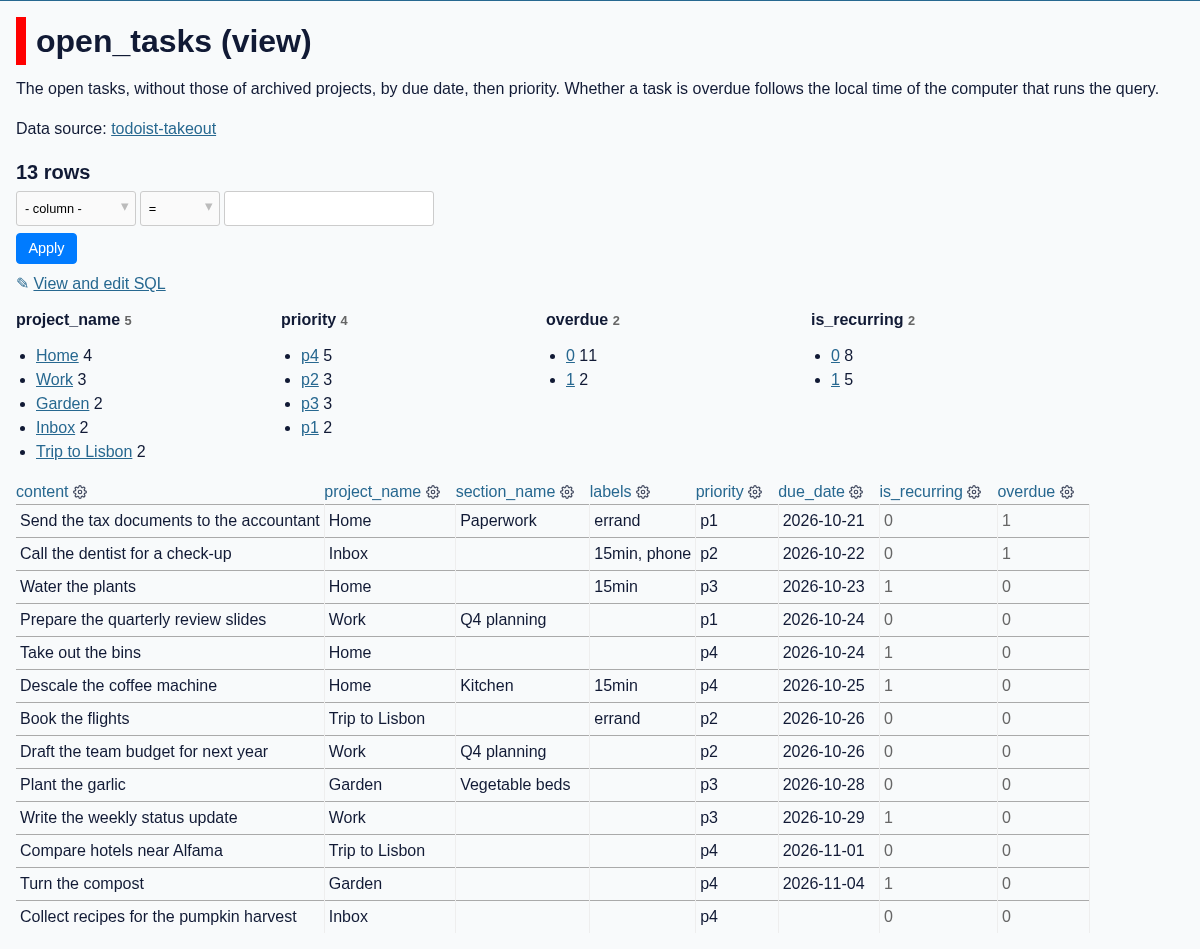
Quick start
todoist-takeout needs Python 3.11 or newer, which uv installs if needed. Install todoist-takeout with uv:
uv tool install todoist-takeout
With pipx, use pipx install todoist-takeout instead, and pipx run datasette where the commands below use uvx datasette.
Copy your API token from Todoist (Settings → Integrations → Developer) into the environment, back up your account, and open the result in Datasette:
export TODOIST_API_TOKEN=0123456789abcdef0123456789abcdef01234567
todoist-takeout backup-and-sqlite ~/Backups/todoist
uvx datasette ~/Backups/todoist
Then open the address that Datasette prints, usually http://127.0.0.1:8001. Run the same backup-and-sqlite command again at any time to bring the backup and the database up to date. The first run on a large account can take a while; see Backing up.
To keep only the JSON backup, use todoist-takeout backup instead.
Run it daily
The tool never asks for input, so a scheduler can run it every night: Scheduling has examples for cron, launchd and the Windows Task Scheduler.
Documentation
- Backing up: the token, what the backup contains, large accounts, the Free plan, options, output and exit status.
- Viewing the backup:
backup-and-sqliteandsqlite, the directory layout, and the tables and views of the database. - Scheduling: unattended daily runs.
- Platform notes: macOS certificates, network drives, Windows long paths.
- Format description: the layout and files of a backup, for reading it without this tool.
Contributing
Installing the unreleased code from the repository, setting up a development environment, running the checks and the tests, the requirements and the key design decisions are described in CONTRIBUTING.md.
License
1 maintainer

Metadata
1 maintainer
Release files for todoist-takeout 0.1.0
For a detailed explanation of source distributions (sdists) and built distributions (wheels), please see the package formats documentation.
Source distribution (sdist)
| File | Size | Uploaded | Provenance | Actions |
|---|---|---|---|---|
| todoist_takeout-0.1.0.tar.gz | 379.5 kB | With provenance | Details for todoist_takeout-0.1.0.tar.gz |
Built distribution (wheel)
| File | Interpreter | ABI | Platform | Actions Reset |
|---|---|---|---|---|
| todoist_takeout-0.1.0-py3-none-any.whl | Python 3 | none | any | Details for todoist_takeout-0.1.0-py3-none-any.whl |
Total release size: 450.3 kB
Release files / todoist_takeout-0.1.0.tar.gz
| Download URL | todoist_takeout-0.1.0.tar.gz |
|---|---|
| Size | 379.5 kB |
| Tags | Source |
|
SHA-256 checksum How to use checksums |
31ada0e203ffdbc68dbf2a9d43d1d48f82200db867329f43c72fd4e98d8d8080
|
|
BLAKE2b-256 checksum How to use checksums |
203af3e1098be3e3a60e2b0c344fc60d005ba40d3bcc926a2eec090a5edb474a
|
| Upload date | |
|
Uploaded using Trusted Publishing? What is trusted publishing? |
Yes |
| Uploaded via |
twine/7.0.0 CPython/3.13.14
|
Provenance
Provenance describes where a file came from. On PyPI, provenance is shared via attestations, which provide a verifiable record of the build or publishing details. View details, limitations and caveats.


PyPI Publish Attestation
PyPI verified that this artifact, at this checksum, originated from the publisher listed below.
Signed by GitHub Actions, verified by PyPI on Oct 24, 2026.
Transparency logRelease files / todoist_takeout-0.1.0-py3-none-any.whl
| Download URL | todoist_takeout-0.1.0-py3-none-any.whl |
|---|---|
| Size | 70.8 kB |
| Tags | Python 3 |
|
SHA-256 checksum How to use checksums |
8d947f5f788f6931818ee07be4293fc46f5f6cb47b34dca536097b287a2cfb11
|
|
BLAKE2b-256 checksum How to use checksums |
8f2b6cba26f82ff5122231ac7b7c8989014592d108d39f449f7de07f52f568e3
|
| Upload date | |
|
Uploaded using Trusted Publishing? What is trusted publishing? |
Yes |
| Uploaded via |
twine/7.0.0 CPython/3.13.14
|
Provenance
Provenance describes where a file came from. On PyPI, provenance is shared via attestations, which provide a verifiable record of the build or publishing details. View details, limitations and caveats.
PyPI Publish Attestation
PyPI verified that this artifact, at this checksum, originated from the publisher listed below.
Signed by GitHub Actions, verified by PyPI on Oct 24, 2026.
Transparency logSecurity for todoist-takeout 0.1.0
Provenance
Provenance describes where a file came from. On PyPI, provenance is shared via attestations, which provide a verifiable record of the build or publishing details. View details, limitations and caveats.
Full provenance
Both files in this release have been uploaded with provenance metadata.
Attestation for todoist_takeout-0.1.0.tar.gz
PyPI Publish Attestation
PyPI verified that this artifact, at this checksum, originated from the publisher listed below.
Signed by GitHub Actions, verified by PyPI on Oct 24, 2026.
Transparency logA note on package security
PyPI is a repository for distributing packages, not a service for auditing them. While third-party security researchers and our staff do their best to detect and remove malicious packages, PyPI cannot guarantee the quality, security or suitability of any given package.
To learn more about protecting yourself from malicious actors, visit our package security documentation.













