
An interactive terminal based todo.txt file editor with an interface similar to mutt

Project description
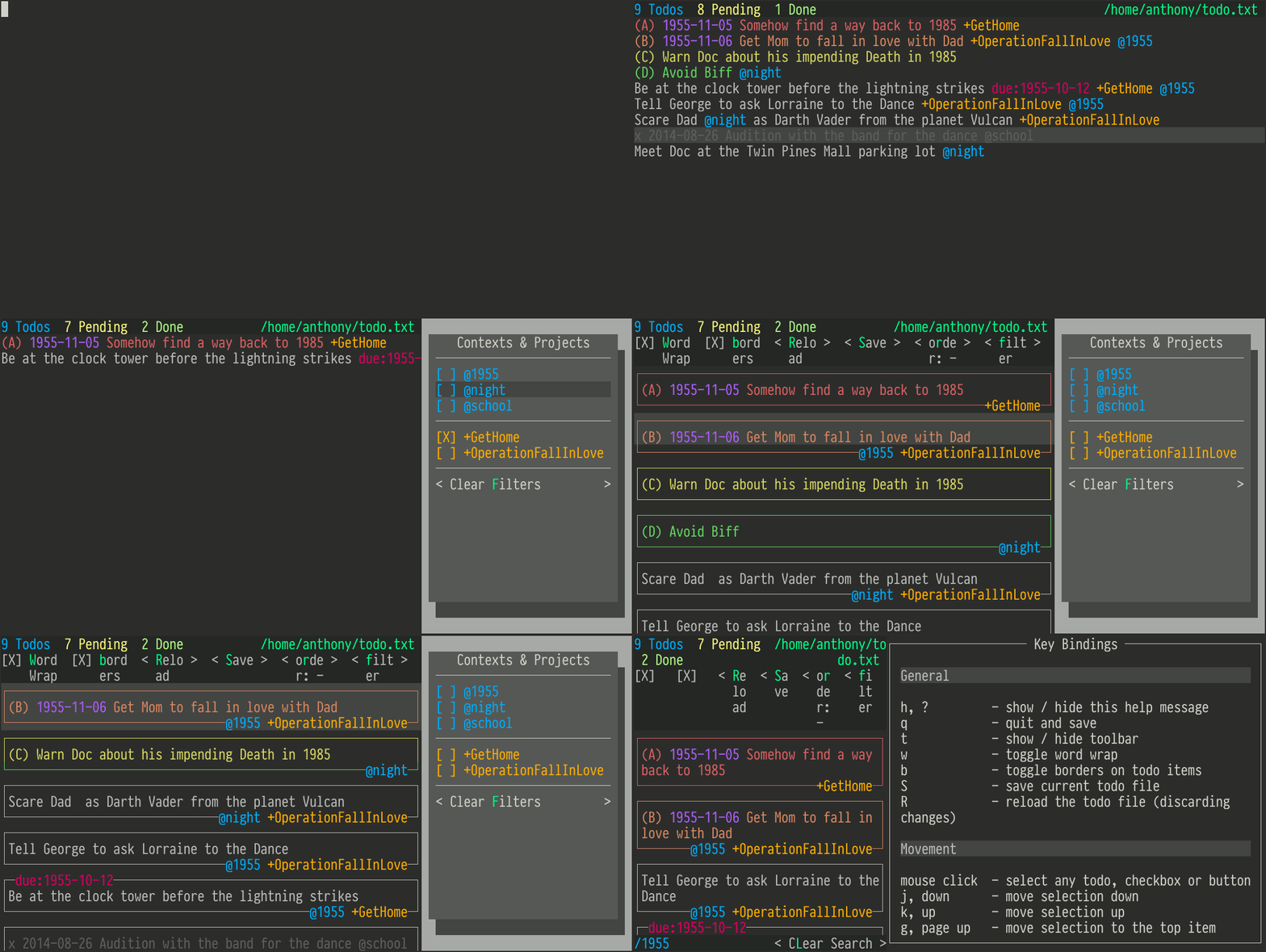
todotxt-machine is an interactive terminal based todo.txt file editor with an interface similar to mutt. It follows the todo.txt format and stores todo items in plain text.
In Action
Features
View your todos in a list with helpful syntax highlighting
Define your own colorschemes
Tab completion of contexts and projects
Filter contexts and projects
Search for the todos you want with fuzzy matching
Sort in ascending or descending order, or keep things unsorted
Clickable UI elements
Requirements
Python 2.7 or Python 3.4 on Linux or Mac OS X.
todotxt-machine 1.1.8 and earlier drew its user interface using only raw terminal escape sequences. While this was very educational it was difficult to extend with new features. Version 2 and up used urwid to draw its interface and is much more easily extendable.
Installation
Using pip
pip install todotxt-machine
Manually
Download or clone this repo and run the todotxt-machine.py script.
git clone https://github.com/AnthonyDiGirolamo/todotxt-machine.git
cd todotxt-machine
./todotxt-machine.py
Command Line Options
todotxt-machine

Usage:
  todotxt-machine
  todotxt-machine TODOFILE
  todotxt-machine [--config FILE]
  todotxt-machine (-h | --help)
  todotxt-machine --version

Options:
  -c FILE --config=FILE  Path to your todotxt-machine configuraton file [default: ~/.todotxt-machinerc]
  -h --help              Show this screen.
  --version              Show version.
Config File
You can tell todotxt-machine to use the same todo.txt file whenever it starts up by adding a file entry to the ~/.todotxt-machinerc file. You can also set you preferred colorscheme or even define new themes.
Here is an example config file with a complete colorscheme definition:
[settings]
file = ~/todo.txt
colorscheme = myawesometheme

[colorscheme-myawesometheme]
plain=h250
selected=,h238
header=h250,h235
header_todo_count=h39,h235
header_todo_pending_count=h228,h235
header_todo_done_count=h156,h235
header_sorting=h235,h39
header_file=h48,h235
dialog_button=h255,h242
dialog_background=,h248
dialog_color=,h240
dialog_shadow=,h238
footer=h39,h235
search_match=h222,h235
completed=h59
context=h39
project=h214
creation_date=h135
due_date=h161
priority_a=h167
priority_b=h173
priority_c=h185
priority_d=h77
priority_e=h80
priority_f=h62
You can add colorschemes by adding sections with names that start with colorscheme-. Then under the [settings] section you can say which colorscheme you want to use.
The format for a color definitions is:
name=foreground,background
Foreground and background colors are follow the 256 color formats defined by urwid. Here is an excerpt from that link:
High colors may be specified by their index h0, …, h255 or with the shortcuts for the color cube #000, #006, #008, …, #fff or gray scale entries g0 (black from color cube) , g3, g7, … g100 (white from color cube).
You can see all the colors defined here.
I recommend you leave the foreground out of the following definitions by adding a comma immediately after the =
selected=,h238
dialog_background=,h248
dialog_color=,h240
dialog_shadow=,h238
If you want to use your terminal’s default foreground and background color use blank strings and keep the comma:
dialog_background=,
Let me know if you make any good colorschemes and I’ll add it to the default collection.
Key Bindings
General
h, ?         - show / hide this help message
q            - quit and save
t            - show / hide toolbar
w            - toggle word wrap
b            - toggle borders on todo items
S            - save current todo file
R            - reload the todo file (discarding changes)
Movement
mouse click  - select any todo, checkbox or button
j, down      - move selection down
k, up        - move selection up
g, page up   - move selection to the top item
G, page down - move selection to the bottom item
left, right  - move selection between todos and filter panel
H, L
tab          - toggle focus between todos, filter panel, and toolbar
Manipulating Todo Items
x            - complete / un-complete selected todo item
n            - add a new todo to the end of the list
o            - add a todo after the selected todo (when not filtering)
O            - add a todo before the selected todo (when not filtering)
enter, A, e  - edit the selected todo
D            - delete the selected todo
J            - swap with item below
K            - swap with item above
While Editing a Todo
tab          - tab complete contexts and projects
return       - save todo item
left, right  - move cursor left and right
ctrl-b       - move cursor backwards (left) by one word
ctrl-f       - move cursor forwards (right) by one word
home, end    - move cursor the beginning or end of the line
ctrl-a, ctrl-e
ctrl-w       - delete one word backwards
ctrl-k       - delete from the cursor to the end of the line
ctrl-y       - paste last deleted text
Filtering
f            - open the filtering panel
F            - clear any active filters
Sorting
s            - toggle sort order (Unsorted, Ascending, Descending)
               sort order is saved on quit
Searching
/            - start search
enter        - finalize search
L            - clear search
Known Issues
OSX
Tmux
With tmux the background color in todotxt-machine can sometimes be lost at the end of a line. If this is happening to you set your $TERM variable to screen or screen-256color
export TERM=screen-256color
Planned Features
[STRIKEOUT:User defined color themes]
[STRIKEOUT:Manual reordering of todo items]
[STRIKEOUT:Config file for setting colors and todo.txt file location]
Add vi readline keybindings. urwid doesn’t support readline currently. The emacs style bindings currently available are emulated.
Support for archiving todos in done.txt
Updates
See the log here
Release history Release notifications | RSS feed


Download files
Download the file for your platform. If you're not sure which to choose, learn more about installing packages.
Source Distribution
Built Distributions
Filter files by name, interpreter, ABI, and platform.
If you're not sure about the file name format, learn more about wheel file names.
Copy a direct link to the current filters
File details
Details for the file todotxt-machine-2.0.4.tar.gz.
File metadata
- Download URL: todotxt-machine-2.0.4.tar.gz
- Upload date:
- Size: 35.2 kB
- Tags: Source
- Uploaded using Trusted Publishing? No
File hashes
| Algorithm | Hash digest | |
|---|---|---|
| SHA256 |
ee09585648bd43f65eabe74429185e157804444b028520602a9884aecbc711c5
|
|
| MD5 |
36334cc70f9a249b8e084209808fdae0
|
|
| BLAKE2b-256 |
5d441f727c5305c19f9496ce1a179261d8eb70e6634f27f244e00082e3f91dd1
|
File details
Details for the file todotxt_machine-2.0.4-py3.4.egg.
File metadata
- Download URL: todotxt_machine-2.0.4-py3.4.egg
- Upload date:
- Size: 86.7 kB
- Tags: Egg
- Uploaded using Trusted Publishing? No
File hashes
| Algorithm | Hash digest | |
|---|---|---|
| SHA256 |
ec3522fbc20be5050299d5524d05dddd5269663067346c4b1af205a1d104a9d0
|
|
| MD5 |
d26dde480db25409b15e5c865df76930
|
|
| BLAKE2b-256 |
9e39ac850dbb6eb4bcc273def6583b4d49da62903b26f7fbebf6faeb81adeaed
|
File details
Details for the file todotxt_machine-2.0.4-py2.7.egg.
File metadata
- Download URL: todotxt_machine-2.0.4-py2.7.egg
- Upload date:
- Size: 84.4 kB
- Tags: Egg
- Uploaded using Trusted Publishing? No
File hashes
| Algorithm | Hash digest | |
|---|---|---|
| SHA256 |
5c732dd60e58806eb249699c5f8493e68ab5492f6a31d68b160ef916aedcd825
|
|
| MD5 |
97577b46c7087701ef565f640a1f4d74
|
|
| BLAKE2b-256 |
632103e5cf899bafbadff55c42221264120e78db00cbd410844fc51f72016f84
|






