

ToFScope


ToFScope is a browser-based application for exploring time-of-flight secondary ion mass spectrometry (ToF-SIMS) data. It allows you to analyze ion images, mass spectra, and depth profiles together so you can inspect an acquisition, compare signals, and save your analysis for later.
ToFScope runs locally as a Python application and opens in your browser. It reads TOFWERK TOFexplorer1 HDF5 (.h5) acquisitions, and provides interactive tools for exploring their mass spectra, ion images, and depth profiles in two and three dimensions.
Read the ToFScope documentation for installation, user guides, deployment, and developer information. Start with Install and launch or Your first analysis.
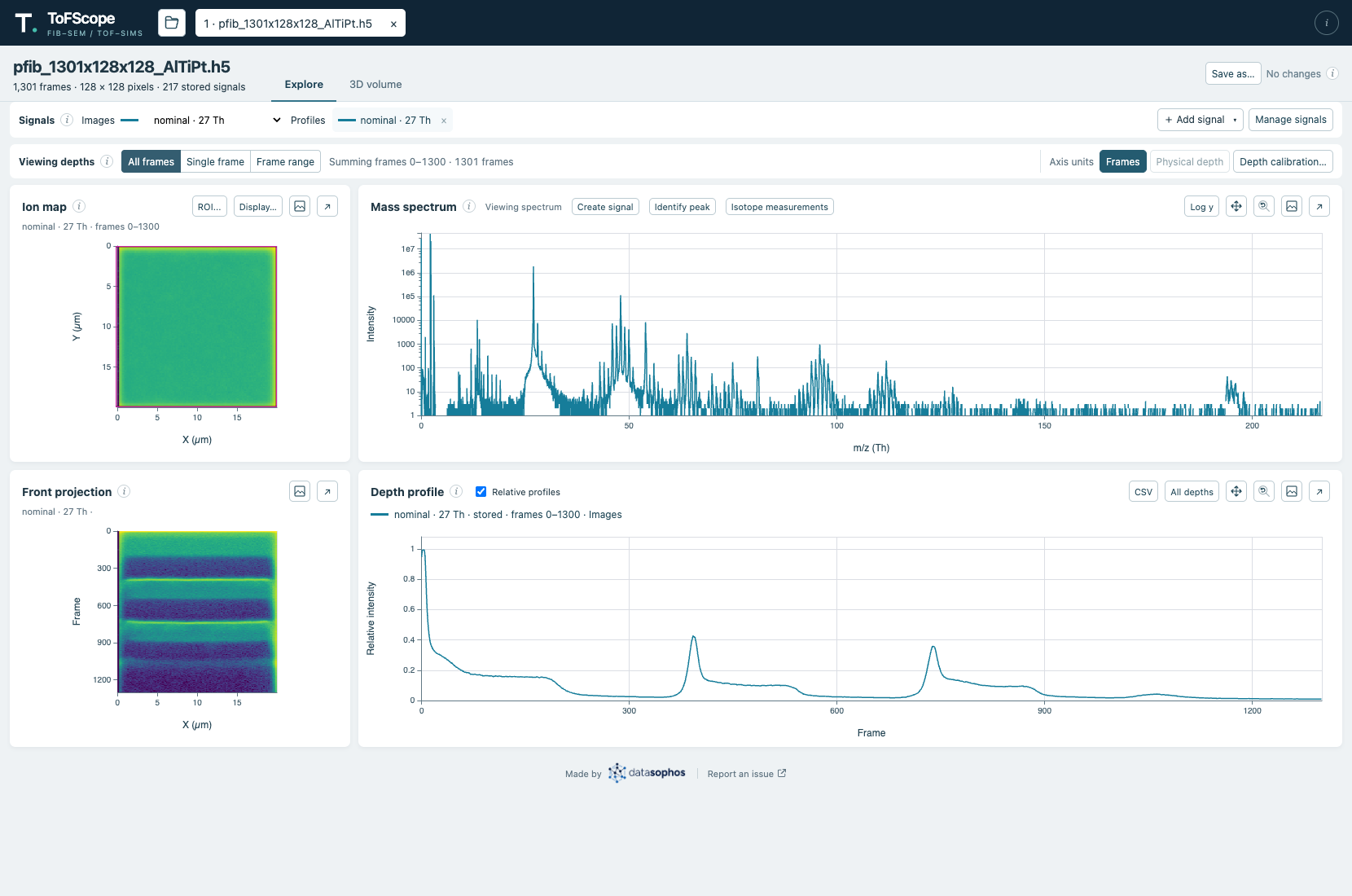
Explore view showing an ion map, mass spectrum, front projection, and depth profile for a real acquisition.
What you can do
- Explore an acquisition: view ion maps, a mass spectrum, front projections, and depth profiles together; choose custom regions of interest and frame range.
- Compare signals: use stored ion channels or define custom mass windows from the spectrum, then compare their profiles.
- Work with depth: add calibration anchors to display profiles and projections in physical depth where calibration is known.
- Inspect peaks and isotopes: find candidate atomic isotope ions and measure selected signals over a region and frame range.
- Visualize in 3D: compare signals as volume overlays or tiled views, with controls for color, opacity, and threshold.
- Keep and share results: export profiles as CSV or plots as PNG, and save data back into TOFexplorer-compatible
.h5files.
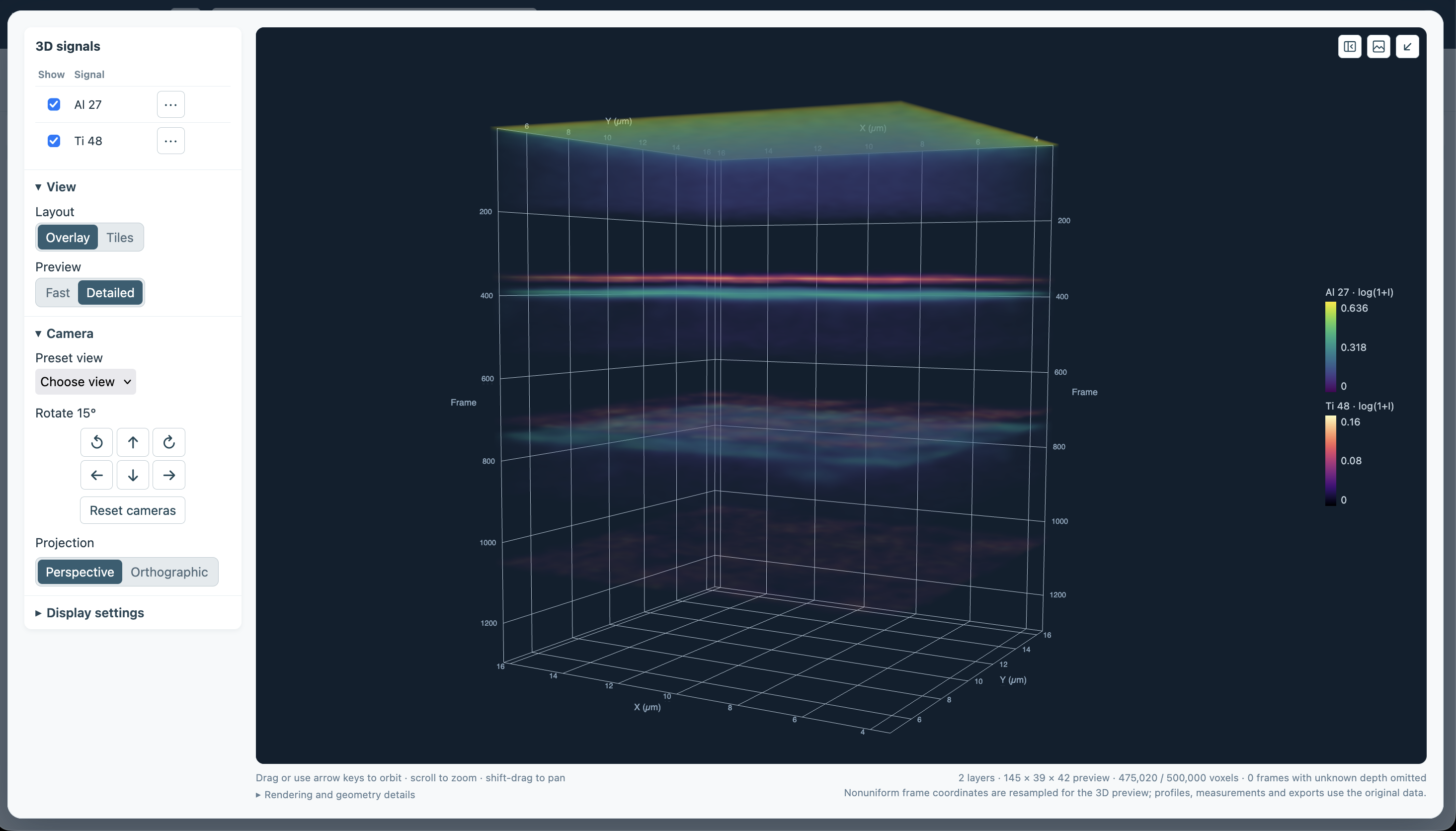
3D volume view comparing aluminum and titanium signals across acquisition frames.
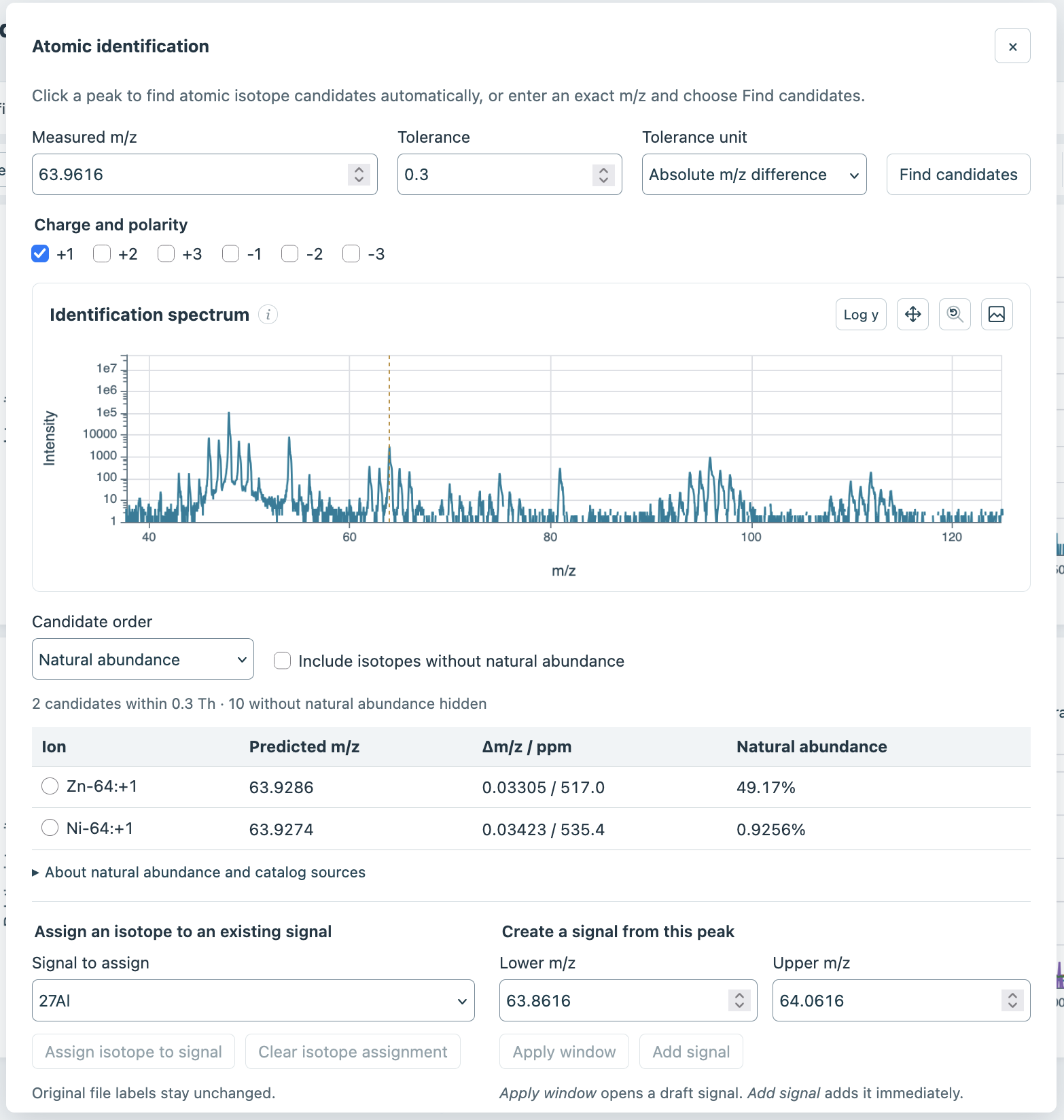
Atomic identification compares a measured mass-to-charge ratio with candidate isotope ions.
Get started
You need Python 3.11 or newer, uv, and a folder containing supported TOFexplorer .h5 files. Install from PyPI:
uv tool install tofscope
tofscope --data-root /path/to/acquisitions --output-root /path/to/saved-analyses
Replace the example paths with your folders. The output folder must be writable and have enough space for a full copy of an acquisition. ToFScope starts a local service and opens the app in your browser. Select a file to begin; keep the terminal open while you work and press Ctrl-C there to stop the app.
For step-by-step installation, folder setup, and troubleshooting, see Install and launch. See the configuration reference for settings, and deployment for hosted use and containers.
Your first analysis
- Open an acquisition and choose a stored signal, or create one from a mass window in the spectrum.
- Select a frame range and region of interest to explore its ion image and depth profile. Add other signals to compare profiles.
- Use Depth calibration… if you have known frame-to-depth measurements, or open 3D volume to explore the signal spatially.
- Choose Save as… to save a new analysis copy. After a restart, open it through Saved files to resume your saved work.
Saving leaves the source acquisition unchanged. Unsaved tabs and in-progress calculations do not survive a restart. Some raw files require preparation into a new copy before exploration; ToFScope previews that step and asks for confirmation.
The user guide covers signals, calibration, exports, isotope identification, saving, and 3D controls in more detail.
Current limitations
ToFScope is under active development and is in an alpha state. The application may change substantially prior to a stable 1.0.0 release. See the user guide for details. If you have ideas of features to add, or notice any bugs, please open an issue!
Developing ToFScope
The frontend is built with React and TypeScript; the service backend uses Python and FastAPI. Node.js is needed to develop or rebuild the frontend, but not to run the packaged application. From a source checkout:
uv sync --frozen
uv run tofscope --data-root /path/to/acquisitions --output-root /path/to/saved-analyses
For frontend and Python checks, build instructions, and distribution validation, see the developer commands.
For a diagram-led overview of the application, see ToFScope architecture.
To build or preview the documentation site, see maintaining the documentation.
License
ToFScope is available under the MIT License.
-
TOFWERK and TOFexplorer are names owned by TOFWERK AG. They are used here solely to identify the products and file formats supported by ToFScope. ToFScope is an independent project and is not affiliated with, endorsed by, or sponsored by TOFWERK AG. ↩
1 maintainer

Metadata
1 maintainer
Release files for tofscope 0.1.2
For a detailed explanation of source distributions (sdists) and built distributions (wheels), please see the package formats documentation.
Source distribution (sdist)
| File | Size | Uploaded | Provenance | Actions |
|---|---|---|---|---|
| tofscope-0.1.2.tar.gz | 880.5 kB | With provenance | Details for tofscope-0.1.2.tar.gz |
Built distribution (wheel)
| File | Interpreter | ABI | Platform | Actions Reset |
|---|---|---|---|---|
| tofscope-0.1.2-py3-none-any.whl | Python 3 | none | any | Details for tofscope-0.1.2-py3-none-any.whl |
Total release size: 1.8 MB
Release files / tofscope-0.1.2.tar.gz
| Download URL | tofscope-0.1.2.tar.gz |
|---|---|
| Size | 880.5 kB |
| Tags | Source |
|
SHA-256 checksum How to use checksums |
f6634ab4984d128b2bf3bb2d1f0963eedc58049c9b2ea93763d18c84f72a7464
|
|
BLAKE2b-256 checksum How to use checksums |
33dada57f4d4e1f57fd8ea9db86e748e97f85b4e61cb7db791fdcaca4ebb36b9
|
| Upload date | |
|
Uploaded using Trusted Publishing? What is trusted publishing? |
Yes |
| Uploaded via |
twine/7.0.0 CPython/3.13.16
|
Provenance
Provenance describes where a file came from. On PyPI, provenance is shared via attestations, which provide a verifiable record of the build or publishing details. View details, limitations and caveats.


PyPI Publish Attestation
PyPI verified that this artifact, at this checksum, originated from the publisher listed below.
Signed by GitHub Actions, verified by PyPI on Nov 1, 2026.
Transparency logRelease files / tofscope-0.1.2-py3-none-any.whl
| Download URL | tofscope-0.1.2-py3-none-any.whl |
|---|---|
| Size | 902.1 kB |
| Tags | Python 3 |
|
SHA-256 checksum How to use checksums |
03bec2d361d65a389c609c9a6c24bd8cc3a9dec2868e8dcc60bcd1a762a5ce0b
|
|
BLAKE2b-256 checksum How to use checksums |
f20f63b03e00e6eec4aca69051c99a14d2db81100d188686197b7bbfaec14447
|
| Upload date | |
|
Uploaded using Trusted Publishing? What is trusted publishing? |
Yes |
| Uploaded via |
twine/7.0.0 CPython/3.13.16
|
Provenance
Provenance describes where a file came from. On PyPI, provenance is shared via attestations, which provide a verifiable record of the build or publishing details. View details, limitations and caveats.
PyPI Publish Attestation
PyPI verified that this artifact, at this checksum, originated from the publisher listed below.
Signed by GitHub Actions, verified by PyPI on Nov 1, 2026.
Transparency logSecurity for tofscope 0.1.2
Provenance
Provenance describes where a file came from. On PyPI, provenance is shared via attestations, which provide a verifiable record of the build or publishing details. View details, limitations and caveats.
Full provenance
All 2 files in this release have been uploaded with provenance metadata.
Attestation for tofscope-0.1.2.tar.gz
PyPI Publish Attestation
PyPI verified that this artifact, at this checksum, originated from the publisher listed below.
Signed by GitHub Actions, verified by PyPI on Nov 1, 2026.
Transparency logA note on package security
PyPI is a repository for distributing packages, not a service for auditing them. While third-party security researchers and our staff do their best to detect and remove malicious packages, PyPI cannot guarantee the quality, security or suitability of any given package.
To learn more about protecting yourself from malicious actors, visit our package security documentation.














