
tok
tok is a plain-text language for process models. One short text file describes a BPMN 2.0 process — pools, lanes, events, tasks, gateways, flows and data — together with the DMN decisions it uses, the forms people fill in and the parameters needed to simulate it. The tok tool checks the model and turns it into everything else: BPMN 2.0 XML with an automatic diagram layout (opens in Camunda Modeler and bpmn.io), SVG pictures, DMN files, Camunda forms and simulation results.
The guide · Playground · Language on one page · BPMN symbols · Report an issue
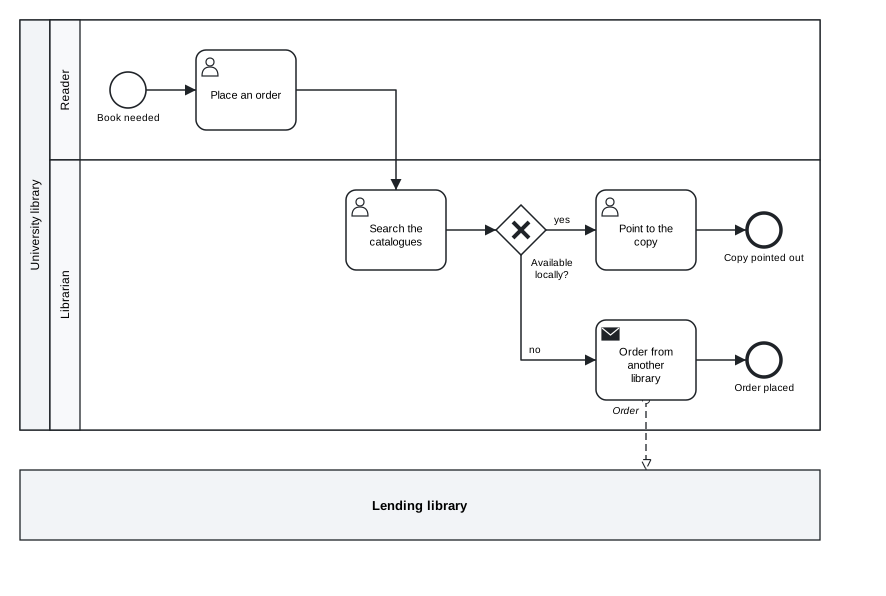
tok 1.0 "Interlibrary loan"

pool library "University library"
  lane reader "Reader"
    start need "Book needed"
    user order "Place an order"
  lane librarian "Librarian"
    user catalogues "Search the catalogues"
    xor available "Available locally?"
    user point "Point to the copy"
    send request "Order from another library" message="Order"
    end pointed "Copy pointed out"
    end ordered "Order placed"

pool other "Lending library"

flow need -> order -> catalogues -> available
flow available -> point "yes"
flow available -> request "no"
flow point -> pointed
flow request -> ordered

message request -> other "Order"
Start here
| You want to | Start with |
|---|---|
| model processes | pip install tok-lang, then the chapters Getting started and Process basics of the guide; the playground needs no installation |
| learn BPMN with tok (students) | the guide from the beginning, the symbol catalogue and the cheat sheet |
| run models on Camunda 8 | the chapter Executable models of the guide and docs/conformance-camunda.md |
| work with an AI agent | the agent bundle tok-lang-bpm/tok-agent (skill and MCP server), docs/mcp.md |
| check models in continuous integration | the action tok-lang-bpm/setup-tok |
| use tok from Python, R, Julia, JavaScript or C | docs/python.md, r/tokr, docs/julia.md, docs/playground.md, docs/c-api.md |
| implement or extend the language | docs/spec.md, the conformance corpus conformance/, CONTRIBUTING.md |
The tok project
| Repository | What it holds |
|---|---|
| tok-lang-bpm/tok | this repository: the language, the engine, every package, the editor support, the MCP server and the documentation |
| tok-lang-bpm/tok-agent | the agent bundle: the skill tok-modelling and the MCP configuration, installable as a plugin |
| tok-lang-bpm/setup-tok | GitHub Action: installs tok and checks the models of a repository |
| tok-lang-bpm/tok-lang-bpm.github.io | the guide (a book) and the playground at https://tok-lang-bpm.github.io/ |
Packages: tok-lang (PyPI), tok-cli, tok-core, tok-bpmn, tok-sim, tok-lsp, tok-mcp (crates.io), tokr (CRAN, and R-universe), Tok (Julia General registry), tok for VS Code (Visual Studio Marketplace and Open VSX).
Why a text language
- Readable and reviewable. Every line starts with a keyword and describes one element. Changes show up as clear diffs in version control.
- Made for people and for AI agents. The whole language fits on one page (
tok cheatsheet). An agent can write a model, runtok check --json(or call thechecktool of the MCP server,tok mcp), read the line-numbered diagnostics and fix them, without ever touching XML or coordinates. - Standards on the outside. tok is a notation for BPMN 2.0 and DMN, not a replacement. Everything you write is exported to the OMG formats that modelling tools and process engines read;
tok importconverts existing BPMN and DMN files back to text. - Executable and measurable. The same file can carry the details Camunda 8 needs to run the process, and the times, resources and probabilities a simulation needs to estimate cycle times and workloads.
- Simple to implement. A line-based grammar with six token types. Python, Rust and Julia implementations pass the same conformance corpus byte for byte.
Install
The tok command is the Rust engine. It comes with the Python package tok-lang (Python 3.8 or newer; wheels for Windows x64, Linux x86_64 and aarch64, macOS; on Windows use py -m pip if pip is not on the path):
pip install tok-lang
tok --version
On a platform without a wheel pip builds the engine from the source archive, which needs Rust 1.99 or newer. The command alone, from crates.io or from a checkout of the repository:
cargo install tok-cli                 # the program tok
cd rust && cargo build --release -p tok-cli      # target/release/tok
Every way reads every version of the language, 0.1 to 1.0. The package also keeps the pure-Python implementation frozen at language 0.3, the reference of the parity tests: TOK_ENGINE=python tok … runs it (docs/python.md).
The package also runs the MCP server for AI agents: tok mcp (docs/mcp.md). The R package tokr (install.packages("tokr")), the Julia package Tok.jl (below), the language server tok-lsp and the MCP server as a program of its own (cargo install tok-lsp tok-mcp) and the VS Code extension tok are described under Tools.
Julia
Tok.jl gives the whole language to Julia through the C interface of the engine, keeps an independent implementation of the core of the specification, and adds a native simulator for large experiments and the calibration of simulation parameters on event logs:
using Pkg; Pkg.add(["Tok", "tok_jll"])    # or Pkg.add(url="https://github.com/tok-lang-bpm/tok", subdir="julia/Tok.jl")
using Tok
text = read("model.tok", String)
Tok.Engine.check(text)                                  # the engine: every layer of the language
m = Tok.Sim.model(text)                                 # native simulation (julia -t auto)
e = Tok.Sim.experiment([m, Tok.Sim.scenario(m; name="+1", resources=Dict("staff" => 3))]; replications=200)
Tok.Sim.summarize(e)
f = Tok.Fit.fit(text, Tok.Fit.read_xes("log.xes"))      # calibration on an event log
Tok.Fit.apply(text, f)                                  # the document with the fitted parameters
The engine library is found through TOK_LIBTOK, the package tok_jll, or the repository build (cargo build --release -p tok-capi); see docs/julia.md.
Use
tok check model.tok              # diagnostics; --lang pl for Polish, --json for programs
tok fmt model.tok -w             # canonical form
tok bpmn model.tok               # model.bpmn with diagram layout
tok svg model.tok                # model.svg
tok export model.tok -o out/     # BPMN, SVG, DMN and forms (executable models for Camunda 8)
tok import diagram.bpmn          # BPMN 2.0 XML to tok
tok sim model.tok --seed 1       # simulation indicators; --log log.csv for the event log
tok eval model.tok DECISION a=1  # evaluate a decision
Tools
| Tool | What it gives | Documentation |
|---|---|---|
tok |
the command line: check, format, export, import, simulate, evaluate | docs/cli.md |
tok-lsp |
language server (LSP 3.17) for any editor: diagnostics, formatting, go to definition, references, rename, outline, hover, completion, the diagram | docs/lsp.md |
| VS Code extension | syntax highlighting, the language server, a live diagram preview, export of BPMN and every file | editors/vscode |
tok mcp, tok-mcp |
MCP server for AI agents: the tools check, fmt, export, import, sim, eval and the language reference (tok mcp from the Python package, or the program tok-mcp) |
docs/mcp.md |
| playground | the engine in the browser (WebAssembly): editor, diagnostics, diagram, bpmn-js viewer, simulation, decisions, downloads | docs/playground.md |
| Python, R, Julia | tok-lang (Python), tokr (R), Tok.jl (Julia) on the same engine |
docs/julia.md, r/tokr |
| C library | tokengine with tok.h, for any language that calls C |
docs/c-api.md |
cd rust
cargo build --release -p tok-lsp -p tok-mcp      # target/release/tok-lsp, target/release/tok-mcp
bash tools/playground.sh                          # the playground in rust/target/playground
Documentation
| Document | Contents |
|---|---|
| docs/spec.md | the language specification (normative) |
| docs/cheatsheet.md | the language on one page |
| docs/symbols.md | every BPMN symbol tok draws, with its tok statement and its support in Camunda 8 (tools/symbols.py) |
| docs/cli.md | command line reference |
| docs/diagnostics.md | diagnostic codes in English and Polish |
| docs/feel.md | FEEL: the subset of languages 0.1–0.6 and the full FEEL of language 0.7 |
| docs/dmn-tck.md | DMN TCK conformance results |
| docs/conformance-camunda.md | every BPMN, DMN and FEEL feature of Camunda 8.10, how tok expresses it, the case and the Camunda run that verify it |
| docs/conformance-bpmn.md | every element of the BPMN 2.0.2 and DMN 1.5 metamodels: tok construct, export, import, MIWG and DMN TCK coverage |
| docs/simulation.md | simulation semantics, distributions and outputs |
| docs/import.md | converting BPMN and DMN XML to tok |
| docs/python.md | the Python module tok.api |
| docs/julia.md | Tok.jl: the engine in Julia, the independent core, native simulation, calibration |
| docs/calibration.md | the fit layer: estimating simulation parameters from event logs |
| docs/c-api.md | the C interface of the engine (library tokengine, header tok.h) |
| docs/lsp.md | the language server tok-lsp and its use in VS Code, Neovim, Helix and Emacs |
| docs/mcp.md | the MCP server tok-mcp: tools, resources, configuration of MCP clients |
| docs/playground.md | the browser playground on the WebAssembly build of the engine |
| docs/fuzzing.md | the fuzz targets of the engine, how to run them, what they found |
| docs/performance.md | benchmarks on large generated models and their results |
| docs/design-1.0.md | language 1.0: decisions, deprecations, the compatibility of 1.x (earlier versions: design-0.3.md to design-0.7.md) |
| docs/roadmap.md | the releases from 0.1 to 1.0: full Camunda 8 and BPMN 2.0.2 coverage, Rust engine for Python and R, Julia standalone |
| docs/changelog.md | the changes of every release |
| skills/tok-modelling | a skill that teaches an AI agent to model in tok |
| examples/ | example models |
Repository
| Folder | Contents |
|---|---|
python/ |
reference implementation (package tok-lang, command tok) and its tests |
rust/ |
Rust engine: tok-core, tok-bpmn (BPMN rules, layout, SVG), tok-sim (simulator), tok-cli (native tok), tok-py (Python bindings), tok-capi (C interface), tok-lsp (language server), tok-mcp (MCP server), tok-wasm (WebAssembly build), tok-bench (generated large models and benchmarks); rust/fuzz holds the fuzz targets (a cargo workspace of its own) |
editors/vscode |
VS Code extension: grammar, language client, diagram preview |
playground/ |
the page of the browser playground |
r/tokr |
R package tokr on the Rust engine: diagnostics as data frames, diagrams in the viewer, knitr engine {tok} |
julia/Tok.jl |
Julia package: the engine through the C interface, the independent core, native simulation and calibration; julia/app (the tok application), julia/binarybuilder (the recipe of tok_jll) |
conformance/ |
shared test corpus: input documents and expected outputs for every implementation |
docs/, examples/, skills/ |
documentation, examples, agent skill |
tools/check.sh runs every check of a release (Rust, Python, R and Julia tests, engine wheel and its parity with the Python implementation, the native tok program, the C library of the engine, the language and MCP servers, the VS Code extension and the playground) on Linux, macOS or Windows with Git Bash.
The BPMN validation comes from the bpmn.py validator used in the course Modelowanie procesów informacyjnych (Jagiellonian University), shipped here as tok.bpmnlib; its rule messages are in Polish and tok adds English equivalents. The diagram layout and SVG rendering started as a port of bpmn.py and, from 0.4, are developed in the Rust engine (rust/tok-bpmn), in the same style: left to right, pools stacked, lanes as rows.
Contributing and issues
Report problems and ideas in the issues of the GitHub repository. How to build, test and propose changes: CONTRIBUTING.md. Security problems: SECURITY.md. To cite tok, use CITATION.cff; the releases are archived on Zenodo, doi:10.5281/zenodo.23769633 (all versions).
License
GNU General Public License v3.0 or later, see LICENSE.
1 maintainer

Metadata
1 maintainer
Release files for tok-lang 1.0.2
For a detailed explanation of source distributions (sdists) and built distributions (wheels), please see the package formats documentation.
Source distribution (sdist)
| File | Size | Uploaded | Provenance | Actions |
|---|---|---|---|---|
| tok_lang-1.0.2.tar.gz | 570.0 kB | Without provenance | Details for tok_lang-1.0.2.tar.gz |
Built distributions (wheels)
| File | Actions Reset | |||
|---|---|---|---|---|
| tok_lang-1.0.2-cp38-abi3-win_amd64.whl | CPython 3.8 | abi3 | Windows x86-64 | Details for tok_lang-1.0.2-cp38-abi3-win_amd64.whl |
| tok_lang-1.0.2-cp38-abi3-manylinux2014_x86_64.manylinux_2_17_x86_64.whl | CPython 3.8 | abi3 | Linux glibc 2.17+ x86-64 | Details for tok_lang-1.0.2-cp38-abi3-manylinux2014_x86_64.manylinux_2_17_x86_64.whl |
| tok_lang-1.0.2-cp38-abi3-manylinux2014_aarch64.manylinux_2_17_aarch64.whl | CPython 3.8 | abi3 | Linux glibc 2.17+ ARM64 | Details for tok_lang-1.0.2-cp38-abi3-manylinux2014_aarch64.manylinux_2_17_aarch64.whl |
| tok_lang-1.0.2-cp38-abi3-macosx_10_12_universal2.macosx_10_12_x86_64.macosx_11_0_arm64.whl | CPython 3.8 | abi3 | macOS 10.12+ universal2 (ARM64, x86-64), macOS 11.0+ ARM64, macOS 10.12+ x86-64 | Details for tok_lang-1.0.2-cp38-abi3-macosx_10_12_universal2.macosx_10_12_x86_64.macosx_11_0_arm64.whl |
Total release size: 14.1 MB
Release files / tok_lang-1.0.2.tar.gz
| Download URL | tok_lang-1.0.2.tar.gz |
|---|---|
| Size | 570.0 kB |
| Tags | Source |
|
SHA-256 checksum How to use checksums |
3aaed635ccf3cb8ecde58266f9c749781be0a22873caec3d05a9327c7f920709
|
|
BLAKE2b-256 checksum How to use checksums |
ae1849af52d08080df7a6d9ea50824a18fdf80121a955bbc70785171b889bd91
|
| Upload date | |
|
Uploaded using Trusted Publishing? What is trusted publishing? |
No |
| Uploaded via |
twine/7.0.0 CPython/3.13.16
|
Release files / tok_lang-1.0.2-cp38-abi3-win_amd64.whl
| Download URL | tok_lang-1.0.2-cp38-abi3-win_amd64.whl |
|---|---|
| Size | 2.7 MB |
| Tags | CPython 3.8 Windows x86-64 abi3 |
|
SHA-256 checksum How to use checksums |
99aac883a5eaeffde0f9f4a41bbc9470fdd29b143000c3c236a25207a4b4f7cb
|
|
BLAKE2b-256 checksum How to use checksums |
041a33587d445c0cad5914cde84a85eb93fd9aa0bca5ecb0cc4d56610a0df3ea
|
| Upload date | |
|
Uploaded using Trusted Publishing? What is trusted publishing? |
No |
| Uploaded via |
twine/7.0.0 CPython/3.13.16
|
Release files / tok_lang-1.0.2-cp38-abi3-manylinux2014_x86_64.manylinux_2_17_x86_64.whl
| Download URL | tok_lang-1.0.2-cp38-abi3-manylinux2014_x86_64.manylinux_2_17_x86_64.whl |
|---|---|
| Size | 2.9 MB |
| Tags | CPython 3.8 Linux glibc 2.17+ x86-64 abi3 |
|
SHA-256 checksum How to use checksums |
aa601030f785b7d80660f7c02cb1e239156a386ed66f37b5ad3ae9f8e644af5e
|
|
BLAKE2b-256 checksum How to use checksums |
5f81635cd87cc8ac4662fc7766f0245d60c3780505773c25c90ce30107a1c774
|
| Upload date | |
|
Uploaded using Trusted Publishing? What is trusted publishing? |
No |
| Uploaded via |
twine/7.0.0 CPython/3.13.16
|
Release files / tok_lang-1.0.2-cp38-abi3-manylinux2014_aarch64.manylinux_2_17_aarch64.whl
| Download URL | tok_lang-1.0.2-cp38-abi3-manylinux2014_aarch64.manylinux_2_17_aarch64.whl |
|---|---|
| Size | 2.8 MB |
| Tags | CPython 3.8 Linux glibc 2.17+ ARM64 abi3 |
|
SHA-256 checksum How to use checksums |
9ab69a4fdf908b95433e4abb3df00f84fd3099a7b847f356be741f3c6c29dfbe
|
|
BLAKE2b-256 checksum How to use checksums |
a2756bbd8da7e62ff5c912d569fd31c3b35f61da938acf1405d5288c5d4f130d
|
| Upload date | |
|
Uploaded using Trusted Publishing? What is trusted publishing? |
No |
| Uploaded via |
twine/7.0.0 CPython/3.13.16
|
Release files / tok_lang-1.0.2-cp38-abi3-macosx_10_12_universal2.macosx_10_12_x86_64.macosx_11_0_arm64.whl
| Download URL | tok_lang-1.0.2-cp38-abi3-macosx_10_12_universal2.macosx_10_12_x86_64.macosx_11_0_arm64.whl |
|---|---|
| Size | 5.2 MB |
| Tags | CPython 3.8 abi3 macOS 10.12+ universal2 (ARM64, x86-64) macOS 10.12+ x86-64 macOS 11.0+ ARM64 |
|
SHA-256 checksum How to use checksums |
d72970e9033a95fb1b4c4e40f463537e79e8e21ee27965d58628393d675f82f8
|
|
BLAKE2b-256 checksum How to use checksums |
353d0b42fcfaa2e6fa8070c1cf22980bd8021fcfe538fad5e34865ea9a038b0f
|
| Upload date | |
|
Uploaded using Trusted Publishing? What is trusted publishing? |
No |
| Uploaded via |
twine/7.0.0 CPython/3.13.16
|
Security for tok-lang 1.0.2
Provenance
Provenance describes where a file came from. On PyPI, provenance is shared via attestations, which provide a verifiable record of the build or publishing details. View details, limitations and caveats.
No provenance found
None of the files in this release were uploaded with provenance metadata.
A note on package security
PyPI is a repository for distributing packages, not a service for auditing them. While third-party security researchers and our staff do their best to detect and remove malicious packages, PyPI cannot guarantee the quality, security or suitability of any given package.
To learn more about protecting yourself from malicious actors, visit our package security documentation.














