
A token counting TUI tool that respects .gitignore and skips binary files

Project description
tokdu - Token Disk Usage Analyzer for LLMs
tokdu (Token Disk Usage) is a terminal-based utility that helps you analyze and visualize token usage in your codebase. Similar to the classic du (disk usage) command, tokdu shows you how many tokens your files and directories consume, which is essential when working with Large Language Models (LLMs) that have token limits.
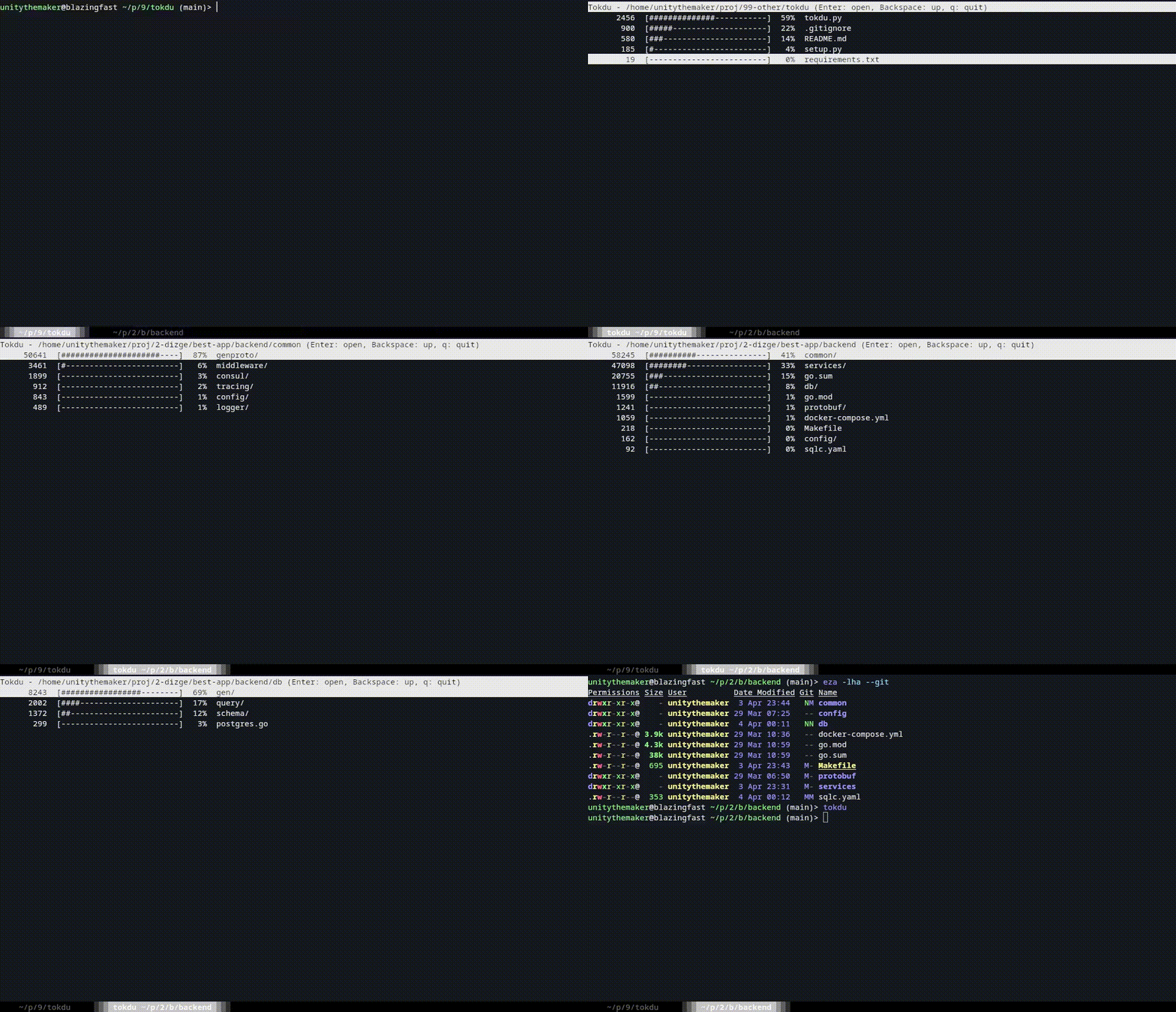
Features
- 📊 Visualize token distribution across your project
- 🚀 Fast, asynchronous scanning with caching
- 🔍 Respects
.gitignorerules - ⏩ Skips binary files automatically
- 🧩 Uses OpenAI's
tiktokenfor accurate token counting - 🔄 Supports Google's Gemini local tokenization
- 🔮 Supports Anthropic's Claude API tokenization
- 🎛️ Support for different models' tokenizers
- ⚙️ Cross-platform configuration system
Installation
pip install tokdu
For Gemini tokenization support:
pip install "tokdu[gemini]"
For Anthropic Claude tokenization support:
pip install "tokdu[anthropic]"
Or install from source:
git clone https://github.com/unitythemaker/tokdu.git
cd tokdu
pip install .
Usage
Basic usage:
tokdu
This will start tokdu in the current directory.
Specify a starting directory:
tokdu /path/to/project
Using the explicit scan command:
tokdu scan /path/to/project
Tokenizer Options
Use a specific tiktoken encoding:
tokdu --encoding cl100k_base
Use tokenization based on a specific model:
tokdu --model gpt-4o
Use Google's Gemini tokenizer:
tokdu --tokenizer gemini --model gemini-1.5-flash-001
Use Anthropic's Claude tokenizer (requires API key):
tokdu --tokenizer anthropic --model claude-3-haiku-20240307
Configuration
View current configuration:
tokdu config --show
Set default tokenizer type:
tokdu config --tokenizer gemini
Set default model (will clear any encoding setting):
tokdu config --model gemini-1.5-flash-001
Set default encoding (will clear any model setting):
tokdu config --encoding cl100k_base
Note: The model and encoding settings are mutually exclusive. Setting one will automatically clear the other to avoid confusion about which one takes precedence.
Configuration is stored in a platform-specific location:
- Windows:
C:\Users\<Username>\AppData\Local\tokdu\config.ini - macOS:
~/Library/Application Support/tokdu/config.ini - Linux:
~/.config/tokdu/config.ini
Navigation Controls
- ↑/↓ or j/k: Navigate up/down
- Enter: Open selected directory
- Backspace: Go to parent directory
- Page Up/Down: Scroll by page
- q: Quit
Why Count Tokens?
Large Language Models like GPT-4o and Gemini have context window limits measured in tokens. When embedding code in prompts or using tools and IDEs like GitHub Copilot or Zed, understanding your project's token usage helps you:
- Stay within context window limits
- Optimize prompts for LLMs
- Identify areas to trim when sharing code with AI assistants
Tokenizer Support
- OpenAI Tiktoken: Used for OpenAI models (GPT-3.5, GPT-4, etc.)
- Google Gemini: Local tokenization for Gemini models (requires
google-cloud-aiplatform[tokenization]>=1.57.0) - Anthropic Claude: API-based tokenization for Claude models (requires
anthropic>=0.7.0and API key)
Technical Details
- Uses OpenAI's
tiktokenlibrary for accurate token counting with OpenAI models - Supports Google's Vertex AI SDK for local Gemini tokenization
- Supports Anthropic's API for Claude model tokenization
- Tokenizers can be specified with
--encoding,--model, or--tokenizerflags - Uses
appdirsto manage cross-platform configuration - Defaults to values from config file, or
tiktokenandgpt-4oif not configured - Scans directories asynchronously for better performance
- Caches results to avoid repeated scans
Requirements
- Python 3
- pathspec
- appdirs
- curses (built into Python standard library)
- tiktoken
- google-cloud-aiplatform[tokenization] (optional, for Gemini tokenization; requires cmake) - requires cmake to be installed
- anthropic (optional, for Claude tokenization)
License
MIT
Author
Halil Tezcan KARABULUT (@unitythemaker)


Download files
Download the file for your platform. If you're not sure which to choose, learn more about installing packages.
Source Distribution
Built Distribution
Filter files by name, interpreter, ABI, and platform.
If you're not sure about the file name format, learn more about wheel file names.
Copy a direct link to the current filters
File details
Details for the file tokdu-0.1.4.tar.gz.
File metadata
- Download URL: tokdu-0.1.4.tar.gz
- Upload date:
- Size: 14.0 kB
- Tags: Source
- Uploaded using Trusted Publishing? No
- Uploaded via: twine/6.1.0 CPython/3.13.2
File hashes
| Algorithm | Hash digest | |
|---|---|---|
| SHA256 |
5ec3e43ce28af83a5df8a0c475492cd55b9e578d80ec04164f9a0ffa33259e2f
|
|
| MD5 |
0f0fd1a0bfd06d482b0a03337cf3861e
|
|
| BLAKE2b-256 |
2f5ba1fd21c85fa32ae82bcabdf9ec46f8f76de472dab3effd3b1f528e715abe
|
File details
Details for the file tokdu-0.1.4-py3-none-any.whl.
File metadata
- Download URL: tokdu-0.1.4-py3-none-any.whl
- Upload date:
- Size: 12.7 kB
- Tags: Python 3
- Uploaded using Trusted Publishing? No
- Uploaded via: twine/6.1.0 CPython/3.13.2
File hashes
| Algorithm | Hash digest | |
|---|---|---|
| SHA256 |
d2d46a3a8bf49eb2497780d1646fdb769c9fd3bc3483810f278ec23f409ab7f1
|
|
| MD5 |
8d2151a3c2574fe85e30b0ec98239ed3
|
|
| BLAKE2b-256 |
baff13dc2847a371242d155c66bb4b7504ff02bb388f3bb9c43438684662325b
|






