
CLI-first prompt guardrail for token, cost, and context observability.

Project description
Token Guardian


Token Guardian is a CLI-first guardrail for checking prompt size, context pressure, and estimated cost before you call an LLM.
It helps developers answer three questions quickly:
- how many tokens this prompt will probably use
- how much this request may cost
- whether this prompt is risky for the selected context window
Preview
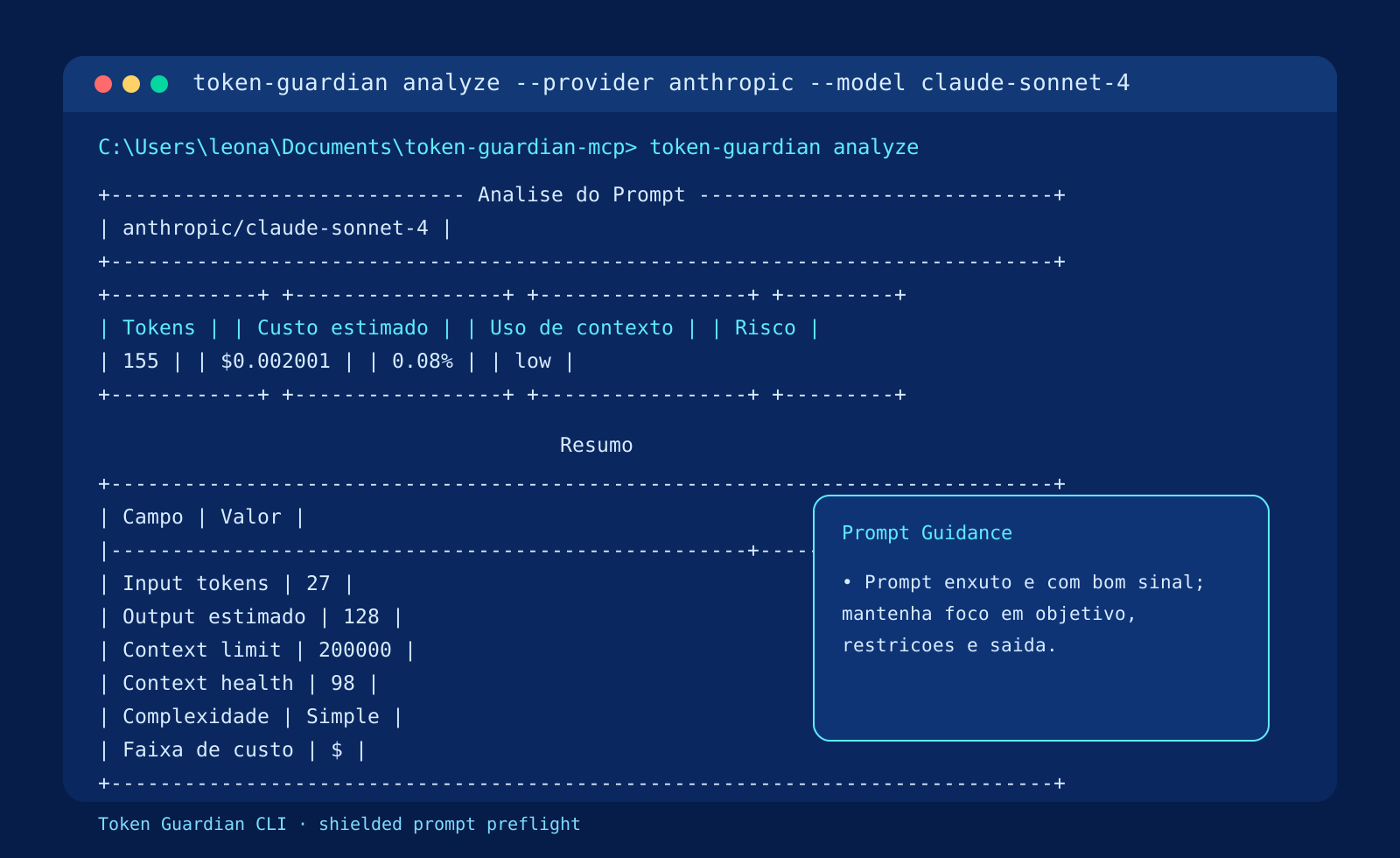
The current CLI interface is optimized for interactive terminal use and the guided experience is presented in pt-BR.
Why Use Token Guardian?
- catch oversized prompts before they hit the model
- estimate cost before expensive runs
- compare supported models using the same prompt
- clean duplicated or bloated prompt text
- keep simple local observability with SQLite metrics
- start from an interactive terminal menu instead of memorizing commands
Copy-Paste Install
Windows PowerShell
pip install token-guardian
token-guardian
macOS / Linux
pip install token-guardian
token-guardian
Running token-guardian without arguments opens an interactive menu when your terminal supports it.
What the CLI Can Do
- analyze one prompt for one provider/model pair
- compare one prompt across the default supported models
- optimize prompt text by removing duplicates and excess whitespace
- list supported models
- sync the local model catalog snapshot
- inspect local usage metrics
- guide the full flow through an interactive menu
Usage
Start here
token-guardian
Running without arguments shows the available flow and the most useful commands to start with.
In interactive terminals, Token Guardian opens a guided menu with:
- provider selection
- model selection
- prompt entry with Enter to send
- sync selection by provider
- quick access to models and metrics
Analyze a prompt
token-guardian analyze \
  --provider anthropic \
  --model claude-sonnet-4 \
  --prompt "Review this architecture proposal and identify risks."
Compare models
token-guardian compare \
  --prompt "Summarize this technical RFC and list migration risks."
Optimize a prompt
token-guardian optimize \
  --prompt "Goal: summarize
Goal: summarize


Return bullets only."
List supported models
token-guardian models
Sync model catalog
token-guardian sync-models
token-guardian sync-models --provider openai
View local metrics
token-guardian metrics
Example Output
Typical analyze output is rendered as a terminal report with token estimate, cost, context usage, risk, and prompt guidance.
Supported Providers
Current built-in catalog:
- OpenAI:
gpt-4.1 - Anthropic:
claude-sonnet-4,claude-opus-4 - Google:
gemini-2.5-pro,gemini-2.5-flash - OpenRouter:
openai/gpt-4.1
Each model stores:
- context limit
- input price per 1K tokens
- output price per 1K tokens
- speed estimate
- source URL
The CLI also shows catalog metadata such as:
Catalogo atualizado em 2026-06-13- the current JSON snapshot path
Scoring
Risk level
Based on estimated context usage:
lowmediumhighcritical
Context health score
Range: 0 to 100
Factors include:
- prompt size
- repeated lines
- repeated vocabulary
- redundant sections
Cost score
$: very low$$: low$$$: medium$$$$: high
Complexity score
SimpleMediumComplexVery Complex
Metrics
Token Guardian stores local metrics in SQLite.
Database file:
token_guardian.db
Tracked fields include:
- total requests
- total tokens
- estimated cumulative cost
- top models
- top providers
Project Structure
token-guardian/
|-- app/
|   |-- cli.py
|   |-- models/
|   |-- providers/
|   |-- services/
|   `-- utils/
|-- docs/
|-- tests/
|-- LICENSE
|-- pyproject.toml
`-- README.md
Development
Run tests:
pytest
Run quality checks:
ruff check .
black --check .
mypy app
Roadmap
- add richer interactive CLI flows
- expand supported model catalog
- improve prompt optimization heuristics
- add exportable reports
- add model catalog sync support
License
MIT
Project details
Release history Release notifications | RSS feed


Download files
Download the file for your platform. If you're not sure which to choose, learn more about installing packages.
Source Distribution
Built Distribution
Filter files by name, interpreter, ABI, and platform.
If you're not sure about the file name format, learn more about wheel file names.
Copy a direct link to the current filters
File details
Details for the file token_guardian-0.1.1.tar.gz.
File metadata
- Download URL: token_guardian-0.1.1.tar.gz
- Upload date:
- Size: 20.6 kB
- Tags: Source
- Uploaded using Trusted Publishing? No
- Uploaded via: twine/6.2.0 CPython/3.12.0
File hashes
| Algorithm | Hash digest | |
|---|---|---|
| SHA256 |
9ed6e7aa7208b9d45cf8f55ce6a4389c0b283a5567bf21592f3fb9092092de87
|
|
| MD5 |
3563a2c20c213bdee698d3b23e2b427f
|
|
| BLAKE2b-256 |
68ff9f354e67894aa862abe93dcf598111edddec4966f01de49432540130036e
|
File details
Details for the file token_guardian-0.1.1-py3-none-any.whl.
File metadata
- Download URL: token_guardian-0.1.1-py3-none-any.whl
- Upload date:
- Size: 23.3 kB
- Tags: Python 3
- Uploaded using Trusted Publishing? No
- Uploaded via: twine/6.2.0 CPython/3.12.0
File hashes
| Algorithm | Hash digest | |
|---|---|---|
| SHA256 |
3d0ce66903a74f1f558d43fa5240e292aeff720d8c4dacd1fe56aab16aee4dff
|
|
| MD5 |
697008e1a2340454ba7b92dfb28b623c
|
|
| BLAKE2b-256 |
b5595af352f66c41b43d3ff3c8cb0dbe63ee369542966446c1d5a207351baefc
|






