
token fishing
An always-on-top pixel-art window that shows how much Claude Code you have used.
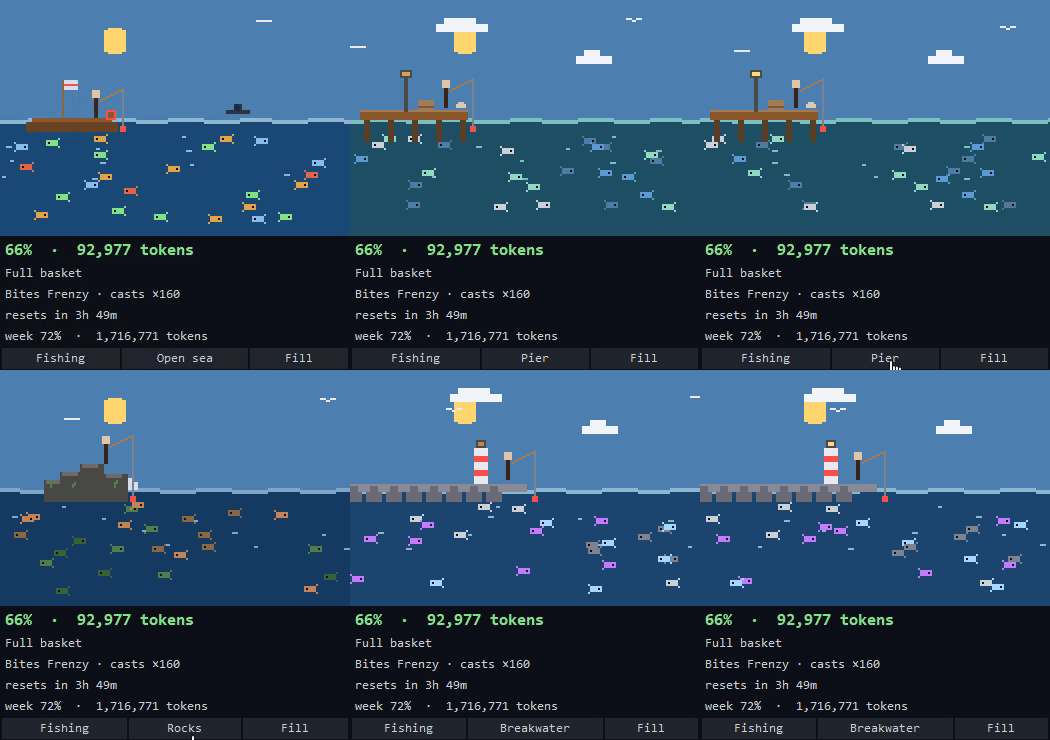



How much have you spent in this 5-hour window, how fast are you burning it, and when
does it reset? tokenfishing answers all three in a small window that stays on top of
your editor. No dashboard to open, no browser tab to keep around.
| What you see | What it means |
|---|---|
| Number of things moving around | Tokens spent in the current 5-hour window |
| How fast they move | Burn rate (tokens per minute) |
| Height of the sun | Time left until the window resets — high at noon, low at dusk |
| Things gathered near the base | In depletion mode, how much of the window is already gone |
The tier climbs through five steps as the window fills. In the fishing theme that is empty basket → small fry → half basket → full basket → full boat.
- No runtime dependencies — standard library only
- Nothing leaves your machine — every byte is read and rendered locally
- Official numbers when available — usage percentage and reset time come straight from what Claude reports, not from a guess
Table of contents
- Themes
- Fishing spots
- Display modes
- Language
- Requirements
- Installation
- Updating
- Uninstalling
- Usage
- Accuracy: where the numbers come from
- Configuration
- Troubleshooting
- What it shows, and what it refuses to show
- How it works
- Development
- License
Themes
The left button at the bottom of the window cycles through eight themes. Your choice is remembered.
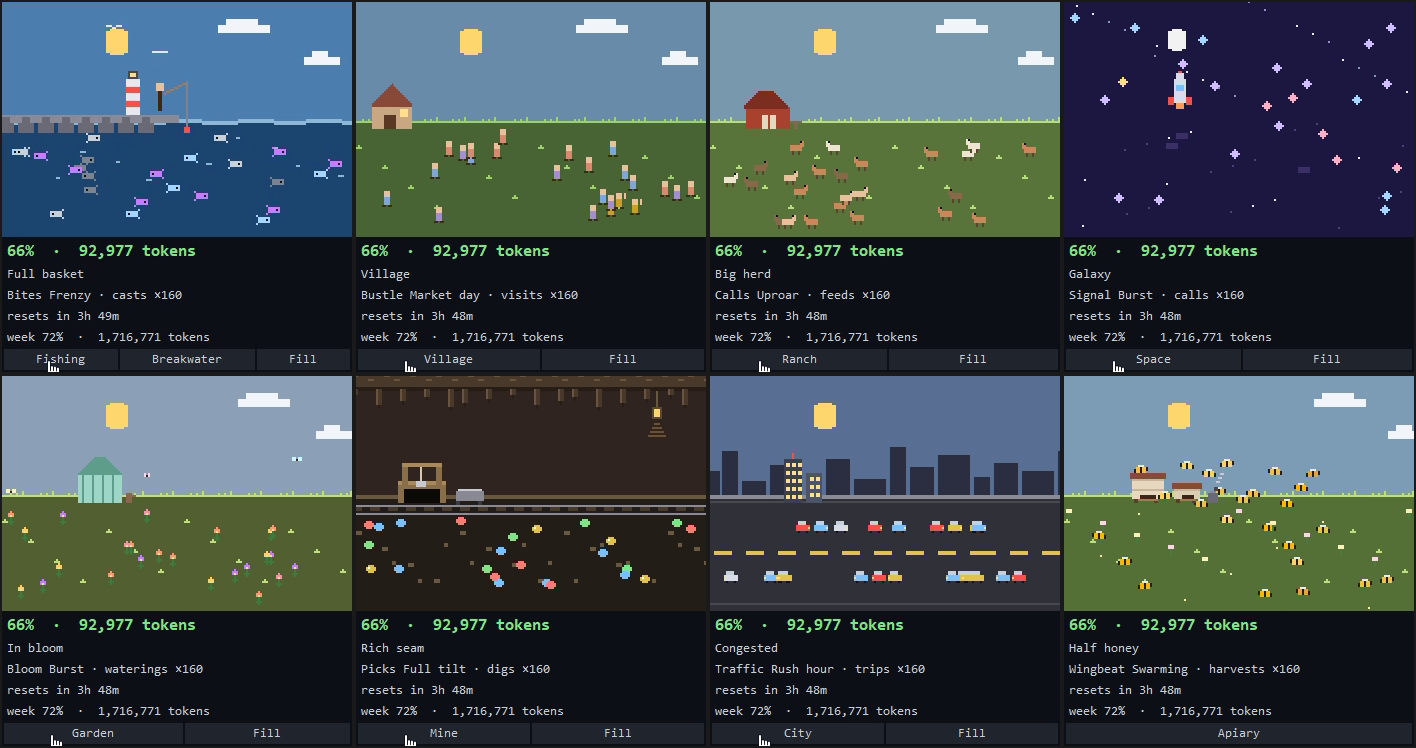
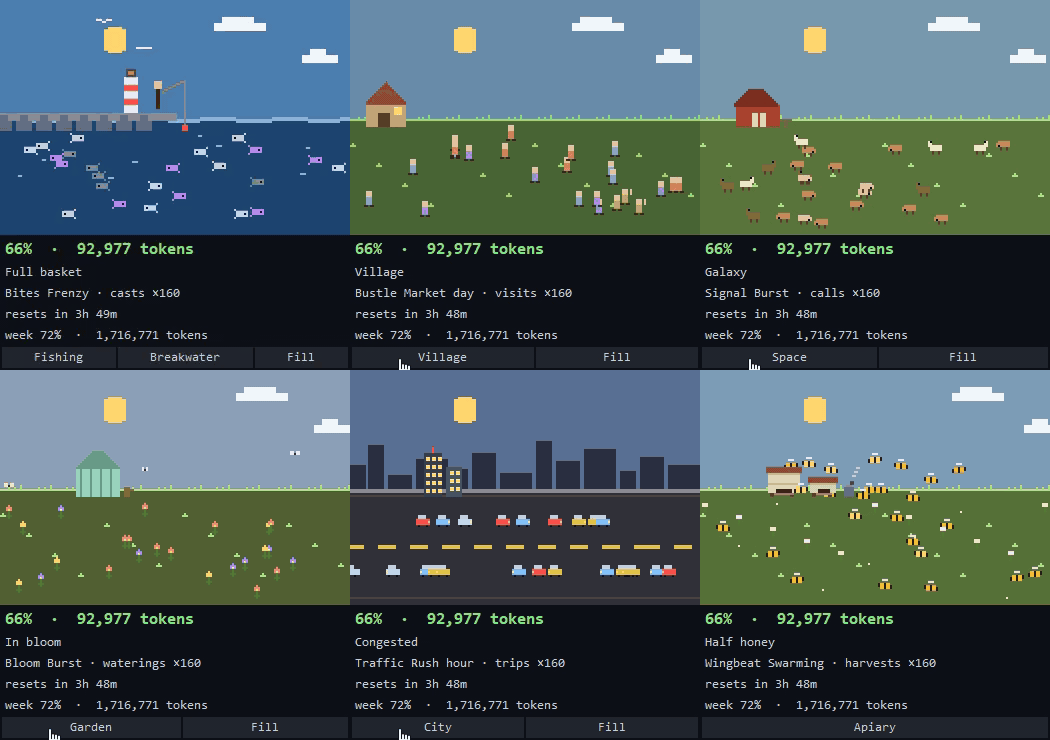
| Theme | Sky | Ground | Landmark | What is counted | When the window drains |
|---|---|---|---|---|---|
| Fishing | Sun | Rolling waves | Boat / pier / breakwater … | Fish | Catch fills a landing net |
| Village | Sun and clouds | Meadow | House | Villagers | New houses go up beside it |
| Ranch | Sun and clouds | Meadow | Barn | Animals | A round corral fills up |
| Space | Starfield and moon | (none — open galaxy) | Rocket | Stars | The rocket's flame grows |
| Garden | Sun and clouds | Meadow | Greenhouse | Flowers | A round flower bed fills up |
| Mine | Rock ceiling and lamp | Sleepers and rails | Mine shaft | Ore | An ore cart fills up |
| City | Scrolling skyline | Two-lane road | Tower | Cars | More buildings light up |
| Apiary | Sun and clouds | Flower meadow | Two hives and a smoker | Bees | (fill only — see below) |
A theme only changes pictures and wording. Every theme shares the same tier
thresholds, so the same usage always maps to the same tier no matter which one you pick.
This is enforced by tests/test_themes.py.
Fishing spots
The fishing theme has its own background selector — a third button appears while the fishing theme is active. Each spot changes the water colour, the sky, the props, and which fish you catch.
| Spot | Setting | Props |
|---|---|---|
| Open sea | Deep blue water | Mast and flag, life ring, passing ship, gulls |
| Pier | Green harbour water | Lamp post, crates, coiled rope, gulls |
| Rocky shore | Cold, deep water | Seaweed, breaking spray, gulls |
| Breakwater | Steel-blue water | Red-striped lighthouse, tetrapods, gulls |
| Island | Tropical turquoise | Palm tree with coconuts, beach ball, shells, gulls |
| Car camping | Lakeside — land on the left | Open tailgate, camping chair, hanging lantern |
| Tent camping | Lakeside — land on the left | Tent, campfire with a pot, hanging lantern |
Display modes
The right button switches between the two.
| Mode | Behaviour |
|---|---|
| Accumulate | The screen fills up as you spend. "How much have I used?" |
| Depletion | Starts full and empties as you spend. "How much is left?" |
The apiary has no depletion mode — a hive is something you fill, not something you empty — so the button hides while that theme is on screen. Your choice is kept, and comes back as soon as you move to another theme.
Language
Everything is in English by default. Add --ko for Korean, on any command:
tokenfishing --ko
tokenfishing-console --ko
That applies to the run you are making. To change the default and have it remembered:
tokenfishing --lang ko
The setting covers every word this tool produces — the window (theme names, tier labels,
buttons, title), the console output, --doctor, the install and uninstall messages, and
the statusline the hook draws inside Claude Code.
Requirements
- Python 3.11 or newer
- tkinter (the standard-library GUI module)
- Claude Code history in
~/.claude/projects/
Check what you have first:
python3 -c "import sys, tkinter; print(sys.version)"
If that prints ModuleNotFoundError: No module named 'tkinter', install it:
| Platform | Command |
|---|---|
| Debian / Ubuntu | sudo apt install python3-tk |
| Fedora / RHEL | sudo dnf install python3-tkinter |
| Arch | sudo pacman -S tk |
| macOS (Homebrew Python) | brew install python-tk |
| macOS (python.org build) | already included |
| Windows | already included |
Installation
With pip
pip3 install tokenfishing
tokenfishing --install-statusline
Two commands land on your PATH: tokenfishing (the window) and tokenfishing-console
(plain text). The second line registers the Claude Code statusline hook — without it the
window falls back to an estimate, so do not skip it.
Prefer an isolated install, or want to run it without installing at all:
pipx install tokenfishing        # isolated from the rest of your Python
uvx tokenfishing                 # run it once, install nothing
To track main instead of the last release, install
git+https://github.com/sozerong/token_fishing.git under any of the commands above.
If your shell answers
command not found: tokenfishingafter apip3 install --user, the user script directory is not on yourPATH. Either addpython3 -m site --user-base'sbin(Windows:Scripts) to it, usepipx, or run the installer script below, which does that part for you.
With the installer script
Use this if you would rather not touch PATH yourself. It picks a Python 3.11+
interpreter, warns you if tkinter is missing (with the exact command for your platform),
installs through pipx if you have it and pip --user otherwise, adds the install
directory to your PATH (in your shell rc file on macOS/Linux, in your user environment
on Windows, and in the current session so it works immediately), and registers the
statusline hook.
git clone https://github.com/sozerong/token_fishing.git
cd token_fishing
bash install.sh
git clone https://github.com/sozerong/token_fishing.git
cd token_fishing
powershell -ExecutionPolicy Bypass -File install.ps1
Do not run the installer with
sudo(or from an elevated PowerShell). Everything this tool touches lives in your own home directory —~/.claude. Installing as root would register the statusline hook in root's home, and the tool would never find your usage data. The script refuses to run as root for exactly this reason.
For hacking on it, install the checkout in place with pip3 install -e ., or just run
python3 -m tokenfishing from the repository root.
Updating
pip3 install --upgrade tokenfishing
tokenfishing --install-statusline
With pipx it is pipx upgrade tokenfishing. If you installed from the git URL, add
--force-reinstall — a git URL carries no version for pip to compare, so --upgrade
alone would decide you are already up to date.
Re-register the hook after every update: it stores an absolute path to the installed
file, and an update that moves the install location would otherwise leave Claude Code
running a file that no longer exists. If you installed with the script, bash install.sh
update (Windows: powershell -File install.ps1 update) pulls, reinstalls and re-registers
in one step.
Uninstalling
tokenfishing --uninstall-statusline
pip3 uninstall tokenfishing        # or: pipx uninstall tokenfishing
The first line unregisters the statusline hook from ~/.claude/settings.json, leaving the
rest of your settings alone. Run it before removing the package — afterwards the
command is gone. Two files are left behind for you to delete if you want them gone:
rm ~/.claude/tokenfishing-config.json ~/.claude/tokenfishing-limits.json
bash install.sh uninstall (Windows: powershell -File install.ps1 uninstall) does all of
that, plus taking the PATH entry back out.
Your Claude Code transcripts under ~/.claude/projects are never touched.
Using it on more than one machine
Install on each machine — the transcripts it reads are local, so there is nothing to sync. See Accuracy for what does and does not match across machines.
Usage
tokenfishing
An always-on-top window opens and refreshes every 10 seconds. Close the window to quit.
Command-line options
tokenfishing [options]

  -d, --detach            run in the background and return the shell immediately
      --ko, --en          language for this run. English by default
      --lang ko|en        change the default language and remember it
      --debug             print diagnostics to stderr
      --doctor            diagnose the usage data sources and exit
      --install-statusline
                          register the Claude Code statusline hook
  -V, --version           print the version
  -h, --help              print this help
Use -d to keep your terminal free. On Windows it re-launches through pythonw so no
console window tags along; on macOS and Linux it detaches into a new session and survives
closing the terminal.
tokenfishing -d
# running in background (PID 18556)
To stop it, close the window or kill the process:
pkill -f "tokenfishing"                       # macOS / Linux
taskkill /F /IM pythonw.exe            # Windows
Console output
For a terminal-only summary:
tokenfishing-console
Accuracy: where the numbers come from
Everything is derived from the JSONL transcripts Claude Code writes under
~/.claude/projects/. Parsing them correctly is the whole point of this project, and the
parser is covered item-by-item (input / output / cache-write / cache-read) by the tests in
tests/, on hand-written fixtures that pin down each of the ways a naive reader gets the
number wrong.
The usage percentage and reset time can come from three places, and the window title always tells you which one is in play:
| Source | Title shows | How exact |
|---|---|---|
| Statusline hook | official·hook |
Exact, as of the last time Claude Code drew its statusline |
| Desktop app history | official·app |
Exact as of the app's last write (roughly every 15 minutes) |
| Neither | estimate (no official numbers) |
Estimated from a learned limit — may drift |
Whichever of the two was captured more recently wins, and the 5-hour and weekly figures
always come from the same capture so they never describe two different moments. If the
number is more than 15 minutes old, the title says how old — official·hook 47분 전 — so a
figure that looks out of date is visibly out of date rather than quietly wrong.
Run tokenfishing --install-statusline once to register the hook. This is the
recommended setup: numbers taken through the Claude Code CLI hook are exact.
Claude Code has only one statusline slot. If something else already owns it — a plugin, your own script — the installer does not take it: it chains, so your existing statusline keeps drawing exactly what it drew before while this tool reads the official numbers off the same input. Uninstalling puts the original command back. If the original ever disappears (plugin paths are per-session), the chain falls back to printing this tool's own line rather than an empty statusline.
Known sources of drift
- Usage from the Claude desktop app, claude.ai on the web, or mobile counts against the
same 5-hour limit but leaves no trace in the local JSONL. If a session was opened by
usage this tool cannot see, the estimated window start — and therefore the reset time —
can be off. Pin it with
TOKENFISHING_RESET_ATwhen that matters. - Estimated values are never presented as certain. They are prefixed with
~and drawn in a different colour.
Across several machines
Transcripts are written by the Claude Code CLI on the machine that ran it, and nothing syncs them. So if you use the same account on a laptop and a desktop, each window shows a different slice — but not of everything:
| Value | Same on every machine? |
|---|---|
| Usage percentage, time until reset, weekly percentage | Yes — reported per account |
| Token count, request count, burn rate, weekly tokens | No — only what that machine did |
| Theme and mode selection | No — the config file is local too |
There is no combined view. Install the statusline hook on every machine: without it a machine falls back to estimating the limit from its own partial token count, which comes out too low.
The percentages agree only as far as each machine's last capture goes. The hook updates when Claude Code draws its statusline, so a machine you have not touched for hours is still holding the figure from back then — correct for the account, but stale. That is why the title prints the age once it passes 15 minutes: when two machines disagree, the one with the fresher capture is the one to believe.
Does it work outside Korea?
Yes. Concretely:
- Time zones. The 5-hour window is computed entirely in UTC from UTC timestamps, so it is correct in any time zone. The weekly figure uses your local midnight.
- Locales and encodings. Transcripts are read as UTF-8 with replacement, and console output is forced to UTF-8, so a non-UTF-8 terminal code page will not crash it.
- Paths.
~/.claudeon macOS, Linux and Windows, plusCLAUDE_CONFIG_DIR, plus the MSIX-redirected location the Windows Store build of the Claude desktop app writes to. - Weekly reset day. Defaults to Tuesday, which is what one observed account used. This
varies per account rather than per country — set
TOKENFISHING_WEEKLY_RESET_DAYif your official screen says a different day.
Configuration
Three settings are toggled in the window itself (theme, fishing spot, display mode) and
stored in ~/.claude/tokenfishing-config.json. Everything else is an environment
variable:
| Variable | Effect |
|---|---|
TOKENFISHING_RESET_AT |
Pin the 5-hour reset time (e.g. 20:17, or an ISO timestamp) when the estimate is off |
TOKENFISHING_WEEKLY_RESET_DAY |
Weekly reset weekday, 0 = Monday … 6 = Sunday. Default 1 (Tuesday) |
CLAUDE_CONFIG_DIR |
Look for Claude Code data somewhere other than ~/.claude |
Troubleshooting
The title says estimate (no official numbers).
Neither source was found. Register the hook with tokenfishing --install-statusline, or
open the Claude desktop app once so it writes its usage history. Then run
tokenfishing --doctor to see exactly which files were found.
The title says official·app and the reset time is marked ~.
Working as intended: the desktop app records percentages but not window boundaries, so the
reset time has to be estimated from that machine's own transcripts. The percentages are
account-wide and will agree with your other machines; the reset time will not. Install the
statusline hook on that machine to make it exact.
Nothing appears / the window opens empty. There is no active 5-hour window — nothing has been sent recently. The window will say so.
The reset time looks wrong. Most likely you used Claude somewhere this tool cannot see (web, mobile, desktop app). Read the reset time off the official usage screen and pin it:
TOKENFISHING_RESET_AT=20:17 tokenfishing
The weekly total looks wrong.
Your account resets on a different weekday. Set TOKENFISHING_WEEKLY_RESET_DAY.
Diagnostics.
tokenfishing --debug
# [tokenfishing] start fill=official official=app pct=64.0 left=270 mode=depletion
What it shows, and what it refuses to show
Included, because it is plain aggregation:
- Tokens used in the current 5-hour window, request count, burn rate
- Per-model breakdown, weekly total, all-time total
- The official usage percentage and reset time, when they are available
Deliberately not included, because it would require guessing:
- Percent-of-limit derived from an estimated limit. A P90-estimated limit was measured at 82.6% against an official screen showing 35% — off by more than double.
- Pace and forecast, which are built on that estimate.
- Dollar cost. It would mean hard-coding a price table that silently goes stale, and subscription users do not pay per token in the first place.
How it works
~/.claude/projects/**/*.jsonl
        │  streamed line by line, never read whole
        ▼
    [ parser ]      normalises one usage record per request
        │           · de-duplicates by requestId (one turn spans several lines)
        │           · takes max(output_tokens) per request (sub-agent files grow)
        │           · includes subagents/agent-*.jsonl (separate files, no double count)
        ▼
   UsageEntry
        │
        ▼
   [ aggregate ]    5-hour rolling window, burn rate, weekly totals
        │
        ▼
    GameState  ──►  [ themes ]  ──►  pixels
The parser is deliberately a thin layer: nothing above it knows what a JSONL line looks
like, and the drawing layer never invents a number — it only translates what aggregate
produced into a metaphor.
The transcript format is an undocumented internal detail with no version field, so the parser ignores unknown fields rather than rejecting records, and keeps a counter of never-before-seen keys as an early warning that the format changed.
Development
git clone https://github.com/sozerong/token_fishing.git
cd token_fishing
python3 -m pytest tests -q
Self-checks for the drawing layers run standalone:
python3 -m tokenfishing.themes # 8 themes, 7 fishing spots
The token tests must keep passing item by item — input, output, cache-write and cache-read each on their own. The two ways of misreading the transcripts push the total in opposite directions, so a test that only compares the sum can pass while both halves are wrong. A screen that looks nice but reports the wrong number is a regression, not a feature.
All test fixtures are hand-written synthetic data. Real transcripts contain real conversations and are never committed.
License
MIT — see LICENSE.
1 maintainer

Metadata
1 maintainer
Release files for tokenfishing 0.10.0
For a detailed explanation of source distributions (sdists) and built distributions (wheels), please see the package formats documentation.
Source distribution (sdist)
| File | Size | Uploaded | |
|---|---|---|---|
| tokenfishing-0.10.0.tar.gz | 101.3 kB | Details |
Built distribution (wheel)
| File | Interpreter | ABI | Platform | Reset |
|---|---|---|---|---|
| tokenfishing-0.10.0-py3-none-any.whl | Python 3 | none | any | Details |
Total release size: 182.2 kB
Release files / tokenfishing-0.10.0.tar.gz
| Download URL | tokenfishing-0.10.0.tar.gz |
|---|---|
| Size | 101.3 kB |
| Tags | Source |
|
SHA-256 checksum How to use checksums |
d09dbc4c35c3d74125ec31b87265e7b9e98b4b903348170d351043c9399bde0d
|
|
BLAKE2b-256 checksum How to use checksums |
64a07d2f759d0c228d1f71f5316d386786b751795d78f33109a58857bdc176c4
|
| Upload date | |
|
Uploaded using Trusted Publishing? What is trusted publishing? |
No |
| Uploaded via |
twine/7.0.0 CPython/3.12.8
|
Release files / tokenfishing-0.10.0-py3-none-any.whl
| Download URL | tokenfishing-0.10.0-py3-none-any.whl |
|---|---|
| Size | 80.9 kB |
| Tags | Python 3 |
|
SHA-256 checksum How to use checksums |
076ea649528c896fca88e0259ea5f49444761049ea66728b16fba3732b7e4067
|
|
BLAKE2b-256 checksum How to use checksums |
083ffc919b515491bd26aefbc9d822f71acd1893cfe562cb0659348a298736ee
|
| Upload date | |
|
Uploaded using Trusted Publishing? What is trusted publishing? |
No |
| Uploaded via |
twine/7.0.0 CPython/3.12.8
|














