
TokenMizer
Your AI forgets why. TokenMizer remembers.
An OpenAI-compatible proxy that builds a knowledge graph of your
session — decisions, files, errors, goals — and replays it when the
context window runs out. Not a summary: a queryable graph that knows
"we switched from MongoDB to PostgreSQL, and here is why."
One line to adopt · works with Claude, GPT, Gemini, Grok, DeepSeek, Mistral, Cohere, Ollama · MIT








Quick start · Claude Code & MCP · Architecture · Benchmarks · Configuration · API & CLI · Contributing
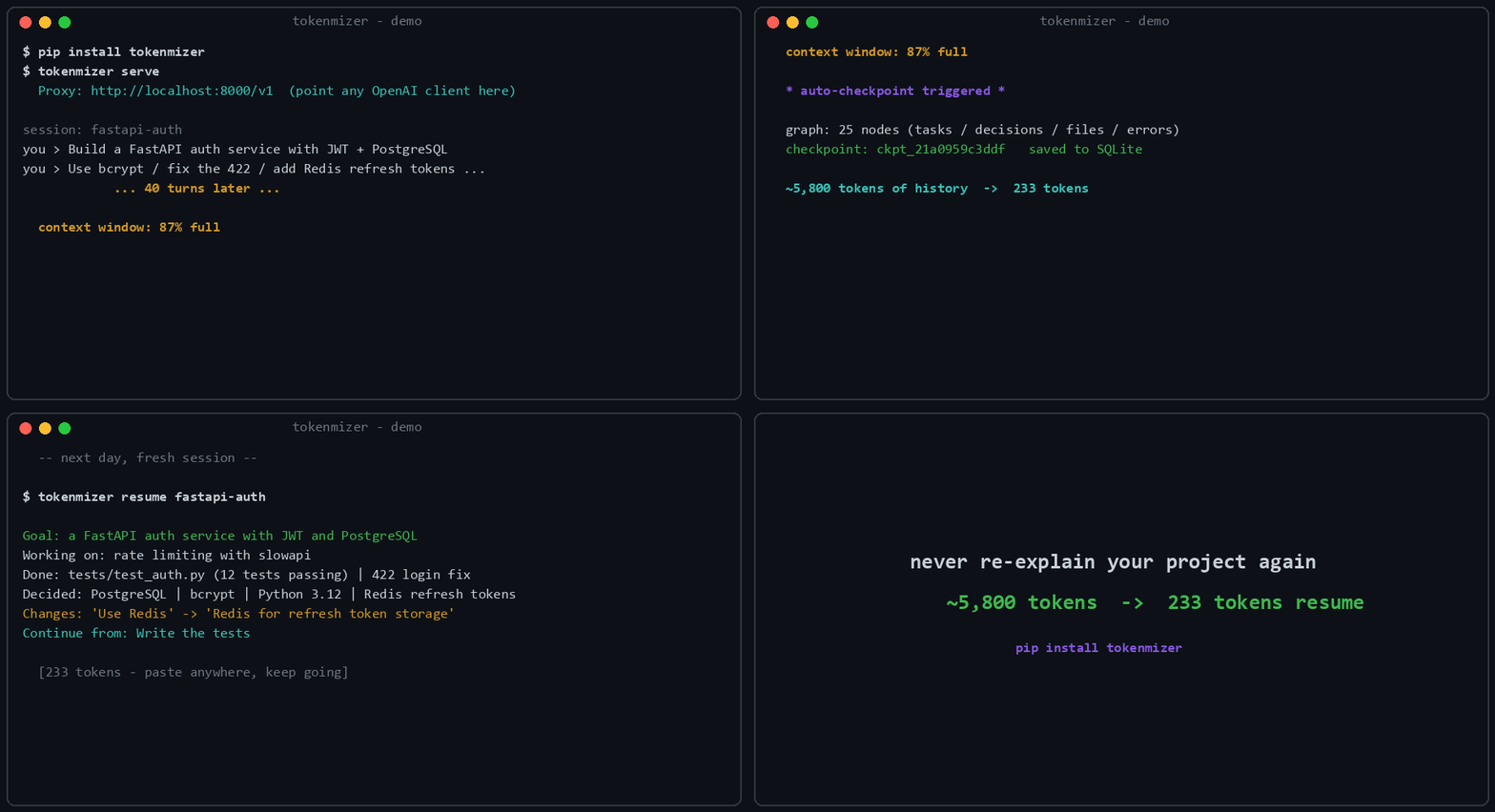
Real run: 25-node graph, checkpoint
ckpt_21a0959c3ddf, 233-token resume. Regenerate with python scripts/gen_demo_gif.py.
The problem
Every AI session has a context limit. When you hit it, the model forgets every decision and every rationale built over hours of work, and you spend the first ten minutes of the next session re-explaining the project.
Summarising the history does not fix this. A summary tells you what was decided; it loses why, and it loses what was rejected — so the model happily re-proposes the thing you moved off three sessions ago.
How it works
TokenMizer is a local proxy between your app and any LLM. Every request passes through a pipeline that builds a live knowledge graph, compresses inputs, caches responses, and checkpoints before the context runs out.
flowchart LR
    App["Your app<br/><sub>OpenAI-compatible client</sub>"]
    subgraph TM["TokenMizer :8000"]
        direction TB
        L0["<b>L0</b> File intelligence"]
        L1["<b>L1</b> Prompt compression"]
        L2["<b>L2</b> Terse-output injection"]
        L4["<b>L4</b> Graph memory<br/><sub>extract → window → inject</sub>"]
        L3["<b>L3</b> Semantic cache"]
        L5["<b>L5</b> Provider prompt cache"]
        L0 --> L1 --> L2 --> L4 --> L3 --> L5
    end
    LLM["Claude · GPT · Gemini<br/>Grok · DeepSeek · Ollama"]
    DB[("SQLite<br/><sub>graph · checkpoints · ownership</sub>")]

    App -->|"POST /v1/chat/completions"| TM
    TM --> LLM
    LLM -.->|response| TM
    TM -.->|"response + savings"| App
    L4 <-->|"per-row, locked"| DB
The graph is not a summary. It is typed nodes and edges — decisions, tasks, files, errors, goals — with a lifecycle, so a decision that gets replaced is marked superseded rather than deleted. The resume block is a filtered projection of it: active decisions, open work, unresolved errors, in a few hundred tokens.
→ Architecture — the request sequence, the data model, and the decision lifecycle.
Quick start
pip install "tokenmizer[anthropic,cache]"
export TOKENMIZER_ANTHROPIC_API_KEY=sk-ant-...
tokenmizer serve
Then change one line in your client:
from openai import OpenAI

client = OpenAI(
    api_key="your-key",
    base_url="http://localhost:8000/v1",   # ← only this changes
)

resp = client.chat.completions.create(
    model="claude-sonnet-4-6",
    messages=[{"role": "user", "content": "Continue where we left off"}],
    extra_body={"session_id": "my-project"},   # ← optional, enables memory
)
Everything else is unchanged: same request shape, same response shape,
plus a tokenmizer block reporting what was saved.
Windows, Ollama, Docker, and the full step-by-step
Windows (PowerShell)
$env:TOKENMIZER_ANTHROPIC_API_KEY = "sk-ant-..."   # this session
setx TOKENMIZER_ANTHROPIC_API_KEY "sk-ant-..."     # persistent
No API key? Ollama runs locally and free:
ollama pull llama3
pip install tokenmizer
# then set `provider: ollama` in tokenmizer.yaml
Docker
docker compose up -d
Full installation notes, every provider's environment variable, and the configuration reference are in docs/configuration.md and docs/deployment.md.
Use it from your tools
Three ways in, depending on where you work. All three talk to the same graph, so a session checkpointed from Claude Code resumes in the CLI.
Claude Code — plugin
/plugin marketplace add Shweta-Mishra-ai/tokenmizer
/plugin install tokenmizer@Shweta-Mishra-ai/tokenmizer
Then, in any session:
/tokenmizer:checkpoint my-project      save the session to graph memory
/tokenmizer:resume my-project          load it back (~300 tokens)
/tokenmizer:analyze data/sales.csv     digest a large file
/tokenmizer:stats                      token savings report
Claude Desktop, Cursor, VS Code, Zed — MCP server
{
  "mcpServers": {
    "tokenmizer": {
      "command": "tokenmizer-mcp",
      "env": { "TOKENMIZER_URL": "http://localhost:8000" }
    }
  }
}
| Client | Where that goes |
|---|---|
| Claude Desktop (macOS) | ~/Library/Application Support/Claude/claude_desktop_config.json |
| Claude Desktop (Windows) | %APPDATA%\Claude\claude_desktop_config.json |
| Claude Code | .mcp.json in the project, or ~/.claude/settings.json |
| Cursor | Settings → MCP → Add server, same JSON |
| VS Code / Zed | their MCP settings, same command and env |
| Codex CLI | ~/.codex/config.toml — TOML, see docs/api.md |
Restart the client afterwards. Keep tokenmizer serve running for the
checkpoint, resume, stats and reasoning tools; file analysis works
without it. If tokenmizer-mcp is not on your PATH, use
"command": "python", "args": ["-m", "tokenmizer.mcp.server"].
Six tools: checkpoint_session, resume_session, get_graph_stats,
get_savings_stats, analyze_file, and why_decision — ask your agent
"why did we pick X?" and it walks the supersession chain with the
reason and evidence for each hop.
Anything else — the proxy
Any OpenAI-compatible client works by pointing base_url at
http://localhost:8000/v1, as in the quick start above. That covers
Continue.dev, Aider, LangChain, LlamaIndex, the OpenAI SDKs in every
language, and curl.
→ API & CLI reference — every endpoint, every command, every MCP tool.
What a resume looks like
Goal: Build FastAPI auth service with JWT + PostgreSQL
Done: Project setup | User model | Login endpoint | Fix 422 | 18 tests passing
In progress: Refresh token rotation
Decided: PostgreSQL (concurrent writes) | bcrypt | Redis for refresh tokens
Changed: ~~React~~ → Next.js (better SEO)
Files: api/auth.py, api/models.py, config.py
Continue: Implement token refresh endpoint
A few hundred tokens in place of the whole conversation. The Changed:
line is the part a summary loses — and asking
GET /api/graph/{session}/why?q=react replays the full chain with the
trigger, the reason and the evidence for each hop.
Measured
python -m benchmarks.eval scores extraction against a labelled corpus
of 14 sessions, 6 of them real transcripts:
| Category | Precision | Recall | F1 |
|---|---|---|---|
| Files | 98% | 100% | 99% |
| Pending tasks | 100% | 90% | 95% |
| Errors | 93% | 96% | 94% |
| Decisions | 90% | 95% | 92% |
| Completed tasks | 92% | 90% | 91% |
| macro F1 | 94% |
Precision is reported, not just recall. An extractor that emits the whole transcript as one node scores 100% recall, which is why recall-only extraction numbers should be distrusted — including our own earlier ones.
Scored separately by origin, because hand-written fixtures are easier than real transcripts and a single headline hides that: synthetic 95%, real 90%. Treat 90% as the number that describes real sessions. n=14 is a small sample and the same person wrote every label.
→ Benchmarks — memory quality against a plain-summary baseline, storage, and how to score your own sessions.
Why TokenMizer and not X?
Why not just use Git history? Git stores what changed, not why you decided to change it. You can't ask Git "what did we decide about auth?" or "why did we switch from MySQL to PostgreSQL?" TokenMizer stores decisions with trigger, reason, and evidence — not diffs.
Why not RAG (retrieval-augmented generation)?
RAG retrieves relevant chunks — it doesn't model decision state. If you switched from bcrypt to Argon2 mid-session, RAG might retrieve both and confuse the model about which is current. TokenMizer tracks decision supersession explicitly: the old decision is marked SUPERSEDED, the new one ACTIVE, and the resume context only includes current state.
Why not a plain summary at the start of each session? Summaries lose structure. You can't query "all superseded decisions" or "what triggered the auth change" from a blob of text. Our benchmark shows graph memory preserves 89% of labelled information against 79% for a summary baseline — +10 points — and unlike a summary, the graph is queryable, editable, and grows incrementally instead of being re-summarized every turn. See Benchmarks.
Why not Mem0 or Zep? Mem0 and Zep store facts ("user prefers Python"). TokenMizer stores decisions with rationale — the full causal chain: what was decided, what replaced it, why, what evidence triggered the change. If you need "remember my name across sessions," use Mem0. If you need "remember that we switched from PostgreSQL to SQLite because of cost, and here's the evidence," use TokenMizer.
Why not just a longer context window? Longer context means higher cost, slower inference, and attention dilution on long histories. TokenMizer compresses a session into a resume block averaging 178 tokens (measured, n=3 — see Benchmarks) by extracting what actually matters, not by summarizing.
What is not implemented
Two settings are accepted by the config and do nothing. They are listed here rather than left to be discovered:
| Setting | Status |
|---|---|
routing.* |
No implementation. savings.routing is always 0. Enabling it logs a warning and changes nothing. |
state_backend: redis |
Accepted and unused. tokenmizer/state/backend.py has no callers; all durable state is SQLite. |
Documentation
| Architecture | Request pipeline, graph data model, decision lifecycle, file intelligence |
| Configuration | Every setting, environment variables, precedence, providers |
| API & CLI | Endpoints, commands, MCP tools, Claude Code integration |
| Deployment | Docker, multiple workers, durability, session isolation, security |
| Benchmarks | Extraction quality, memory quality, storage, running your own |
| Comparisons | Mem0, Zep, longer context windows, running alongside other token tools, and the roadmap |
| Contributing | Setup, layer rules, and how to improve extraction |
| Testing | How to run the suite, the coverage floor, and known limits of the local audit scripts |
| Changelog · Security | Release history and how to report a vulnerability |
Contributing
git clone https://github.com/Shweta-Mishra-ai/tokenmizer
cd tokenmizer
pip install -e ".[dev]"
pytest tests/ -q && ruff check tokenmizer/     # 600 tests, must stay green
The most valuable contribution is a session where extraction got it
wrong. The eval corpus is 14 sessions and the same person wrote every
label in it — that is the honest ceiling on what the numbers above can
tell you about your workload, and the only way past it is transcripts
nobody here wrote. Label a few of your own in the format documented in
benchmarks/eval/corpus.py and open a PR,
or open an issue
with the turn that was missed. Redact freely — the shape of the prose is
what matters, not its content.
CONTRIBUTING.md covers setup, the layer rules, and how to run the eval harness.
Contributors
Thanks to everyone who has sent a fix upstream:
- @0xfroOty — negated-decision handling in the decision tracker (#22),
OutputTrimmerlevel alignment (#25), streaming cache-hit analytics (#31) - @pollychen-lab — graph node IDs derived from stored (truncated) labels (#21), semantic-opposite decision detection (#26)
- @floze-the-genius — dashboard stats authentication fix (#35)
Support
If TokenMizer is useful to you, please give it a ⭐ star. It takes a second and it genuinely helps.
Sponsorship is open too, if you would like to support the work. Entirely optional.
License
MIT © Shweta Mishra
1 maintainer

Download files
Download the file for your platform. If you're not sure which to choose, learn more about installing packages.
Source Distribution
Built Distribution
Filter files by name, interpreter, ABI, and platform.
If you're not sure about the file name format, learn more about wheel file names.
Copy a direct link to the current filters
File details
Details for the file tokenmizer-0.5.1.tar.gz.
File metadata
- Download URL: tokenmizer-0.5.1.tar.gz
- Upload date:
- Size: 374.5 kB
- Tags: Source
- Uploaded using Trusted Publishing? Yes
- Uploaded via: twine/7.0.0 CPython/3.13.14
File hashes
| Algorithm | Hash digest | |
|---|---|---|
| SHA256 |
2c5406db12717690f0e72ee9d1a059e25a7014f09083a35ca4e46b211c85acef
|
|
| MD5 |
eef3ee472f4f57d6cef52b2a22acbe2d
|
|
| BLAKE2b-256 |
e878f75a87ff736f2e846249ea78a8f072bf01847d8570af568da8d15955ee3c
|
Provenance
The following attestation bundles were made for tokenmizer-0.5.1.tar.gz:
Publisher:
release.yml on Shweta-Mishra-ai/tokenmizer
-
Statement:
-
Statement type:
https://in-toto.io/Statement/v1 -
Predicate type:
https://docs.pypi.org/attestations/publish/v1 -
Subject name:
tokenmizer-0.5.1.tar.gz -
Subject digest:
2c5406db12717690f0e72ee9d1a059e25a7014f09083a35ca4e46b211c85acef - Sigstore transparency entry: 2370454280
- Sigstore integration time:
-
Permalink:
Shweta-Mishra-ai/tokenmizer@4b518ba9a1d28ad274427063b44578af20da78ee -
Branch / Tag:
refs/heads/main - Owner: https://github.com/Shweta-Mishra-ai
-
Access:
public
-
Token Issuer:
https://token.actions.githubusercontent.com -
Runner Environment:
github-hosted -
Publication workflow:
release.yml@4b518ba9a1d28ad274427063b44578af20da78ee -
Trigger Event:
workflow_dispatch
-
Statement type:
File details
Details for the file tokenmizer-0.5.1-py3-none-any.whl.
File metadata
- Download URL: tokenmizer-0.5.1-py3-none-any.whl
- Upload date:
- Size: 219.2 kB
- Tags: Python 3
- Uploaded using Trusted Publishing? Yes
- Uploaded via: twine/7.0.0 CPython/3.13.14
File hashes
| Algorithm | Hash digest | |
|---|---|---|
| SHA256 |
b247c9eefb41ef4e2db065bc44078f2a754e016274040041f7ba380b698cab64
|
|
| MD5 |
6daefdc2af6dee4cf16e1df0d5b0bdf2
|
|
| BLAKE2b-256 |
b40cb29145d448416e8067df4c05e9ad1d0a79467d4107122278abb1360026b0
|
Provenance
The following attestation bundles were made for tokenmizer-0.5.1-py3-none-any.whl:
Publisher:
release.yml on Shweta-Mishra-ai/tokenmizer
-
Statement:
-
Statement type:
https://in-toto.io/Statement/v1 -
Predicate type:
https://docs.pypi.org/attestations/publish/v1 -
Subject name:
tokenmizer-0.5.1-py3-none-any.whl -
Subject digest:
b247c9eefb41ef4e2db065bc44078f2a754e016274040041f7ba380b698cab64 - Sigstore transparency entry: 2370454302
- Sigstore integration time:
-
Permalink:
Shweta-Mishra-ai/tokenmizer@4b518ba9a1d28ad274427063b44578af20da78ee -
Branch / Tag:
refs/heads/main - Owner: https://github.com/Shweta-Mishra-ai
-
Access:
public
-
Token Issuer:
https://token.actions.githubusercontent.com -
Runner Environment:
github-hosted -
Publication workflow:
release.yml@4b518ba9a1d28ad274427063b44578af20da78ee -
Trigger Event:
workflow_dispatch
-
Statement type:







