

TokenRace — Local LLM Speed Test





English · Italiano
An LLM inference speed test: compare local inference servers (Ollama, LM Studio, Rapid-MLX, oMLX, llama.cpp, vLLM and more) on your own hardware, with the exact same measuring code for all of them.
Speed depends on the combination of model, inference server and hardware: there is no universal winner, and numbers measured elsewhere, with other rules, rarely apply to your machine. Measure first, then choose.
A small Streamlit app: pick a server and a model, start the test and watch TTFT, tokens per second, total time and RAM live, with a summary, a chart and CSV export.
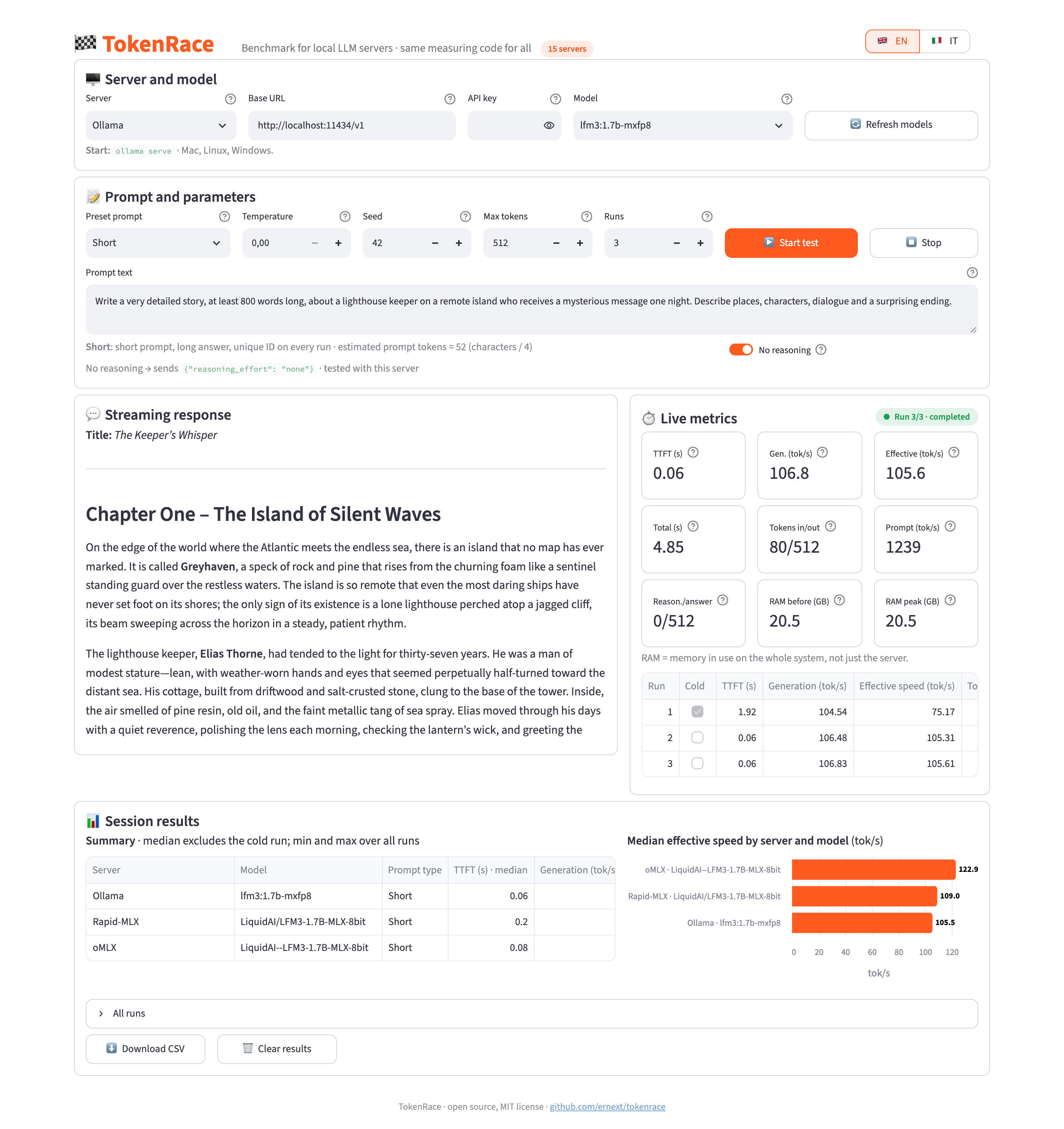
LFM3 1.7B at 8-bit on Rapid-MLX and oMLX (same MLX weights) and on Ollama (mxfp8), "Short" prompt, no reasoning, 3 runs on one Mac. A single example, not a ranking.
Features
- Same method for every server: streaming
POST /chat/completions, timed on the client withtime.perf_counter(), never with the servers' own stats. - Three preset tests: Short (long answer), Long (≈8,000 tokens of context) and Cache (identical prompt on every run).
- Streaming response and live metrics.
- Reasoning models timed correctly, with reasoning and answer tokens shown separately, plus a No reasoning switch.
- First run marked "cold" and excluded from the median.
- Summary with median, min and max, a chart per server and model, CSV export.
- English and Italian interface; servers, defaults and texts in easy-to-edit TOML files.
- Fully local: no database, accounts or telemetry.
Example results
LFM3 1.7B at 8-bit on an Apple M5 Pro (24 GB), "Short" prompt, 512 tokens, median of 3 warm runs. Effective speed in tok/s.
| Server | IT, reasoning on | IT, no reasoning | EN, reasoning on | EN, no reasoning |
|---|---|---|---|---|
| oMLX | 131.8 | 129.1 | 123.1 | 117.2 |
| Rapid-MLX | 128.8 | 126.8 | 127.0 | 103.2 |
| Ollama (mxfp8) | 118.0 | 113.9 | 101.1 | 104.4 |
- oMLX and Rapid-MLX use the same MLX weights (
LiquidAI/LFM3-1.7B-MLX-8bit). - With reasoning on, oMLX and Ollama spend all 512 tokens reasoning, while Rapid-MLX does not reason with this model: those columns are not a like-for-like comparison.
- The same test can vary by 10–20% from one minute to the next on the same Mac: treat small gaps as a tie and run your own tests.
Got different numbers on your hardware? Share your results.
Requirements
- Python 3.11 or newer
- At least one local OpenAI-compatible LLM server, already running
Built for Apple Silicon Macs, works on Linux and Windows too.
Install
The quickest way needs only uv (macOS/Linux: curl -LsSf https://astral.sh/uv/install.sh | sh):
uvx tokenrace
The app opens at http://localhost:8501. Options: uvx tokenrace --port 8600 --lang it.
Alternatively, from the source code:
git clone https://github.com/ernext/tokenrace.git
cd tokenrace
python3 -m venv .venv
source .venv/bin/activate        # Windows: .venv\Scripts\activate
pip install -r requirements.txt
Run
If you installed from the source code:
streamlit run app.py
Then open http://localhost:8501. The interface opens in English; switch language with the selector at the top right, or open http://localhost:8501/?lang=it.
Supported servers
TokenRace never installs or starts servers: start them yourself. They all speak the same OpenAI-compatible API, and the app shows the start command of the selected server.
If your server is not listed but is OpenAI-compatible, pick any entry and change the base URL, or add it to config/servers.toml (see below).
| Server | Default URL | Start | Notes |
|---|---|---|---|
 Ollama |
http://localhost:11434/v1 |
ollama serve |
Mac, Linux, Windows. |
 LM Studio |
http://localhost:1234/v1 |
lms server start && lms load <model> |
Mac, Linux, Windows. |
 Rapid-MLX |
http://localhost:7659/v1 |
rapid-mlx serve <model> --port 8000 |
Mac only. The Rapid-MLX Desktop app uses port 7659 and requires the API key; the CLI uses 8000. |
 oMLX |
http://localhost:8000/v1 |
— | Mac only. Start it from the oMLX app: it uses port 8000 and requires the API key set in the app. |
 mlx_lm.server |
http://localhost:8080/v1 |
mlx_lm.server --model <model> --port 8080 |
Mac only. The reference MLX server, with no extra optimizations. |
 llama.cpp (llama-server) |
http://localhost:8080/v1 |
llama-server -m <file.gguf> --port 8080 |
Mac, Linux, Windows. The engine used by Ollama and LM Studio. |
 vLLM |
http://localhost:8000/v1 |
vllm serve <model> |
Linux with NVIDIA/AMD GPU. The most widely used in production. |
 SGLang |
http://localhost:30000/v1 |
python -m sglang.launch_server --model-path <model> |
Linux with NVIDIA/AMD GPU. |
 Lemonade |
http://localhost:13305/api/v1 |
lemonade-server serve |
Windows/Linux, optimized for AMD Ryzen AI. Older versions use port 8000. |
 Docker Model Runner |
http://localhost:12434/engines/v1 |
docker desktop enable model-runner --tcp 12434 |
Mac, Linux, Windows. Host-side TCP access must be enabled. |
 Unsloth Studio |
http://localhost:8888/v1 |
unsloth run --model <model> |
Port 8888 comes from examples: «unsloth run» prints the real one at startup. Needs the sk-unsloth-… API key (Studio → Settings → API). |
 LocalAI |
http://localhost:8080/v1 |
local-ai run <model> |
Mac, Linux, Windows. |
 Jan |
http://localhost:1337/v1 |
— | Mac, Linux, Windows. In Jan: Settings → Local API Server → Start. Requires the API key set in Jan. |
 KoboldCpp |
http://localhost:5001/v1 |
koboldcpp --model <file.gguf> |
Mac, Linux, Windows. |
 text-generation-webui |
http://localhost:5000/v1 |
— | Mac, Linux, Windows. Start it with --api. On Mac port 5000 is taken by AirPlay Receiver: use --api-port 5005 and change the URL. |
Notes:
- Several servers share port 8000 or 8080: run one at a time, or change the port with
--portand update the URL in the app. - The API key field is optional: it is needed for Rapid-MLX Desktop, oMLX, Jan, Unsloth Studio or vLLM started with
--api-key. It is never saved or exported.
Metrics
- TTFT: time from sending the request to the first non-empty chunk (content or reasoning).
- Generation (tok/s): (output tokens − 1) / (last token − first token).
- Effective speed (tok/s): output tokens / (last token − request sent).
- Prompt processing (estimate): input tokens / TTFT.
- RAM: memory in use on the whole system, sampled every 0.5 s (value before the test and peak).
Tokens come from the usage field. If the server does not send it, chunks are counted and an "estimated count" warning appears.
Presets
- Short: short prompt, long answer.
- Long: about 8,000 tokens of context, short answer.
- Cache: the same long prompt, identical on every run.
In Short and Long every run starts with a unique ID, so prompt caching does not skew the result. Prompts exist in both languages: compare only runs made with the same prompt language (the CSV records it).
The No reasoning switch sends a different parameter depending on the server (✅ = tested):
- Ollama:
reasoning_effort: "none"✅ - LM Studio:
reasoning_effort: "none"pluschat_template_kwargs✅ - oMLX:
chat_template_kwargs: {"enable_thinking": false}✅ - text-generation-webui:
enable_thinking: false - all others (llama.cpp, MLX, vLLM, SGLang…):
chat_template_kwargs: {"enable_thinking": false}
Some models reason anyway: the app shows a warning in that case.
Project structure
app.py               Streamlit interface
tokenrace/
  bench.py           measuring logic (streaming, timing, RAM, token counts), no Streamlit
  cli.py             the `tokenrace` command
  config.py          reads the TOML files
  i18n.py            translations
config/
  servers.toml       preconfigured servers
  defaults.toml      default parameters, timeouts, languages, colours
  prompts.toml       preset prompt texts, per language
locales/
  en.toml, it.toml   interface texts
assets/style.css     visual style
assets/logo/         mascot, icon and favicon (SVG + PNG)
tools/make_logo.py   regenerates the logo: python tools/make_logo.py --png
Add a server: add a [[server]] block to config/servers.toml and its note under [server_notes] in each locales/*.toml file.
Add a language: copy locales/en.toml to locales/<code>.toml, translate it, add the prompt texts in config/prompts.toml and the code to languages in config/defaults.toml.
Limitations
- RAM is the whole system's, not just the server's.
- It measures speed, not the quality of the answers.
- Prompt processing speed is an estimate (input tokens / TTFT) and includes network latency and any model loading.
- Default ports for Unsloth Studio and text-generation-webui come from examples in their docs: check them when you start the server.
Contributing
Issues and pull requests are welcome, especially:
- confirmations or fixes for ports and "no reasoning" parameters of servers not yet tested;
- new OpenAI-compatible servers;
- new translations.
If TokenRace is useful to you, a ⭐ on GitHub is always appreciated.
License
MIT. Server logos belong to their respective projects and are shown only to identify them.
1 maintainer

Metadata
1 maintainer
Release files for tokenrace 1.0.0
For a detailed explanation of source distributions (sdists) and built distributions (wheels), please see the package formats documentation.
Source distribution (sdist)
| File | Size | Uploaded | Provenance | Actions |
|---|---|---|---|---|
| tokenrace-1.0.0.tar.gz | 206.4 kB | Without provenance | Details for tokenrace-1.0.0.tar.gz |
Built distribution (wheel)
| File | Interpreter | ABI | Platform | Actions Reset |
|---|---|---|---|---|
| tokenrace-1.0.0-py3-none-any.whl | Python 3 | none | any | Details for tokenrace-1.0.0-py3-none-any.whl |
Total release size: 410.7 kB
Release files / tokenrace-1.0.0.tar.gz
| Download URL | tokenrace-1.0.0.tar.gz |
|---|---|
| Size | 206.4 kB |
| Tags | Source |
|
SHA-256 checksum How to use checksums |
0df1365ed9384e1ef0d69fe69e4d4ce99f88ae3df8044117cdcb180d069fe518
|
|
BLAKE2b-256 checksum How to use checksums |
4a346ad162df8ff0acec114a80251c0b7717bd38bbe68b68e69c9014b6bc3b89
|
| Upload date | |
|
Uploaded using Trusted Publishing? What is trusted publishing? |
Yes |
| Uploaded via |
uv/0.13.7 {"installer":{"name":"uv","version":"0.13.7","subcommand":["publish"]},"python":null,"implementation":{"name":null,"version":null},"distro":{"name":"Ubuntu","version":"24.04","id":"noble","libc":null},"system":{"name":null,"release":null},"cpu":null,"openssl_version":null,"setuptools_version":null,"rustc_version":null,"ci":true}
|
Release files / tokenrace-1.0.0-py3-none-any.whl
| Download URL | tokenrace-1.0.0-py3-none-any.whl |
|---|---|
| Size | 204.3 kB |
| Tags | Python 3 |
|
SHA-256 checksum How to use checksums |
3e110caaf112b2b14477ac561c3141515603ff991bb2a45ca6667e3179f49a44
|
|
BLAKE2b-256 checksum How to use checksums |
19ad7eaf0e8abc8093b41b8f21bf6b7028a5f9a59f3ebbb03d772106d7ba2d52
|
| Upload date | |
|
Uploaded using Trusted Publishing? What is trusted publishing? |
Yes |
| Uploaded via |
uv/0.13.7 {"installer":{"name":"uv","version":"0.13.7","subcommand":["publish"]},"python":null,"implementation":{"name":null,"version":null},"distro":{"name":"Ubuntu","version":"24.04","id":"noble","libc":null},"system":{"name":null,"release":null},"cpu":null,"openssl_version":null,"setuptools_version":null,"rustc_version":null,"ci":true}
|
Security for tokenrace 1.0.0
Provenance
Provenance describes where a file came from. On PyPI, provenance is shared via attestations, which provide a verifiable record of the build or publishing details. View details, limitations and caveats.
No provenance found
None of the files in this release were uploaded with provenance metadata.
A note on package security
PyPI is a repository for distributing packages, not a service for auditing them. While third-party security researchers and our staff do their best to detect and remove malicious packages, PyPI cannot guarantee the quality, security or suitability of any given package.
To learn more about protecting yourself from malicious actors, visit our package security documentation.














