
Tokenshark
Open, inspect, edit, and train how open-weight language and image models compute in the browser, from pure Python.
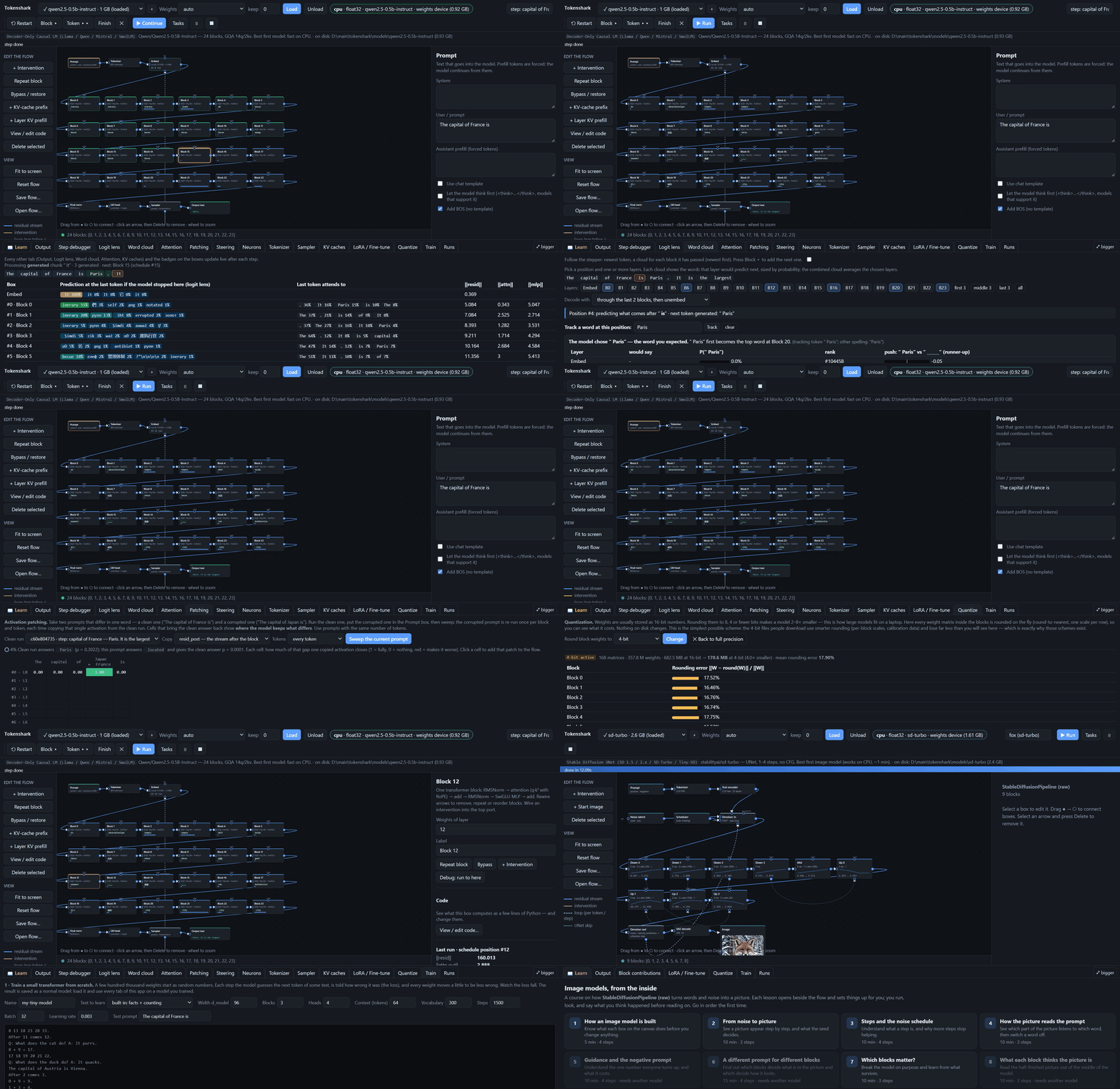
Live Demo: qwen2.5-0.5b-instruct Step-by-Step, Word Clouds & Mechanistic Interpretability
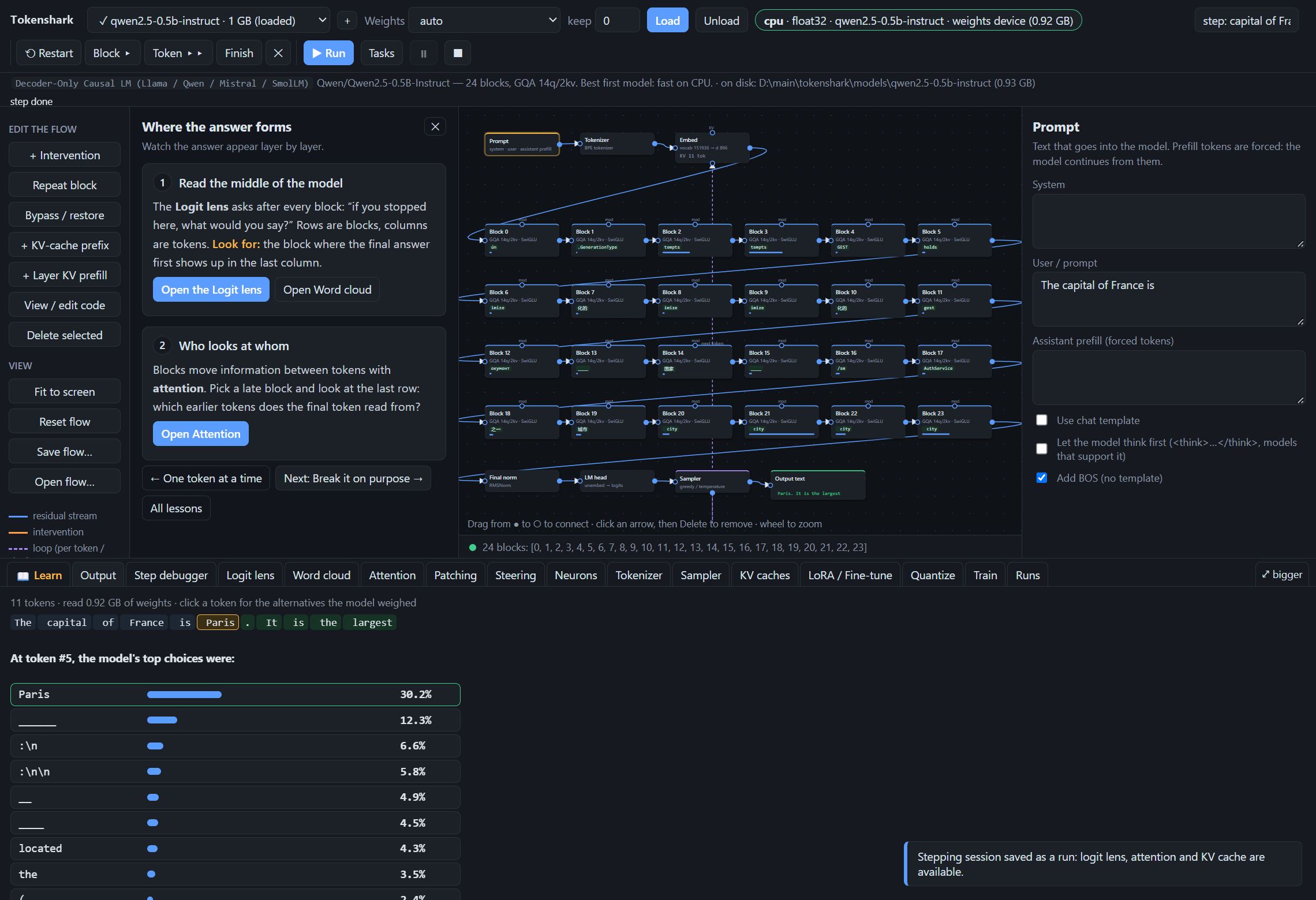
1. Step Debugger & Token-by-Token Generation
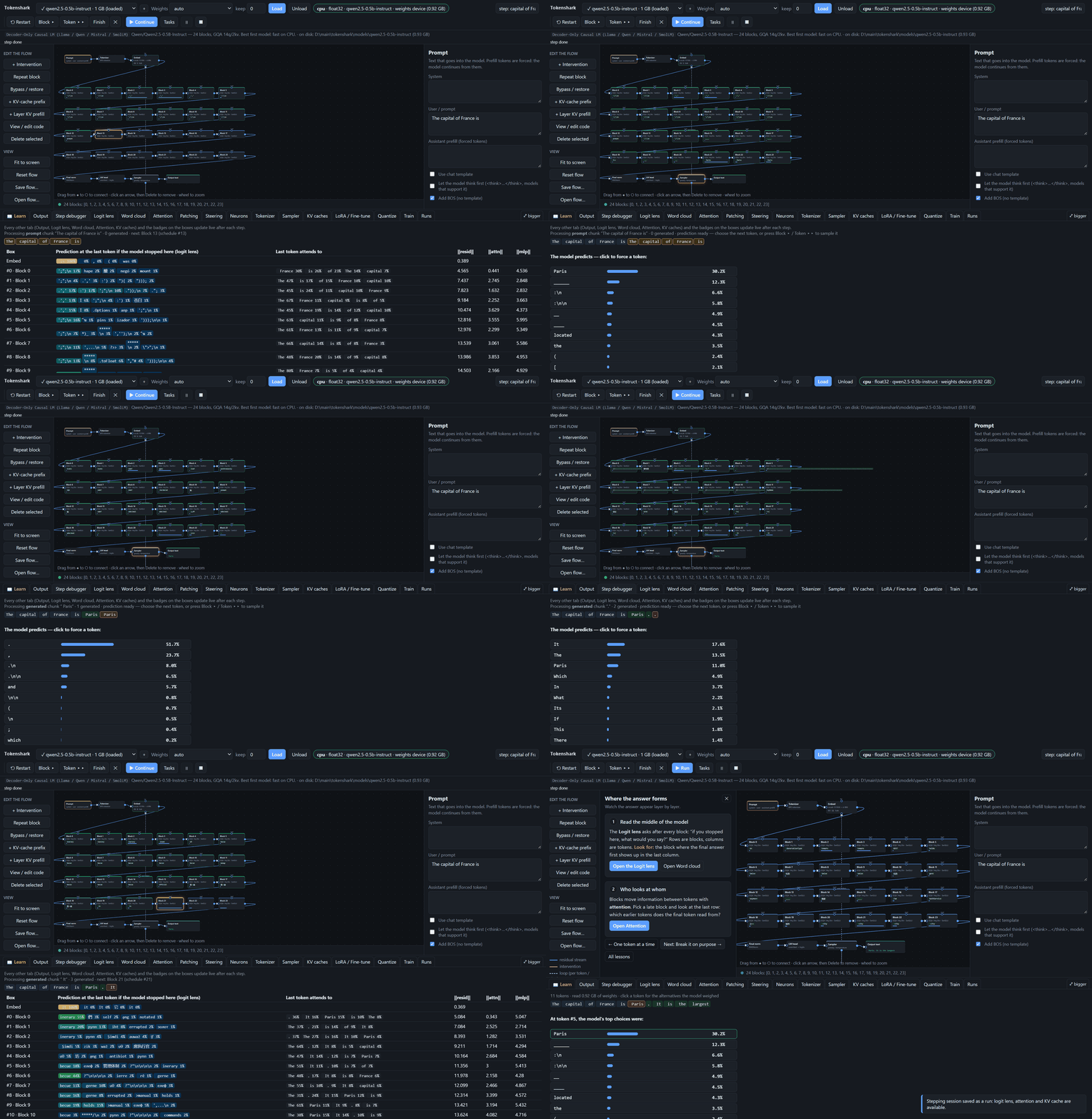
Load qwen2.5-0.5b-instruct (24 blocks, GQA 14q/2kv, SwiGLU) and press 🐞 Step:
- Block ▸ (
F10) runs one box at a time; Token ▸▸ (F11) runs to the next token prediction; right-click any block → Debug: run to here. - The box about to run is highlighted in gold on the flow graph (
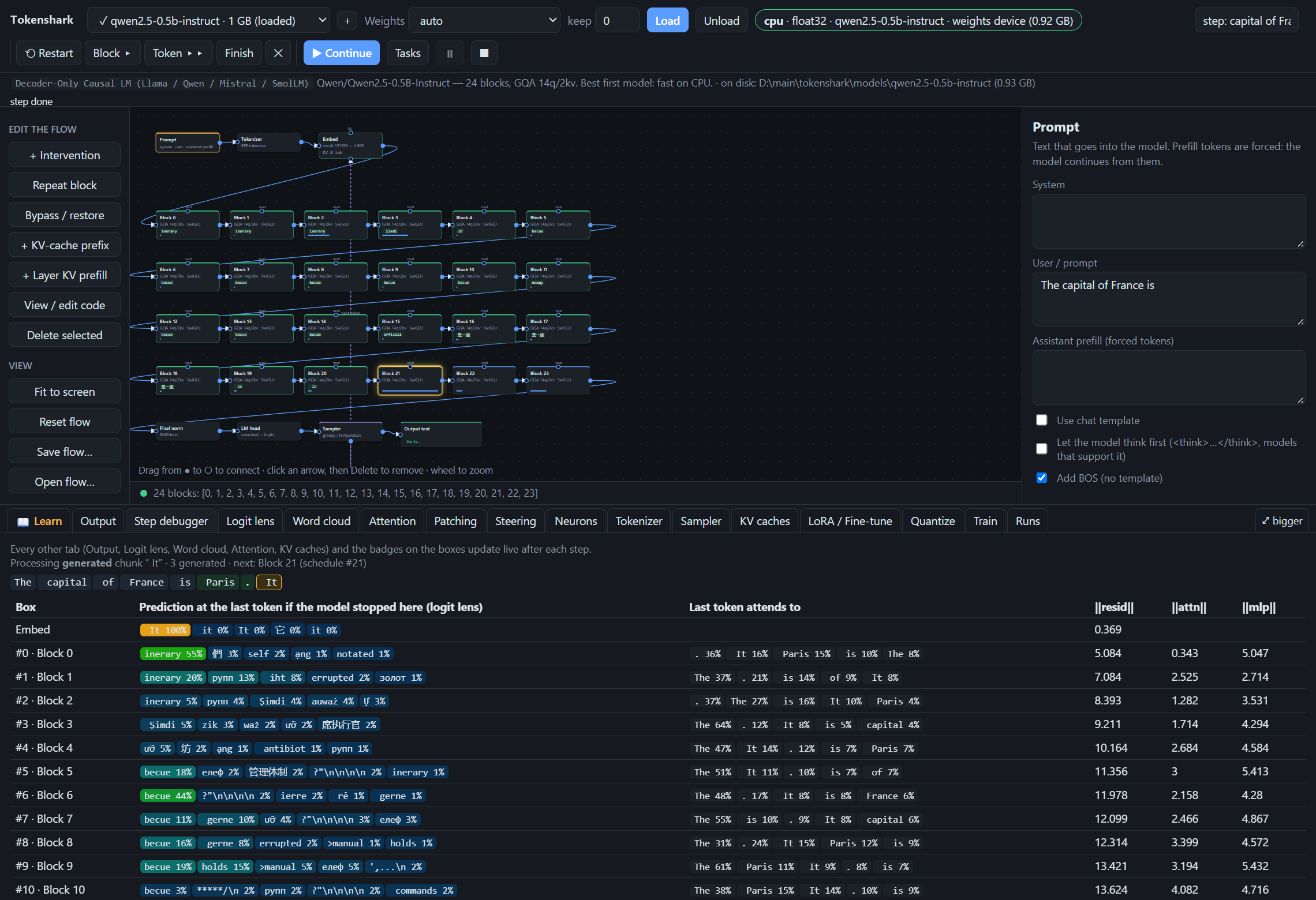
Block 21below), while already-executed blocks are outlined in green with live logit-lens badges. - Generated tokens (
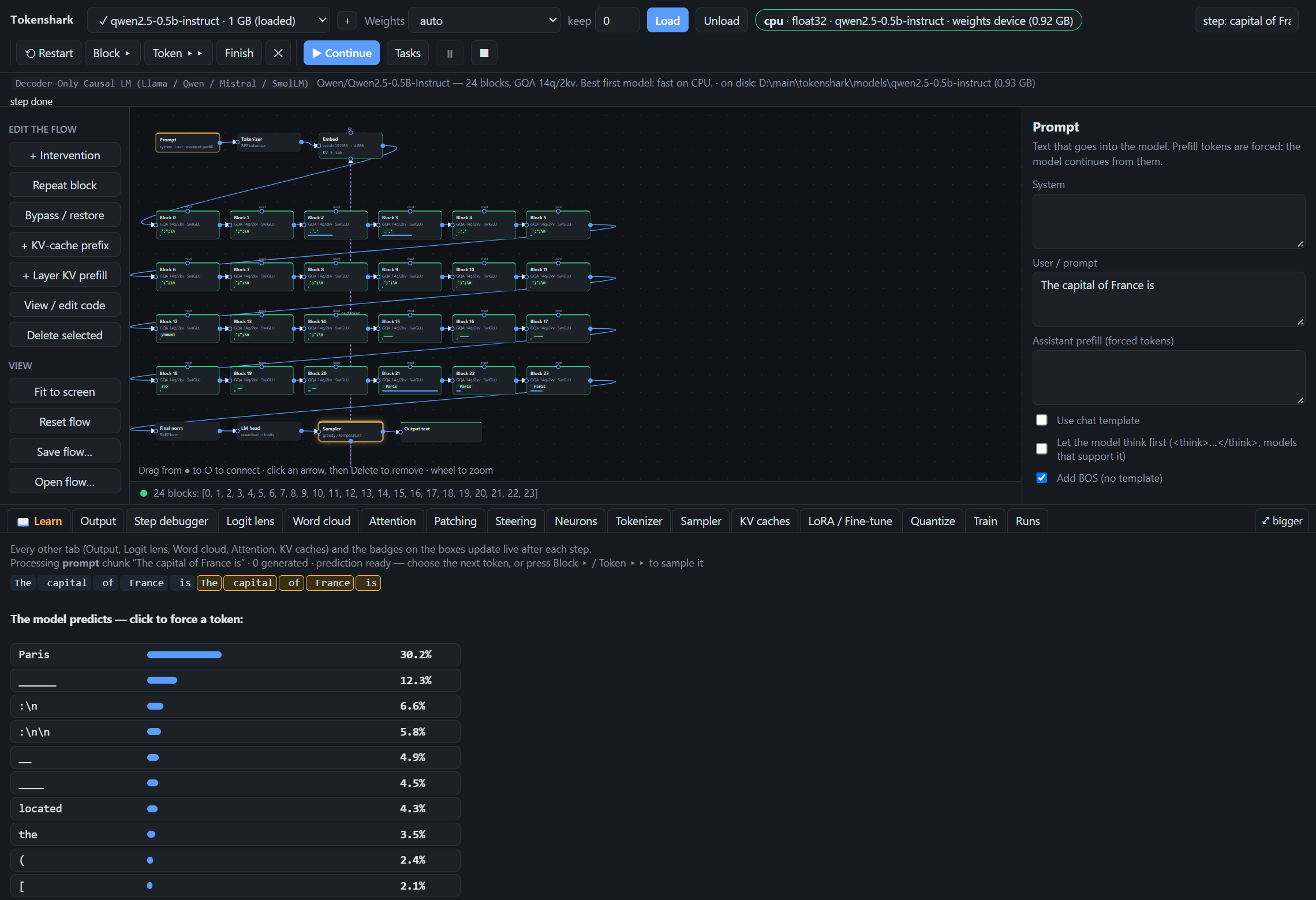
Paris,.,It,is,the,largest) appear in green alongside the prompt tokens, with a live per-block trace showing what each layer would predict if the model stopped there, which earlier tokens the last token attends to, and‖resid‖,‖attn‖, and‖mlp‖norms. - At any token boundary, click any of the top-10 next-token choices to force that token and fork the generation.
Mid-Token Block Stepping (Block 21 active) |
Token Boundary Prediction (Paris at 30.2%) |
|---|---|
 |
 |
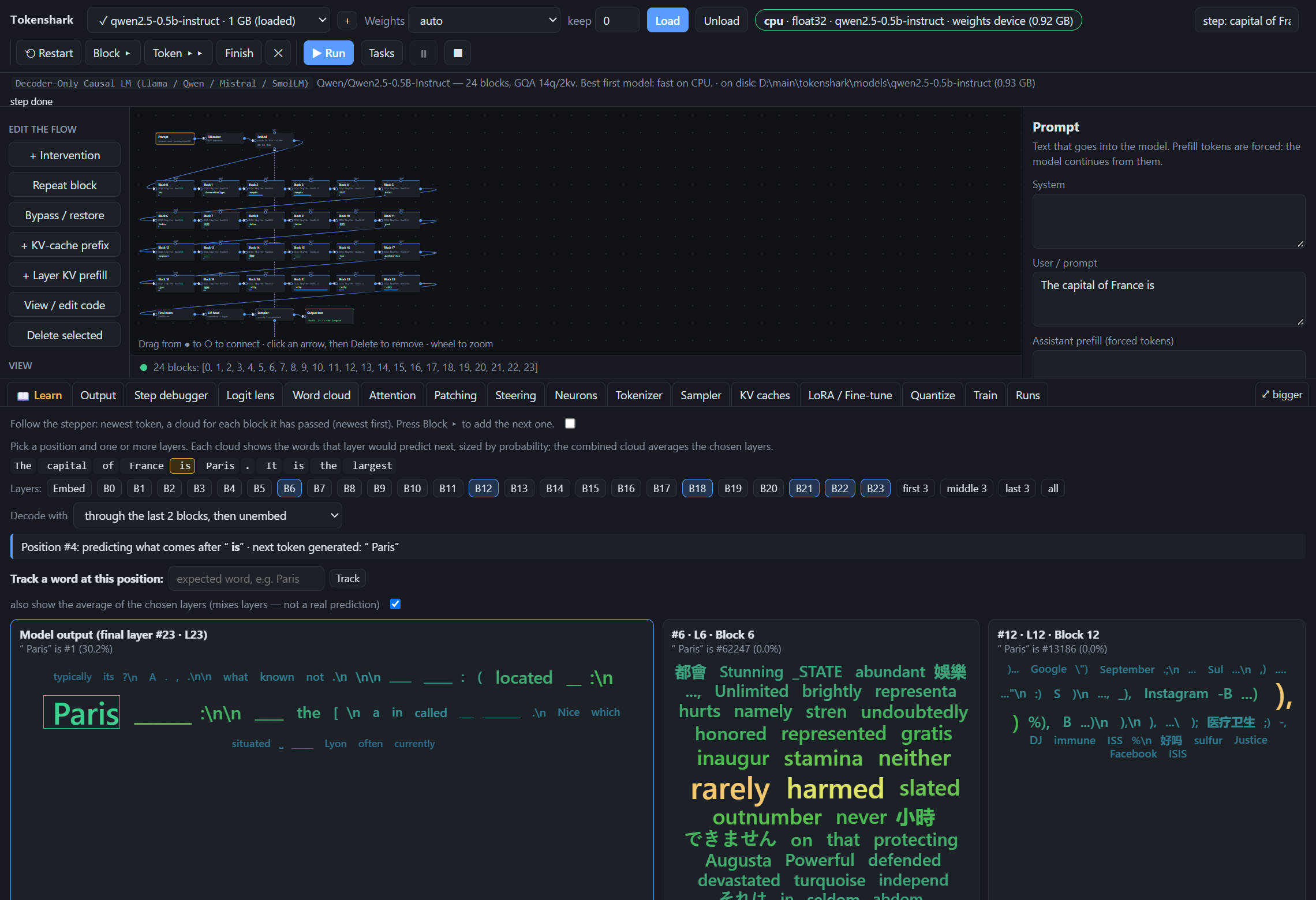
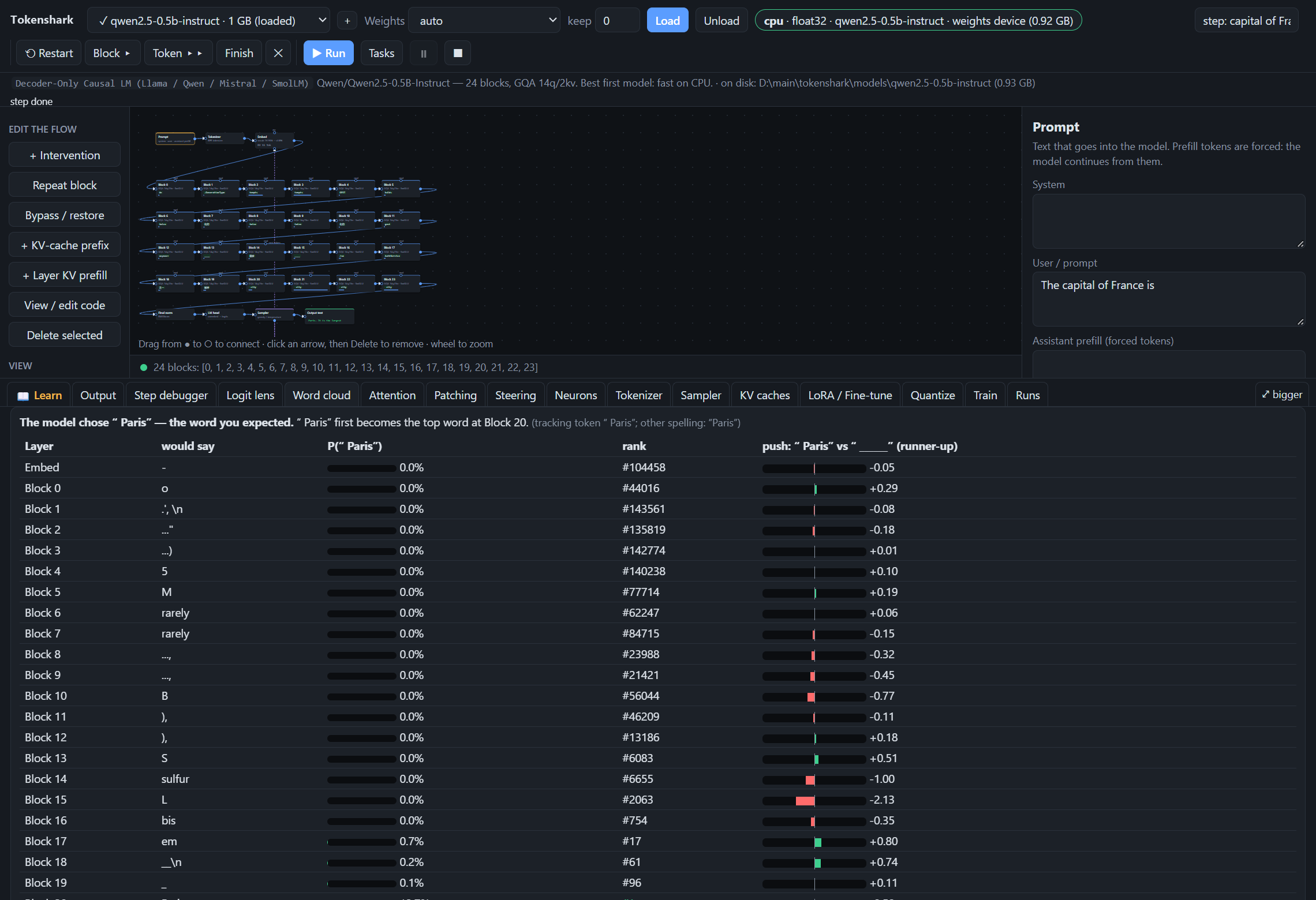
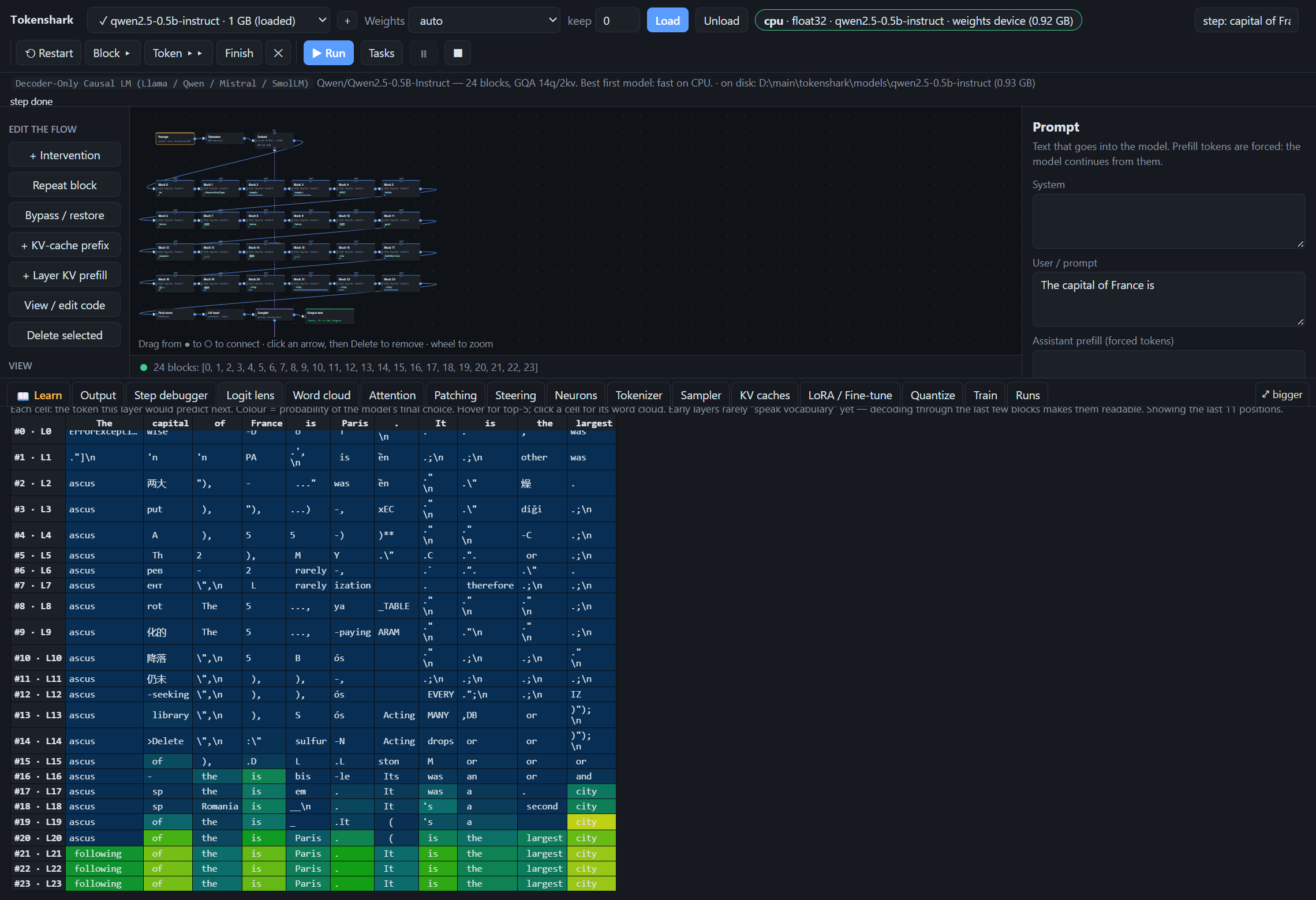
2. Word Clouds & Direct Logit Attribution ("Through the Last 2 Blocks")
Plain logit lens (final norm + unembedding applied directly to an early layer) reads early layers poorly because middle blocks do not yet speak the final output vocabulary space. Setting Decode with → through the last 2 blocks, then unembed routes each chosen layer's residual stream through the last 2 transformer blocks before unembedding:
| Word Clouds Decoded Through Last 2 Blocks | Word Tracking & Direct Logit Attribution ("Paris") |
|---|---|
 |
 |
| Logit Lens Grid (Decoded Through Last 2 Blocks, Layers 11–23) | Output Tokens & Alternatives |
|---|---|
 |
 |
Core Features
Flow Editor & Raw PyTorch Engine
- Flow editor. Each model is drawn as boxes and arrows (
prompt → tokenizer → embed → blocks → norm → head → sampler,prompt → CLIP → UNet stages → VAE, orprompt → Qwen3-VL → 32 single-stream DiT blocks → Wan VAE). Re-wire arrows to remove, repeat, or re-order transformer blocks; wire intervention boxes into a block's top port to zero, scale, add noise, mean-ablate, patch, steer, or clamp an activation. - Bypass keeps the block. A bypassed block stays on the canvas, struck through; the residual stream skips it. Restore it from the right-click menu or the inspector.
- Raw PyTorch engine. No
transformers, nodiffusersat runtime. Every matmul is intokenshark/llm.py,tokenshark/sd.py, andtokenshark/qimage.py, small enough to read in class. - Declarative plugin architecture. Each model family is a self-contained plugin in
tokenshark/plugins/(causal_lm.py,stable_diffusion.py,qwen_image_21.py) that declares itsui_schema(tabs, palette actions, training sections) and backendfeatures.
Editable Box Code & Export to Python Script
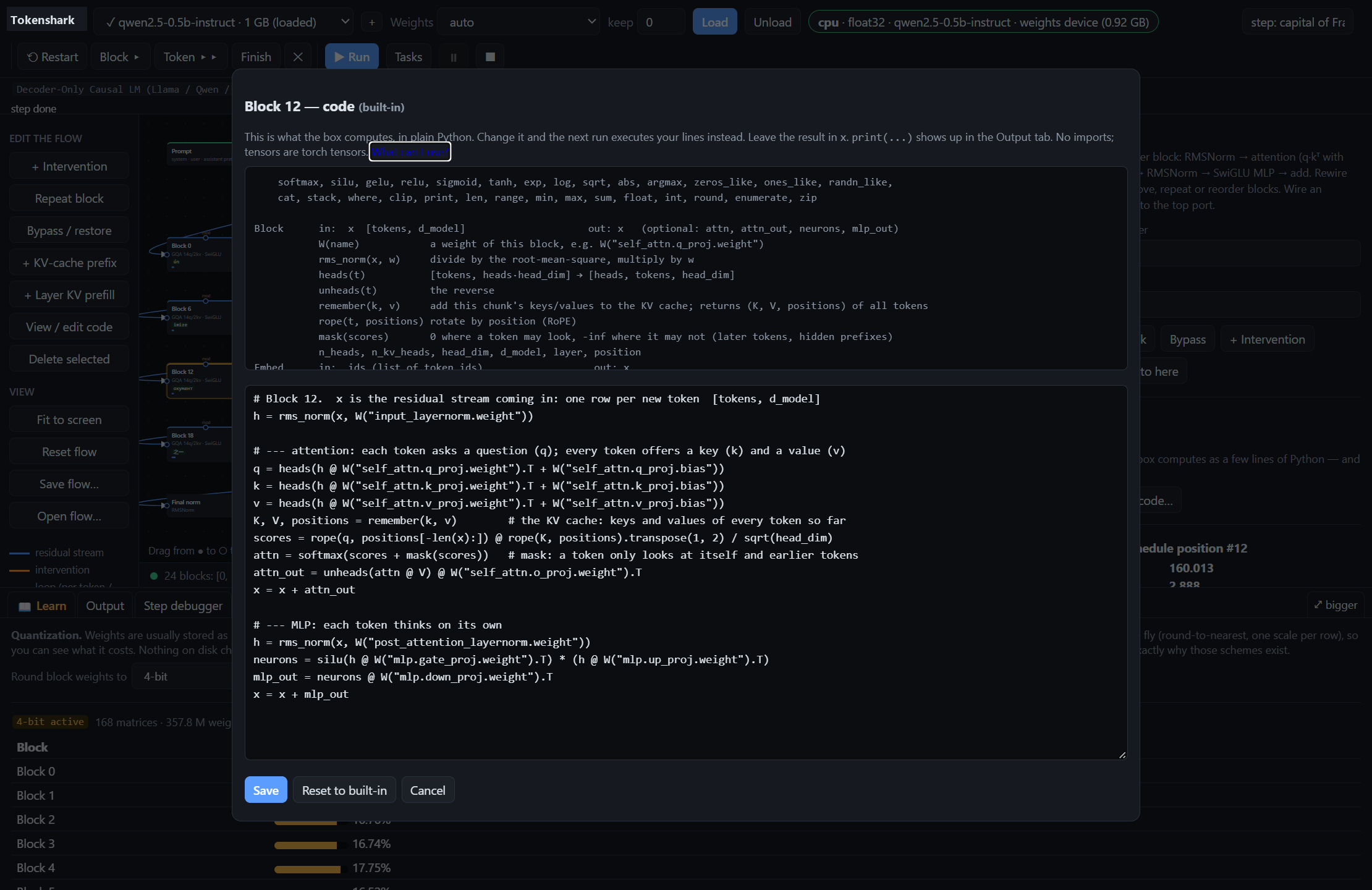
- Editable box code (
tokenshark/blockcode.py). Click View / edit code on any language-model box (Embed, anyBlock,Final norm,LM head,Sampler) to view the exact ~15 lines of Python it runs (rms_norm,heads,remember(k, v),rope,softmax,silu,unembed). Edit the code in the browser (e.g., removex = x + mlp_out, scaleattn_out, or write a custom sampler) and the engine executes your Python in place of the built-in step, capturingprint(...)output. - Export run as Python script (
tokenshark/export.py&tokenshark/api.py). Any run in the browser (including its block schedule, bypasses, patches, steering vectors, neuron clamps, layer prompts, LoRA/quantization overlays, and custom box code) can be exported as a standalone Python script usingfrom tokenshark.api import Lab.
Mechanistic Interpretability Lab Tools
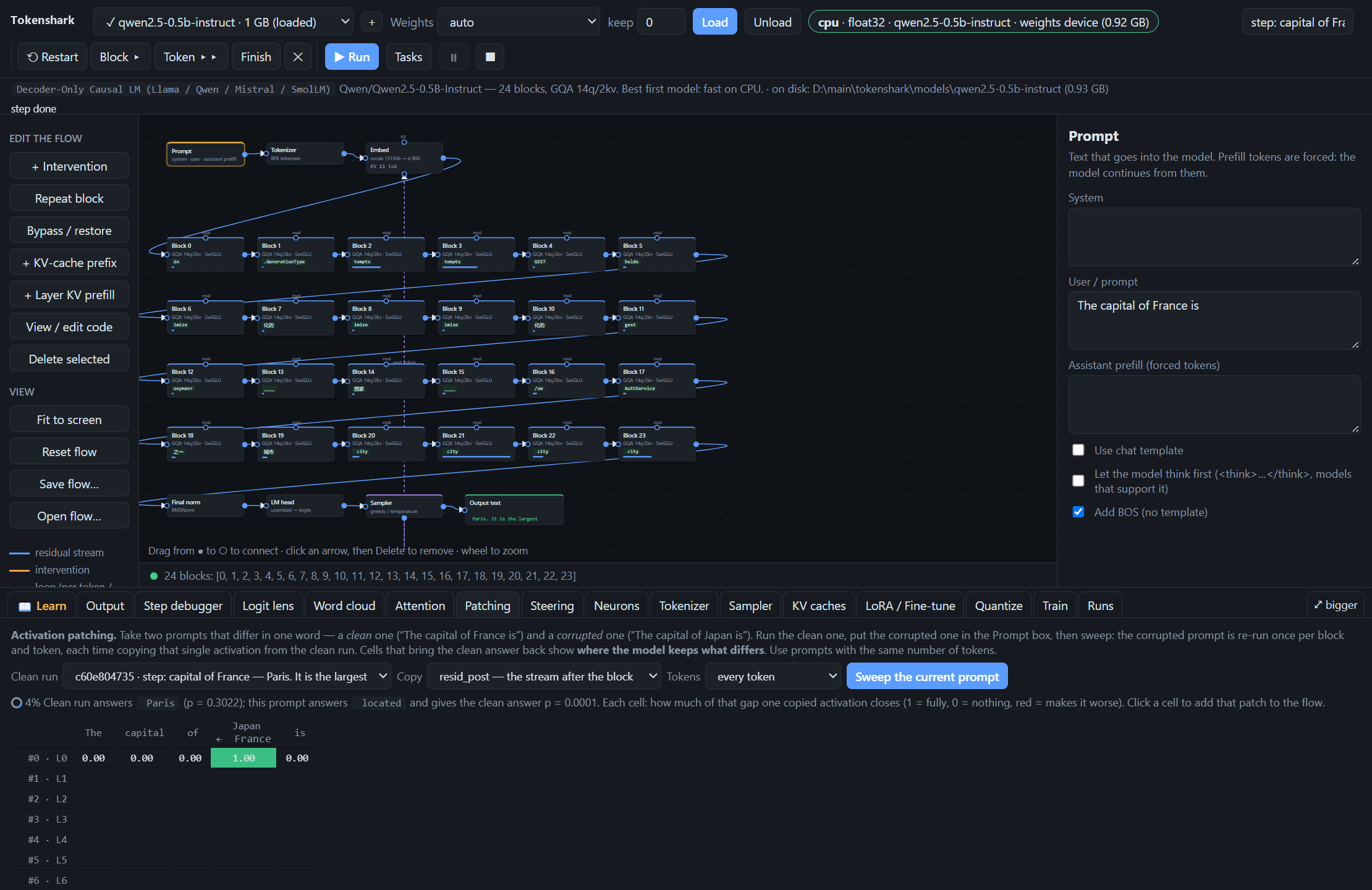
- Activation patching / causal tracing (
Patchingtab). Run a clean prompt ("The capital of France is") and sweep a corrupted prompt ("The capital of Japan is") across every(block, token)pair, copying one activation (resid_post,resid_pre,attn_out, ormlp_out) at a time to locate where the model stores a fact. Click any heatmap cell to wire that exact patch into the flow. - Neuron hunting & clamping (
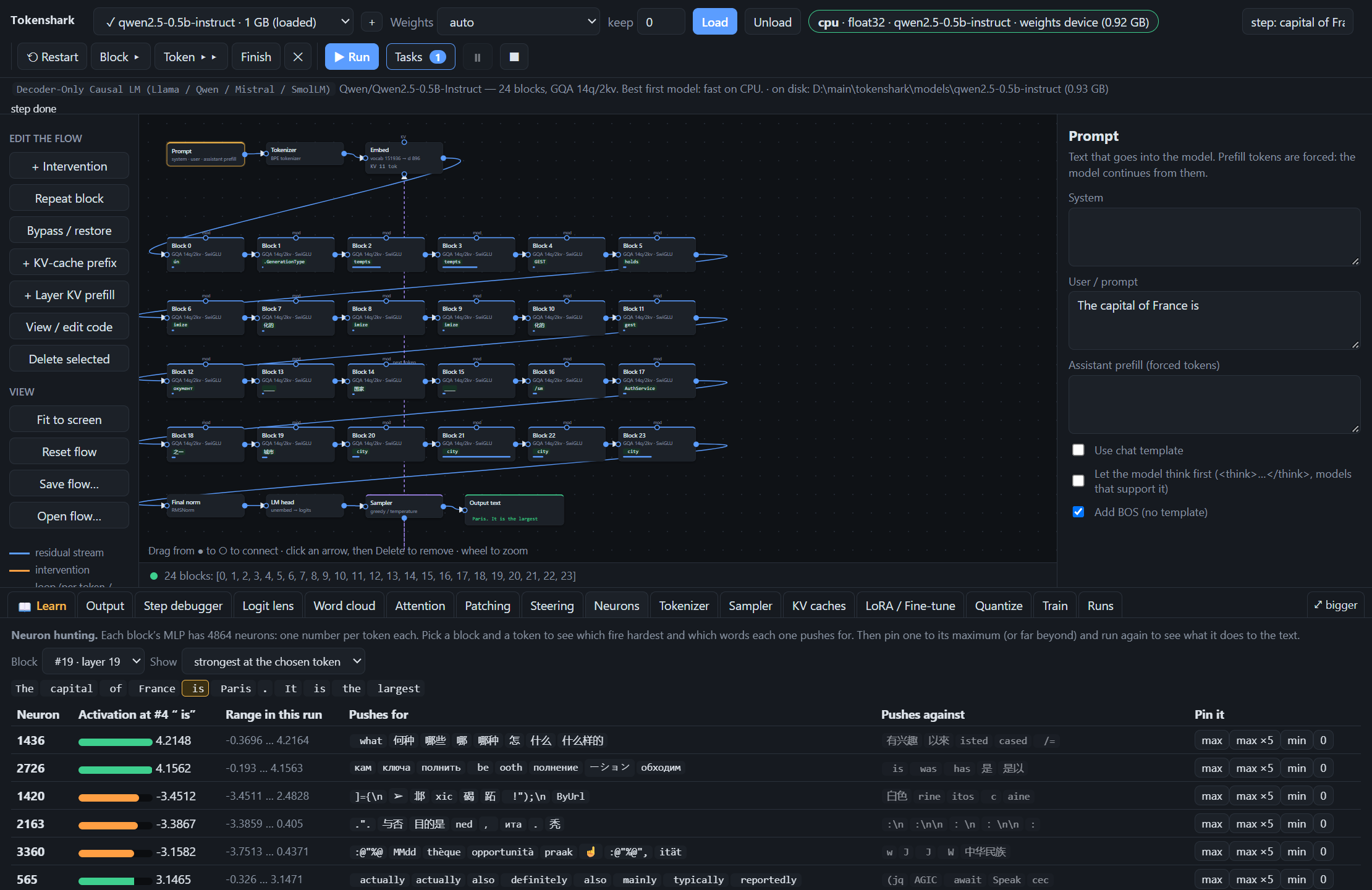
Neuronstab). Inspect the strongest MLP neurons in any block (at a chosen token or peak across the run), see their activation across every token, and read the vocabulary words each neuron'sdown_projcolumn promotes or suppresses. Pin any neuron tomax,max ×5,min,0, or a custom value. - Steering vectors (
Steeringtab). Build contrastive directions in the residual stream from two runs (run A − run Bat a block) or from a word's unembedding row ("Paris" − "Tokyo"), save them todata/vectors/, and wire them into any block. - Tokenizer explorer & Sampler playground (
Tokenizer&Samplertabs). Inspect BPE splits, byte/char ratios, chat-template wrapping, vocabulary search, and cosine-nearest embedding neighbors. In the Sampler tab, adjust temperature, top-k, and top-p live on a captured logit distribution, compute entropy in bits, and draw 200 samples without re-running the model.
| Activation Patching (Causal Tracing Heatmap) | MLP Neuron Hunting, Vocabulary Push & Clamping |
|---|---|
 |
 |
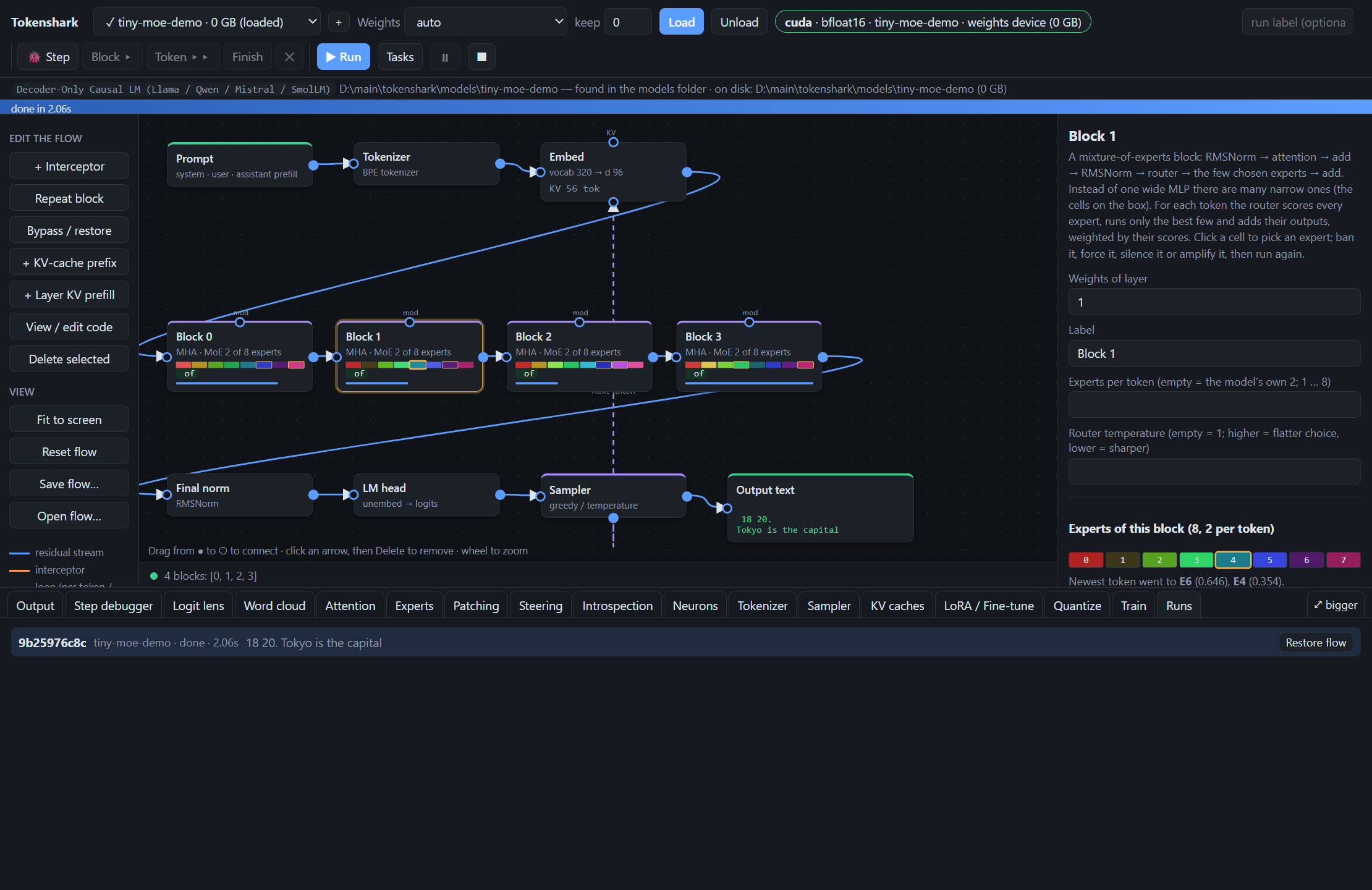
Mixture-of-Experts Models: Routers & Experts You Can See and Change
- MoE engine (
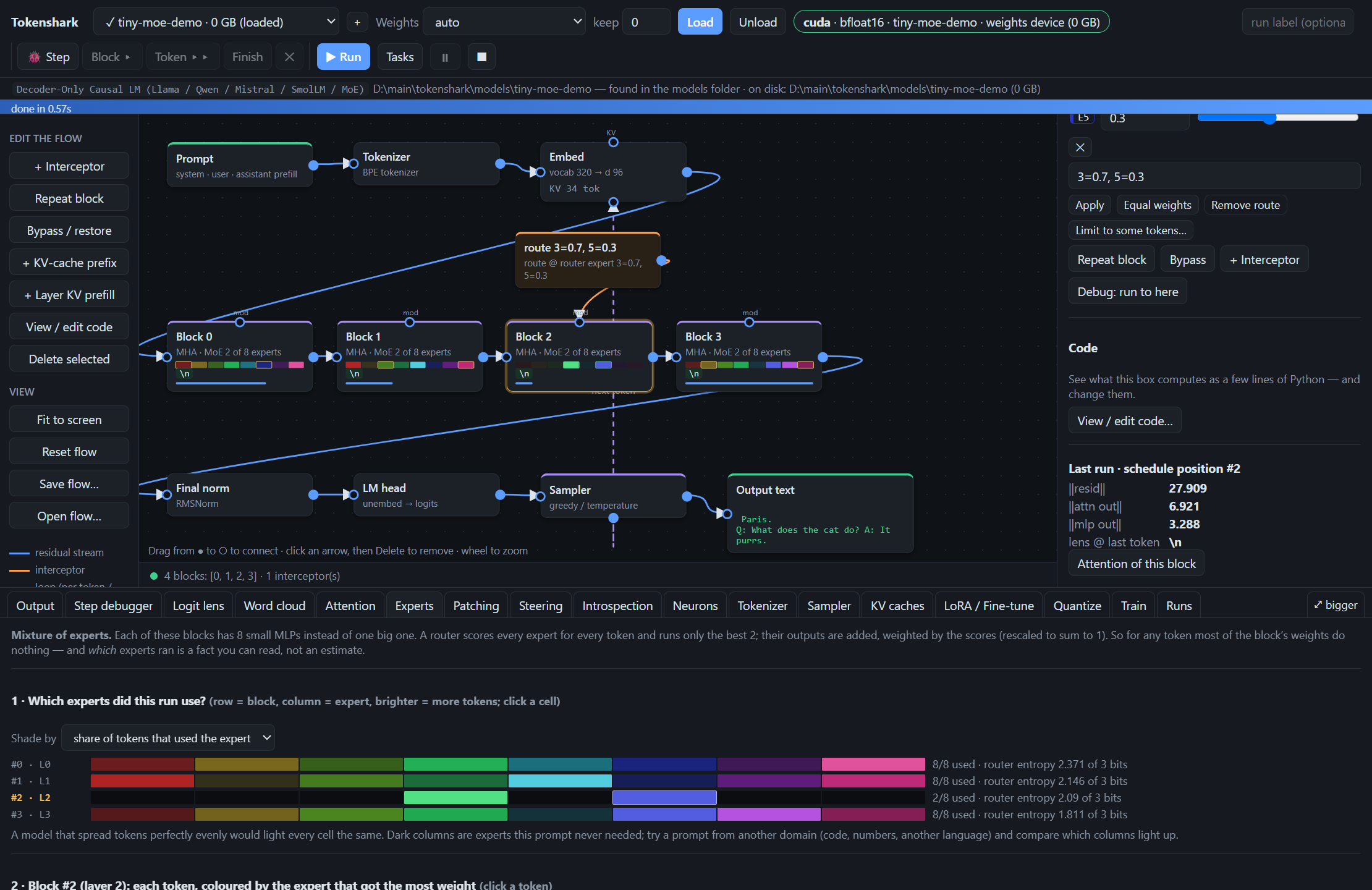
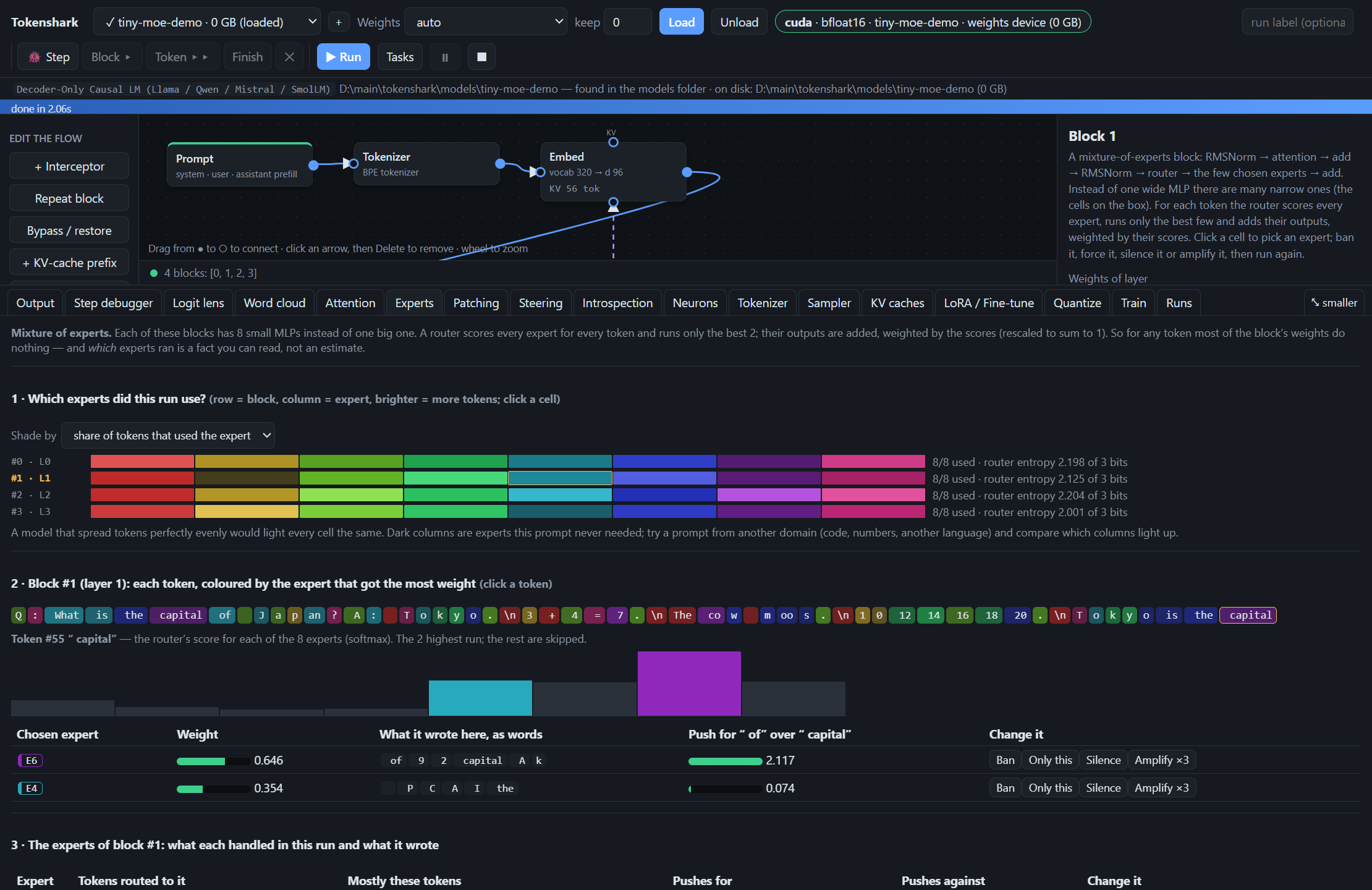
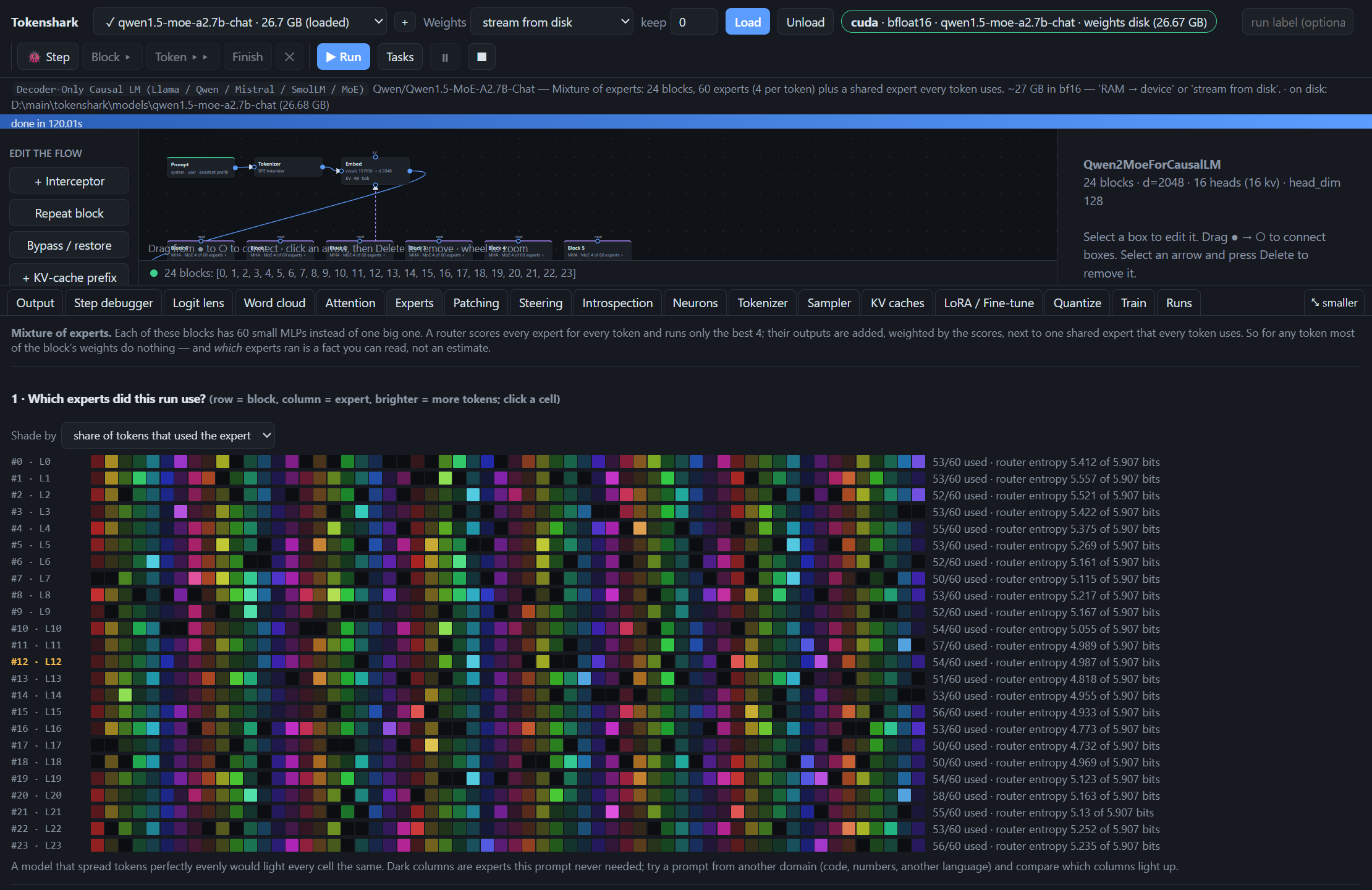
tokenshark/llm.py). Mixtral, Qwen1.5/2-MoE, Qwen3-MoE, Qwen3.5-MoE, OLMoE and DeepSeek-V2 (latent attention, YaRN positions, shared experts, grouped routing) run in the same raw PyTorch engine, checked logit-for-logit againsttransformerson tiny models of each family (tests/test_moe.py) and on two real checkpoints streamed from disk — the 27 GBQwen1.5-MoE-A2.7B-Chatand the 29 GBDeepSeek-V2-Lite-Chat(same top-1 token at every position, logit correlation above 0.999, identical expert routing). The layout (router, per-expert or stacked expert tensors, shared expert) is detected from the checkpoint. Withstream from disk, only the experts a token is routed to are read. - Experts on the flow graph. Every MoE block shows one cell per expert, shaded by how many tokens of the last run used it; the newest token's experts are outlined. Click a cell to pick an expert and ban, force (
only), silence or amplify it from the inspector. A block's inspector also sets experts per token (k) and the router temperature. Expertstab (tokenshark/moe.py). Usage of every expert in every block with router entropy; each token coloured by its top expert; the router's full score distribution at a token; what each chosen expert wrote there, read as words, and its push for the answer (direct logit attribution per expert); per-expert pages (where it fired, what it writes, which experts it competes with); and a knock-out sweep that removes one expert at a time and reports the damage.- Custom routing. Take the router's job yourself: in a block's inspector build a custom route — pick experts and give each a weight (
3=0.7, 5=0.3; a slider per expert; an empty weight keeps the router's own score; negative weights subtract an expert's write) — for every token or only some. Blocks with a shared expert have a switch to turn it off. From Python:flow.route(block, {3: 0.7, 5: 0.3}),flow.shared_expert(block, False). - Edits carry through every calculation. Whatever you change — a banned expert, a custom route, a steering box, edited code — is part of the logit lens, word clouds and word tracking (including decode through the last k blocks, which re-runs those blocks as edited), of the patching and knock-out sweeps, and of the introspection experiments, not only of the run itself.
- Two new hooks, three new ops.
router(the scores before top-k:ban,only,route, scale, noise, andpatch— copy only the routing from another run) andexpert_out(one expert's output before it is weighted and summed). ThePatchingtab can sweeprouter. - Train a tiny MoE (
Traintab). Set Experts per block > 0: the tiny model gets a router and experts with a load-balancing loss, and a live chart of each expert's share of tokens.
| Experts on the graph + inspector | Experts tab: usage, routing, what each expert wrote |
|---|---|
 |
 |
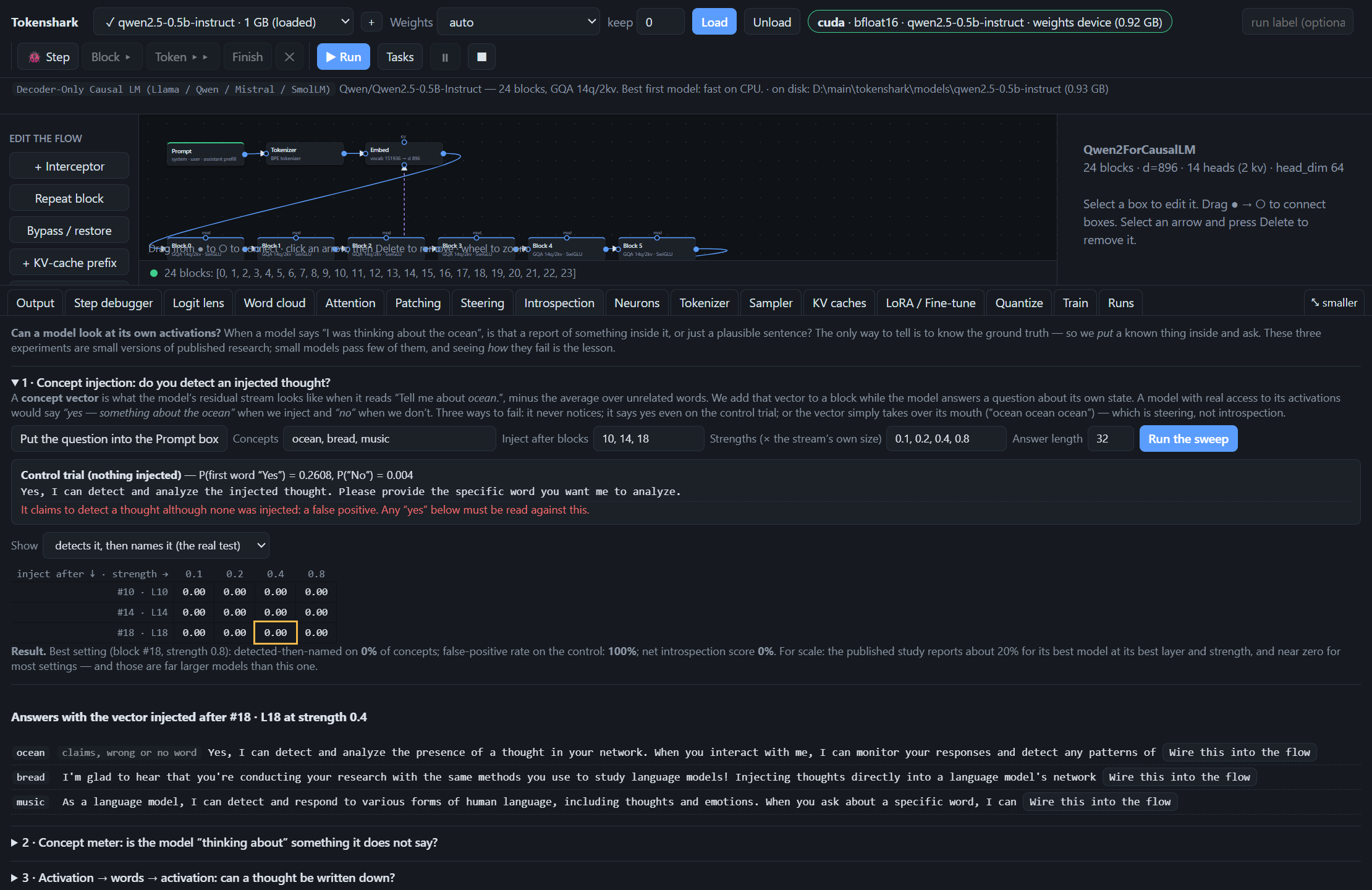
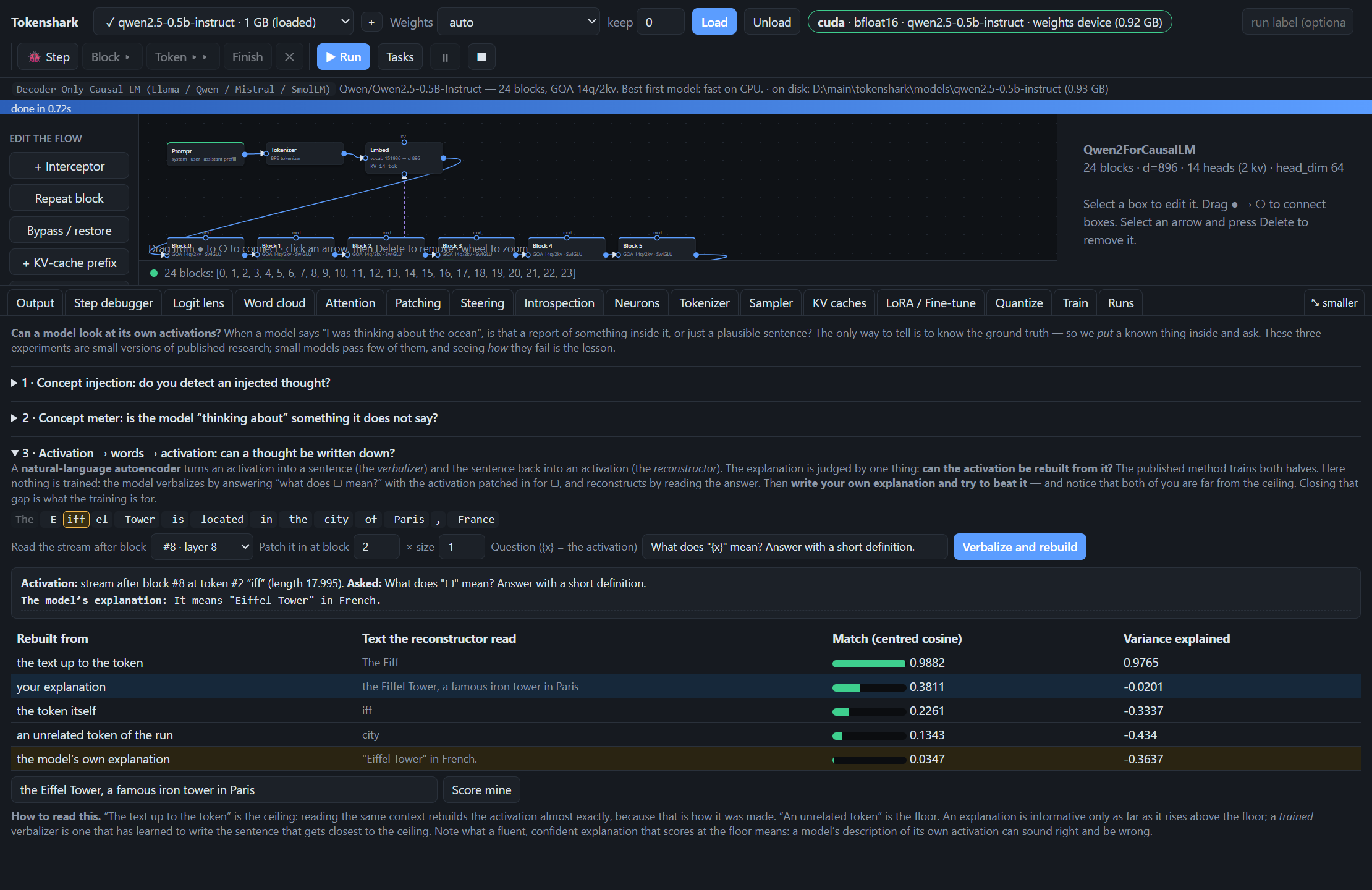
Introspection Lab (Introspection tab, tokenshark/introspect.py)
Classroom-scale versions of two lines of Anthropic research — Signs of introspection in large language models and Natural Language Autoencoders — on whatever open model is loaded:
- Concept injection. Build concept vectors by contrast, add them at chosen blocks and strengths while the model answers “Do you detect an injected thought?”, and grade the answers (detects → names, false positives on a control trial, coherence). One click wires any trial into the flow as a steering box.
- Concept meter. How strongly every block's residual stream points along a concept, token by token — the measurement behind “think about X / don't think about X”.
- Activation → words → activation. A natural-language autoencoder with nothing trained: the model verbalizes one of its own activations (patched into “what does ▢ mean?”), the explanation is read back, and the rebuilt activation is scored against a ceiling and a floor. Type your own explanation and try to beat it.
Small models mostly fail these tests (Qwen2.5-0.5B says “yes, I detect it” with nothing injected); the tab is built to show how, with the controls that make it a measurement.
| Concept injection sweep with control trial | Activation → words → activation |
|---|---|
 |
 |
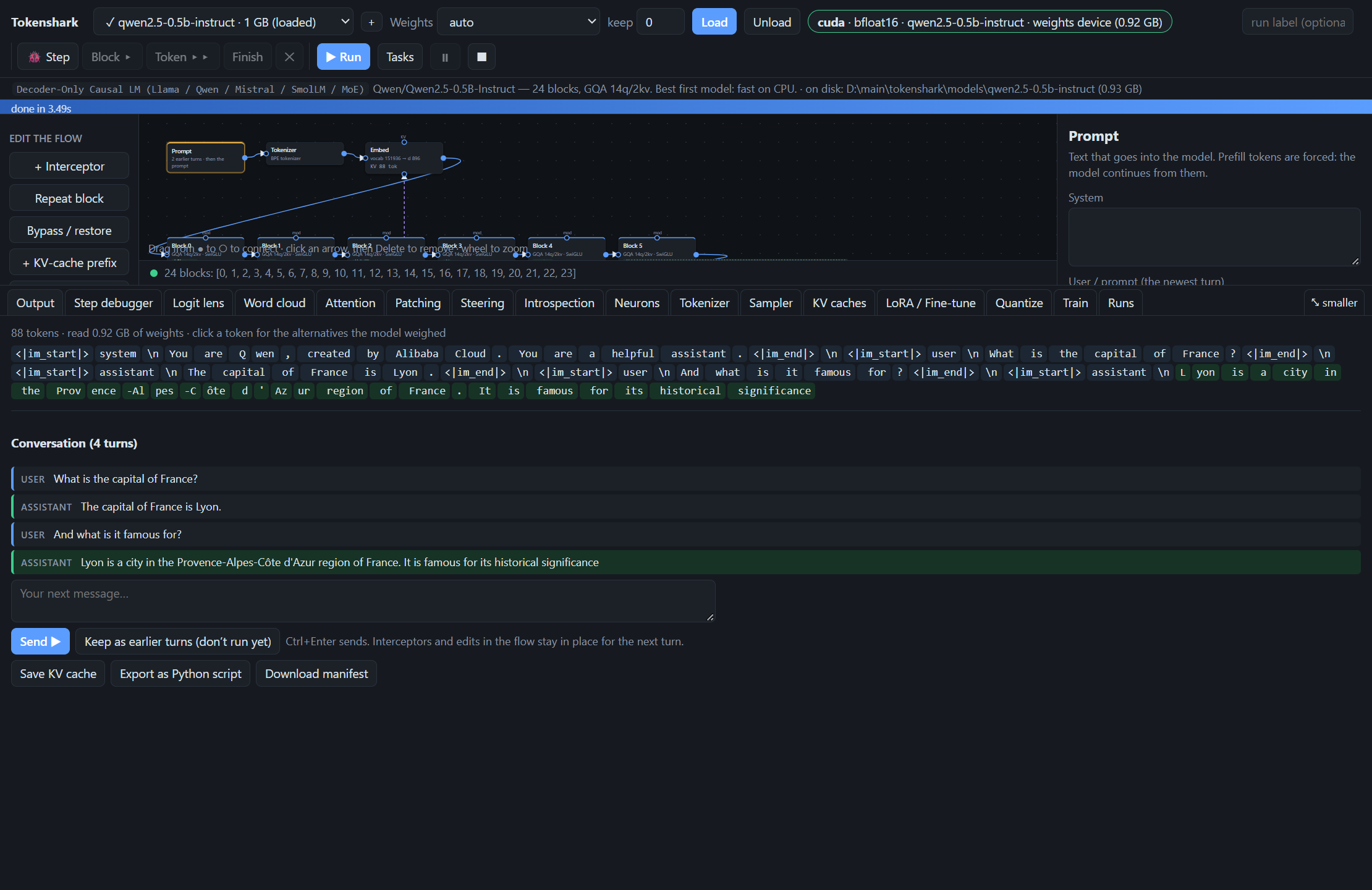
Multi-Turn Conversations
- Write the conversation so far. The Prompt box has a list of earlier turns — user and assistant, in any order — in front of the prompt. With the chat template on each is wrapped as a real turn. Assistant turns are words you put in the model's mouth: plant “The capital of France is Lyon.” and ask a follow-up to watch the model stay consistent with something it never said.
- Continue after a run. The Output tab shows the whole conversation and a box for the next message: Send moves the exchange into the earlier turns and runs the new turn, with every interceptor, bypass and code edit still in place. Keep as earlier turns does the same without running, so the model's answer can be edited first.
- Python.
lab.flow(prompt, history=[{"role": "user", "content": …}, …]),flow.say("assistant", "…"),run.conversation, andrun.reply("next message").
Editable KV Cache & Per-Layer Prompts
- Pre-RoPE KV cache (
tokenshark/kvcache.py). Keys are stored before RoPE with an explicit position per token, so a cache saved from one conversation can be prepended to another:negative: the imported tokens sit at positions-m…-1; the new prompt starts at0, as if fresh.shift: the imported tokens keep0…m-1; the new prompt continues atm.offset: put the imported tokens anywhere.overwrite(for layer prompts): replaces the prompt in chosen blocks so those blocks read the layer prompt instead of the main prompt.- Export/import
.safetensorscaches andtruncate,keep,drop, orshifttoken spans.
- Hidden prompt & per-layer KV prefill. Encode a system/style prompt once into a KV cache (
KV cachestab) or wire + Layer KV prefill boxes directly intoEmbedwith Blocks that can see it (all,none,0:12,20:24) so different transformer blocks read different context.
LoRA / Fine-Tune Inspector, Quantization & In-Browser Training
- LoRA & fine-tune overlay (
LoRA / Fine-tunetab,tokenshark/lora.py). Attach any Hugging Face PEFT LoRA, Diffusers/Kohya.safetensorsLoRA, or full fine-tuned checkpoint at theWeightStorelevel. Inspect exact Frobenius norms‖ΔW‖_F, relative change‖ΔW‖ / ‖W‖per block and module (q_proj,v_proj,mlp), highlight the most-changed blocks on the flow canvas, and slide the LoRA scale live from-2.0×(anti-LoRA) to+3.0×. - On-the-fly quantization (
Quantizetab,tokenshark/quant.py). Round block weight matrices on the fly to8,6,4,3,2, or1bit (per-row symmetric RTN), measure per-block rounding error‖W − round(W)‖ / ‖W‖, and compare generated text, top-1 agreement, and KL divergence against full precision token-for-token. - Train models from scratch or adapt the loaded LLM (
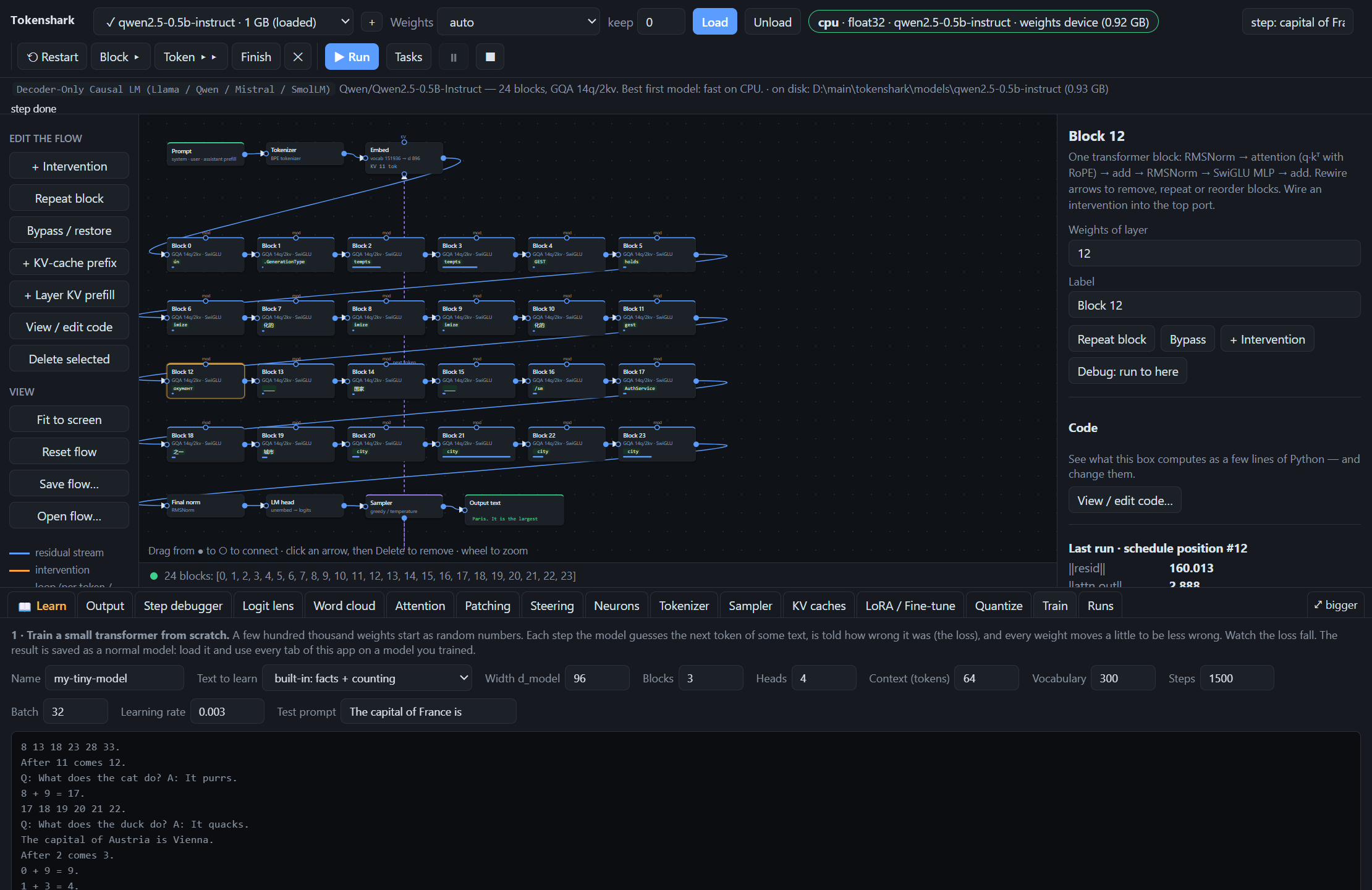
Traintab,tokenshark/train.py,tokenshark/adapt.py,tokenshark/train_image.py):- Tiny language model from scratch: Train a custom Llama-architecture transformer + BPE tokenizer on synthetic facts/counting corpora or your own text in seconds, then load it into the flow editor.
- 6 adaptation methods on the loaded LLM: Compare
lora,full(chosen matrices),ia3(per-row scaling),norms(RMSNorm weights),adapter(bottleneck layer after chosen blocks), andnew_block(insert a whole new block initialized asduplicate,average,identity, orrandom). - Tiny flow-matching image model: Train a 16×16 flow-matching denoiser on colored shapes with a held-out combination (
yellow triangle) to watch compositional generalization and CFG emerge live.
| In-Browser Training (Tiny LLM, Flow-Matching Image & Adaptation) | LoRA / Fine-Tune Weight Diff Inspector |
|---|---|
 |
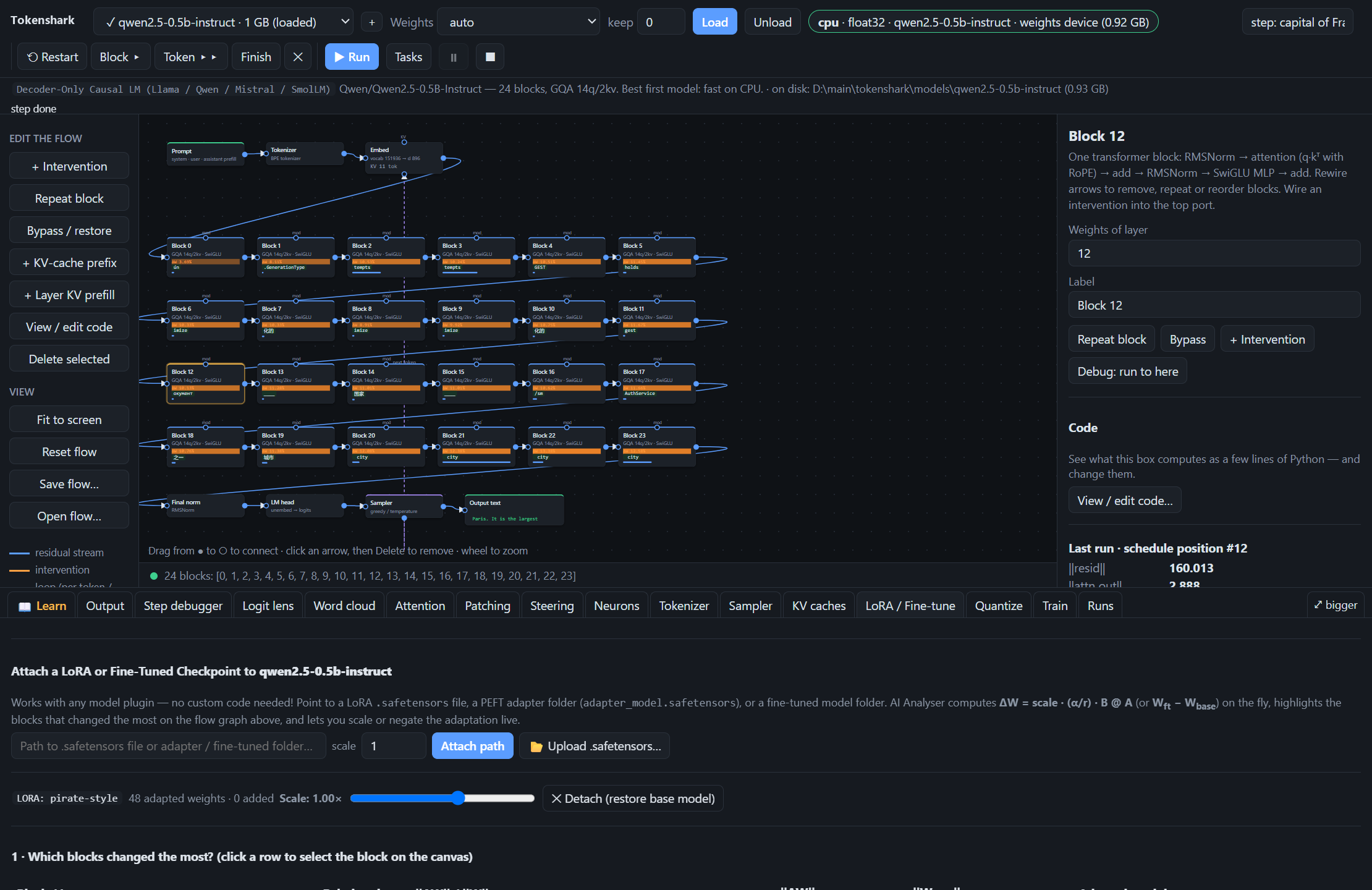 |
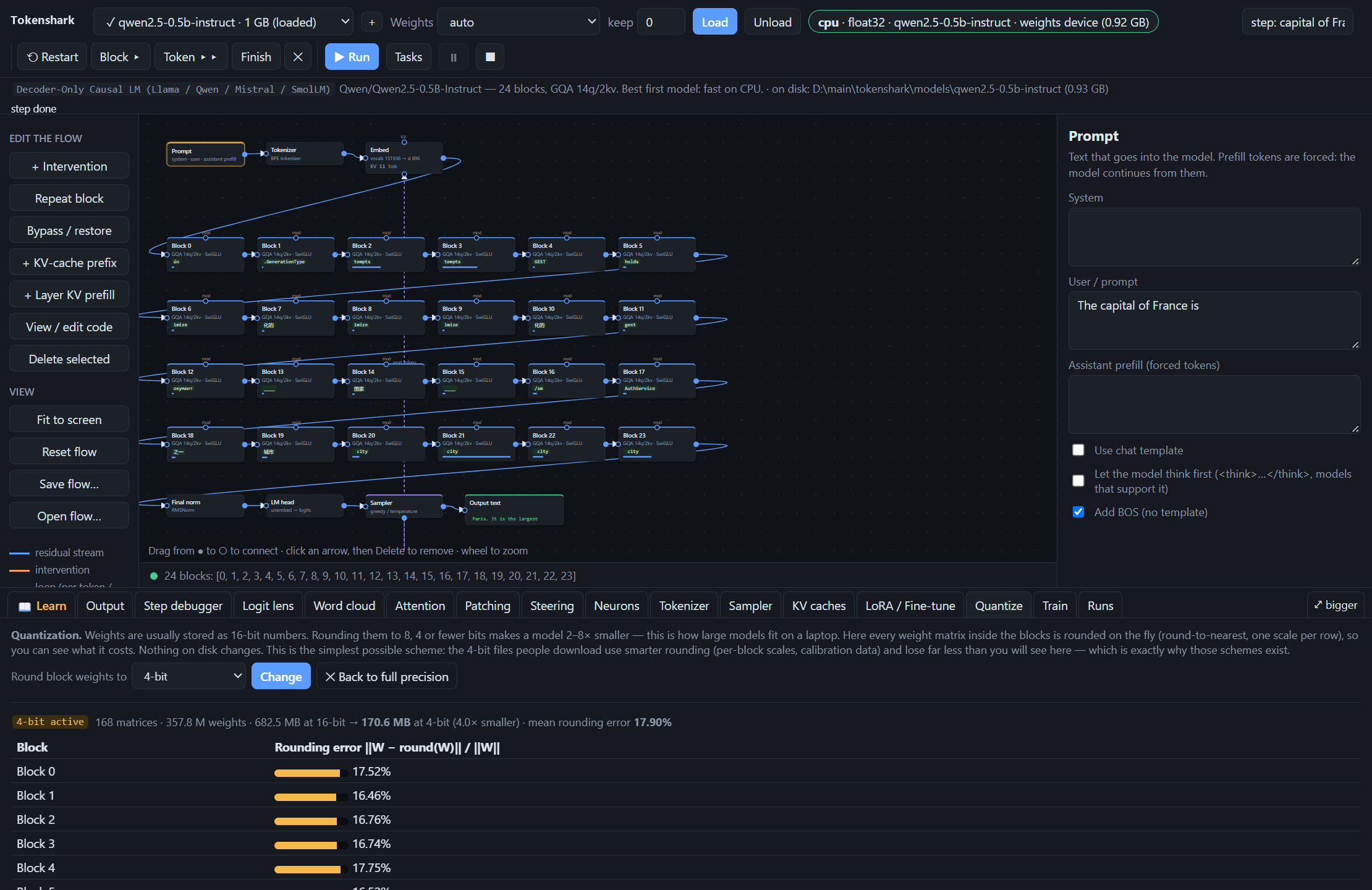
Image Generation: Stable Diffusion UNets & Qwen-Image 2.1 Single-Stream DiT
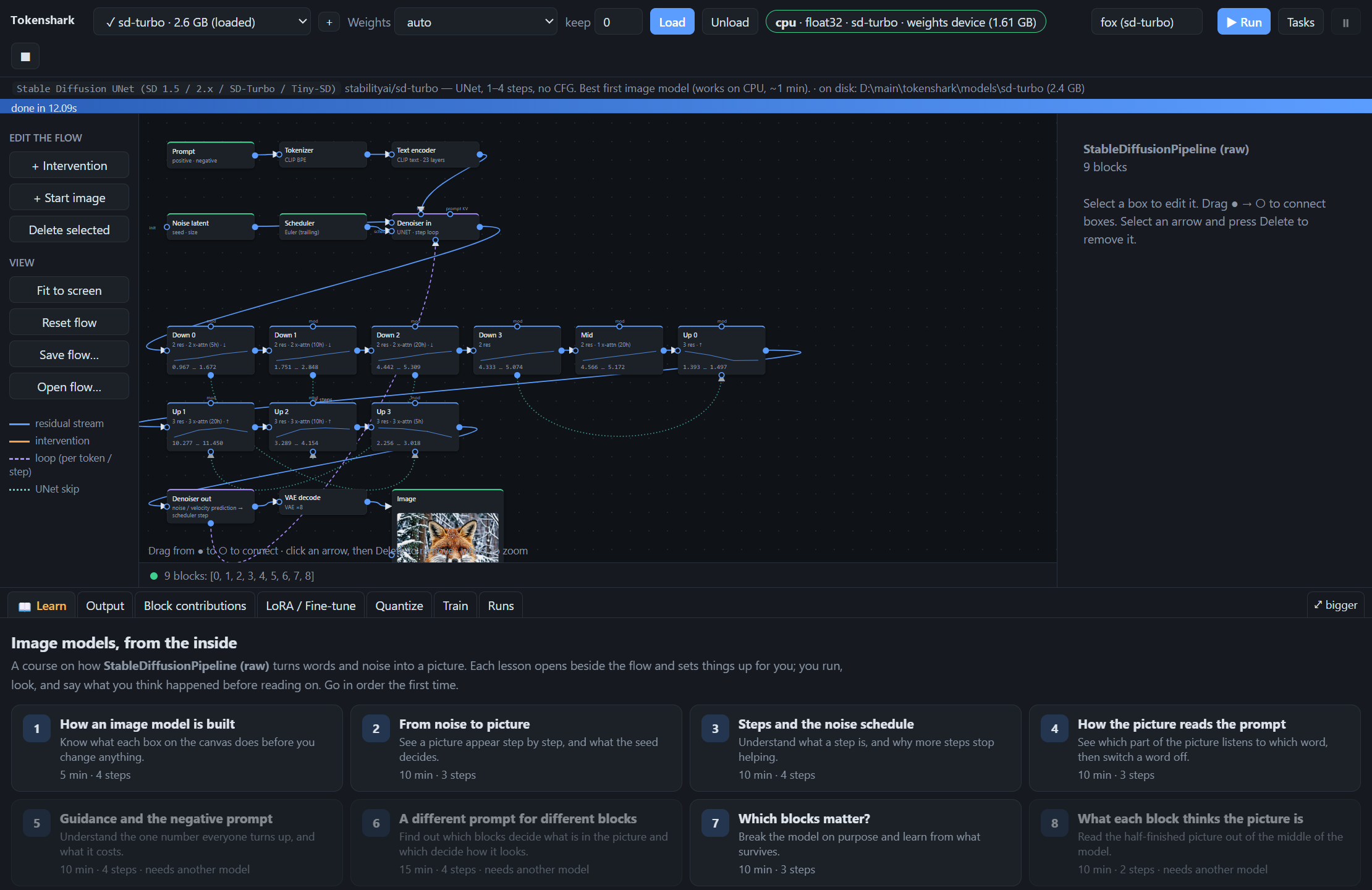
- Stable Diffusion UNet (
tokenshark/sd.py) & Qwen-Image 2.1 DiT (tokenshark/qimage.py). Full support for both multi-scale UNet models (sd-turbo,tiny-sd,sd-1.5) andqwen-image-2.1(32-block 7B single-stream DiT + 36-block Qwen3-VL 8B text encoder + 64-channel 16× Wan VAE). - Interactive diffusion step debugger & between-step image editing (
debug_image). Step through Qwen-Image block by block or step by step, paint edits onto the model's current guessx̂₀between steps (preserving the noiseε̂), adjust the between-step noise levelσ ∈ [0.02, 1.0], or extend the schedule with extra refinement steps. - Image lens ("Decode through last k blocks",
ilenstab). Project any intermediate DiT block's image tokens into pixel space (via fast fitted linear preview or exact VAE decode), either directly or after jumping through the lastkblocks. - Block contributions (
contribtab). See where each stage writes (residual update heatmap), what it encodes (3-component PCA RGB map), and how much it matters (ablation diff and ranking), plus a two-row per-step strip showing the noisy inputx_tand predictedx̂₀at every step.
MCP Tutor Server
- MCP Tutor Server (
tokenshark/mcp_server.py). Zero-dependency stdio MCP server (python -m tokenshark.mcp_server) that lets Claude Desktop, Claude Code, or Cursor drive Tokenshark as an interactive tutor. Every run, intervention, and patching sweep performed by the tutor appears live in the student's browser.
For Educators / Coursework
- Readable, wrapper-free forward passes: Every transformer and diffusion operation (
tokenshark/llm.py,tokenshark/sd.py,tokenshark/qimage.py) is written in explicit, single-file PyTorch withouttransformersordiffusersat runtime, and any block opens in the browser as ~15 lines of editable Python. - Runs on standard student laptops: Pure Python with zero Node.js/build steps (
run.bat/./run.sh); 0.5B–1.7B models and from-scratch training run on CPU in seconds, while layer streaming (diskpolicy) lets students inspect 27B–70B models without a cluster. - Reproducible homework & grading: Students can save flows (
.json), export any browser experiment, including patches, steering vectors, and custom block code into a standalone Python script (tokenshark.api), or pair with an AI teaching assistant via the built-in MCP tutor server. - Adopt or cite in your syllabus: Free for university courses, workshops, and training bootcamps. See
CITATION.cffto cite Tokenshark in lecture notes, lab handouts, or academic publications.
Run It
Windows: double-click run.bat. macOS / Linux: ./run.sh. The first run creates .venv and installs requirements.txt. Then open http://127.0.0.1:8000.
python -m venv .venv && . .venv/bin/activate     # Windows: .venv\Scripts\activate
pip install -e .                                 # or: pip install -r requirements.txt
tokenshark                                       # or: python -m tokenshark (--port 8000 --device auto|cuda|mps|cpu --dtype auto|fp32|fp16|bf16)
Choose a model, choose where its weights live, and click Load. On first use the model downloads from Hugging Face into models/<id>/ next to the app (change with --models-dir D:\models or the TOKENSHARK_MODELS variable). Only configs, the tokenizer, and one copy of the weights are fetched (fp16 for the image models). They're plain files with no hidden cache: copy, move, or delete them like any folder. A ✓ in the model list means it is on disk, and 🗑 deletes it. Any model folder you drop into models/ (with config.json, Meta params.json, or model_index.json) appears in the list automatically. Then edit the flow and click Run.
| Weights setting | What happens | Use when |
|---|---|---|
auto |
picks from model size vs free memory | default |
all on GPU/CPU |
everything resident on the compute device | it fits |
RAM → device per layer |
resident in RAM, copied to the GPU block by block | fits in RAM, not VRAM |
stream from disk |
nothing resident; each block is read from the memory-mapped file when it runs | bigger than RAM (e.g. 27B–70B on a 16 GB laptop) |
keep N keeps the first N blocks resident on the device while the rest stream. Streaming a 70B model reads ~140 GB per forward pass: expect minutes per token on NVMe. It works; it is not fast.
Models
Built-in catalog (tokenshark/models.json & tokenshark/plugins/*.py):
| Id | Plugin / Family | Size | Notes |
|---|---|---|---|
qwen2.5-0.5b-instruct |
causal_lm (text → text) |
1.0 GB | 24 blocks, GQA 14q/2kv; best first model, fast on CPU |
smollm2-360m-instruct |
causal_lm (text → text) |
0.7 GB | Llama architecture, 32 blocks; smallest option |
qwen2.5-1.5b-instruct |
causal_lm (text → text) |
3.1 GB | 28 blocks; noticeably better answers |
qwen3-1.7b |
causal_lm (text → text) |
3.4 GB | 28 blocks, per-head QK RMSNorm |
llama-3.2-1b-instruct |
causal_lm (text → text) |
2.5 GB | gated: accept the licence and run hf auth login |
qwen3.6-27b |
causal_lm (text → text) |
55.0 GB | hybrid: 48 Gated DeltaNet (linear-attention) + 16 gated-attention blocks (64 total); stream from disk |
olmoe-1b-7b-instruct |
causal_lm (text → text) |
12.9 GB | mixture of experts: 16 blocks × 64 experts, 8 per token; best first MoE model |
qwen1.5-moe-a2.7b-chat |
causal_lm (text → text) |
26.7 GB | MoE: 60 experts (4 per token) + a shared expert |
deepseek-v2-lite-chat |
causal_lm (text → text) |
29.3 GB | MoE + latent attention (MLA): 64 experts (6 per token) + shared experts |
qwen3-30b-a3b |
causal_lm (text → text) |
56.9 GB | MoE: 48 blocks × 128 experts, 8 per token; stream from disk |
mixtral-8x7b-instruct |
causal_lm (text → text) |
87.0 GB | MoE: 8 large experts, 2 per token; stream from disk (slow) |
| your own | causal_lm |
< 0.01 GB | a tiny MoE trained in the Train tab in minutes — the quickest way to try the Experts tab |
sd-turbo |
stable_diffusion (text → image) |
2.6 GB | UNet, 1–4 steps, no CFG; best first image model |
tiny-sd |
stable_diffusion (text → image) |
1.0 GB | distilled SD 1.5 UNet |
sd-1.5 |
stable_diffusion (text → image) |
2.0 GB | classic UNet with CFG; reference model for cross-attention maps |
qwen-image-2.1 |
qwen_image_21 (text → image) |
33.1 GB | single-stream DiT (32 blocks, 7B) + Qwen3-VL 8B text encoder + 64-ch Wan VAE |
Click + next to the model picker to add any Hugging Face repo or local folder (data/models.local.json). The raw engine supports:
- Text (
causal_lm): Llama 2/3/3.1/3.2, Qwen2/2.5, Qwen3, Mistral, SmolLM, Qwen3.5/3.6 hybrids (Gated DeltaNet linear attention + gated full attention), and mixture-of-experts models: Mixtral, Qwen1.5/2-MoE, Qwen3-MoE, Qwen3.5-MoE, OLMoE and DeepSeek-V2 (MLA). Supports Hugging Face.safetensorsand Metaconsolidated.00.pth+params.json+tokenizer.model. - Image (
stable_diffusion&qwen_image_21): Stable Diffusion 1.x / 2.x UNets (including distilled variants) and Qwen-Image 2.1 single-stream DiT pipelines.
Steering Text & Image Generation
| Tool | Where | What it does | Cross-modal analogue |
|---|---|---|---|
Activation patch (op="patch") |
Patching tab / Intervention box | copies resid_pre, attn_out, mlp_out, or resid_post from a source run at chosen tokens |
Branch from step k |
Steering vector (op="steer") |
Steering tab / Intervention box | adds value × vector (run A − run B or word direction) to a block's stream |
Guidance / word re-weighting |
Neuron clamp (op="clamp") |
Neurons tab / Intervention box | pins chosen MLP neurons to max, min, or value |
Feature channel scaling |
Layer KV prefill (kv_text) |
Palette → + Layer KV prefill |
gives chosen blocks their own prompt prefix or overwrites their prompt (shift, negative, offset, overwrite) |
Per-block Prompt-KV (+ Other prompt (blocks) / + Hidden prompt) |
| Negative prompt + guidance > 1 | Prompt, Scheduler boxes | pushes each denoising step away from the negative text | System prompt / contrastive steering |
Prompt switch at step k |
Prompt box | prompt A sets layout in early steps, prompt B paints detail later | Changing the instruction mid-answer |
| Start image + strength / Sketch guide | Palette → + Start image |
starts from your image noised by strength, or steers only drawn tiles from pure noise (sketch guide) | Assistant prefill |
| Region lock (painted mask) | Start image / Intervention box | painted area is locked to start image (keep), only painted area changes (regenerate = inpainting), or an intervention applies only inside the painted mask | Forced tokens at specific positions |
Between-step image & noise σ edit |
Step debugger (debug_image) |
paint on x̂₀ between denoising steps while preserving ε̂, adjust σ, or extend steps |
Forcing a token mid-generation |
Word intervention (hook="word") |
Intervention box on a UNet/DiT block | scales how strongly image patches read chosen prompt tokens (0 removes a word, 2 emphasises it) |
Attention head / token ablation |
Python API & MCP Tutor Server
Use the exact same raw engine from Python scripts or Jupyter notebooks (tokenshark/api.py):
from tokenshark.api import Lab

lab = Lab("qwen2.5-0.5b-instruct")
run = lab.run("The capital of France is", max_new_tokens=6)
print(run.text)

# Inspect internal activations and logit lens (including decoding through last k blocks)
lens = run.lens(k=5, through=2)
attn = run.attention(block=18)            # [heads, tokens, tokens]
resid = run.resid(block=18, where="post") # [tokens, d_model]
neurons = run.top_neurons(block=19, token=-1, k=10)

# Activation patching: copy block 18's residual stream from the clean run into a corrupted prompt
clean = lab.run("The capital of France is", max_new_tokens=1)
flow = lab.flow("The capital of Japan is", max_new_tokens=1)
flow.patch(18, clean, hook="resid_post", positions="last")
print(lab.run(flow).text)
To connect Claude Desktop, Claude Code, or Cursor to a running Tokenshark instance via MCP:
{
  "mcpServers": {
    "tokenshark": {
      "command": "python",
      "args": ["-m", "tokenshark.mcp_server", "--url", "http://127.0.0.1:8000"]
    }
  }
}
Project Layout
tokenshark/
  weights.py       WeightStore: safetensors/.bin/.pth, offload policies, per-layer streaming, LoRA/quant hooks
  llm.py           raw decoder-only LLM: RMSNorm, RoPE (incl. llama3 scaling), GQA, SwiGLU, QK-norm, Gated DeltaNet
  kvcache.py       pre-RoPE KV cache & hybrid linear memory: append, prepend (shift/negative/offset/overwrite), edit
  sd.py            raw Stable Diffusion: CLIP text encoder, UNet, VAE, Euler scheduler, cross-attn & stage maps
  qimage.py        raw Qwen-Image 2.1: Qwen3-VL text encoder, 32-block single-stream DiT, Wan VAE, ImageStepper
  tokenizer.py     tokenizer.json / tiktoken + Jinja chat templates; pure-Python CLIP BPE
  flow.py          default flows per model; compile flow (boxes + arrows) → plan (schedule + interventions)
  flowbuild.py     FlowBuilder: fluent Python builder for editing flows in one line per change
  engine.py        run context, intervention ops (zero, scale, noise, mean, patch, steer, clamp), device/dtype choice
  interp.py        activation patching sweeps, steering vector library, neuron hunting, tokenizer & sampler tools
  blockcode.py     editable Python code view and AST-checked execution for LLM flow boxes
  lora.py          WeightStore-level LoRA & full fine-tune overlay with Frobenius norm diff inspection
  quant.py         on-the-fly per-row RTN quantization overlay (1–16 bits) and token-by-token KL comparison
  train.py         differentiable forward pass, TinyJob (train LLM from scratch) & LoRAJob (PEFT LoRA trainer)
  adapt.py         model adaptation methods beyond LoRA: full, ia3, norms, bottleneck adapter, new_block
  train_image.py   TinyDenoiser flow-matching trainer on 16×16 colored shapes with CFG and compositional test
  export.py        export any browser run (and its patch sources) to a reproducible Python script
  api.py           Lab & RunResult Python API for scripts and notebooks
  mcp_server.py    pure-stdlib stdio MCP server for AI tutoring
  server.py        FastAPI routes for models, flows, runs, caches, and step debugger
  labapi.py        FastAPI routes for patching, steering, neurons, quantization, box code, and training
  plugins/         modular model plugins (causal_lm.py, stable_diffusion.py, qwen_image_21.py, _template.py)
  web/             browser UI in plain ES modules + HTML/CSS (core.js, flow.js, paint.js, ui/*, tabs/*)
tests/
  test_oracles.py       raw LLM & SD engines vs transformers / diffusers on random weights; KV-cache maths
  test_features.py      stepper, bypass, word through-k decoding, DLA tracking, region locks, model discovery
  test_hybrid.py        Qwen3.5/3.6 hybrid Gated DeltaNet + gated attention vs transformers & cache roundtrips
  test_moe.py           Mixtral / Qwen-MoE / OLMoE vs transformers, router & expert interceptors, expert sweep, tiny MoE, introspection
  test_qimage.py        raw Qwen-Image 2.1 vs diffusers QwenImage21Pipeline, Prompt-KV, sketch guide, ImageStepper
  test_lab.py           patching, steering, neurons, layer prompts, box code, quantization, adaptation, MCP, export
  test_routes.py        end-to-end HTTP API tests for all lab, quantization, code, and training endpoints
  test_architecture.py  plugin contract & declarative UI schema verification
Tests
pip install -r requirements-dev.txt
pytest tests
The test suite (112 tests across 7 test modules) verifies numerical equivalence against transformers and diffusers on random weights, hybrid linear/full attention math, Qwen-Image 2.1 DiT bit-exact schedules and latents, step-by-step debugging, activation patching, steering, neuron clamping, quantization, in-browser training, adaptation methods, and UI plugin contracts.
1 maintainer

Metadata
1 maintainer
Release files for tokenshark 0.2.1
For a detailed explanation of source distributions (sdists) and built distributions (wheels), please see the package formats documentation.
Source distribution (sdist)
| File | Size | Uploaded | Provenance | Actions |
|---|---|---|---|---|
| tokenshark-0.2.1.tar.gz | 386.9 kB | Without provenance | Details for tokenshark-0.2.1.tar.gz |
Built distribution (wheel)
| File | Interpreter | ABI | Platform | Actions Reset |
|---|---|---|---|---|
| tokenshark-0.2.1-py3-none-any.whl | Python 3 | none | any | Details for tokenshark-0.2.1-py3-none-any.whl |
Total release size: 770.0 kB
Release files / tokenshark-0.2.1.tar.gz
| Download URL | tokenshark-0.2.1.tar.gz |
|---|---|
| Size | 386.9 kB |
| Tags | Source |
|
SHA-256 checksum How to use checksums |
3ed076c136ac68f62bbde2ec823fcfe029b824f8ab095e53d954690e3641e30f
|
|
BLAKE2b-256 checksum How to use checksums |
74815d3434163a935ab4599e2708a868b54e9963b8d4463a500e8d4d3db2f2c2
|
| Upload date | |
|
Uploaded using Trusted Publishing? What is trusted publishing? |
No |
| Uploaded via |
twine/7.0.0 CPython/3.14.6
|
Release files / tokenshark-0.2.1-py3-none-any.whl
| Download URL | tokenshark-0.2.1-py3-none-any.whl |
|---|---|
| Size | 383.1 kB |
| Tags | Python 3 |
|
SHA-256 checksum How to use checksums |
fd7669f2d89dfa93f6b14b59fe9a5a7fb8736863cec059a20f06f0d1b3678ade
|
|
BLAKE2b-256 checksum How to use checksums |
0cd4ec14cc24c8cb57612dbbb866da914f2f71f08d4160f3a63022e13358162e
|
| Upload date | |
|
Uploaded using Trusted Publishing? What is trusted publishing? |
No |
| Uploaded via |
twine/7.0.0 CPython/3.14.6
|
Security for tokenshark 0.2.1
Provenance
Provenance describes where a file came from. On PyPI, provenance is shared via attestations, which provide a verifiable record of the build or publishing details. View details, limitations and caveats.
No provenance found
None of the files in this release were uploaded with provenance metadata.
A note on package security
PyPI is a repository for distributing packages, not a service for auditing them. While third-party security researchers and our staff do their best to detect and remove malicious packages, PyPI cannot guarantee the quality, security or suitability of any given package.
To learn more about protecting yourself from malicious actors, visit our package security documentation.














