
High-performance Async Python scraper for Tokopedia (Fork of tokopaedi)

Project description
Tokopaedi Async - High-Performance Async Python Scraper for Tokopedia


Extract product data, reviews, and search results from Tokopedia with ease.
tokopaedi-async is a high-performance fork of the original Tokopaedi library. It leverages Python's asyncio and curl_cffi to perform massive data extraction concurrently, making it significantly faster for bulk operations like enriching product details or fetching thousands of reviews.
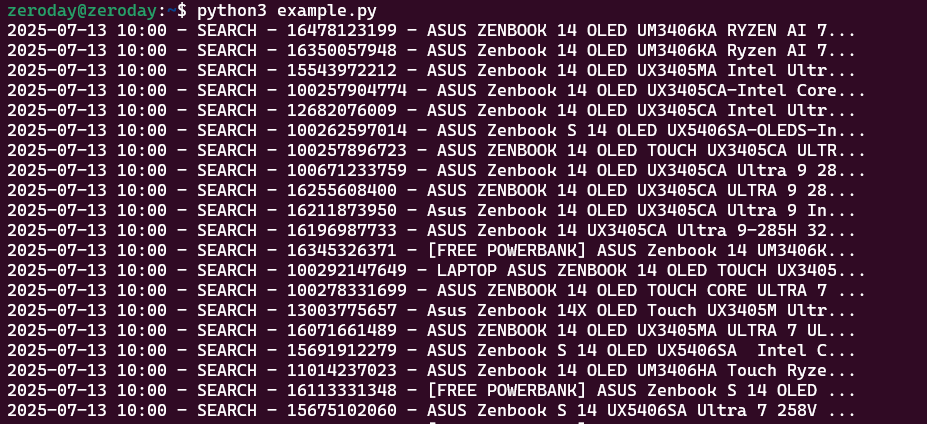
Key Features
- 🚀 Asynchronous & Concurrent: Built on asyncio for non-blocking I/O. Fetch details for more products in the time it takes to fetch one.
- 🔍 Product Search: Search products with advanced filters (price, rating, condition, official store, etc.).
- 📦 Detailed Product Data: Retrieve rich product details, including variants, pricing, stock, and media.
- 💬 Reviews Scraper: Scrape product reviews with ratings, timestamps, and more.
- 🛡️ Smart Anti-Detection: Uses curl_cffi to mimic real browser fingerprints (JA3/TLS) and rotating user agents.
- 📊 JSON Export: Easy serialization to JSON or Pandas DataFrame.
Installation
Tokopaedi is available on PyPi: https://pypi.org/project/tokopaedi-async/
Install Tokopaedi via pip:
pip install tokopaedi-async
Quick Start
Since this library is asynchronous, you must run it within an async function using asyncio.
import asyncio
import json
from tokopaedi import search, SearchFilters, get_product

async def main():
    # 1. Setup Filters (Optional)
    filters = SearchFilters(
        bebas_ongkir_extra=True,
        pmin=15000000,
        pmax=25000000,
        rt=4.5
    )

    print("🔍 Searching...")
    # 'await' is required for search
    results = await search("Asus Zenbook S14 32GB", max_result=100, debug=True, filters=filters)

    # 2. Parallel Enrichment
    # This runs 20+ concurrent requests to fetch details/reviews almost instantly
    print(f"⚡ Enriching data for {len(results)} products...")
    await results.enrich_details(debug=True)
    await results.enrich_reviews(max_result=50, debug=True)

    # 3. Save to JSON
    with open('result.json', 'w') as f:
        f.write(json.dumps(results.json(), indent=4))
    print("✅ Done!")

if __name__ == "__main__":
    asyncio.run(main())
📘 API Overview
🔍 async search(keyword: str, max_result: int = 100, filters: Optional[SearchFilters] = None, debug: bool = False) -> SearchResults
Search for products from Tokopedia.
results = await search(
    keyword="Laptop Gaming",
    max_result=100,
    filters=filters,
    debug=True
)
Parameters:
-
keyword: string keyword (e.g.,"logitech mouse"). -
max_result: Expected number of results to return. -
filters: OptionalSearchFiltersinstance to narrow search results. -
debug: Show debug message if True
Returns:
- A
SearchResultsinstance (list-like object ofProductSearchResult), supporting.json()for easy export.
📦 async get_product(product_id: Optional[Union[int, str]] = None, url: Optional[str] = None, debug: bool = False) -> ProductData
Fetch detailed information for a given Tokopedia product.
Parameters:
product_id: (Optional) The product ID returned fromsearch(). If provided, this will take precedence overurl.url: (Optional) The full product URL. Used only ifproduct_idis not provided.debug: IfTrue, prints debug output for troubleshooting.
⚠️ Either
product_idorurlmust be provided. If both are given,product_idis used andurlis ignored.
Returns:
- A
ProductDatainstance containing detailed information such as product name, pricing, variants, media, stock, rating, etc. - Supports
.json()for easy serialization (e.g., to use withpandasor export as.json).
🗣️ async get_reviews(product_id: Optional[Union[int, str]] = None, url: Optional[str] = None, max_count: int = 20, debug: bool = False) -> List[ProductReview]
Scrape customer reviews for a given product.
Parameters:
product_id: (Optional) The product ID to fetch reviews for. Takes precedence overurlif both are provided.url: (Optional) Full product URL. Used only ifproduct_idis not provided.max_count: Maximum number of reviews to fetch (default: 20).debug: Show debug messages ifTrue.
⚠️ Either
product_idorurlmust be provided.
Returns:
- A list of
ProductReviewobjects. - Each object supports
.json()for serialization (e.g., for use withpandasor JSON export).
Returns:
- A new
SearchResultsobject with.product_detailand.product_reviewsfields filled in (if data was provided).
SearchFilters – Optional Search Filters
Use SearchFilters to refine your search results. All fields are optional. Pass it into the search() function via the filters argument.
Example:
from tokopaedi_async import SearchFilters

filters = SearchFilters(
    pmin=100000,           # Min Price
    pmax=5000000,          # Max Price
    condition=1,           # 1=New, 2=Used
    shop_tier=2,           # 2=Official Store, 3=Power Merchant
    rt=4.5,                # Min Rating
    latest_product=30,     # Added in last 30 days
    is_discount=True,      # Only discounted items
    is_fulfillment=True,   # "Dilayani Tokopedia"
    is_plus=True           # Tokopedia PLUS
)

results = await search("logitech mouse", filters=filters)
Available Fields:
| Field | Type | Description | Accepted Values |
|---|---|---|---|
pmin |
int |
Minimum price (in IDR) | e.g., 100000 |
pmax |
int |
Maximum price (in IDR) | e.g., 1000000 |
condition |
int |
Product condition | 1 = New, 2 = Used |
shop_tier |
int |
Type of shop | 2 = Mall, 3 = Power Shop |
rt |
float |
Minimum rating | e.g., 4.5 |
latest_product |
int |
Product recency filter | 7, 30, 90 |
bebas_ongkir_extra |
bool |
Filter for extra free shipping | True / False |
is_discount |
bool |
Only show discounted products | True / False |
is_fulfillment |
bool |
Only Fulfilled by Tokopedia | True / False |
is_plus |
bool |
Only Tokopedia PLUS sellers | True / False |
cod |
bool |
Cash on delivery available | True / False |
Product Details & Reviews Enrichment
Tokopaedi supports data enrichment to attach detailed product information and customer reviews directly to search results. This is useful when you want to go beyond basic search metadata and analyze full product details or customer feedback.
Example:
# Enrich search results
results = search("Asus Zenbook S14 32GB", max_result=10, debug=True, filters=filters)
results.enrich_details(debug=True)
results.enrich_reviews(max_result=50, debug=True)

# Enrich product detail with reviews
product = get_product(url="https://www.tokopedia.com/asusrogindonesia/asus-tuf-a15-fa506ncr-ryzen-7-7435hs-rtx3050-4gb-8gb-512gb-w11-ohs-o365-15-6fhd-144hz-ips-rgb-blk-r735b1t-om-laptop-8gb-512gb-4970d?extParam=whid%3D17186756&aff_unique_id=&channel=others&chain_key=")
product.enrich_reviews(max_result=50, debug=True)
Enrichment methods are available on both the SearchResults container and individual ProductData objects:
On SearchResults
# Fetches details for ALL items in the list concurrently
await results.enrich_details()

# Fetches reviews for ALL items in the list concurrently
await results.enrich_reviews(max_result=20)
-
enrich_details(debug: bool = False) -> None
Enriches all items in the result with detailed product info.debug: IfTrue, logs each enrichment step.
-
enrich_reviews(max_result: int = 10, debug: bool = False) -> None
Enriches all items with customer reviews (up tomax_resultper product).max_result: Number of reviews to fetch for each product.debug: IfTrue, logs the review enrichment process.
On ProductData
await product.enrich_details()
await product.enrich_reviews()
-
enrich_details(debug: bool = False) -> None
Enriches this specific product with detailed information. -
enrich_reviews(max_result: int = 10, debug: bool = False) -> None
Enriches this product with customer reviews.
This design allows for flexibility: enrich a full result set at once, or enrich individual items selectively as needed.
📋 Changelog
0.1.0
- Initial release based on tokopaedi 0.2.3
Disclaimer
This is an unofficial library and is not affiliated with, endorsed, or supported by Tokopedia. It is intended for educational and research purposes only. Please use responsibly and respect the website's Terms of Service.
Credits & License
Original library by Hilmi Azizi - Thanks :)
Async fork maintained by pandamoon21.
Distributed under the MIT License. See LICENSE for more information.
Release history Release notifications | RSS feed


Download files
Download the file for your platform. If you're not sure which to choose, learn more about installing packages.
Source Distribution
Built Distribution
Filter files by name, interpreter, ABI, and platform.
If you're not sure about the file name format, learn more about wheel file names.
Copy a direct link to the current filters
File details
Details for the file tokopaedi_async-0.1.1.tar.gz.
File metadata
- Download URL: tokopaedi_async-0.1.1.tar.gz
- Upload date:
- Size: 21.4 kB
- Tags: Source
- Uploaded using Trusted Publishing? No
- Uploaded via: twine/6.2.0 CPython/3.9.13
File hashes
| Algorithm | Hash digest | |
|---|---|---|
| SHA256 |
c2d2c8e6055e6e7436accddd08b9a989cabf2f518c83aaccefa7a125470e78fa
|
|
| MD5 |
2c56c6ca6a4afc9137471ed310b0ae12
|
|
| BLAKE2b-256 |
fe592fc2d242fcf61359de398acd54345c858718aa2f4160157b38de94f2b486
|
File details
Details for the file tokopaedi_async-0.1.1-py3-none-any.whl.
File metadata
- Download URL: tokopaedi_async-0.1.1-py3-none-any.whl
- Upload date:
- Size: 21.3 kB
- Tags: Python 3
- Uploaded using Trusted Publishing? No
- Uploaded via: twine/6.2.0 CPython/3.9.13
File hashes
| Algorithm | Hash digest | |
|---|---|---|
| SHA256 |
f5d90fcb9beebe411187516d6c48ad7741fe47ea0d44d663fcd342f35c83f39b
|
|
| MD5 |
0b0ebdeb6d1d39c4053e09ebbfafd3ce
|
|
| BLAKE2b-256 |
6c125ccd619cda6b6b191a45c28af07d42e0bdb090b2b0ebe3f78644b5f2174d
|






