
Tokopaedi - Python Library for Tokopedia E-Commerce Data Extraction


Extract product data, reviews, and search results from Tokopedia with ease.
Tokopaedi is a powerful Python library designed for scraping e-commerce data from Tokopedia, including product searches, detailed product information, and customer reviews. Ideal for developers, data analysts, and businesses looking to analyze Tokopedia's marketplace.
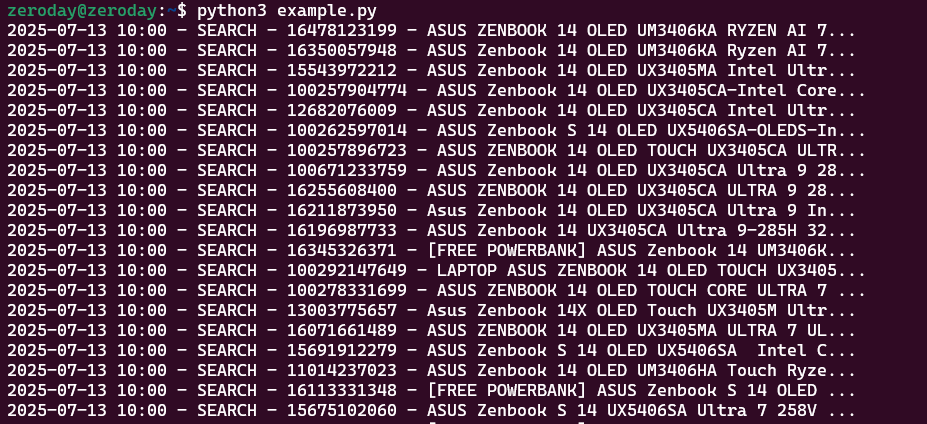
Features
- Product Search: Search Tokopedia products by keyword with customizable filters (price, rating, condition, etc.).
- Detailed Product Data: Retrieve rich product details, including variants, pricing, stock, and media.
- Customer Reviews: Scrape product reviews with ratings, timestamps, and more.
- Serializable Results: Dataclass-based results with
.json()for easy export to JSON or pandas DataFrames. - SearchResults Container: Iterable and JSON-serializable container that supports enrich_details() and enrich_reviews() to automatically fetch product metadata and reviews for each item.
Installation
Tokopaedi is available on PyPi: https://pypi.org/project/tokopaedi/
Install Tokopaedi via pip:
pip install tokopaedi
Quick Start
from tokopaedi import search, SearchFilters, get_product, get_reviews
import json

filters = SearchFilters(
            bebas_ongkir_extra = True,
            pmin = 15000000,
            pmax = 25000000,
            rt = 4.5
        )

results = search("Asus Zenbook S14 32GB", max_result=10, debug=True, filters=filters)
results.enrich_details(debug=True)
results.enrich_reviews(max_result=50, debug=True)

with open('log.json','w') as f:
    f.write(json.dumps(results.json(), indent=4))
print(results.json())
📘 API Overview
🔍 search(keyword: str, max_result: int = 100, filters: Optional[SearchFilters] = None, debug: bool = False) -> SearchResults
Search for products from Tokopedia.
Parameters:
-
keyword: string keyword (e.g.,"logitech mouse"). -
max_result: Expected number of results to return. -
filters: OptionalSearchFiltersinstance to narrow search results. -
debug: Show debug message if True
Returns:
- A
SearchResultsinstance (list-like object ofProductSearchResult), supporting.json()for easy export.
📦 get_product(product_id: Optional[Union[int, str]] = None, url: Optional[str] = None, debug: bool = False) -> ProductData
Fetch detailed information for a given Tokopedia product.
Parameters:
product_id: (Optional) The product ID returned fromsearch(). If provided, this will take precedence overurl.url: (Optional) The full product URL. Used only ifproduct_idis not provided.debug: IfTrue, prints debug output for troubleshooting.
⚠️ Either
product_idorurlmust be provided. If both are given,product_idis used andurlis ignored.
Returns:
- A
ProductDatainstance containing detailed information such as product name, pricing, variants, media, stock, rating, etc. - Supports
.json()for easy serialization (e.g., to use withpandasor export as.json).
🗣️ get_reviews(product_id: Optional[Union[int, str]] = None, url: Optional[str] = None, max_count: int = 20, debug: bool = False) -> List[ProductReview]
Scrape customer reviews for a given product.
Parameters:
product_id: (Optional) The product ID to fetch reviews for. Takes precedence overurlif both are provided.url: (Optional) Full product URL. Used only ifproduct_idis not provided.max_count: Maximum number of reviews to fetch (default: 20).debug: Show debug messages ifTrue.
⚠️ Either
product_idorurlmust be provided.
Returns:
- A list of
ProductReviewobjects. - Each object supports
.json()for serialization (e.g., for use withpandasor JSON export).
Returns:
- A new
SearchResultsobject with.product_detailand.product_reviewsfields filled in (if data was provided).
SearchFilters – Optional Search Filters
Use SearchFilters to refine your search results. All fields are optional. Pass it into the search() function via the filters argument.
Example:
from tokopaedi import SearchFilters, search

filters = SearchFilters(
    pmin=100000,
    pmax=1000000,
    condition=1,              # 1 = New
    is_discount=True,
    bebas_ongkir_extra=True,
    rt=4.5,                   # Minimum rating 4.5
    latest_product=30         # Products listed in the last 30 days
)

results = search("logitech mouse", filters=filters)
Available Fields:
| Field | Type | Description | Accepted Values |
|---|---|---|---|
pmin |
int |
Minimum price (in IDR) | e.g., 100000 |
pmax |
int |
Maximum price (in IDR) | e.g., 1000000 |
condition |
int |
Product condition | 1 = New, 2 = Used |
shop_tier |
int |
Type of shop | 2 = Mall, 3 = Power Shop |
rt |
float |
Minimum rating | e.g., 4.5 |
latest_product |
int |
Product recency filter | 7, 30, 90 |
bebas_ongkir_extra |
bool |
Filter for extra free shipping | True / False |
is_discount |
bool |
Only show discounted products | True / False |
is_fulfillment |
bool |
Only Fulfilled by Tokopedia | True / False |
is_plus |
bool |
Only Tokopedia PLUS sellers | True / False |
cod |
bool |
Cash on delivery available | True / False |
Product Details & Reviews Enrichment
Tokopaedi supports data enrichment to attach detailed product information and customer reviews directly to search results. This is useful when you want to go beyond basic search metadata and analyze full product details or customer feedback.
Example:
# Enrich search results
results = search("Asus Zenbook S14 32GB", max_result=10, debug=True, filters=filters)
results.enrich_details(debug=True)
results.enrich_reviews(max_result=50, debug=True)

# Enrich product detail with reviews
product = get_product(url="https://www.tokopedia.com/asusrogindonesia/asus-tuf-a15-fa506ncr-ryzen-7-7435hs-rtx3050-4gb-8gb-512gb-w11-ohs-o365-15-6fhd-144hz-ips-rgb-blk-r735b1t-om-laptop-8gb-512gb-4970d?extParam=whid%3D17186756&aff_unique_id=&channel=others&chain_key=")
product.enrich_reviews(max_result=50, debug=True)
Enrichment methods are available on both the SearchResults container and individual ProductData objects:
On SearchResults
-
enrich_details(debug: bool = False) -> None
Enriches all items in the result with detailed product info.debug: IfTrue, logs each enrichment step.
-
enrich_reviews(max_result: int = 10, debug: bool = False) -> None
Enriches all items with customer reviews (up tomax_resultper product).max_result: Number of reviews to fetch for each product.debug: IfTrue, logs the review enrichment process.
On ProductData
-
enrich_details(debug: bool = False) -> None
Enriches this specific product with detailed information. -
enrich_reviews(max_result: int = 10, debug: bool = False) -> None
Enriches this product with customer reviews.
This design allows for flexibility: enrich a full result set at once, or enrich individual items selectively as needed.
Example: Scrape directly from Jupyter Notebook
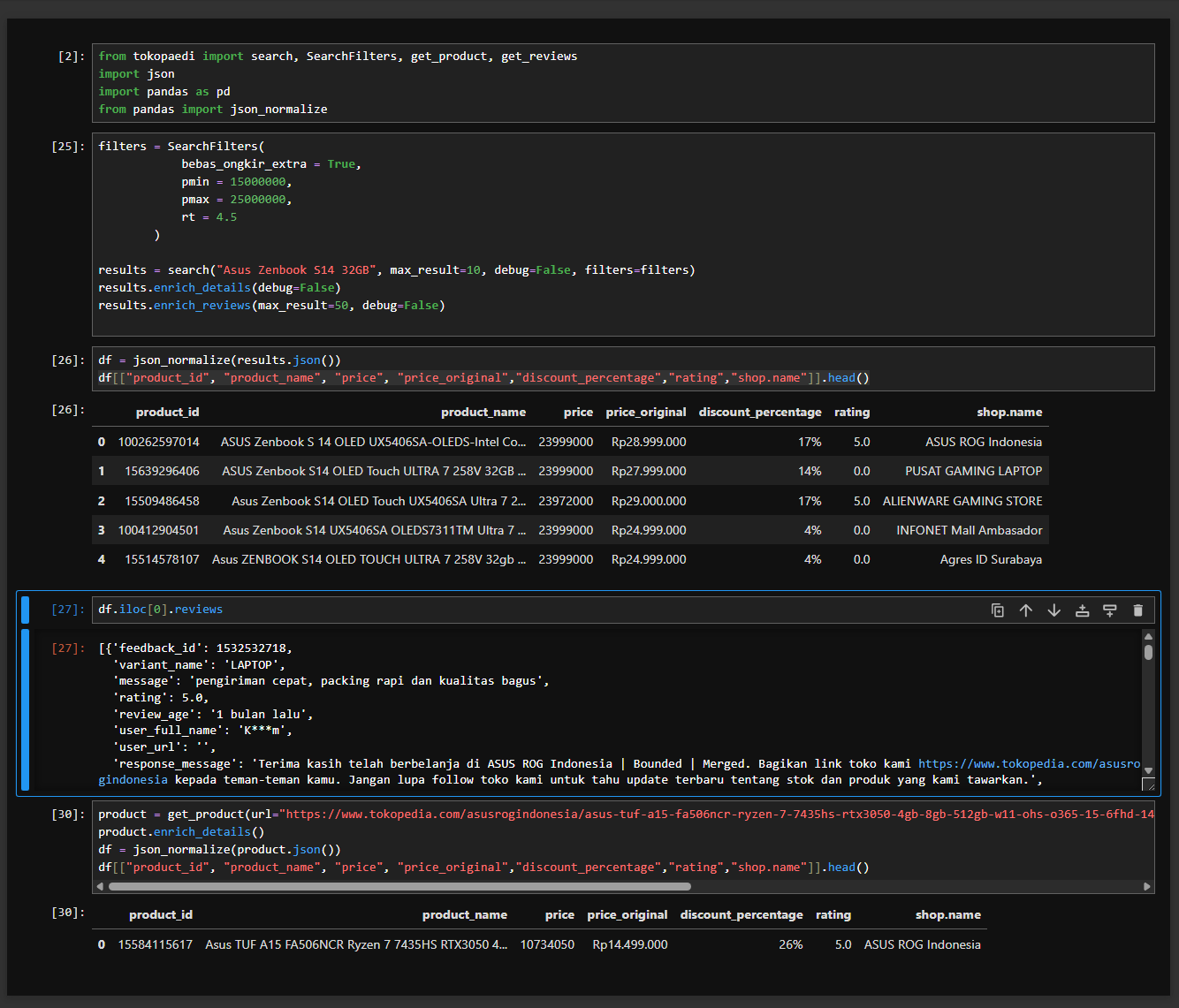
Tokopaedi is fully compatible with Jupyter Notebook, making it easy to explore and manipulate data interactively. You can perform searches, enrich product details and reviews, and convert results to pandas DataFrames for analysis all from a notebook environment.
from tokopaedi import search, SearchFilters, get_product, get_reviews
import json
import pandas as pd
from pandas import json_normalize

filters = SearchFilters(
            bebas_ongkir_extra = True,
            pmin = 15000000,
            pmax = 25000000,
            rt = 4.5
        )

results = search("Asus Zenbook S14 32GB", max_result=10, debug=False, filters=filters)

# Enrich each result with product details and reviews
results.enrich_details(debug=False)
results.enrich_reviews(max_result=50, debug=False)

# Convert to DataFrame and preview important fields
df = json_normalize(results.json())
df[["product_id", "product_name", "price", "price_original","discount_percentage","rating","shop.name"]].head()

# Reviews
df.iloc[0].reviews

# Retrieve single product by url
product = get_product(url="https://www.tokopedia.com/asusrogindonesia/asus-tuf-a15-fa506ncr-ryzen-7-7435hs-rtx3050-4gb-8gb-512gb-w11-ohs-o365-15-6fhd-144hz-ips-rgb-blk-r735b1t-om-laptop-8gb-512gb-4970d?extParam=whid%3D17186756&aff_unique_id=&channel=others&chain_key=")
product.enrich_reviews(max_result=50, debug=True)
df = json_normalize(product.json())
df[["product_id", "product_name", "price", "price_original","discount_percentage","rating","shop.name"]].head()
📋 Changelog
0.2.3
- Update search query
0.2.2
- Add
ProductData.descriptionto extract description
0.2.1
- Fix image link on documentation for PyPi release
0.2.0
- Improve price accuracy with user spoofing (mobile pricing)
- Shop type conistency
- Minor extractor fix
- Replaced
ProductSearchResultwithProductDatafor a unified model - Removed
combine_dataand replace it with enrichment functions - Added
.enrich_details(debug=False)toProductDataandSearchResults - Added
.enrich_reviews(max_result=10, debug=False)toProductDataandSearchResults
0.1.3
- Added
urlparameter toget_reviews()andget_product()for direct product URL support
0.1.1
- Improved documentation and metadata
0.1.0
- Initial release with:
search()function with filtersget_product()for detailed product infoget_reviews()for customer reviews
Author
Created by Hilmi Azizi. For inquiries, feedback, or collaboration, contact me at root@hilmiazizi.com. You can also reach out via GitHub Issues for bug reports or feature suggestions.
📄 License
This project is licensed under the MIT License.
You are free to use, modify, and distribute this project with attribution. See the LICENSE file for more details.
1 maintainer

Metadata
1 maintainer
Release files for tokopaedi 0.2.3
For a detailed explanation of source distributions (sdists) and built distributions (wheels), please see the package formats documentation.
Source distribution (sdist)
| File | Size | Uploaded | |
|---|---|---|---|
| tokopaedi-0.2.3.tar.gz | 21.2 kB | Details |
Built distribution (wheel)
| File | Interpreter | ABI | Platform | Reset |
|---|---|---|---|---|
| tokopaedi-0.2.3-py3-none-any.whl | Python 3 | none | any | Details |
Total release size: 42.0 kB
Release files / tokopaedi-0.2.3.tar.gz
| Download URL | tokopaedi-0.2.3.tar.gz |
|---|---|
| Size | 21.2 kB |
| Tags | Source |
|
SHA-256 checksum How to use checksums |
d98462a019490a21359da7b07cfdc0bb2fca01ab1bf4902c86c6876da6621b5f
|
|
BLAKE2b-256 checksum How to use checksums |
7175a4f69a5ab86abb97b9b0763b219508b74b4a0c225cc03ccc41025967db6d
|
| Upload date | |
|
Uploaded using Trusted Publishing? What is trusted publishing? |
No |
| Uploaded via |
poetry/2.1.3 CPython/3.10.12 Linux/6.6.87.2-microsoft-standard-WSL2
|
Release files / tokopaedi-0.2.3-py3-none-any.whl
| Download URL | tokopaedi-0.2.3-py3-none-any.whl |
|---|---|
| Size | 20.7 kB |
| Tags | Python 3 |
|
SHA-256 checksum How to use checksums |
0154223c7ef3e41e567876ddc8b1f82ab0b65c4cdd9389b01fcc5892a7e8db45
|
|
BLAKE2b-256 checksum How to use checksums |
6fe69c648a5a8da76731651ed2d9d48a3dbf7fb650a9260002c15accdedb2c94
|
| Upload date | |
|
Uploaded using Trusted Publishing? What is trusted publishing? |
No |
| Uploaded via |
poetry/2.1.3 CPython/3.10.12 Linux/6.6.87.2-microsoft-standard-WSL2
|














