
Tol_colors
Colormaps and qualitative colorsets that are colorblind-safe





Those color schemes were designed by Paul Tol. This repository is packaging his work so that it can be easily installed using pip. This package and its documentation follow his technical notes1, which are archived in this repository. Details and implementations for other languages can be found on Paul Tols's website.
A more user-friendly documentation is available at https://tol-colors.readthedocs.io, detailing how and when to use the various colorsets and colormaps in this package.
Install
Using pip:
pip install tol-colors
From source:
git clone https://github.com/Descanonge/tol_colors.git
cd tol_colors
pip install .
Show the available colorsets, colormaps, and the discrete rainbow colormap:
python -m tol_colors
Requirements
- numpy
- matplotlib
Discrete/qualitative schemes
Sets of colors that can be used for lines, markers, qualitative maps, etc. All colorsets are given as named tuples. You can then access the colors by index or by name:
>>> import tol_colors as tc
>>> cset = tc.bright
>>> cset.blue
'#4477AA'
Each colorset is available as a module attribute (tc.bright) or in the
dictionary tol_colors.colorsets. This is a special mapping that will accept
both hyphen and underscore versions (tc.colorsets["high-contrast"] and
tc.colorsets["high_contrast"] will both work).
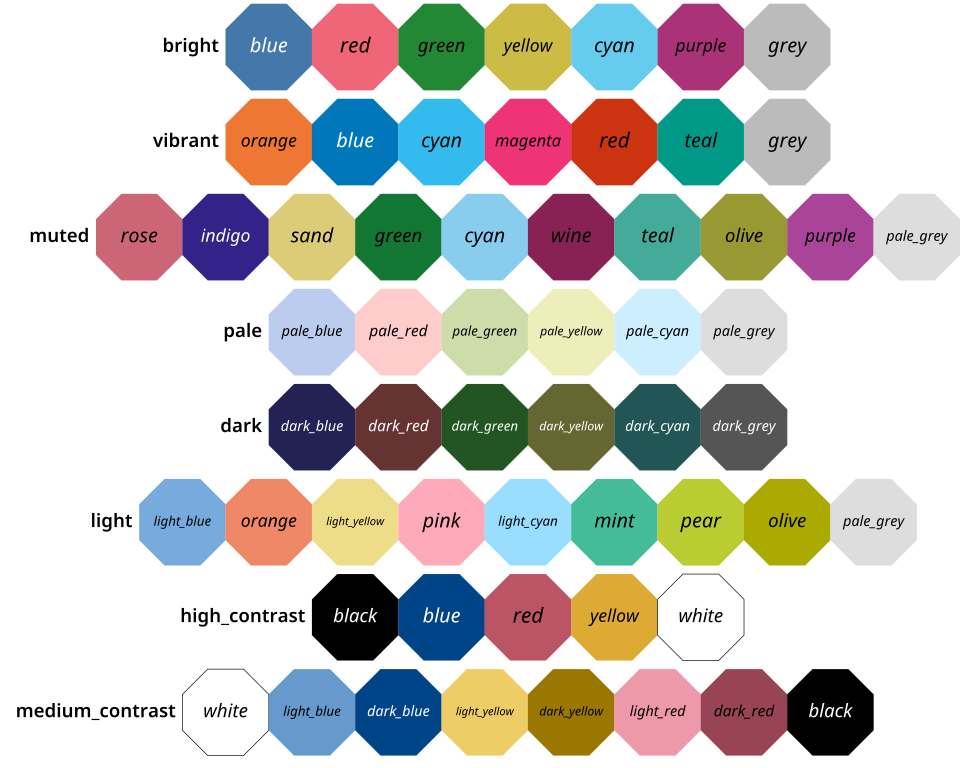
This package also provides a function to easily set the default colors used by Matplotlib to one of the colorsets. This will change your matplotlibrc file or a given stylesheet file.
Colormaps
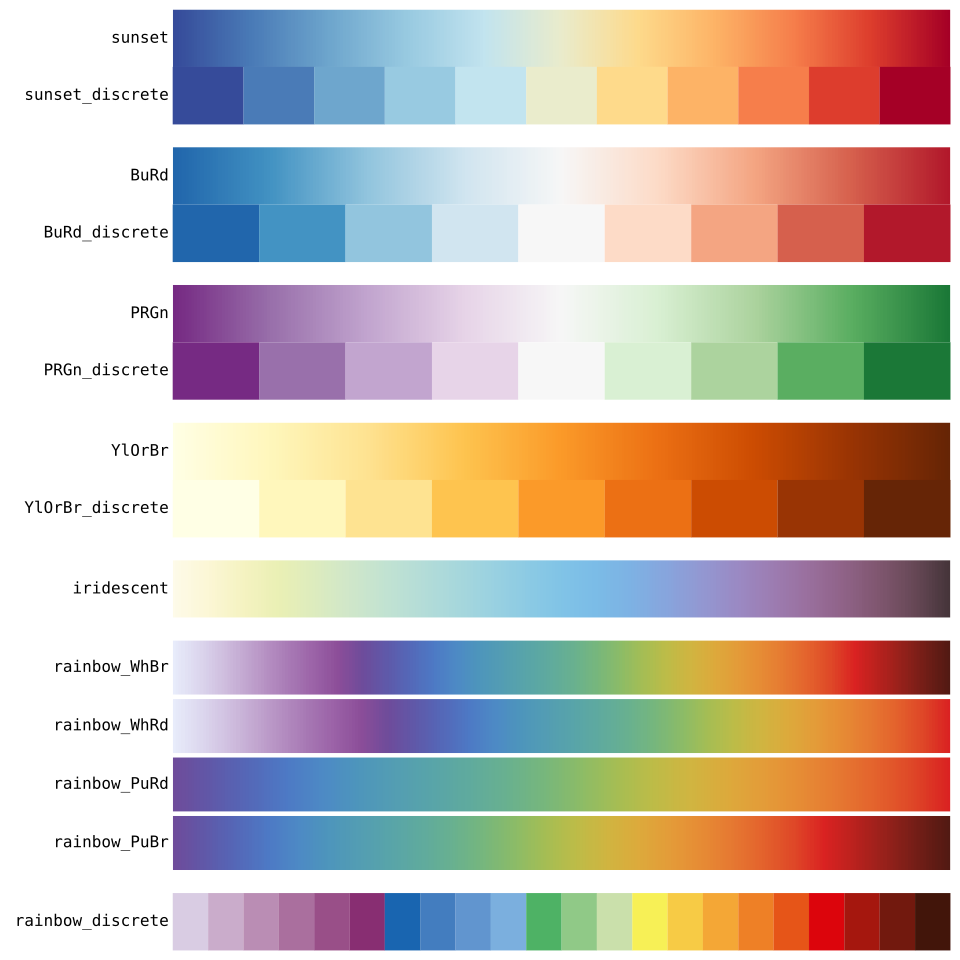
The following colormaps were created by linear interpolation of carefully chosen
colors. Those colors can be used as is for discrete colormaps. Discrete variants
are available by adding "_discrete" to the colormap name (eg
tc.sunset_discrete).
The iridescent colormap is meant to be used interpolated; you can still use
tc.iridescent.resampled(N) to obtain a discrete version. To obtain a discrete
rainbow colormap, use tc.rainbow_discrete(n_colors=14) with a number between 1
and 23.
Colormaps are available either:
- as module attributes (
tc.sunset), - stored in a dictionary (
tc.colormaps["sunset"]) which returns copies, - registered in matplotlib with the prefix "tol." (
plt.imshow(..., cmap="tol.sunset")).
Reversed variants are available by appending "_r" to the colormap name.
See also
Other packages already implement these colorschemes and might better suit your needs:
- color_tol
- pyplot-themes
- khroma: R package that includes those schemes
1: Colour Schemes, Paul Tol, SRON/EPS/TN/09-002, issue 3.2, 18 August 2021 ↩
1 maintainer

Metadata
1 maintainer
Release files for tol-colors 2.2.0
For a detailed explanation of source distributions (sdists) and built distributions (wheels), please see the package formats documentation.
Source distribution (sdist)
| File | Size | Uploaded | Provenance | Actions |
|---|---|---|---|---|
| tol_colors-2.2.0.tar.gz | 1.9 MB | With provenance | Details for tol_colors-2.2.0.tar.gz |
Built distribution (wheel)
| File | Interpreter | ABI | Platform | Actions Reset |
|---|---|---|---|---|
| tol_colors-2.2.0-py3-none-any.whl | Python 3 | none | any | Details for tol_colors-2.2.0-py3-none-any.whl |
Total release size: 1.9 MB
Release files / tol_colors-2.2.0.tar.gz
| Download URL | tol_colors-2.2.0.tar.gz |
|---|---|
| Size | 1.9 MB |
| Tags | Source |
|
SHA-256 checksum How to use checksums |
212ff02e2fcf5c7f9cdb928ba1701bcfbf7fe7a24c52a838488e1db398115db6
|
|
BLAKE2b-256 checksum How to use checksums |
2a18c4877a3dfd90a7350da789fb3e23f2a0a711eb13d56f3c9f6ce1aa9876b9
|
| Upload date | |
|
Uploaded using Trusted Publishing? What is trusted publishing? |
Yes |
| Uploaded via |
twine/6.1.0 CPython/3.13.7
|
Provenance
Provenance describes where a file came from. On PyPI, provenance is shared via attestations, which provide a verifiable record of the build or publishing details. View details, limitations and caveats.


PyPI Publish Attestation
PyPI verified that this artifact, at this checksum, originated from the publisher listed below.
Signed by GitHub Actions, verified by PyPI on Jan 12, 2026.
Transparency logRelease files / tol_colors-2.2.0-py3-none-any.whl
| Download URL | tol_colors-2.2.0-py3-none-any.whl |
|---|---|
| Size | 12.9 kB |
| Tags | Python 3 |
|
SHA-256 checksum How to use checksums |
f9a13efbbdc9469ee73a4b497c2e7b2acd7e36ad78cfa5a227c1589826ae74f5
|
|
BLAKE2b-256 checksum How to use checksums |
b671113f6baf45953f214f7de1a3cc1494fb0289641a93adc42ba78eaec5c513
|
| Upload date | |
|
Uploaded using Trusted Publishing? What is trusted publishing? |
Yes |
| Uploaded via |
twine/6.1.0 CPython/3.13.7
|
Provenance
Provenance describes where a file came from. On PyPI, provenance is shared via attestations, which provide a verifiable record of the build or publishing details. View details, limitations and caveats.
PyPI Publish Attestation
PyPI verified that this artifact, at this checksum, originated from the publisher listed below.
Signed by GitHub Actions, verified by PyPI on Jan 12, 2026.
Transparency logSecurity for tol-colors 2.2.0
Provenance
Provenance describes where a file came from. On PyPI, provenance is shared via attestations, which provide a verifiable record of the build or publishing details. View details, limitations and caveats.
Full provenance
All 2 files in this release have been uploaded with provenance metadata.
Attestation for tol_colors-2.2.0.tar.gz
PyPI Publish Attestation
PyPI verified that this artifact, at this checksum, originated from the publisher listed below.
Signed by GitHub Actions, verified by PyPI on Jan 12, 2026.
Transparency logA note on package security
PyPI is a repository for distributing packages, not a service for auditing them. While third-party security researchers and our staff do their best to detect and remove malicious packages, PyPI cannot guarantee the quality, security or suitability of any given package.
To learn more about protecting yourself from malicious actors, visit our package security documentation.














