

Build a parallel program out of blocks. Run the same graph on threads, in child processes, or across machines — and watch it work in your browser.






Try it without installing anything: the live demo on Hugging Face, sign in as demo / tolquane.
pip install "tolquane[web]" · tolquane web
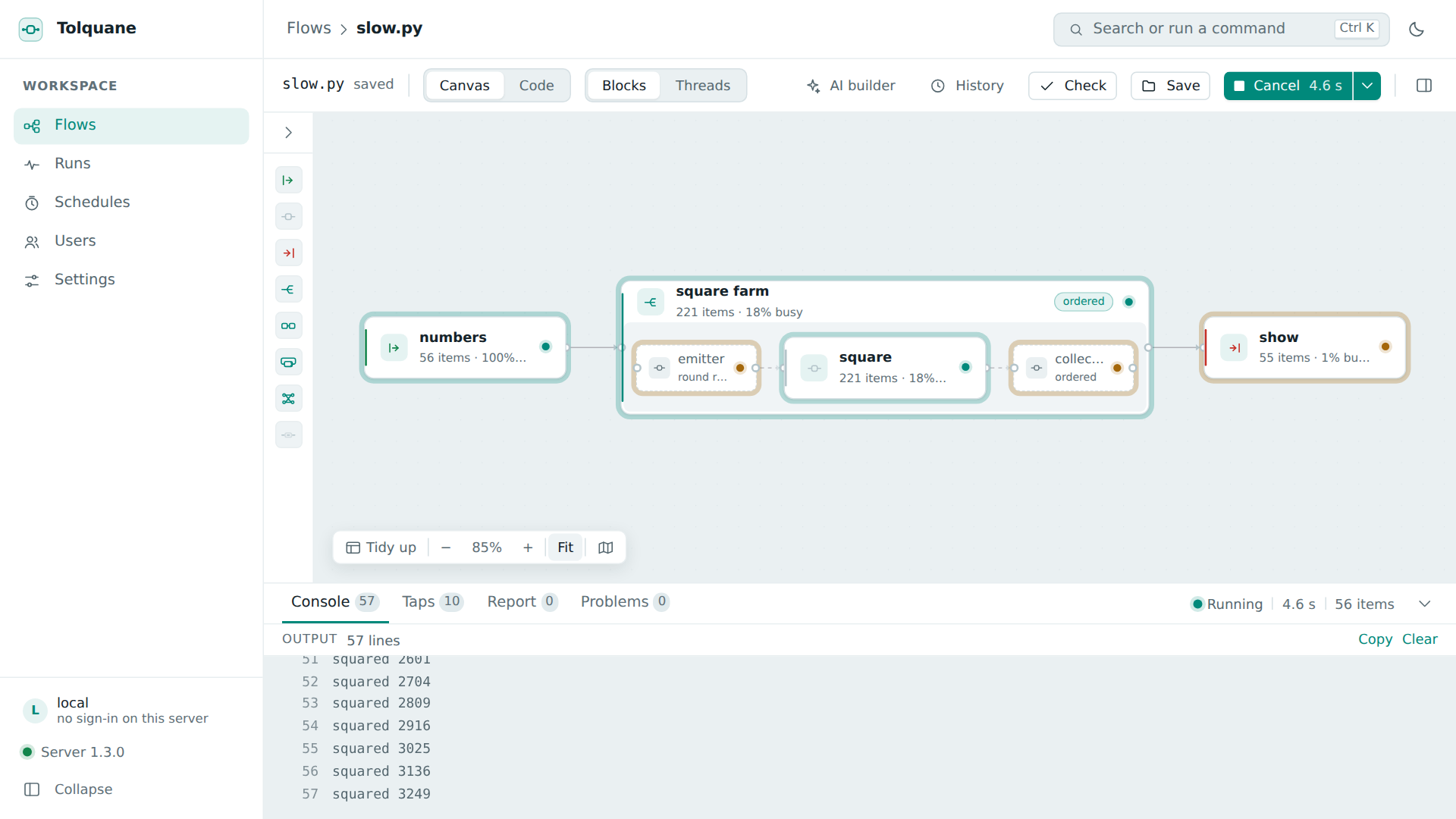
A run in progress: every card carries its state, how many items it has taken and produced and how busy it has been; every edge carries its queue depth.
What Tolquane is
A parallel programming library where a function is a node, >> is a pipeline, and
tq.farm runs copies of a worker. The graph you describe is separate from the way it
runs, so one line switches it from threads to child processes to two machines. Nothing
hangs: every edge is bounded, every node waits on one inbox, an error cancels the run and
names the node, and a watchdog reports a deadlock by name instead of waiting for ever.
Pure Python, 3.11 or newer, no required dependencies — plus an AI builder that writes a
working flow from a sentence, and a browser GUI to watch one run.
import tolquane as tq

@tq.source
def numbers():
    yield from range(1, 101)           # a source is a generator

@tq.node
def double(x: int) -> int:
    return x * 2                       # the return value goes downstream

@tq.sink
def show(x: int) -> None:
    print(x)

graph = numbers >> tq.farm(double, workers=4) >> show

tq.run(graph)                                     # threads, by default
tq.run(graph, runtime="processes")                # the farm's workers in child processes
tq.run(graph, runtime="sync")                     # one thread, deterministic, for tests
tq.run(graph, deploy="deploy.toml", group="G1")   # this host's share of the same graph
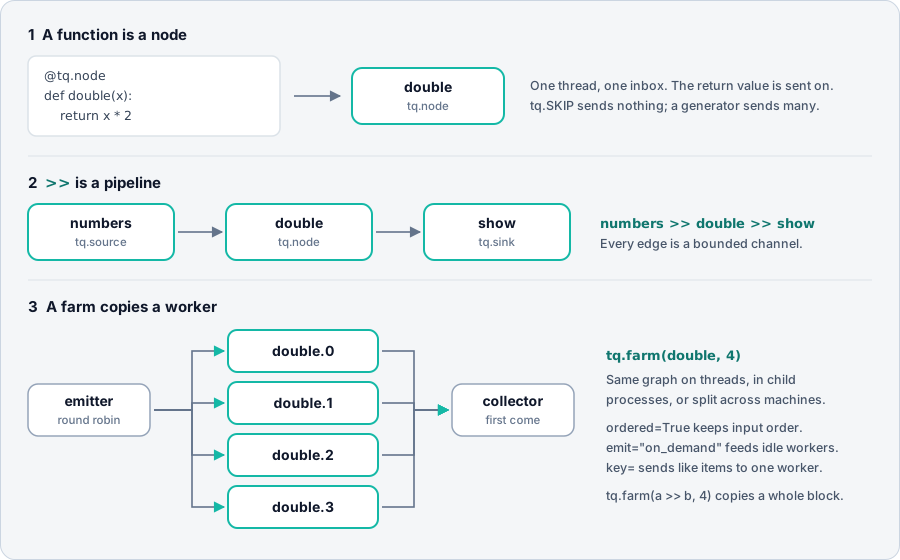
Tolquane is the successor of BBFlow, a Java implementation of the FastFlow building blocks, rewritten from scratch to be simple to use and impossible to hang.
Tolquane Web
pip install "tolquane[web]"
cd ~/flows && tolquane web
A local page for the flows in one directory. The point of it is that nothing is locked
in: every flow is an ordinary flow.py that python flow.py runs on any machine with
Tolquane installed. The canvas is a view of the file, not a format of its own.
The blocks on a canvas
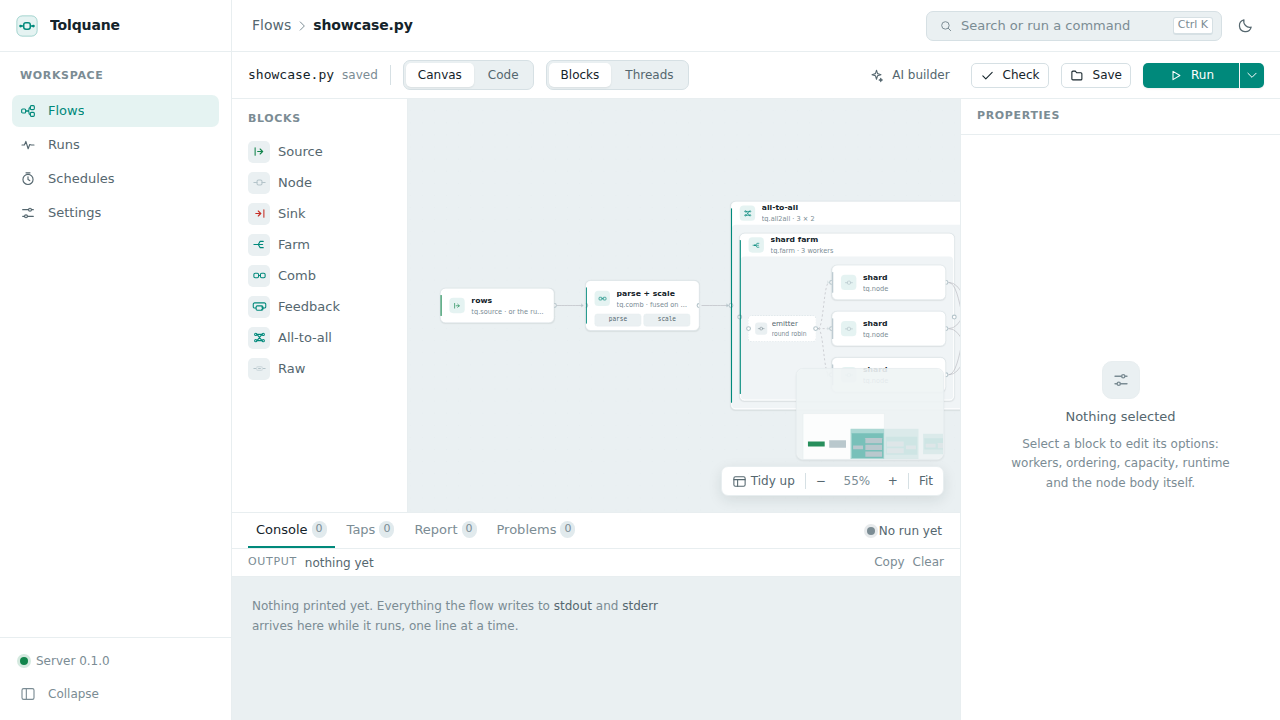
The canvas shows the blocks you write — a source, a node, a sink, a farm with its worker inside it, a feedback loop, an all-to-all pair — not the threads they become. Drag a kind from the palette to add one, drag between handles to connect them, and press Threads to see the expanded graph that will actually run.
Every option, in a panel
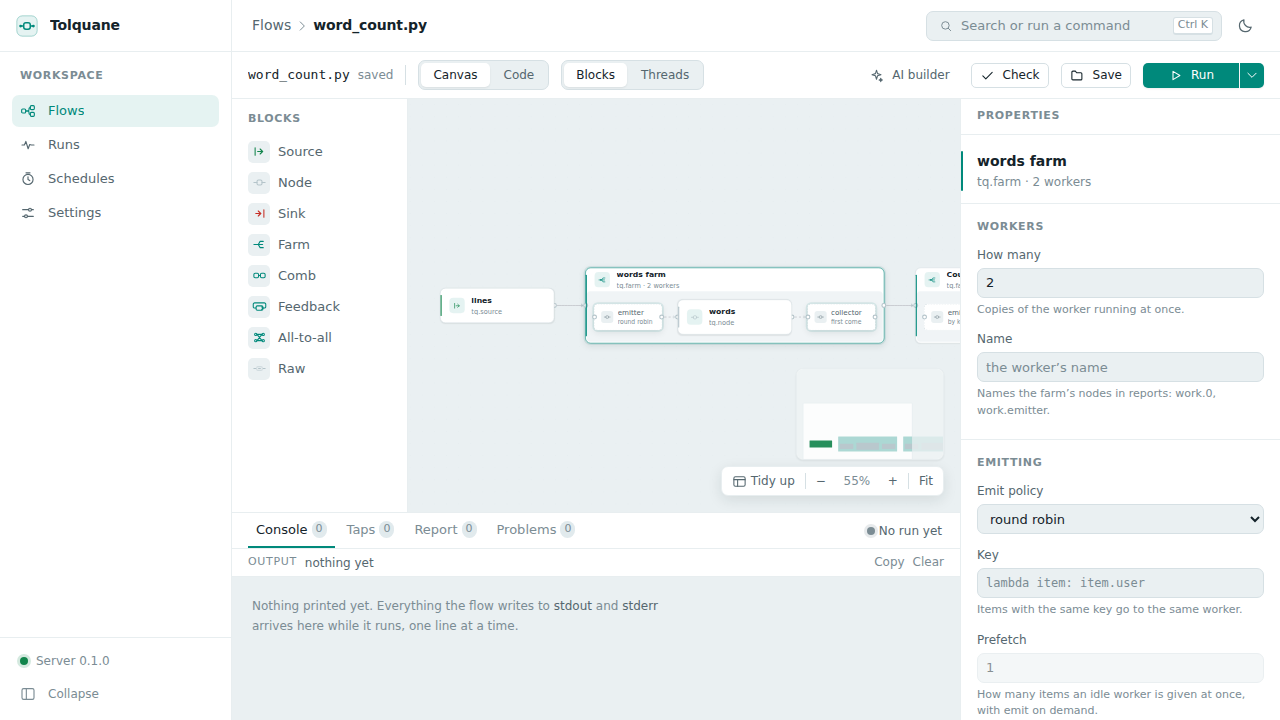
Select a card and the panel on the right holds everything that block has: how many workers, the emit and collect policies, ordering, prefetch, capacity, the runtime for that block alone, and the node's own body. Every change is written straight into the Python.
The code stays yours
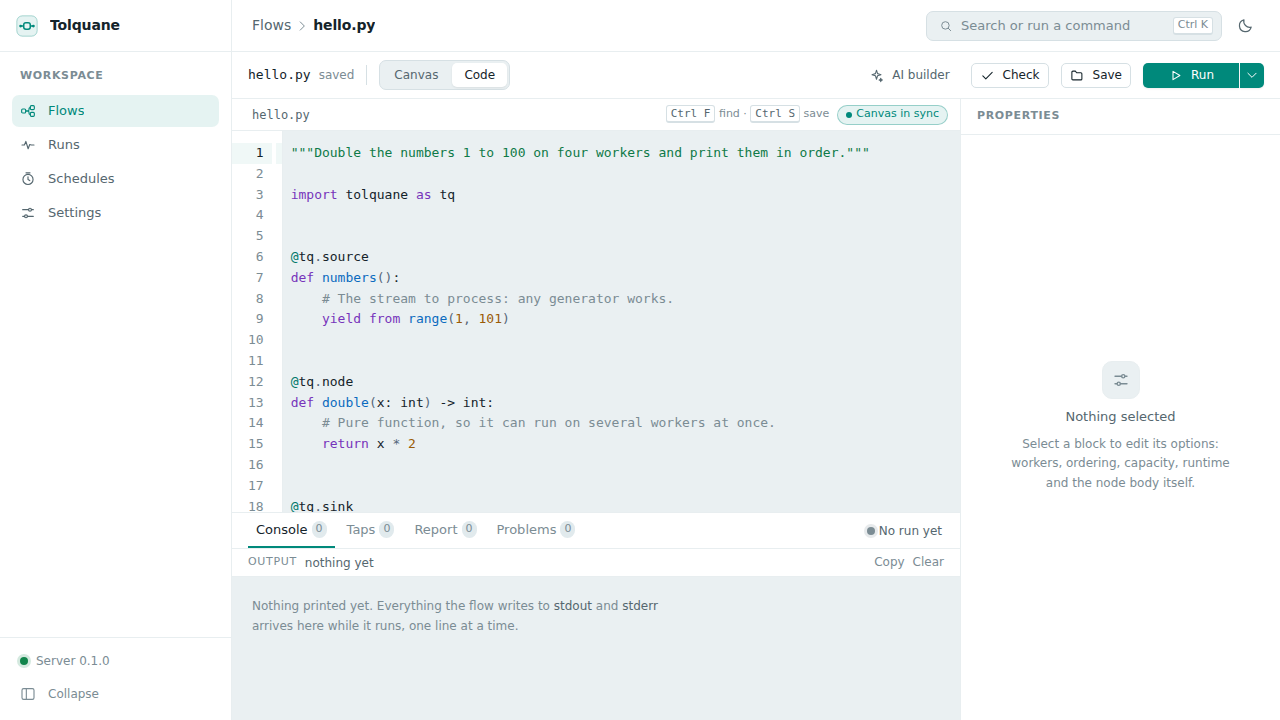
Canvas / Code switches to the whole file in an editor, and the two edit each other: a canvas change regenerates the Python in the house style, and typing re-parses about half a second after you stop, with the canvas catching up. Node bodies are kept exactly as written — a round trip never reformats what you typed — and if the parser cannot model what you wrote, the file is left alone and the flow drops to code-only mode rather than losing anything.
Run it, and see where the time went
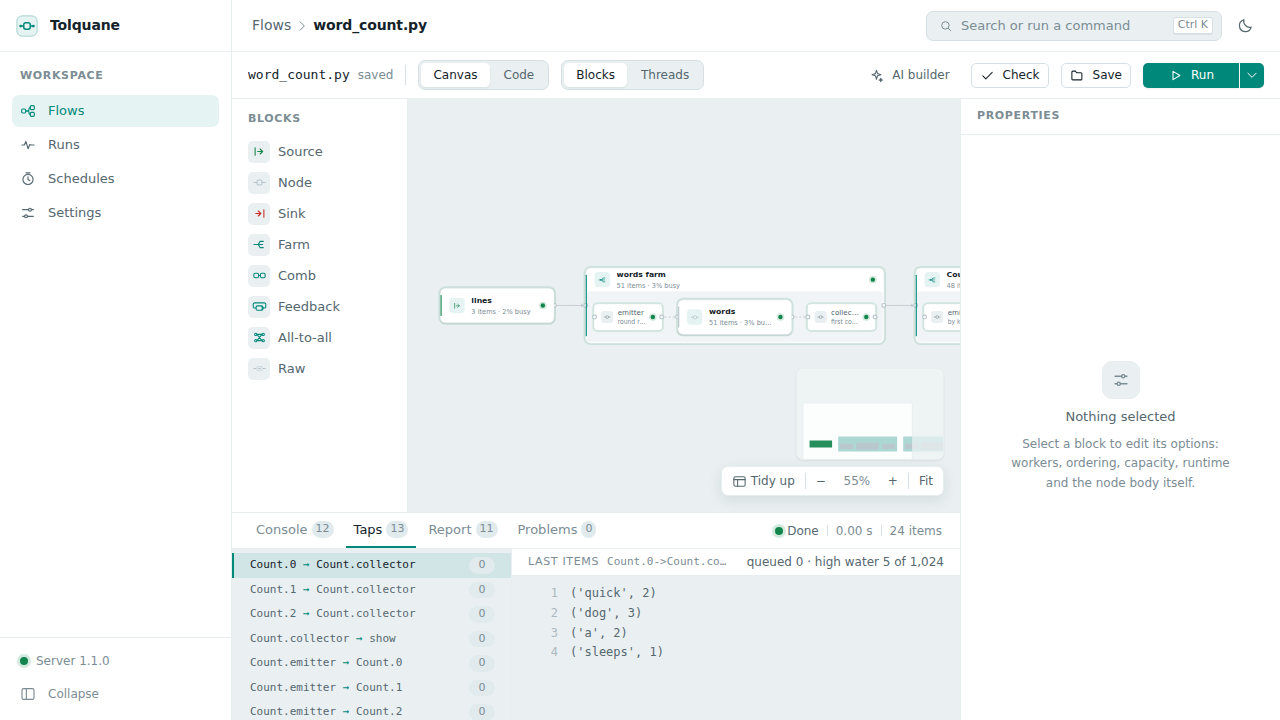
Run starts the flow in a child process, never in the server, so a flow that hangs or crashes costs one process and the page keeps answering. The drawer has four tabs: Console for everything the flow printed, Taps for the last items that crossed each edge, Report for the per-node table with the bottleneck marked, and Problems, where an error or a deadlock report points at the card that caused it.
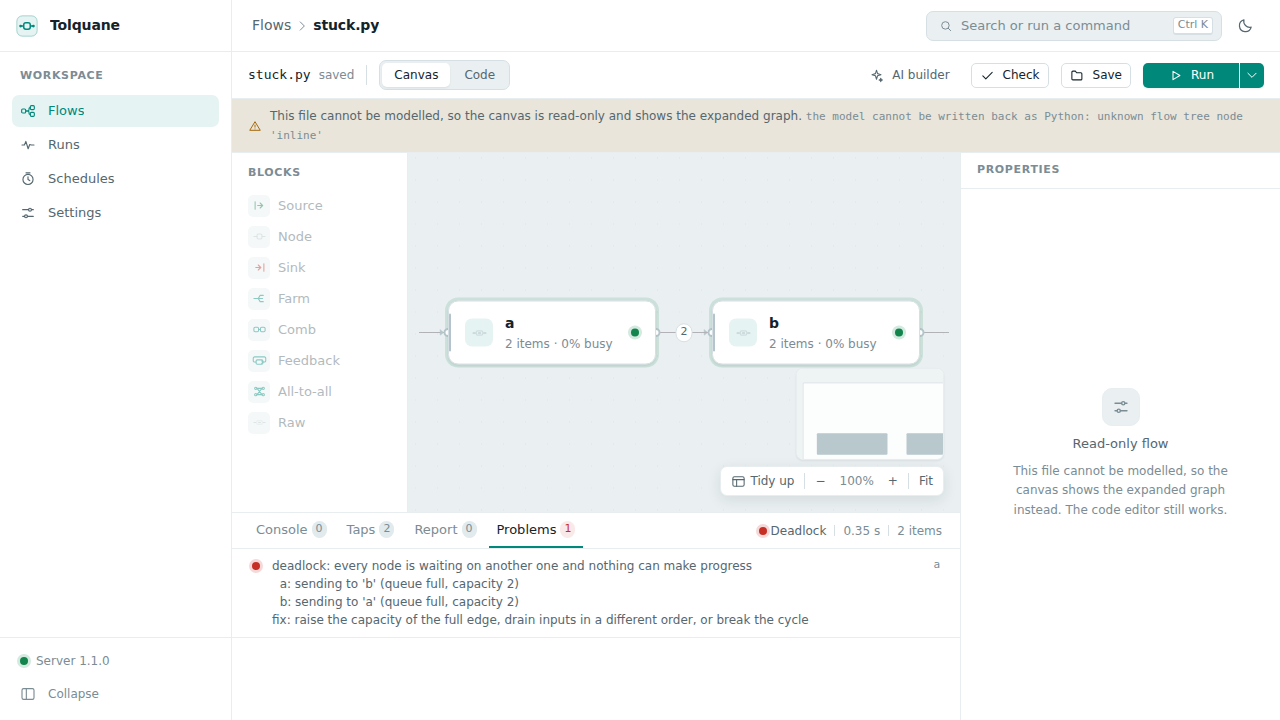
A flow that hangs will not hang for ever: the watchdog notices that every node is waiting
on another one, ends the run, and names the cycle and the fix. You can also pick the
sync runtime, where one node runs at a time in a fixed order and every run of the same
graph interleaves the same way.
The AI assistant
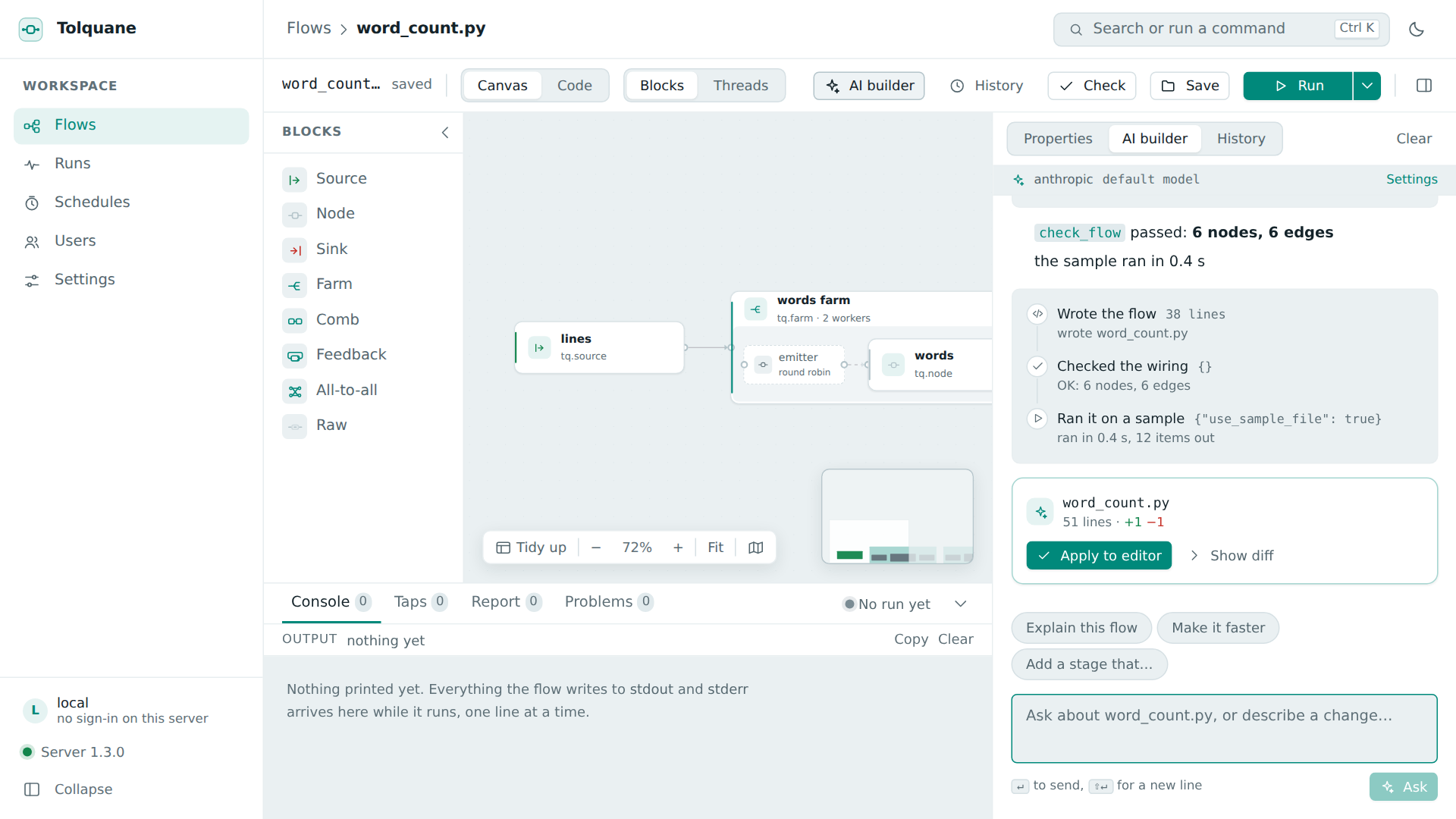
This is the part that makes Tolquane usable by anyone. Describe what you want in a
sentence and the builder writes a flow, checks its wiring, runs it on a sample it makes
up, fixes what failed, and hands you a diff to apply. Every step is shown as it happens —
write_flow, check_flow, run_flow — so you can see what it did rather than trusting
it. It works in the panel beside the editor, with your open flow as context, and at the
command line:
pip install "tolquane[ai]"
export ANTHROPIC_API_KEY=...        # or OPENAI_API_KEY with --provider openai
tolquane build "read urls.txt, fetch each with 8 workers, write url, status and size to status.csv"
Three rounds and 12,994 tokens later, unedited:
@tq.node
def fetch(url: str):
    # The slow, I/O bound stage, so this is what the farm multiplies.
    # A failed request is a result to record, not a crash, hence the except.
    try:
        with urllib.request.urlopen(url, timeout=TIMEOUT) as response:
            return (url, response.status, len(response.read()))
    except urllib.error.HTTPError as exc:
        return (url, exc.code, len(exc.read()))
    except Exception as exc:                       # timeout, DNS failure, bad URL
        return (url, f"{type(exc).__name__}: {exc}", 0)


def build(source=None):
    start = tq.from_iterable(source) if source is not None else read_urls
    return start >> tq.farm(fetch, workers=8) >> WriteCsv
Ten flows it wrote, unedited, with their full transcripts and the sentence each came
from, are in
examples/generated.
None of the ten conversations had a tool error. Claude Opus 5 is the default and GPT
works with --provider openai; the key is yours, read from the environment or from a
mode-600 file, never stored in the database and never given to a flow. Generated code
runs on your machine, in a subprocess, with a timeout.
Parameters, so a flow is not a constant
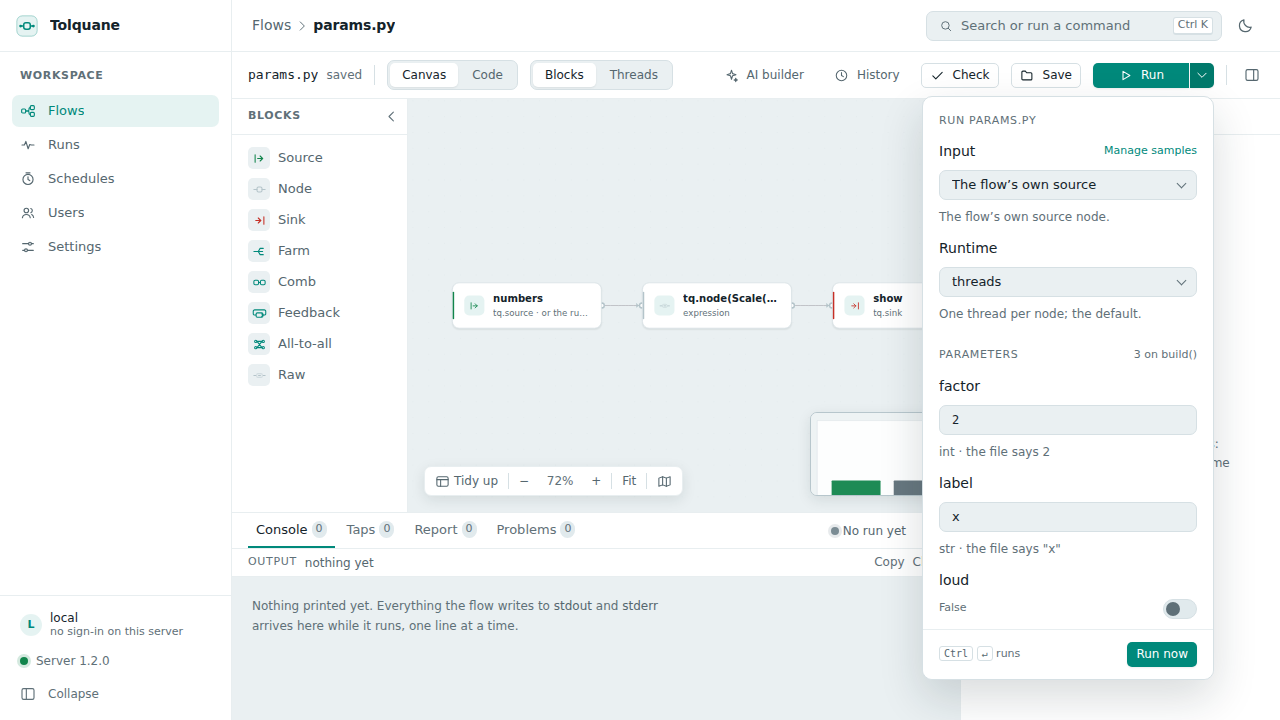
Keyword arguments of build() with literal defaults become fields in the Run popover,
typed from the default — a number, a toggle, a text box. The defaults are what the file
does on its own, so python flow.py still needs nothing, and
tolquane run flow.py --param factor=4 sets them from a shell.
Schedules that tell you how it went
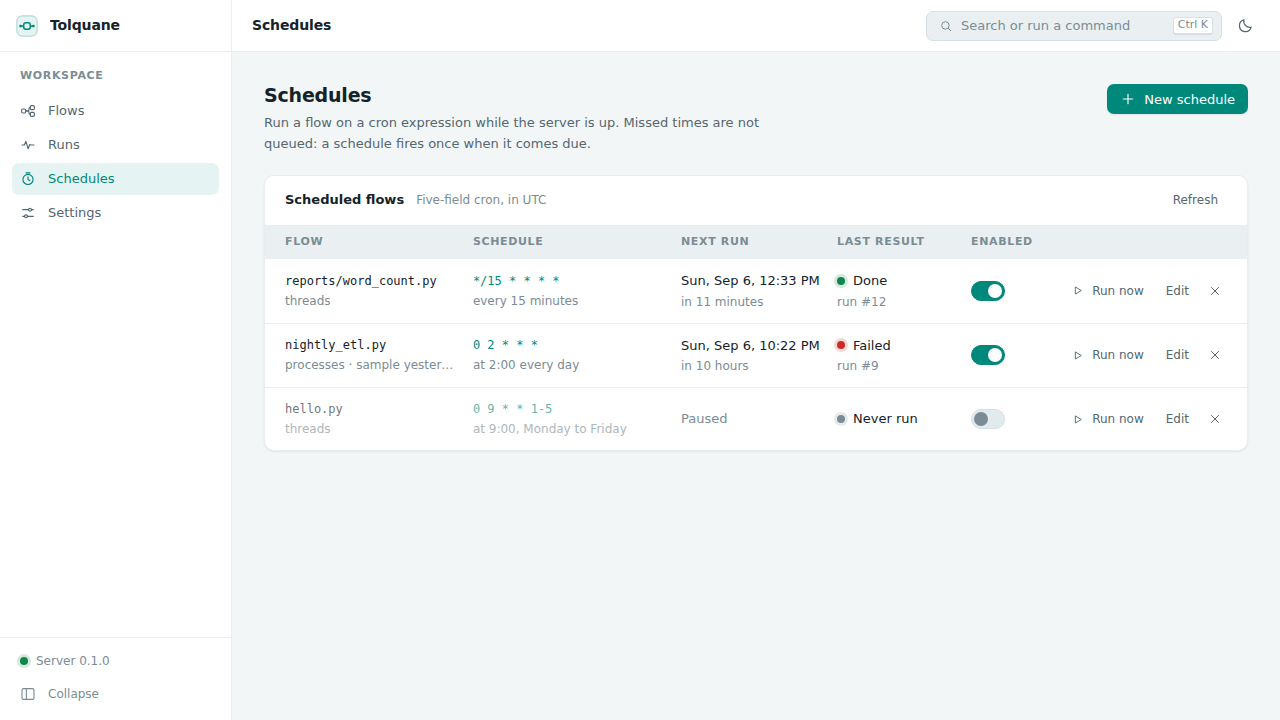
A schedule is a flow, a five-field cron expression, its parameters and a runtime. The editor shows what the expression means as a sentence with the next five times it fires, so it is never a guess.
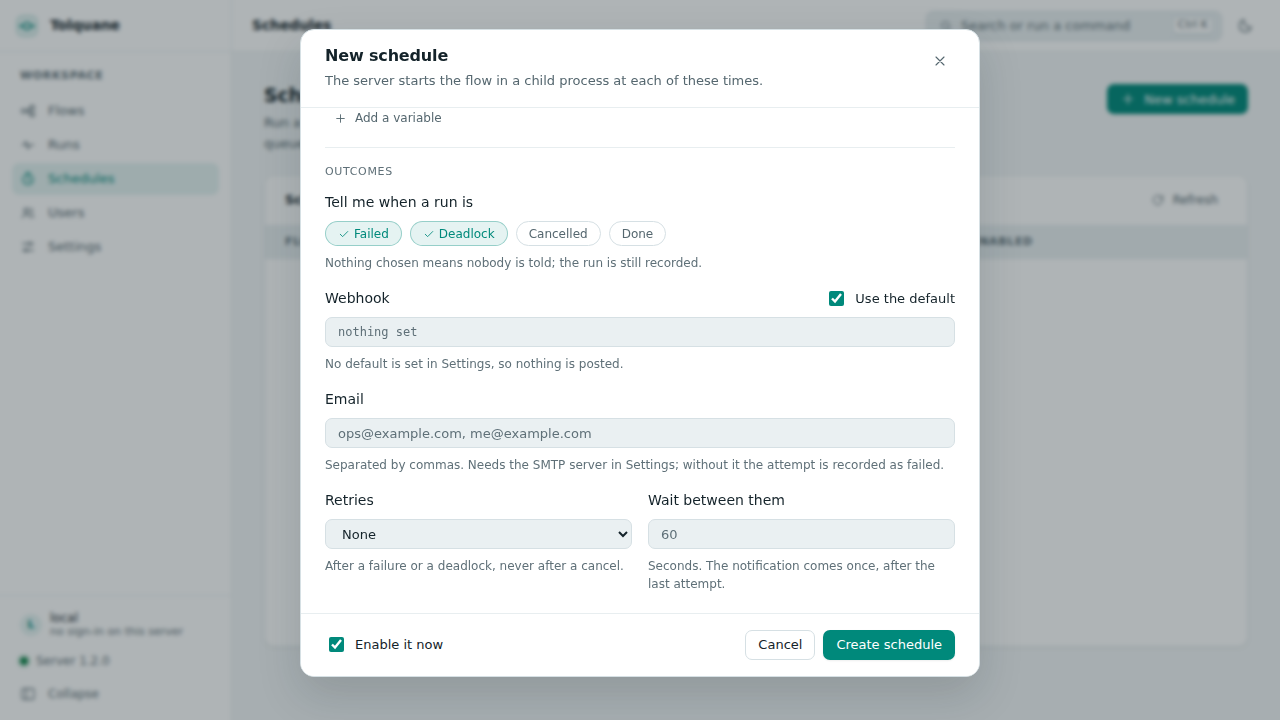
Because a schedule runs when nobody is watching, it can say how it went: a webhook, mail, or both, on the statuses you pick, with up to five retries. Each attempt is a run of its own on the Runs page, and the message comes once, at the end, with the final status.
Every run, kept
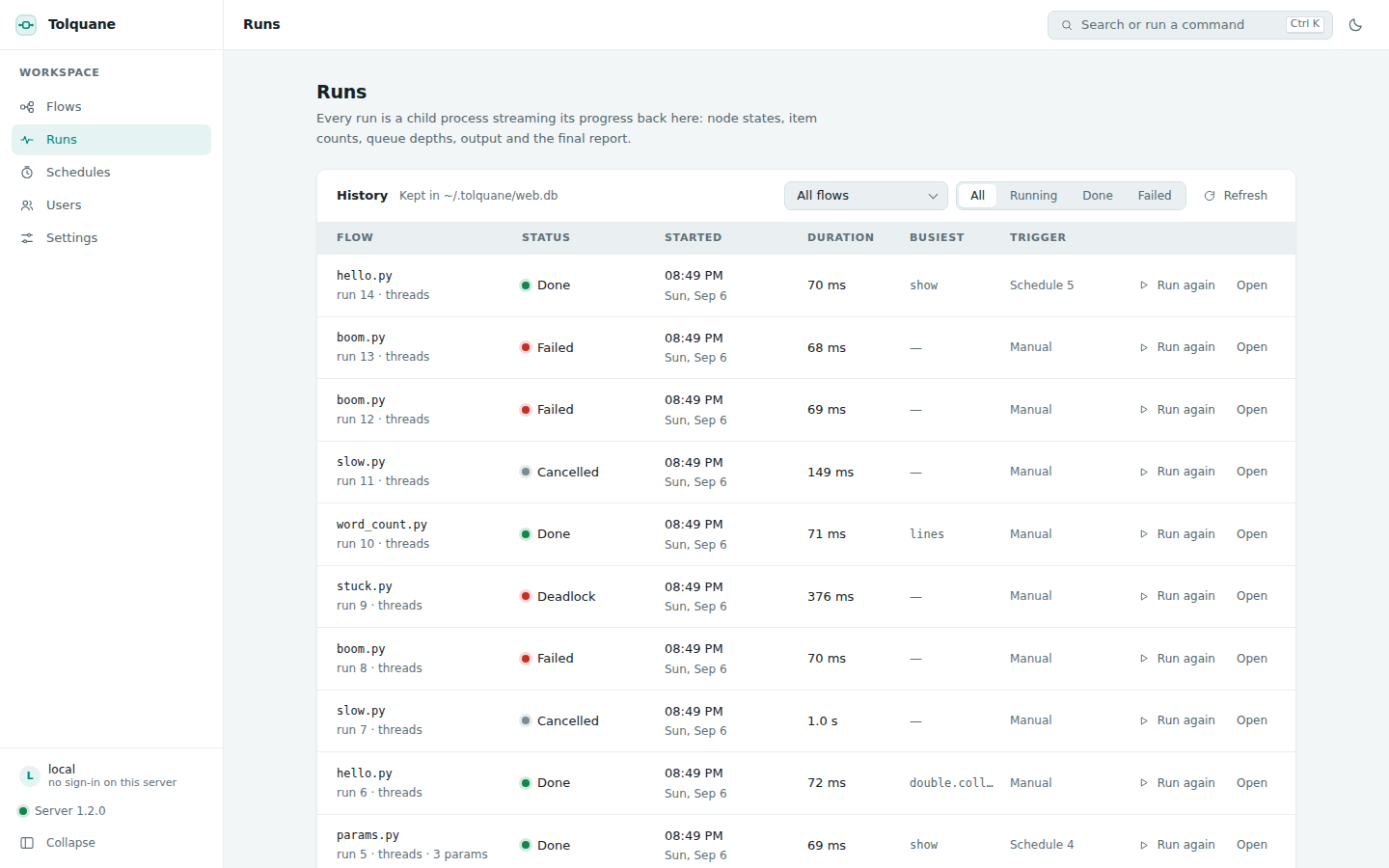
Every run is recorded with its report, its log, the parameters and variables it was given, who started it and what triggered it. Opening one shows the report and the last 64 KB of output, and Run again repeats it exactly.
Version history, in git
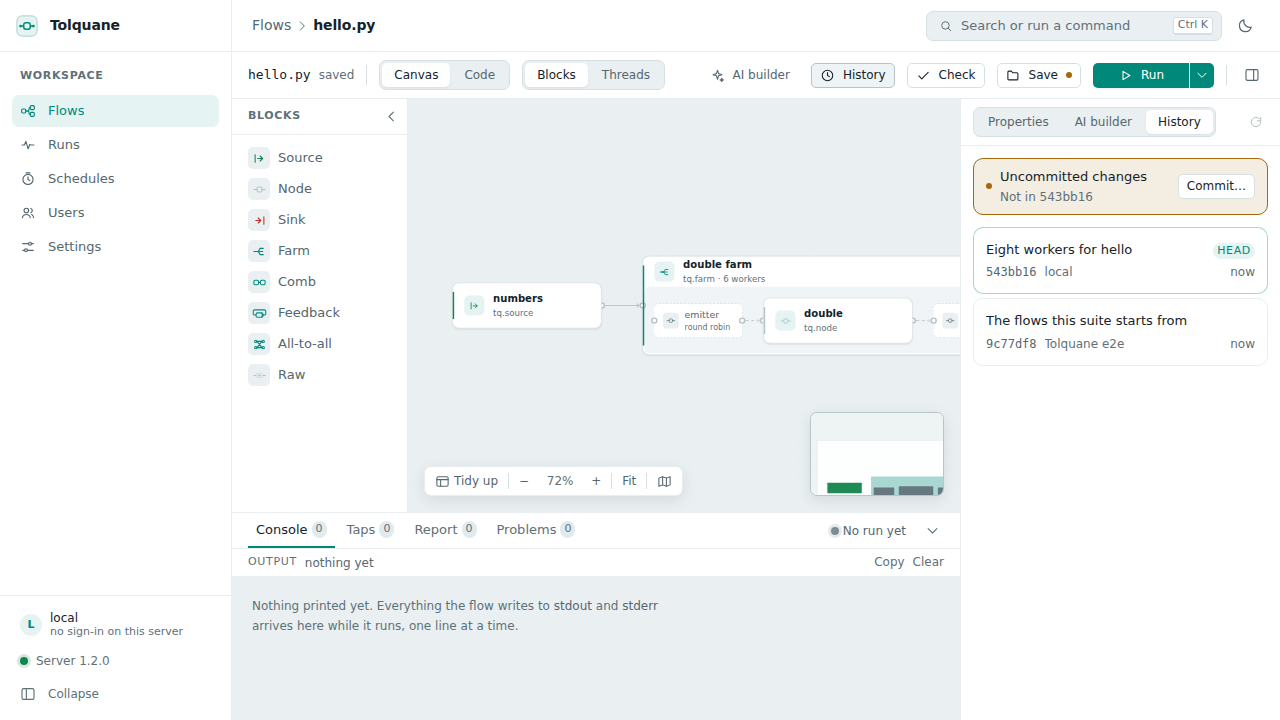
When the workspace is a git repository, the History tab lists the commits that touched
this flow with their diffs, restores an old version, and commits on save with a message
you type (or automatically). Only the flow and its layout sidecar are ever added by name,
so a commit never sweeps up anything else, and nothing here runs push, reset or
checkout.
People, when there is more than one
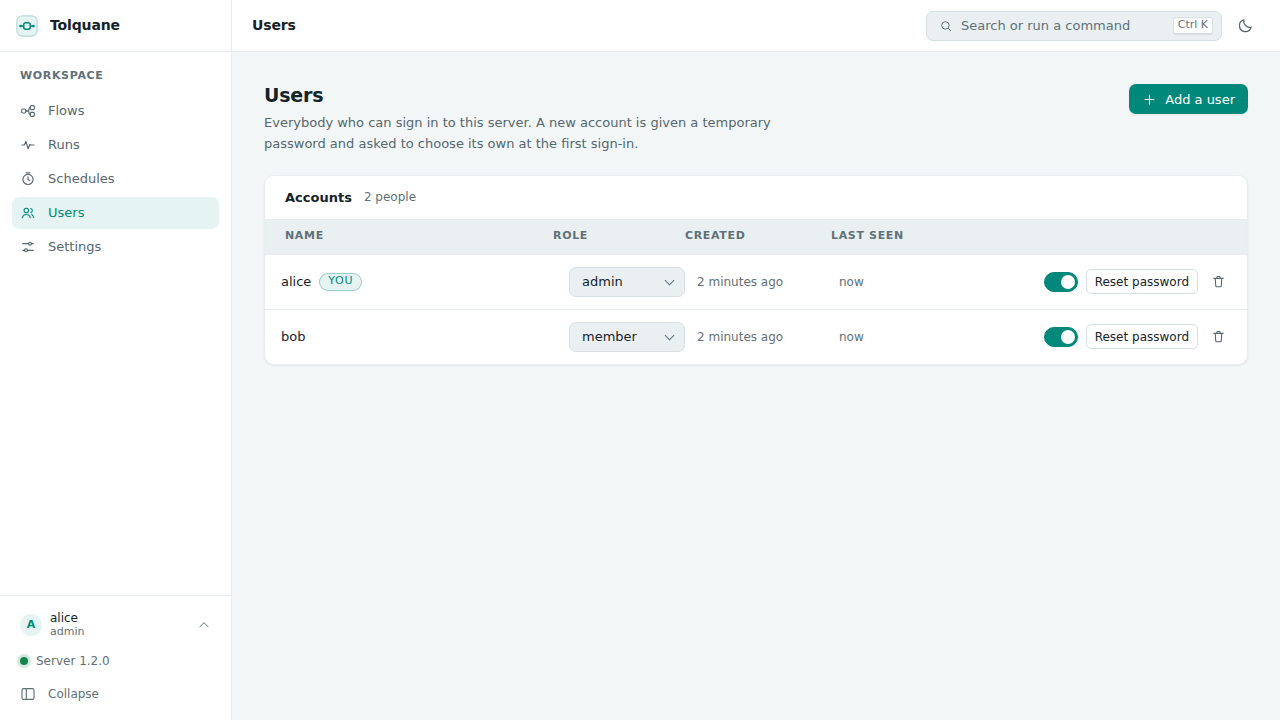
A local server with no accounts has no login, because only your machine can reach it. The
first account turns sign-in on for everybody: administrators get the settings, the keys
and the users, members get the flows, the runs, the schedules, the AI panel and the
history. Passwords are scrypt hashes, sessions and API tokens are kept only as their
SHA-256, and personal tokens let scripts use the same API.
The whole tour, screen by screen, is the user guide.
The library
The vocabulary
| Write | What it is |
|---|---|
@tq.source, @tq.node, @tq.sink |
A function is a node. tq.SKIP drops an item, None is a value, a generator yields many. |
a >> b >> c |
A pipeline. Five wiring rules cover 1-to-1, 1-to-N, N-to-1, N-to-N and N-to-M. |
tq.farm(work, 8) |
Eight copies of a worker, with round-robin, on-demand, broadcast, scatter and keyed emitters and first-come, round-robin, gather and ordered collectors. |
tq.farm(a >> b, 4) |
Any block as a worker: a pipeline, another farm, a loop, an all-to-all. |
tq.comb(a, b) |
Two nodes fused onto one thread. |
tq.all2all(left, right) |
Every left worker to every right worker; the eight FastFlow fusion cases. |
tq.feedback(block) |
Outputs wired back to inputs, with a loop that closes when nothing is left in flight. |
tq.session(block) |
A graph kept running while you push items in and read results out. |
tq.optimize(block) |
The same results with fewer threads. |
@tq.raw, Graph.link |
Full control of a node's channels, and topologies the blocks cannot say. |
tq.check, tq.explain, tq.draw |
Validate the wiring, list what was wired and why, print a Mermaid diagram. |
The whole public surface fits on one page.
The runtimes, and what they measured
| Runtime | Nodes run as | Pick it when |
|---|---|---|
threads (default) |
one thread per node | I/O-bound stages, numpy and C extensions, and full parallelism on free-threaded CPython 3.14t |
processes |
farm workers in spawned children, the rest as threads here | CPU-bound pure Python on a GIL build |
| async nodes | async def nodes on an event loop; a farm of them is one pool |
hundreds of network requests in flight on one thread |
| distributed | each group on its host, TCP between groups | two or more machines |
sync |
one node at a time, in a fixed order, in the calling thread | tests, debugging, deterministic runs |
On a 16-thread machine, a farm of eight CPU-bound pure-Python workers, 2.4 s of sequential work:
| speedup | |
|---|---|
| 3.13 threads (GIL) | 0.9x |
| 3.13 processes | 5.5x |
| 3.14t threads | 5.6x |
Processes on a GIL build match the free-threaded interpreter. The rest of the gap to 8x is process start-up, pickling each item, and the parent's own threads. Details in Runtimes.
No hangs
That is a contract, not a hope: section 6 of DESIGN.md states the rules and tests/liveness/ keeps them.
- Every edge is bounded (1024 items by default) and back pressure is a state, not an error.
- EOS is a message, not a
Nonesentinel and not a flag on a queue, soNoneis an ordinary value and a forgotten return cannot silently drop an item. - Every node waits on one inbox, so a multi-input node never polls or scans.
- An error cancels the run and re-raises as a
NodeErrornaming the node and the worker, or as anExceptionGroupwhen several fail. - A deadlock is reported, not suffered: the watchdog names the nodes in the cycle and what each was waiting for.
Across machines
A deploy file cuts the graph into named groups. Edges that cross a group become TCP channels with batching, credit-based back pressure, resend after a dropped connection and an optional shared secret — and the flow does not know.
# deploy.toml
[groups.G1]
endpoint = "10.0.0.1:7000"
nodes = ["numbers", "double.emitter", "double.collector", "show"]

[groups.G2]
endpoint = "10.0.0.2:7000"
nodes = ["double.[0-9]*"]           # the workers, on the other machine
tolquane launch deploy.toml flow.py # starts every group, here or over ssh
Fewer threads, same results
tq.optimize(graph) rewrites the block tree: a stage before a farm becomes its emitter,
a default collector goes when the next stage can read the workers, an ordered farm's
collector absorbs the next stage, and a farm of farms becomes one farm.
tolquane optimize flow.py shows what it would do; tolquane run --optimize does it.
Ways to run it
On your own machine. tolquane web listens on 127.0.0.1:8765, opens a browser and
takes the current directory as the workspace. No login, because nothing else can reach
the port.
On a shared machine. Leave the server on loopback and reach it through an SSH tunnel
(ssh -L 8765:127.0.0.1:8765 host), or put a proxy in front of it for HTTPS and make
accounts. --host anything but loopback is refused without --token, because anyone who
can reach the page can run code as you. There is a systemd unit and an nginx and Caddy
configuration in the deployment guide.
In a container. The
Dockerfile installs
the wheel on python:3.13-slim, with two volumes and one token:
docker compose up -d # docker-compose.yml, with a Caddy service for HTTPS
docker build -t tolquane:local .
docker run --rm -p 127.0.0.1:8765:8765 \
    -e TOLQUANE_WEB_TOKEN="$(python -c 'import secrets; print(secrets.token_urlsafe(24))')" \
    -v "$PWD/flows:/workspace" -v tolquane-data:/data tolquane:local
/workspace is your flow files and /data is TOLQUANE_HOME: the SQLite database and
the mode-600 key file. Nothing else is state.
As a library, in any script. pip install tolquane and import tolquane as tq. No
server, no GUI, no dependencies.
From the command line, on any file that defines build(source=None):
tolquane run flow.py --stats --runtime processes --param workers=8
tolquane check flow.py            # validate the wiring before anything runs
tolquane explain flow.py          # every node, policy and wiring rule
tolquane draw flow.py             # a Mermaid diagram
tolquane optimize flow.py         # what the optimizer would cut
tolquane build "..."              # write a flow from a sentence
tolquane launch deploy.toml flow.py
tolquane web                      # the GUI
tolquane web users add alice --admin
Testing it
The deterministic runtime is what makes a flow testable: runtime="sync" runs one node
at a time in a fixed order, so the same graph gives the same interleaving on every run
and a deadlock is reported the instant it happens.
tq.to_list and tq.from_iterable turn a graph into a function of a list.
def test_doubles():
    out = tq.to_list()
    tq.run(tq.from_iterable([1, 2, 3]) >> double >> out, runtime="sync")
    assert out.items == [2, 4, 6]
tolquane check flow.py validates the wiring before anything runs, and reports a
GraphError that says the fix rather than a stack trace.
The project's own suites:
uv venv .venv --python 3.13
uv pip install --python .venv/bin/python -e ".[dev]"

.venv/bin/ruff check . && .venv/bin/ruff format --check .
.venv/bin/mypy
.venv/bin/pytest                       # close to 800 tests, tests/liveness/ included
.venv/bin/mkdocs build --strict        # with pip install -e ".[docs]"
cd web
npm ci
npm run lint && npm run typecheck && npm test     # the frontend's own unit tests
npx playwright install --with-deps chromium
npm run e2e                            # 15 specs against a real `tolquane web`
The end-to-end suite starts a real server on a workspace it writes from scratch and drives a browser through it: the canvas, the code round trip, runs and cancels, the AI panel, schedules, users and history. Nothing is mocked except the model's own stream, and the server being gone in the two specs about that. CI runs the Python suite on 3.11 to 3.14 and on free-threaded 3.14t, plus Windows and macOS on 3.13, and lint, types, the docs build, the frontend, the end-to-end suite and the packaging check on every push.
Where things are
| Documentation site | The tutorial, the cookbook, the runtimes, the API card |
| Tutorial | Five minutes from install to a flow on two machines |
| Cookbook | Thirteen recipes, each a few lines |
| API card | The whole public surface on one page |
| Tolquane Web user guide | Every screen, with screenshots |
| Deploying Tolquane Web | Local, systemd, Docker, reverse proxies, backups |
| The AI builder | What it does, and what it is allowed to do |
| House style | What a flow file looks like |
| Coming from FastFlow or BBFlow | The vocabulary, translated |
| DESIGN.md | Why it is built this way; section 6 is the liveness contract |
| CHANGELOG.md | 1.0 to 1.3 |
| Backlog | Everything deferred, and why |
| examples/ | Flows in the house style, and ten written by the builder |
Contributing
Issues and pull requests are welcome at
github.com/robtacconelli/Tolquane.
Before a pull request, run ruff check, ruff format --check, mypy and pytest; if
you touched the core, run the tests on 3.11, 3.13 and 3.14t. Deferred ideas live in
docs/backlog.md —
adding one there is a contribution too.
License
Apache-2.0. See LICENSE.
1 maintainer

Download files
Download the file for your platform. If you're not sure which to choose, learn more about installing packages.
Source Distribution
Built Distribution
Filter files by name, interpreter, ABI, and platform.
If you're not sure about the file name format, learn more about wheel file names.
Copy a direct link to the current filters
File details
Details for the file tolquane-1.3.1.tar.gz.
File metadata
- Download URL: tolquane-1.3.1.tar.gz
- Upload date:
- Size: 2.7 MB
- Tags: Source
- Uploaded using Trusted Publishing? No
- Uploaded via:
twine/7.0.0 CPython/3.13.7
File hashes
| Algorithm | Hash digest | |
|---|---|---|
| SHA256 |
ad13fb63795417e54b6e6c173dc10871f82a509e42eafb9db0b8d140d3683e76
|
|
| MD5 |
c31288224d997ad56c9c39667ab45eaf
|
|
| BLAKE2b-256 |
b94b39895b216367816abf3e33bdbd8d23123830a6eed6e72da0d5f8e11b9a85
|
File details
Details for the file tolquane-1.3.1-py3-none-any.whl.
File metadata
- Download URL: tolquane-1.3.1-py3-none-any.whl
- Upload date:
- Size: 592.1 kB
- Tags: Python 3
- Uploaded using Trusted Publishing? No
- Uploaded via:
twine/7.0.0 CPython/3.13.7
File hashes
| Algorithm | Hash digest | |
|---|---|---|
| SHA256 |
aa5533c159b306b80fb11504177dad5eff2b4f51f990eee3ee965ba8f6ce91be
|
|
| MD5 |
b11389262f616091d35d928e0aa5637b
|
|
| BLAKE2b-256 |
2f4b0a6e7cefefb8f4d03dd2a203ad5e978d3a096bbf05d48bb8fb377e4a379a
|














