
command-line tool to generate TOML-defined regression tables from JSON data files

Project description
tomltable: generate LaTeX tables from TOML specifications and JSON data
This Python package provides a command-line utility called tomltable.
This utility generates a LaTeX table from a TOML formatted table specification (read from stdin) and a set of JSON files (specified as arguments).
tomltable can accommodate JSON files regardless of how they are structured.
However, its specification language also provides a convenience shortcut for regression tables.
There are two related packages that save regression results in a structure that is compatible with tomltable:
jsonwriterfor R andjson_thisfor Stata.
The spiritual ancestor of this package is coeftable which performed a similar task but without the TOML-based specification language.
Installation
To install this package using pip, type either
$ python3 -m pip install --user git+https://codeberg.org/gnyeki/tomltable
or
$ git clone https://codeberg.org/gnyeki/tomltable
$ python3 -m pip install --user ./tomltable
Usage
Generating a regression table
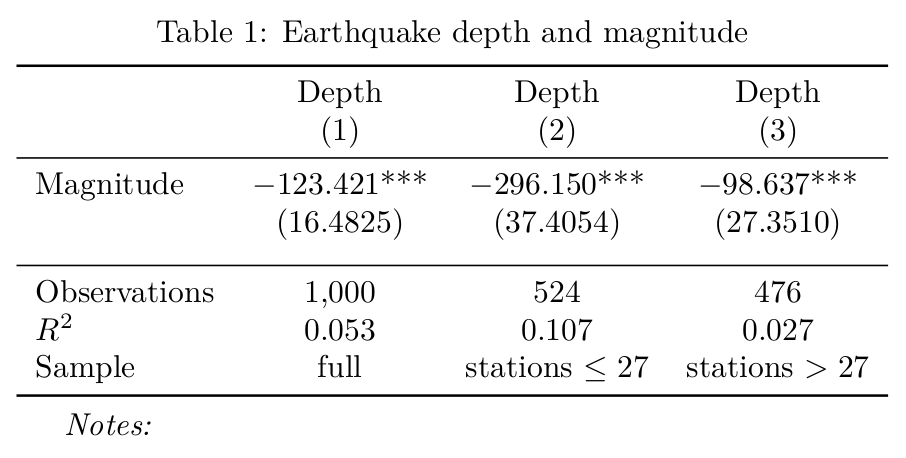
We will generate the following table:
To start with, it is convenient to save regression results with jsonwriter or json_this.
An example that uses the former in R:
# example_mag.R

install.packages("devtools")
devtools::install_git(url = "https://codeberg.org/gnyeki/jsonwriter")

library(fixest)
library(jsonwriter)

data(quakes)

# Regression on all earthquakes.
#
write_json(
    feols(depth ~ mag, quakes),
    "example_model_1.json")

# Regression on earthquakes that were reported by a below-median number
# of stations.
#
write_json(
    feols(depth ~ mag, quakes[quakes$stations <= 27, ]),
    "example_model_2.json")

# Regression on earthquakes that were reported by an above-median number
# of stations.
#
write_json(
    feols(depth ~ mag, quakes[quakes$stations > 27, ]),
    "example_model_3.json")
Let's specify a table with three columns, one for each JSON file that is generated by the R script above. We add column numbers and the name of the outcome variable to the header, and the R-squared along with the number of observations to the footer:
# example_mag.toml

[header]
add-column-numbers = true

[[header.row]]
cell = ["Depth", "Depth", "Depth"]

[[body.cell]]
label = "Magnitude"
coef = "mag"

[[footer.cell]]
label = "Observations"
cell = "%(n::nobs)d"

[[footer.cell]]
label = "$R^2$"
cell = "%(n::r_squared).03f"

[[footer.row]]
label = "Sample"
cell = ["full", 'stations $\leq 27$', "stations $> 27$"]
Now we can run the R script and generate the regression table with tomltable:
$ Rscript example_mag.R
$ cat example_mag.toml \
    | tomltable \
        -j example_model_1.json \
        -j example_model_2.json \
        -j example_model_3.json \
        --title "Earthquake depth and magnitude" \
        --label tab:quakes \
        --human-readable-numbers \
    > example_mag.tex
Only generating a template
Use the --only-table option if you only want to generate the template, not the final table:
$ cat example_mag.toml \
    | tomltable \
        -j example_model_1.json \
        -j example_model_2.json \
        --title "Earthquake depth and magnitude" \
        --label tab:quakes \
        --only-template \
    > example_mag.tmpl
Note that the --human-readable-numbers option is dropped.
This option is only used for generating the final table.
Using a template to generate a table
Use the --from-template option if you want to use a pre-specified template instead of generating the template from a TOML specification:
$ cat example_mag.tmpl \
    | tomltable \
        -j example_model_1.json \
        -j example_model_2.json \
        --from-template \
        --human-readable-numbers \
    > example_mag.tex
Note that the --title and the --label options are dropped.
These options are only used for template generation.
Generating a regression table with column-specific coefficients
We will generate the following table:
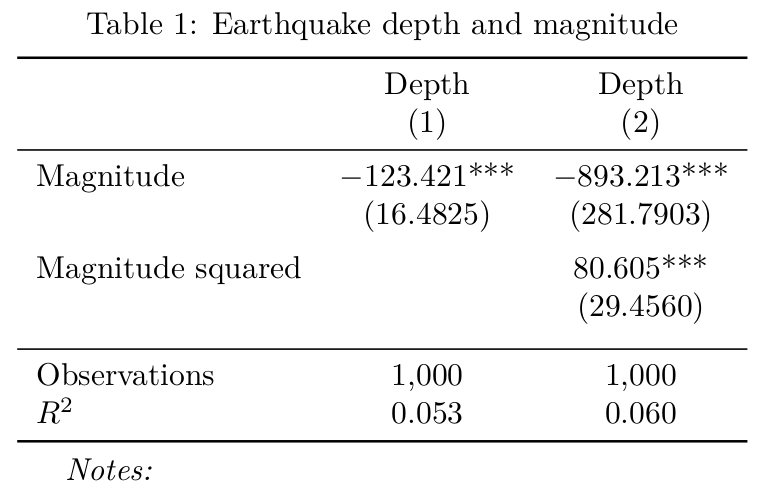
In the above table, the coefficient for Magnitude squared is only present in column (2).
Because it is missing in the JSON file for column (1), we will need to call tomltable with the --ignore-missing-keys option.
To make the example complete, the following R script generates the results for column (2):
# example_mag_squared.R

library(fixest)
library(jsonwriter)

data(quakes)

write_json(
    feols(depth ~ mag + mag^2, quakes),
    "example_model_4.json")
The TOML specification for the table is similar to before.
The most notable difference is in the new [[body.cell]] block for Magnitude squared:
# example_mag_squared.toml

[header]
add-column-numbers = true

[[header.row]]
cell = ["Depth", "Depth"]

[[body.cell]]
label = "Magnitude"
coef = "mag"

[[body.cell]]
label = "Magnitude squared"
coef = "I(mag^2)"

[[footer.cell]]
label = "$R^2$"
cell = "%(n::r_squared).03f"

[[footer.cell]]
label = "Observations"
cell = "%(n::nobs)d"
Running the R script and generating the table, tomltable gives us warning messages because Magnitude squared is missing for column (1).
The missing elements in the table are simply omitted in the output, leaving some dangling text in the affected cells.
To remove these, we use sed:
$ Rscript example_mag_squared.R
$ cat example_mag_sqaured.toml \
    | tomltable \
        -j example_model_1.json \
        -j example_model_4.json \
        --title "Earthquake depth and magnitude" \
        --label tab:quakes \
        --human-readable-numbers \
        --ignore-missing-keys \
    | sed \
        -e "s/ & \$\$/ \& /" \
        -e "s/ & ()/ \& /" \
    > example_mag_squared.tex
warning: Specifier '%(1::coef::I(mag^2)::est).03f' refers to key '1::coef::I(mag^2)::est' but this key is not in the JSON object.
warning: Specifier '%(1::coef::I(mag^2)::stars)s' refers to key '1::coef::I(mag^2)::stars' but this key is not in the JSON object.
warning: Specifier '%(1::coef::I(mag^2)::se).04f' refers to key '1::coef::I(mag^2)::se' but this key is not in the JSON object.
Author
Gabor Nyeki. Contact information is on https://www.gabornyeki.com/.
Release history Release notifications | RSS feed


Download files
Download the file for your platform. If you're not sure which to choose, learn more about installing packages.
Source Distribution
Built Distribution
Filter files by name, interpreter, ABI, and platform.
If you're not sure about the file name format, learn more about wheel file names.
Copy a direct link to the current filters
File details
Details for the file tomltable-1.1.1.tar.gz.
File metadata
- Download URL: tomltable-1.1.1.tar.gz
- Upload date:
- Size: 13.1 kB
- Tags: Source
- Uploaded using Trusted Publishing? No
- Uploaded via: twine/4.0.2 CPython/3.10.6
File hashes
| Algorithm | Hash digest | |
|---|---|---|
| SHA256 |
ccc30ac86fd4dca1f4c478a085f78bd87972345e0939b170c9fd2d81ad55db36
|
|
| MD5 |
121f75a82039132f634a3ea05f0a1300
|
|
| BLAKE2b-256 |
3d4278db3e643478390f0bb439cc02eea1c70a050a946742cf07ee1513c9805d
|
File details
Details for the file tomltable-1.1.1-py3-none-any.whl.
File metadata
- Download URL: tomltable-1.1.1-py3-none-any.whl
- Upload date:
- Size: 18.0 kB
- Tags: Python 3
- Uploaded using Trusted Publishing? No
- Uploaded via: twine/4.0.2 CPython/3.10.6
File hashes
| Algorithm | Hash digest | |
|---|---|---|
| SHA256 |
a49009ebdb139ba3a8d55b8b23b9bd324b9e718d68934e6dac11c269568280e3
|
|
| MD5 |
19341c963def016c81dd6ae9f581ba4e
|
|
| BLAKE2b-256 |
85d95df8de5bc587b9b27154dcb842bf3e35e03e3e08cde46bfdedfbd1251fef
|






