
Python utility for remote administration over WinRM, SMB, and SSH.

Project description
Tomoe
Tomoe is a python utility for remote administration over multiple protocols with credential fail-over across hosts.
PS C:\Users\carte\Documents\GitHub\Tomoe> tomoe winrm .\Credentials\hosts -u .\Credentials\usernames -p .\Credentials\passwords --command "whoami"

  Targets: 5 host(s)
  Credentials: 4 user(s) x 4 password(s)
  Protocol: winrm

                             Tomoe
┏━━━━━━━━━━━━━━━┳━━━━━━━━━┳━━━━━━━━━━━━━━━┳━━━━━━━━━━━━━━━━━━━┓
┃ Host          ┃ Status  ┃ Username      ┃ Message           ┃
┡━━━━━━━━━━━━━━━╇━━━━━━━━━╇━━━━━━━━━━━━━━━╇━━━━━━━━━━━━━━━━━━━┩
│ 192.168.56.10 │ Success │ Administrator │ Command executed. │
│ 192.168.56.11 │ Success │ Administrator │ Command executed. │
│ 192.168.56.12 │ Success │ Administrator │ Command executed. │
│ 192.168.56.22 │ Success │ Administrator │ Command executed. │
│ 192.168.56.23 │ Success │ Administrator │ Command executed. │
└───────────────┴─────────┴───────────────┴───────────────────┘

Execution Results

✓ 192.168.56.11 - Success (user: Administrator)
  Output:
    north\administrator

✓ 192.168.56.23 - Success (user: Administrator)
  Output:
    braavos\administrator

✓ 192.168.56.12 - Success (user: Administrator)
  Output:
    essos\administrator

✓ 192.168.56.10 - Success (user: Administrator)
  Output:
    sevenkingdoms\administrator

✓ 192.168.56.22 - Success (user: Administrator)
  Output:
    castelblack\administrator


Summary: 5/5 hosts successful
Installation
Requires Python 3.10 or higher.
Install from PyPI so the tomoe command is available on your PATH:
pipx install tomoe-exec
Or, if you prefer a regular pip install:
pip install tomoe-exec
To install from a local checkout instead, run pipx install . (or pip install .) from the repo root. For a live-editing dev install, use pip install -e ..
Usage
tomoe -h

usage: tomoe {smb, winrm, ssh} <ip/file> -u <username/file> -p <password/file> [--script <script> | --command <command> | --upload <source> <dest> | --download <source> <dest>]

Tomoe is a python utility for remote administration over multiple protocols in case of fail-over.

positional arguments:
  {smb,winrm,ssh}       protocol to use for remote administration
  IP                    target host IP/hostname or path to file with targets (one per line)

options:
  -h, --help            show this help message and exit
  -d, --domain DOMAIN   domain of selected user
  -u, --username USERNAME
                        username or path to file with usernames (one per line)
  -p, --password PASSWORD
                        password or path to file with passwords (one per line)
  --os {windows,linux}  target host OS (default: windows). Only applies to SSH.
  -s, --script SCRIPT   local path to script to execute (PowerShell on Windows, bash on Linux)
  -c, --command COMMAND
                        command to execute (PowerShell on Windows, shell on Linux)
  --upload SOURCE DEST  upload local SOURCE to remote DEST
  --download SOURCE DEST
                        download remote SOURCE to local DEST
  -a, --args ARGS       arguments to pass to the script
  --shell {powershell,cmd}
                        shell type for SMB protocol (default: powershell)
  --no-encrypt          disable SMB encryption (encryption is enabled by default)
  -v, --verbose         show verbose status messages
  --show-failures       show failed hosts in the compact-mode completion log
  -t, --threads THREADS
                        maximum concurrent threads (default: 10)
  -o, --output DIR      output directory to create for per-host result files
Features
Target Specification
Tomoe accepts targets as a positional argument. You can specify:
- Single IP or hostname —
192.168.1.100orserver.example.com - CIDR notation —
192.168.1.0/24,/25, or/26(expands to all usable host addresses) - IP range —
192.168.1.1-50(dash notation in the last octet) - File — path to a file with one target per line (supports CIDR and ranges within the file)
Only /24, /25, and /26 IPv4 subnets are accepted for CIDR expansion.
tomoe winrm 192.168.56.0/24 -u admin -p password --command "whoami"
tomoe winrm 192.168.56.10-25 -u admin -p password --command "whoami"
Protocols
- WinRM — Remote PowerShell; commands and scripts run in the context of the authenticated user.
- SMB — PsExec-style execution; commands and scripts run as
NT Authority\SYSTEM. Supports--shell powershell|cmdand--no-encryptto disable SMB encryption. - SSH — Remote shell and file transfer for Windows or Linux (
--os windows|linux). Uses Paramiko; PowerShell on Windows, bash on Linux.
Command & Script Execution
Tomoe supports command execution and script execution. When using the SMB protocol, commands and scripts run as NT Authority\SYSTEM.
✓ 192.168.56.23 - Success (user: Administrator)
Output:
nt authority\system
When using the WinRM protocol option, commands and scripts run in the context of the current user.
✓ 192.168.56.11 - Success (user: Administrator)
  Output:
    north\administrator
Arguments have a small quirk to make note of. When passing arguments to a script, please add a = character after your -a/--args argument. For example, the script being executed will execute a command passed to the "-Command" argument. You can wrap your arguments in either ' or " characters, depending on if your arguments for the actual script require one or the other.
tomoe winrm .\Credentials\hosts -u .\Credentials\usernames -p .\Credentials\passwords -s .\Scripts\Command.ps1 -a='-Command "whoami"'
✓ 192.168.56.12 - Success (user: Administrator)
  Output:
    essos\administrator
File Upload
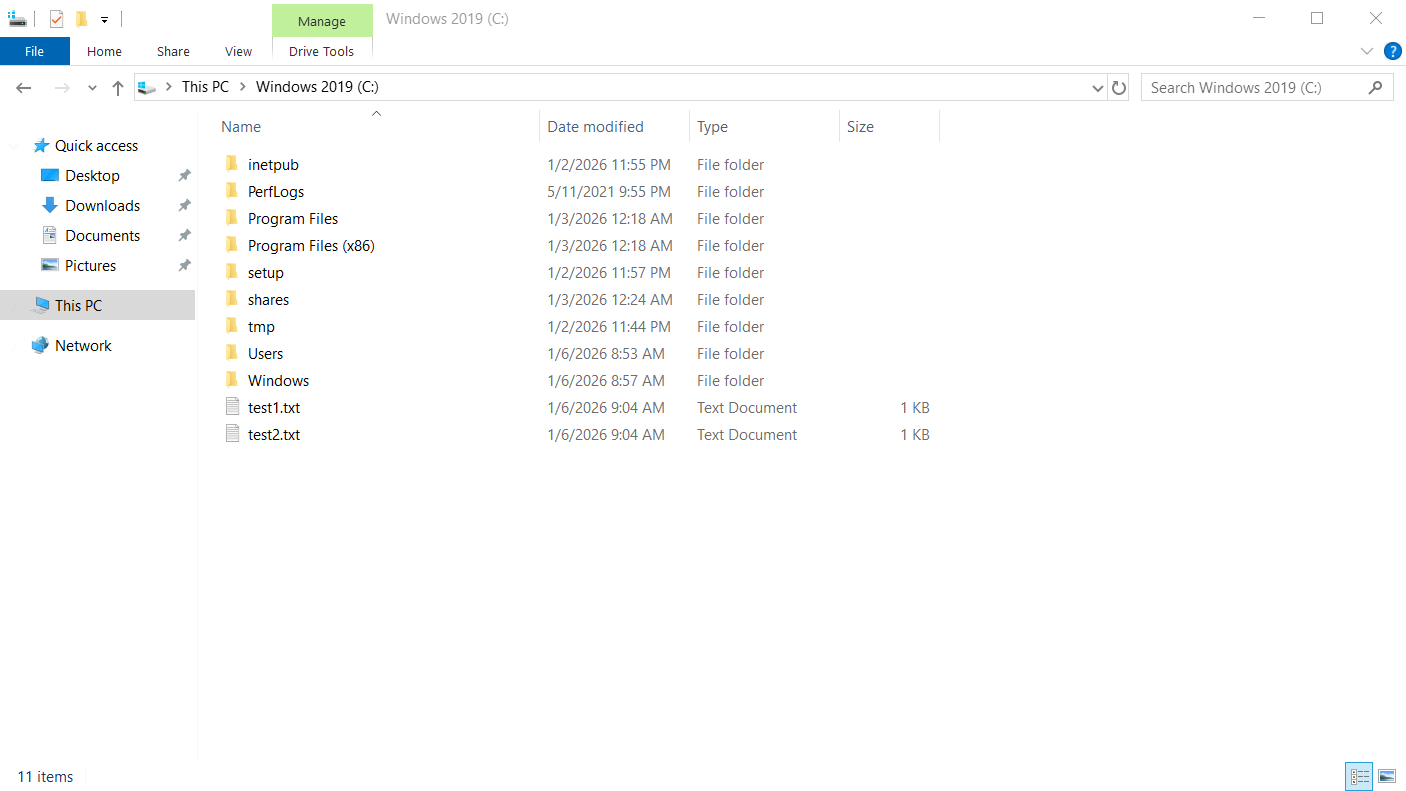
Use --upload SOURCE DEST to copy files or directories from your machine to the remote host(s). Supported with WinRM, SMB, and SSH. SMB uses the administrative C$ share by default and is typically faster for Windows targets.
Single file:
tomoe smb .\Credentials\hosts -u .\Credentials\usernames -p .\Credentials\passwords --upload .\test.txt C:\test.txt
✓ 192.168.56.12 - Success (user: Administrator)
  Output:
    Copied test.txt (13 bytes) to \\192.168.56.12\C$\test.txt
Directory (recursive):
tomoe smb .\Credentials\hosts -u .\Credentials\usernames -p .\Credentials\passwords --upload .\Test\ C:\
✓ 192.168.56.22 - Success (user: Administrator)
  Output:
    Copied 2 file(s) (26 bytes) to \\192.168.56.22\C$\
Creating a new directory on the remote host (e.g. C:\Test2) works with SMB, WinRM, and SSH:
tomoe winrm .\Credentials\hosts -u .\Credentials\usernames -p .\Credentials\passwords --upload .\Test\ C:\Test2
✓ 192.168.56.23 - Success (user: Administrator)
  Output:
    Copied 2 file(s) (26 bytes) to 192.168.56.23:C:\Test2
File Download
Use --download SOURCE DEST to pull files or directories from the remote host(s) to your machine. Supported with WinRM, SMB, and SSH. When targeting multiple hosts, Tomoe creates per-host subdirectories under the local DEST so results do not overwrite each other.
tomoe winrm .\Credentials\hosts -u .\Credentials\usernames -p .\Credentials\passwords --download C:\logs\app.log .\results
For SSH on Linux targets, use --os linux and remote paths as on the server (e.g. /var/log/app.log).
Output Files
Use -o DIR to write each host's command or script output to a file under DIR (e.g. DIR\<host>.txt).
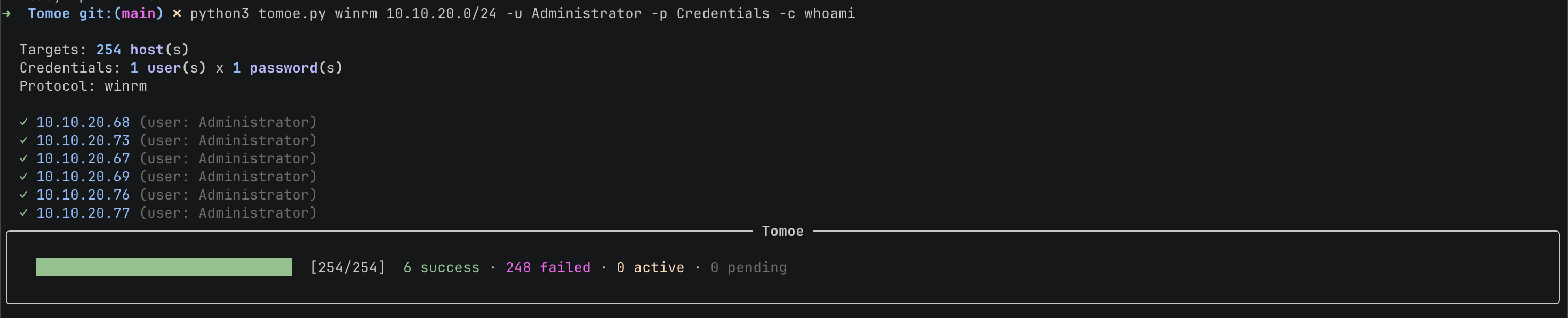
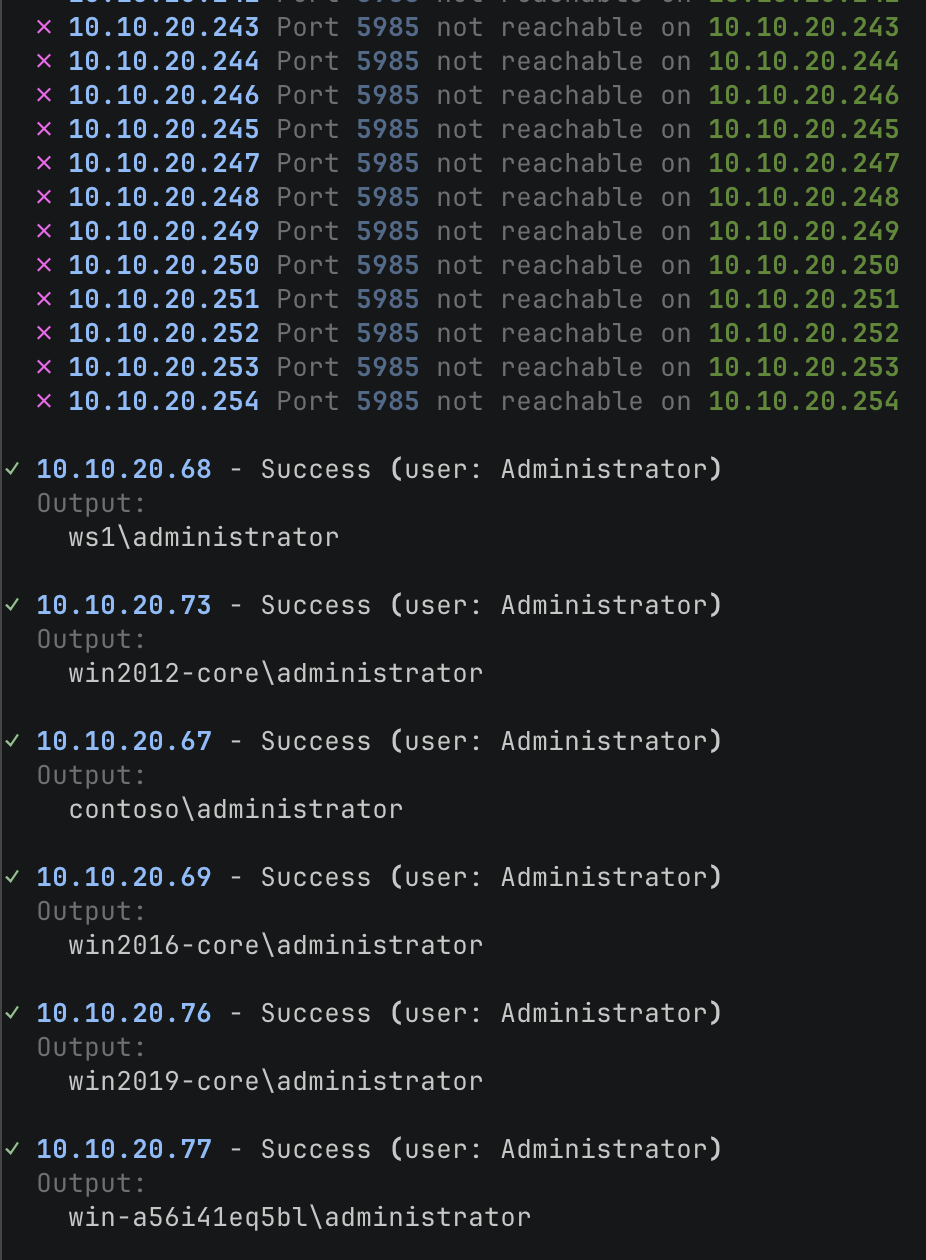
Compact Mode
When Tomoe detects that there are more hosts then would be suitable for your terminal, it enters compact mode. Compact mode will show you successes directly at the bottom of the output, so you can quickly see what succeeded and what results are printed by hosts.
Release history Release notifications | RSS feed


Download files
Download the file for your platform. If you're not sure which to choose, learn more about installing packages.
Source Distribution
Built Distribution
Filter files by name, interpreter, ABI, and platform.
If you're not sure about the file name format, learn more about wheel file names.
Copy a direct link to the current filters
File details
Details for the file tomoe_exec-1.0.3.tar.gz.
File metadata
- Download URL: tomoe_exec-1.0.3.tar.gz
- Upload date:
- Size: 32.4 kB
- Tags: Source
- Uploaded using Trusted Publishing? No
- Uploaded via: twine/6.2.0 CPython/3.14.4
File hashes
| Algorithm | Hash digest | |
|---|---|---|
| SHA256 |
1443d8c96d5841d384ae121d73e1e16fea9d71ab9508dab37edfd95686df4c09
|
|
| MD5 |
6d26cbc02e0e029fb9e8c96acd4356ab
|
|
| BLAKE2b-256 |
f8e75e9d727b77fdaf927bf32049c5c3765099f69b2c567acf43b0f2b3110904
|
File details
Details for the file tomoe_exec-1.0.3-py3-none-any.whl.
File metadata
- Download URL: tomoe_exec-1.0.3-py3-none-any.whl
- Upload date:
- Size: 33.8 kB
- Tags: Python 3
- Uploaded using Trusted Publishing? No
- Uploaded via: twine/6.2.0 CPython/3.14.4
File hashes
| Algorithm | Hash digest | |
|---|---|---|
| SHA256 |
84bd4f3f9f9154392be6520f4a8248a8accd988ed07e533fdcff26ffce156c4a
|
|
| MD5 |
a8633c799eaecaa638e28359353f0d2e
|
|
| BLAKE2b-256 |
4045e2b67024d387e93742ed6ef01b1c1393644186c164c8e0f1ab6f031f2200
|






