
This release is a pre-release and may not be stable for production use.

TomoJAX reconstructs and aligns parallel-beam tomography, laminography, and lab cone-beam CT in JAX with CUDA kernels. It provides differentiable forward projectors with exact transposes, fast analytical and iterative reconstruction (Fourier, FBP/FDK, CGLS, SIRT/OS-SART, MLEM/OSEM, FISTA-TV, SPDHG-TV), joint volume-and-pose alignment, a CLI, an MCP server for AI agents, and a native desktop workspace for NXtomo and NeXus scan files, APS Data Exchange, Nikon .xtekct, Zeiss .txrm, ESRF, SkyScan, and TIFF data.
Full documentation is at tomojax.dev.
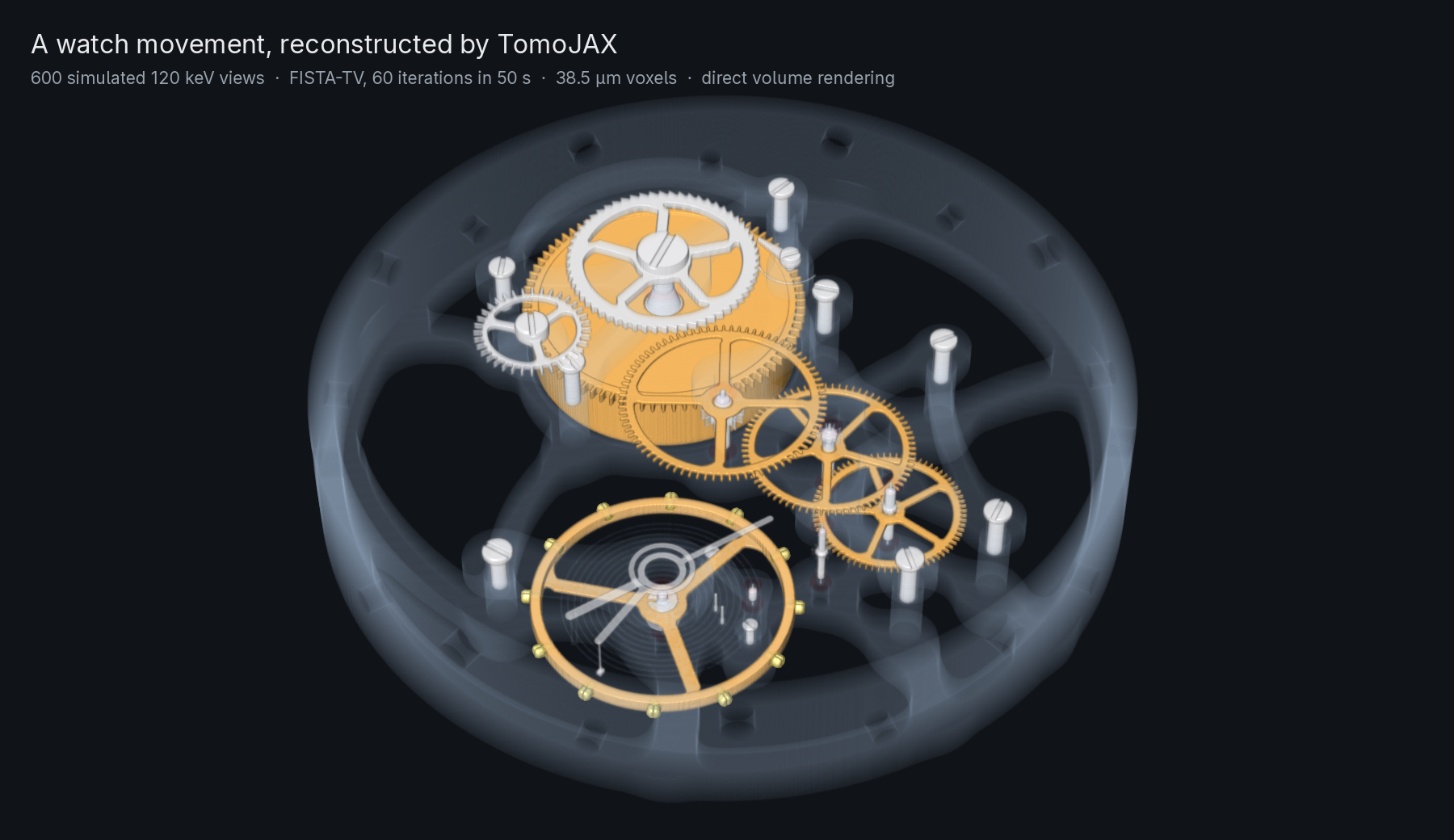
A 29 mm mechanical watch movement simulated with 600 views of a 120 keV parallel beam in gVXR (independent of TomoJAX's projector), reconstructed with FISTA-TV on 38.5 µm voxels in 50 s on a laptop GPU, and rendered directly in JAX. Reproduce it.
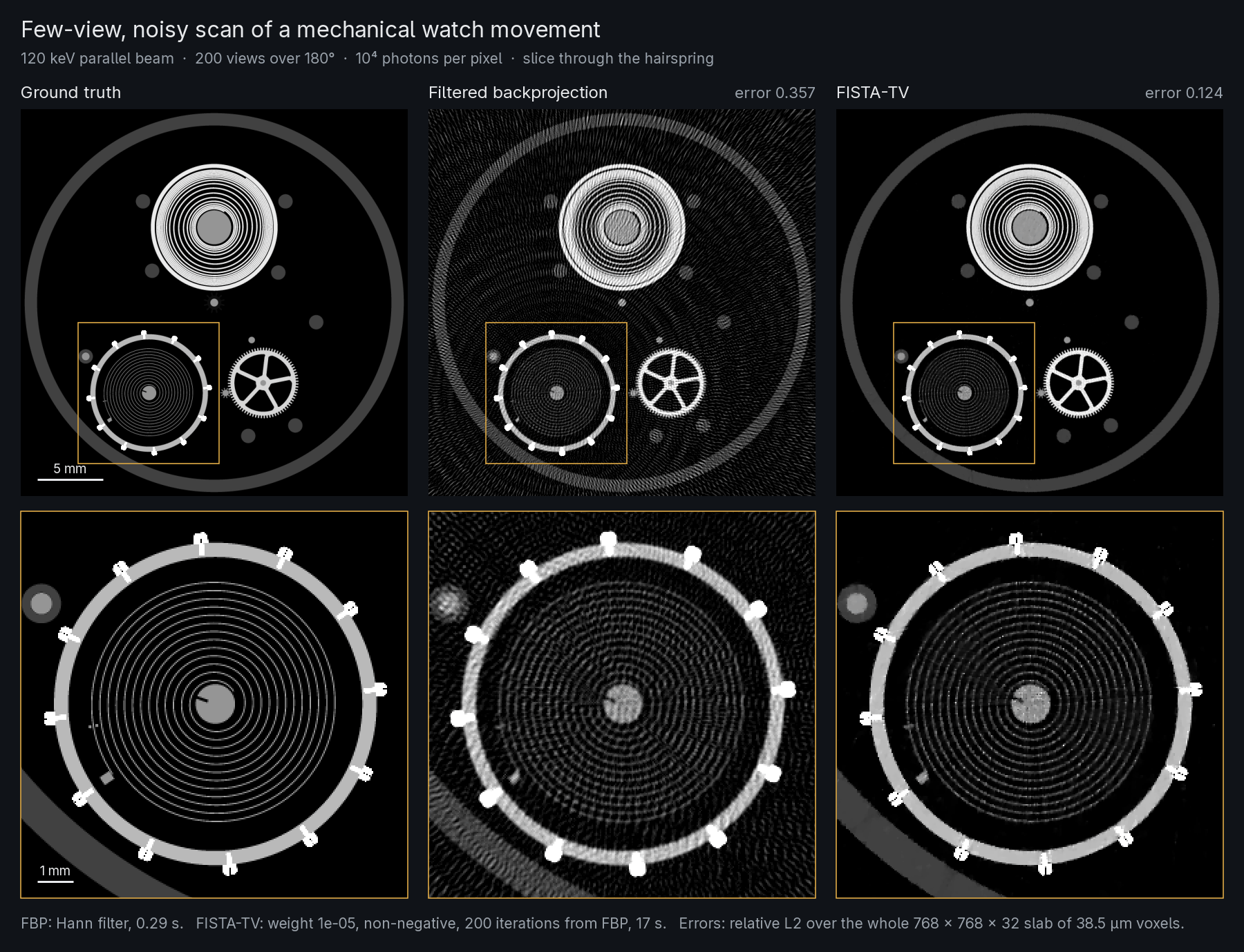
From 200 views at 10⁴ photons per pixel, filtered backprojection through the hairspring has relative error 0.357 against the exact voxel average of the meshes; FISTA-TV reaches 0.124 in 17 s. Reproduce the figure.
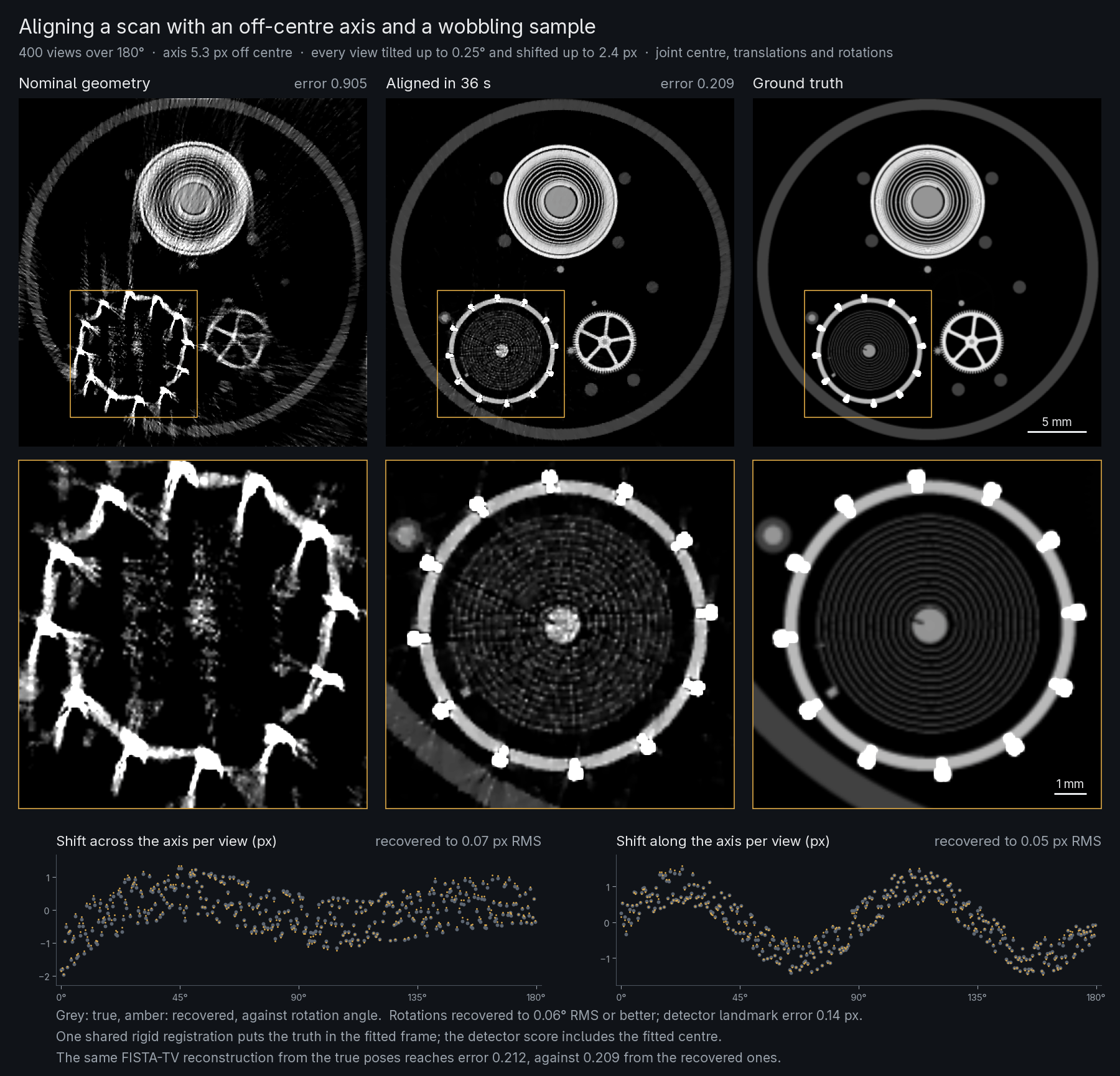
tomojax align and tj.align fit geometry errors and per-view motion. On well-sampled axial parallel scans, fit="center" measures the rotation axis directly from the projections across the full detector width without reconstructing a volume. By default tj.align fits per-view translations jointly with the volume; add "tilt" and "roll" for shared setup angles, or "rotations" for per-view wobble. See align a scan.
First reconstruction
On Linux, install uv and install the CPU wheel into a fresh environment:
uv venv --python 3.12
uv pip install --python .venv/bin/python "tomojax[cpu]"

.venv/bin/tomojax simulate -o synthetic.nxs --size 32 --n-views 60
.venv/bin/tomojax reconstruct synthetic.nxs -o recon.nxs
.venv/bin/tomojax inspect recon.nxs --preview-dir previews
To try unreleased changes from source, build and install a wheel first, then run the same three commands.
For this axial parallel scan, reconstruct selects the Fourier-slice inverse automatically and writes the volume, geometry, and processing record to recon.nxs (pass --include-scan to keep the projections in the same file). inspect checks the file (Valid: yes) and writes display-scaled central slice PNGs to previews/.
Numerical commands that write data take -o OUTPUT and refuse to overwrite existing files without --force (inspect prints a report and optionally writes PNGs to --preview-dir DIR; simulate takes no input). Run tomojax <command> --help for flags, or see the CLI overview. For CUDA 12 installation see installation; for real data start with the quickstart.
Studio
TomoJAX Studio is a native Rune desktop workspace for persistent tomography projects. Keep acquisitions, reconstructions, saved recipes, and job records together; queue operations through TomoJAX's numerical engine; and inspect linked orthogonal slices, sinograms, side-by-side comparisons, and 3D GPU volume renderings while jobs run.
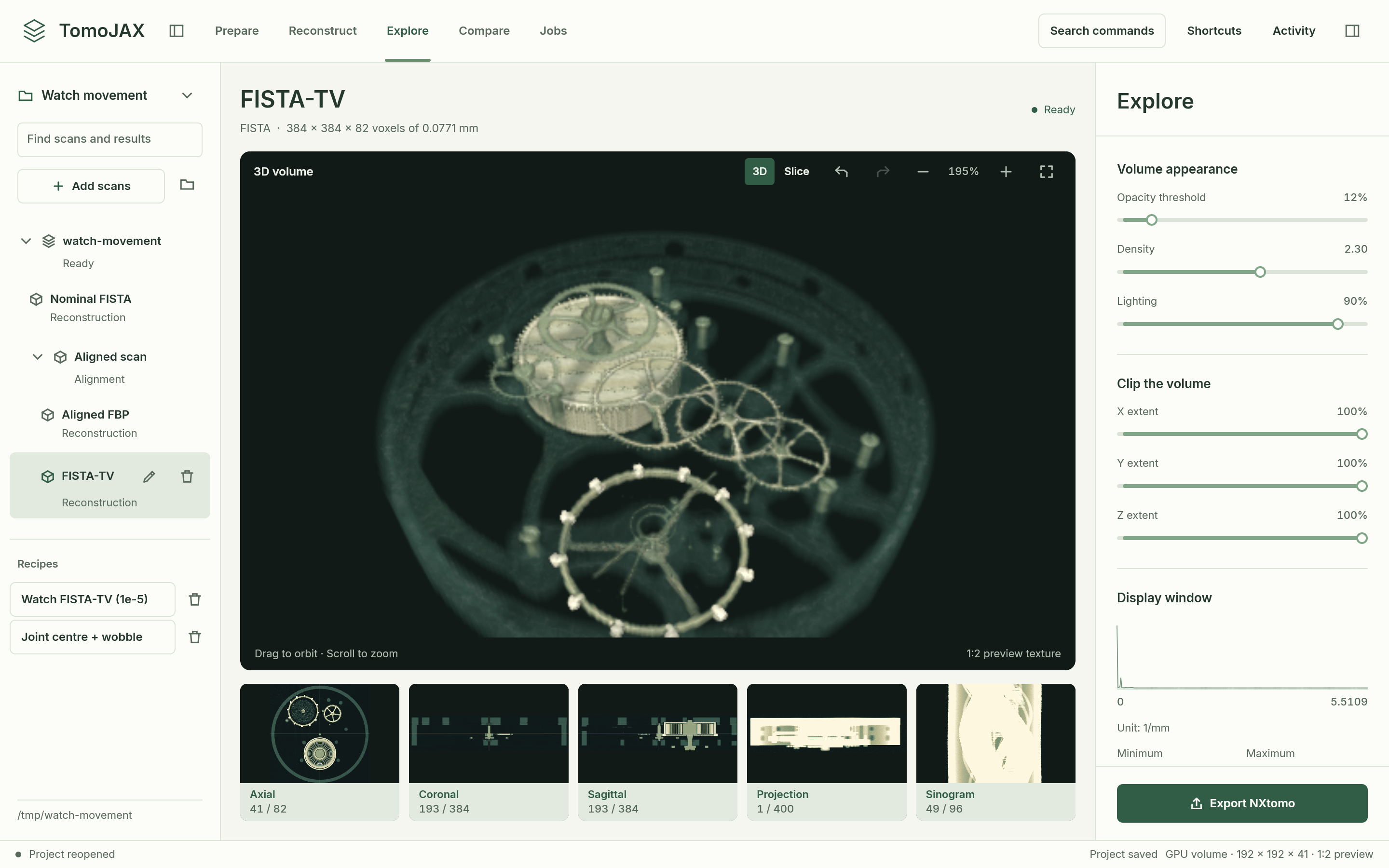
Install the prebuilt Linux x86_64 or aarch64 wheel alongside TomoJAX (while 1.0.0 is in release candidate, include --prerelease=allow, or --pre with pip):
uv pip install --prerelease=allow "tomojax[cuda12]" tomojax-studio
tomojax studio
Use cpu on CPU-only machines, or build from a source checkout with Rust 1.99.1 (uv run --no-sync tomojax studio --build; see install and run). Choose Create a project and add scans, or Try a demo project to simulate a scan and reconstruct it. Reopen a project later with tomojax studio /path/to/project.
See the Studio guide for calibration, live previews, measurements, comparison modes, exports, and verification, and studio/ARCHITECTURE.md for its persistence and rendering architecture.
Choose a workflow
| Task | Guide |
|---|---|
| Manage persistent projects, queue work and explore 3D results in the native GUI | TomoJAX Studio |
| Load, correct, and reconstruct NXtomo, Data Exchange, Nikon, or TIFF scans | Quickstart |
| Supply measured geometry for parallel or laminography scans, including TIFF stacks | Real scan guide |
| Import, calibrate, and reconstruct lab cone-beam CT, including multi-orbit scans | Lab cone-beam CT |
| Simulate data or script the Python API | Synthetic tomography, examples |
| Correct per-view motion, setup angles, or the center of rotation | Align a scan |
| Reconstruct volumes larger than GPU memory, use several GPUs, or resume killed cluster jobs | Large scans and several GPUs |
| Let an AI agent such as Claude Code drive TomoJAX through MCP | Use TomoJAX from an AI agent |
| Check supported formats, models, and limitations | Support matrix, known limitations |
Python API
A Scan bundles projections with their geometry, and every operation returns a result carrying its geometry and processing record:
import tomojax as tj

scan = tj.load("scan.nxs")
recon = tj.reconstruct(scan)                                # chooses method from geometry
recon = tj.reconstruct(scan, "cgls", iterations=50)
result = tj.align(scan, fit="translations")  # result.scan holds the updated poses
tj.save("recon.nxs", tj.reconstruct(result.scan))
CLI options use the same names: tomojax reconstruct scan.nxs -o recon.nxs --method cgls --iterations 50 and tomojax align scan.nxs -o aligned.nxs --fit translations. Pass method-specific settings via config classes from tomojax.recon (such as FISTAConfig(regularizer="huber_tv") or FBPConfig(exterior="zero")) or a TOML file passed to --config. For region-of-interest scans where the object extends past the detector, fourier, fbp, and cone-beam FDK continue each detector row with a cylinder model by default (exterior="cylinder"). Iterative methods use the continued rows to estimate the contribution from outside the reconstruction grid. All methods record truncation metrics in recon.info["truncation"]. See truncated scans. See align a scan for alignment settings.
Build a scan from arrays with tj.Scan(projections, geometry) and simulate projections with tj.project(geometry, volume). Volumes use (z, y, x) and projections use (view, v, u), with detector and voxel spacings in one consistent length unit. Lower-level interfaces live in tomojax.recon, tomojax.alignment, tomojax.corrections, tomojax.geometry, tomojax.io, tomojax.forward, and tomojax.datasets. Start with examples/simulate_and_reconstruct.py or browse tomojax.dev.
Benchmarks
| Library | 1 V100S (s) | 4 V100S (s) | 1 Blackwell (s) | 8 Blackwell (s) |
|---|---|---|---|---|
| TomoJAX | 74.51 Fourier | 41.28 Fourier | 27.87 Fourier | 28.99 FBP |
| tomocupy | 109.8 fourierrec |
66.35 fourierrec |
69.71 fourierrec |
45.77 linerec |
| ASTRA FBP | 768.6 | 199.6 | 182.0 | 46.21 |
| TIGRE FBP | 558.3 | 172.3 | 180.5 | 48.91 |
| LEAP FBP | 753.3 | 198.2 | 227.7 | 51.28 |
TomoPy gridrec (CPU) |
430.4 | — | 143.9 | — |
Median seconds of three fresh worker launches reconstructing a full Diamond K11 (DIAD) scan (8,000 views of 2,160 × 2,560 pixels into a 56.62 GB volume) from process startup until the volume is flushed to disk on Tesla V100S 32 GB and RTX PRO 6000 Blackwell 96 GB nodes (40 CPU cores; excludes the 96.0 s one-time input rechunking required by the five comparison libraries above). See measurements and the full-volume speed chart for all nine libraries, repeat ranges, and the cases where TomoJAX does not win (a 256-row band on eight Blackwell cards and Fourier scaling beyond one Blackwell card).
Volumes larger than GPU memory stream automatically in slabs: SIRT of a whole Diamond I12 scan (1801 views of 2160 × 2560 pixels into a 56.6 GB volume) ran on an 8 GB laptop GPU using 1.4 GB of VRAM at 1.13× the per-voxel time of an in-core scan (large scans).
Development and license
See CONTRIBUTING.md for development setup, conventions, and test commands, and CHANGELOG.md for release notes.
TomoJAX is licensed under GPL-3.0-only.
1 maintainer

Metadata
1 maintainer
Release files for tomojax 1.0.0rc7
For a detailed explanation of source distributions (sdists) and built distributions (wheels), please see the package formats documentation.
Source distribution (sdist)
| File | Size | Uploaded | Provenance | Actions |
|---|---|---|---|---|
| tomojax-1.0.0rc7.tar.gz | 1.1 MB | With provenance | Details for tomojax-1.0.0rc7.tar.gz |
Built distribution (wheel)
| File | Interpreter | ABI | Platform | Actions Reset |
|---|---|---|---|---|
| tomojax-1.0.0rc7-py3-none-any.whl | Python 3 | none | any | Details for tomojax-1.0.0rc7-py3-none-any.whl |
Total release size: 2.5 MB
Release files / tomojax-1.0.0rc7.tar.gz
| Download URL | tomojax-1.0.0rc7.tar.gz |
|---|---|
| Size | 1.1 MB |
| Tags | Source |
|
SHA-256 checksum How to use checksums |
856f070eda632696df12b5e69f69f8c1b39efd17849de40f33b676d8a10a1eda
|
|
BLAKE2b-256 checksum How to use checksums |
a5381477b7e4b5dacf129765c5daa94db1af1b70ce1bb867f4ec0cffa068f08c
|
| Upload date | |
|
Uploaded using Trusted Publishing? What is trusted publishing? |
Yes |
| Uploaded via |
twine/7.0.0 CPython/3.13.16
|
Provenance
Provenance describes where a file came from. On PyPI, provenance is shared via attestations, which provide a verifiable record of the build or publishing details. View details, limitations and caveats.


PyPI Publish Attestation
PyPI verified that this artifact, at this checksum, originated from the publisher listed below.
Signed by GitHub Actions, verified by PyPI on Nov 28, 2026.
Transparency logRelease files / tomojax-1.0.0rc7-py3-none-any.whl
| Download URL | tomojax-1.0.0rc7-py3-none-any.whl |
|---|---|
| Size | 1.3 MB |
| Tags | Python 3 |
|
SHA-256 checksum How to use checksums |
d0028262bf96be0d9200a0d876e3475cf0bfcff57a8afc4ef65217396e433678
|
|
BLAKE2b-256 checksum How to use checksums |
ccf6aaccd98870e3a122d1d5b5c0d2836fd1dd4b2dd409bde3131d04445f6dfc
|
| Upload date | |
|
Uploaded using Trusted Publishing? What is trusted publishing? |
Yes |
| Uploaded via |
twine/7.0.0 CPython/3.13.16
|
Provenance
Provenance describes where a file came from. On PyPI, provenance is shared via attestations, which provide a verifiable record of the build or publishing details. View details, limitations and caveats.
PyPI Publish Attestation
PyPI verified that this artifact, at this checksum, originated from the publisher listed below.
Signed by GitHub Actions, verified by PyPI on Nov 28, 2026.
Transparency logSecurity for tomojax 1.0.0rc7
Provenance
Provenance describes where a file came from. On PyPI, provenance is shared via attestations, which provide a verifiable record of the build or publishing details. View details, limitations and caveats.
Full provenance
Both files in this release have been uploaded with provenance metadata.
Attestation for tomojax-1.0.0rc7.tar.gz
PyPI Publish Attestation
PyPI verified that this artifact, at this checksum, originated from the publisher listed below.
Signed by GitHub Actions, verified by PyPI on Nov 28, 2026.
Transparency logA note on package security
PyPI is a repository for distributing packages, not a service for auditing them. While third-party security researchers and our staff do their best to detect and remove malicious packages, PyPI cannot guarantee the quality, security or suitability of any given package.
To learn more about protecting yourself from malicious actors, visit our package security documentation.















