
Convert audio files to mp3 format

Project description
tomp3
tomp3 is a command-line tool to batch convert audio files to high-quality MP3 format using FFmpeg. It supports parallel conversion, intelligent file skipping, optional deletion of originals, and customizable audio settings.
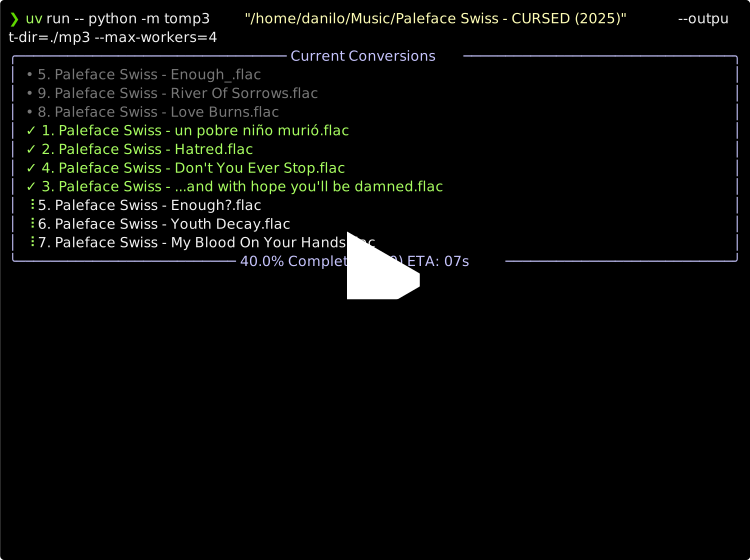
🚀 Features
- Batch convert
.flac,.wav, and other audio files to MP3 - Input directory structure is preserved in the output (if applicable)
- Run multiple FFmpeg processes in parallel for faster conversion
- Optional deletion of original files
- Adjustable output bitrate, sample rate, quality, and channel mode (mono/stereo)
- Clean terminal UI with conversion status updates
- Dry run mode to preview which files will be converted
🛠 Installation
Make sure you have Python and FFmpeg installed.
Install uv if you haven't already:
pipx install uv # (or pip)
📦 Usage
uv run -- python -m tomp3 <input_directory> [OPTIONS]
Example
uv run -- python -m tomp3 ~/Music --delete --mono
This command will convert all .flac and .wav files in ~/Music to mono MP3s and delete the originals.
⚙️ Command-Line Arguments
| Argument | FFmpeg Equivalent | Description |
|---|---|---|
input |
-i |
Directory containing audio files to convert |
--output-dir DIR |
-o |
Output directory for converted files. Defaults to same as input |
--delete |
(manual delete) | Delete original files after successful conversion |
--target-extensions EXT |
N/A | Comma-separated list of file extensions to convert (default: flac,wav) |
--max-workers N |
N/A | Number of parallel FFmpeg processes to run (default: CPUs/2) |
--dry-run |
N/A | Only show which files would be converted, without running FFmpeg |
--mono |
-ac 1 |
Convert audio to mono (default is stereo) |
--quality N |
-q:a N |
LAME quality setting (0 is best, 9 is worst, default: 0) |
--sample-rate SR |
-ar SR |
Sample rate in Hz for the output audio (default: 44100) |
--bitrate BR |
-b:a BR |
Set constant output bitrate (e.g., 192k). Overrides quality if specified |
--overwrite |
-y |
Overwrite existing converted files |
🧪 Dry Run Mode
You can preview what will be converted without executing any conversions:
uv run -- python -m tomp3 <input_directory> --dry-run
🧼 Clean Conversion Logic
- Files are only processed if the output does not exist (unless
--overwriteis used) - Conversion progress is shown in a clean TUI
- Original files are deleted only if
--deleteis passed and the conversion succeeds
📝 License
This project is licensed under the GNU General Public License v3.0.
You are free to use, modify, and distribute this software under the terms of the license. However, any derivative work must also be distributed under the same license.
For the full license text, see the LICENSE file or visit https://www.gnu.org/licenses/gpl-3.0.html.
Release history Release notifications | RSS feed

Download files
Download the file for your platform. If you're not sure which to choose, learn more about installing packages.
Source Distribution
Built Distribution
Filter files by name, interpreter, ABI, and platform.
If you're not sure about the file name format, learn more about wheel file names.
Copy a direct link to the current filters
File details
Details for the file tomp3-1.0.2.tar.gz.
File metadata
- Download URL: tomp3-1.0.2.tar.gz
- Upload date:
- Size: 36.4 kB
- Tags: Source
- Uploaded using Trusted Publishing? No
- Uploaded via: twine/6.1.0 CPython/3.13.3
File hashes
| Algorithm | Hash digest | |
|---|---|---|
| SHA256 |
772e1cd4cc578063cc28e9d5d5c6d450cc5d713ee7c90879dd656d8b2a7e68cf
|
|
| MD5 |
c235b8e5b7891f3175bae19f02f78c72
|
|
| BLAKE2b-256 |
c595f05da6b784383062dd576c052fd66dacbc98e21c7ef9be82181ea76183ec
|
File details
Details for the file tomp3-1.0.2-py3-none-any.whl.
File metadata
- Download URL: tomp3-1.0.2-py3-none-any.whl
- Upload date:
- Size: 24.4 kB
- Tags: Python 3
- Uploaded using Trusted Publishing? No
- Uploaded via: twine/6.1.0 CPython/3.13.3
File hashes
| Algorithm | Hash digest | |
|---|---|---|
| SHA256 |
3adbaf1f530575e1120c07e0205cc44da457006814caeeb3a9bd7631b11f12e3
|
|
| MD5 |
1d94ddd7566cb347167de25c2abc5162
|
|
| BLAKE2b-256 |
0391bddb62cceb8aea39cf9e8438dd811029f129983ecd5fde3b65cba78cad03
|






