
ToneTint


ToneTint is a Python package that provides an intuitive way to perform sentiment analysis on text data and visualize the results. It splits the input text into manageable chunks, analyzes each chunk using a pre-trained sentiment analysis model, and highlights the text with background colors corresponding to the sentiment. Additionally, it displays tooltips with detailed sentiment scores when hovering over each text chunk. Perfect for Jupyter Notebooks & Steamlit.
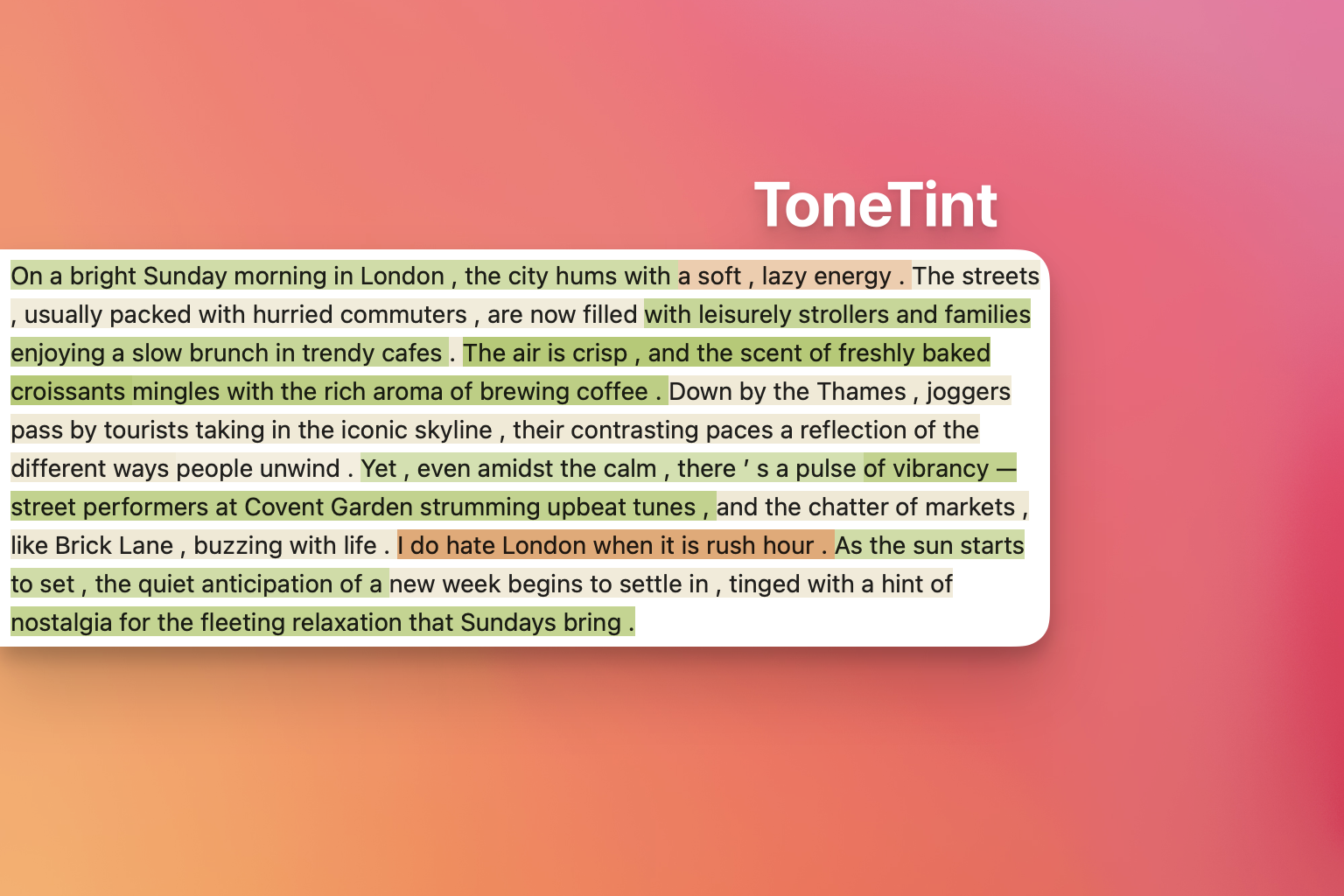
Table of Contents
Features
- Sentiment Analysis: Uses pre-trained models to analyze the sentiment of text chunks.
- Color-Coded Visualization: Highlights text with colors representing positive, negative, or neutral sentiments.
- Opacity Adjustment: Adjusts the opacity of the highlight based on the confidence score of the sentiment prediction.
- Interactive Tooltips: Displays sentiment labels and scores when hovering over text chunks.
- Customizable Colors: Allows customization of highlight colors for different sentiments.
- Flexible Text Chunking: Splits text into sentences and further into chunks of specified sizes for detailed analysis.
Installation
You can install ToneTint via pip:
pip install tonetint
Alternatively, you can clone the repository and install it manually:
git clone https://github.com/janduplessis883/tonetint_package.git
cd tonetint_package
python setup.py install
Usage
Basic Example - Jupyter Notebook
from tonetint.sentiment_visualizer import ToneTint

# Initialize the visualizer
visualizer = ToneTint()

# Your input text
text = "I love sunny days. However, I hate the rain. The weather today is okay."

# Display the sentiment visualization in Jupyter Notebook
visualizer.display_notebook(text)
Basic Example - Stremlit App
from tonetint.sentiment_visualizer import ToneTint

# Initialize the visualizer
visualizer = ToneTint()

# Your input text
text = "I love sunny days. However, I hate the rain. The weather today is okay."

# Display the sentiment visualization in a Streamlit app
visualizer.display_streamlit(text)
This code will display your text with:
- Positive sentiments highlighted in green.
- Negative sentiments highlighted in red.
- Neutral sentiments highlighted in yellow.
Hovering over each text chunk will show a tooltip with the sentiment label and confidence score.
Customization
Customizing Highlight Colors
You can specify custom colors for positive, negative, and neutral sentiments by passing a dictionary to the ToneTint constructor:
custom_colors = {
        "POS": "#aec867",  # Green
        "NEG": "#e8a56c",  # Red
        "NEU": "#f0e8d2",  # Yellow
}

visualizer = ToneTint(colors=custom_colors)
Adjusting Chunk Size
You can adjust the chunk size (number of words per chunk) for more granular or broader analysis:
visualizer = ToneTint(chunk_size=10)
Using a Different Model
By default ToneTint uses nlptown/bert-base-multilingual-uncased-sentiment from Huggingface.co The model performs well on most sentiment analysis tasks.
You can specify a different pre-trained model, more suited to your sentiment analysis usecase:
visualizer = ToneTint(model_name='distilbert/distilbert-base-uncased-finetuned-sst-2-english')
Dependencies
- Python 3.6 or higher
- Transformers: For using pre-trained sentiment analysis models.
- NLTK: For text tokenization.
- IPython: For displaying HTML in Jupyter notebooks.
- Torch: Required by some Transformer models.
- SentencePiece: For certain tokenizer models.
You can install the dependencies via pip:
pip install transformers nltk ipython torch sentencepiece
Contributing
Contributions are welcome! If you have ideas for improvements or new features, feel free to open an issue or submit a pull request.
- Fork the repository.
- Create your feature branch (
git checkout -b feature/YourFeature). - Commit your changes (
git commit -am 'Add some feature'). - Push to the branch (
git push origin feature/YourFeature). - Open a pull request.
Please ensure your code adheres to the existing style conventions and that all tests pass.
License
This project is licensed under the MIT License - see the LICENSE file for details.
Disclaimer: This package uses pre-trained models from Hugging Face's Transformers library. The performance and accuracy of sentiment analysis depend on the chosen model. Always verify the outputs, especially when used for critical applications.
1 maintainer

Metadata
1 maintainer
Release files for tonetint 0.0.15
For a detailed explanation of source distributions (sdists) and built distributions (wheels), please see the package formats documentation.
Source distribution (sdist)
| File | Size | Uploaded | |
|---|---|---|---|
| tonetint-0.0.15.tar.gz | 1.5 MB | Details |
Built distribution (wheel)
| File | Interpreter | ABI | Platform | Reset |
|---|---|---|---|---|
| tonetint-0.0.15-py3-none-any.whl | Python 3 | none | any | Details |
Total release size: 1.5 MB
Release files / tonetint-0.0.15.tar.gz
| Download URL | tonetint-0.0.15.tar.gz |
|---|---|
| Size | 1.5 MB |
| Tags | Source |
|
SHA-256 checksum How to use checksums |
8295f85f195be9bc236d6935ee7e1098fe2d78a2af693544bf011ac3528fa08d
|
|
BLAKE2b-256 checksum How to use checksums |
30b56bb7b37a377af1af710e3cc3538245c40b0f6040dfe8c2570d9f19e5fcb1
|
| Upload date | |
|
Uploaded using Trusted Publishing? What is trusted publishing? |
No |
| Uploaded via |
twine/5.1.1 CPython/3.10.6
|
Release files / tonetint-0.0.15-py3-none-any.whl
| Download URL | tonetint-0.0.15-py3-none-any.whl |
|---|---|
| Size | 7.3 kB |
| Tags | Python 3 |
|
SHA-256 checksum How to use checksums |
8d6fdfd6549d05e073196138d493f04b3dac83c850698bc2396ad51762388520
|
|
BLAKE2b-256 checksum How to use checksums |
1738c312999bde749c39126c0ee77561ea14b160139138e252666a33ab7b75e1
|
| Upload date | |
|
Uploaded using Trusted Publishing? What is trusted publishing? |
No |
| Uploaded via |
twine/5.1.1 CPython/3.10.6
|














