
Tooey
Turn any python console script into an interactive TUI application. Tooey is similar to (and inspired by) Gooey, but keeps you in the terminal.
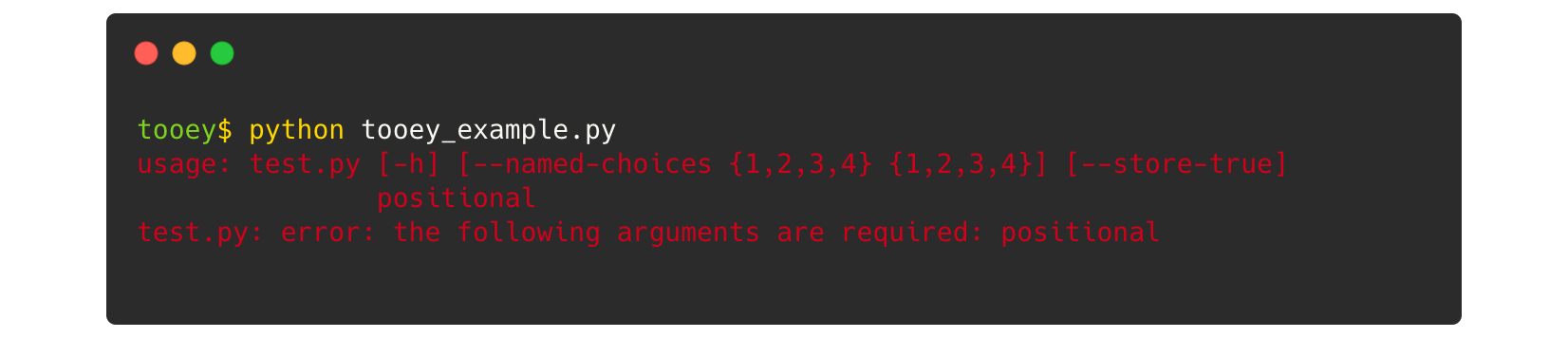
Without Tooey 😕
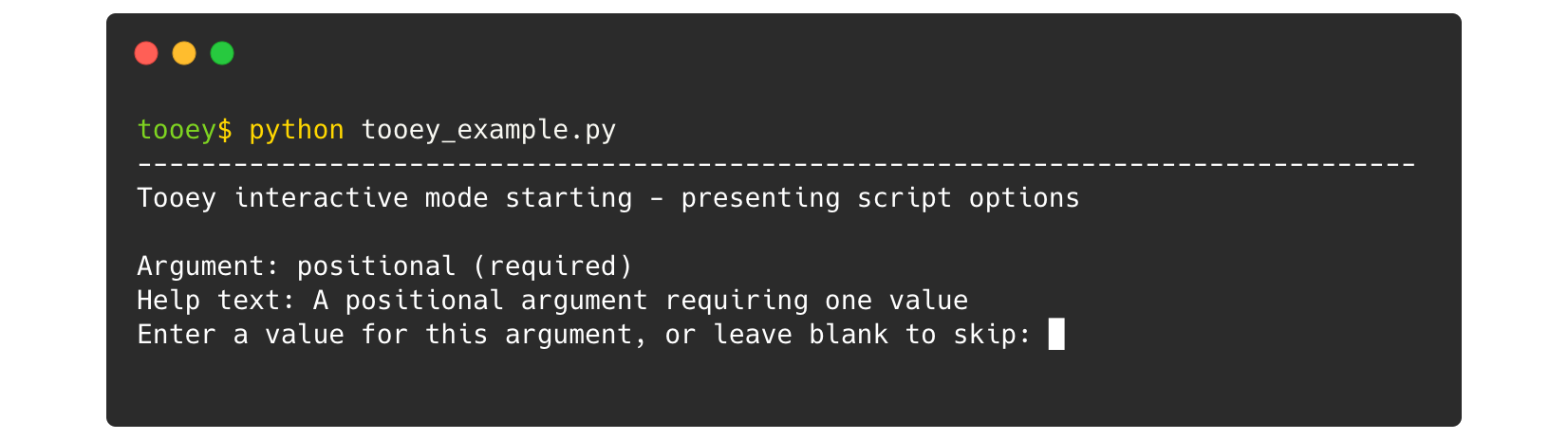
With Tooey 🎉
Installation
Install Tooey from PyPi via pip:
python -m pip install tooey
Getting started
Decorate your script's argparse function with @Tooey, then run the script with or without any of its arguments.
You'll be prompted interactively in the terminal to enter each argument.
After this the script will continue as normal.
Example
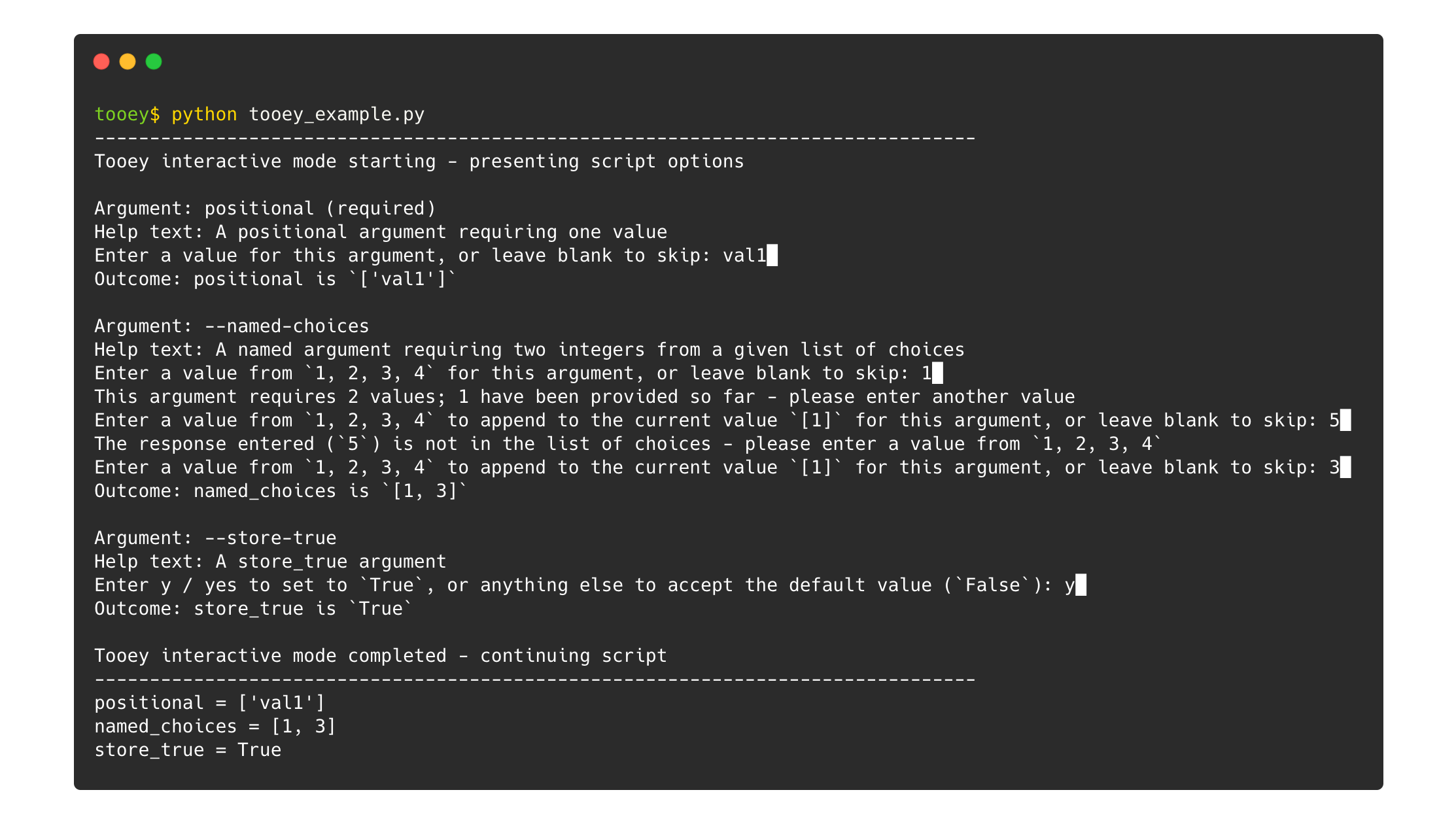
The following python script requests and then prints three arguments.
The method that handles command line arguments is decorated with @Tooey.
import argparse
from tooey import Tooey

@Tooey
def main():
    parser = argparse.ArgumentParser()
    parser.add_argument('positional', nargs=1, help='A positional argument requiring one value')
    parser.add_argument('--named-choices', nargs=2, type=int, choices=range(1, 5), help='A named argument requiring two integers from a given list of choices')
    parser.add_argument('--store-true', action='store_true', help='A store_true argument')
    print(parser.parse_args())

main()
Tooey automatically turns this into an interactive prompt for each argument.
Configuration
Tooey will automatically inject itself into any decorated functions whenever sys.isatty() is True.
If you would like to override this behaviour and disable Tooey when running a script, add the additional parameter --ignore-tooey when running, or set an environment variable IGNORE_TOOEY.
For example, Tooey will ignore any decorated methods in this script:
$ python tooey_example.py val1 --named-choices 1 3 --ignore-tooey
Conversely, if you would like to force Tooey to inject itself into decorated functions even when it does not detect a terminal-like environment, add the additional parameter --force-tooey when running, or set an environment variable FORCE_TOOEY.
For example, Tooey will still run in the following script:
$ FORCE_TOOEY=1 python tooey_example.py val1 --named-choices 1 3 | sort
Using alongside Gooey
It can be useful to decorate methods with both @Tooey and @Gooey so that scripts can be run flexibly depending on context.
To avoid conflicts, if both decorators are present for a single method, Tooey makes sure that only one of them is active.
Which one is chosen depends on the order in which you add their decorators, with the decorator closest to the function taking priority:
@Gooey
@Tooey
def main_tooey():
    # Here Tooey is activated and Gooey is ignored
    # To force Gooey to be used instead, pass the `--ignore-tooey` command line option
    [...]

@Tooey
@Gooey
def main_gooey():
    # Here Gooey is activated and Tooey is ignored
    # To force Tooey to be used instead, pass the `--ignore-gooey` command line option
    [...]
Regardless of decorator order, you can always use the command line parameters --ignore-tooey and --ignore-gooey to switch behaviour, as outlined in the example above.
If Gooey is present (and not ignored) it will take precedence over the the --force-tooey parameter.
Please note that due to the nature of Gooey's interaction with command line arguments, complex scripts with multiple Gooey decorators or unusual configurations may not be fully compatibile with this approach, and it is advisable to test your script when using both Tooey and Gooey simultaneously.
Testing
To run the Tooey tests and generate a coverage report, first clone this repository and open the tests directory in a terminal, then:
python -m pip install gooey
python -m coverage run -m unittest
python -m coverage html --include '*/tooey/*' --omit '*test*'
Inspirations and alternatives
- Gooey adds a GUI interface to (almost) any script
- GooeyWrapper extends Gooey to make switching between the command line and Gooey a little more seamless
- Click supports command line options that auto-prompt when missing
License
1 maintainer

Metadata
1 maintainer
Release files for tooey 0.4.0
For a detailed explanation of source distributions (sdists) and built distributions (wheels), please see the package formats documentation.
Source distribution (sdist)
| File | Size | Uploaded | Provenance | |
|---|---|---|---|---|
| tooey-0.4.0.tar.gz | 14.2 kB | Without provenance | Details |
Built distribution (wheel)
| File | Interpreter | ABI | Platform | Reset |
|---|---|---|---|---|
| tooey-0.4.0-py3-none-any.whl | Python 3 | none | any | Details |
Total release size: 27.3 kB
Release files / tooey-0.4.0.tar.gz
| Download URL | tooey-0.4.0.tar.gz |
|---|---|
| Size | 14.2 kB |
| Tags | Source |
|
SHA-256 checksum How to use checksums |
8bb70d696062a772d9a4dacddd4f90dcfa459b18bd97b3c0d3467c271b3e32d5
|
|
BLAKE2b-256 checksum How to use checksums |
02a29887fa630b14ff82f5cad4a653640b1ba58a7e82ae6db681954bcf9324ac
|
| Upload date | |
|
Uploaded using Trusted Publishing? What is trusted publishing? |
No |
| Uploaded via |
twine/4.0.2 CPython/3.11.0rc2
|
Release files / tooey-0.4.0-py3-none-any.whl
| Download URL | tooey-0.4.0-py3-none-any.whl |
|---|---|
| Size | 13.1 kB |
| Tags | Python 3 |
|
SHA-256 checksum How to use checksums |
53f65374564b7cdbd56a970d73507f708cf6a2c280a7a444a31ab5c5355c00d0
|
|
BLAKE2b-256 checksum How to use checksums |
94fb0ee3119e84656f2254702715222984da889d47369dce96d017ea409f4f5c
|
| Upload date | |
|
Uploaded using Trusted Publishing? What is trusted publishing? |
No |
| Uploaded via |
twine/4.0.2 CPython/3.11.0rc2
|
Security for tooey 0.4.0
Provenance
Provenance describes where a file came from. On PyPI, provenance is shared via attestations, which provide a verifiable record of the build or publishing details. View details, limitations and caveats.
No provenance found
None of the files in this release were uploaded with provenance metadata.
A note on package security
PyPI is a repository for distributing packages, not a service for auditing them. While third-party security researchers and our staff do their best to detect and remove malicious packages, PyPI cannot guarantee the quality, security or suitability of any given package.














