

Your agent's next tool call, already done.
28% faster agents — median of paired runs.
Finish faster. Wait less.
uvx toolahead
ToolAhead learns recurring tool sequences in a repository and starts safe, repeatable calls before Codex, Claude Code, or Antigravity requests them. Prepared output is returned only when the eventual call and workspace match exactly.







Stop waiting for tools
Agents normally work serially:
reason → call tool → wait → inspect → reason → call tool → wait
ToolAhead learns which calls usually follow each other. It starts the likely next call while the model is still working:
Agent       inspect result ───── reason ───── request next tool ── result
ToolAhead                  └──── run predicted tool ──────────────┘
The agent still calls ordinary MCP tools. If no matching result is ready, the tool runs normally. If ToolAhead prepared the exact call against the exact same files, the result returns immediately from memory.
ToolAhead also hides a second kind of waiting: declared dev servers and other slow prerequisites start right after the first edit — while the model is still reasoning — so they are already warm and health-checked when the test or e2e call arrives. In a real Next.js session that turned a 3.5s dev-server wait into 0.45s. See Pre-warming external services.
See it run
Codex: the same task with and without ToolAhead
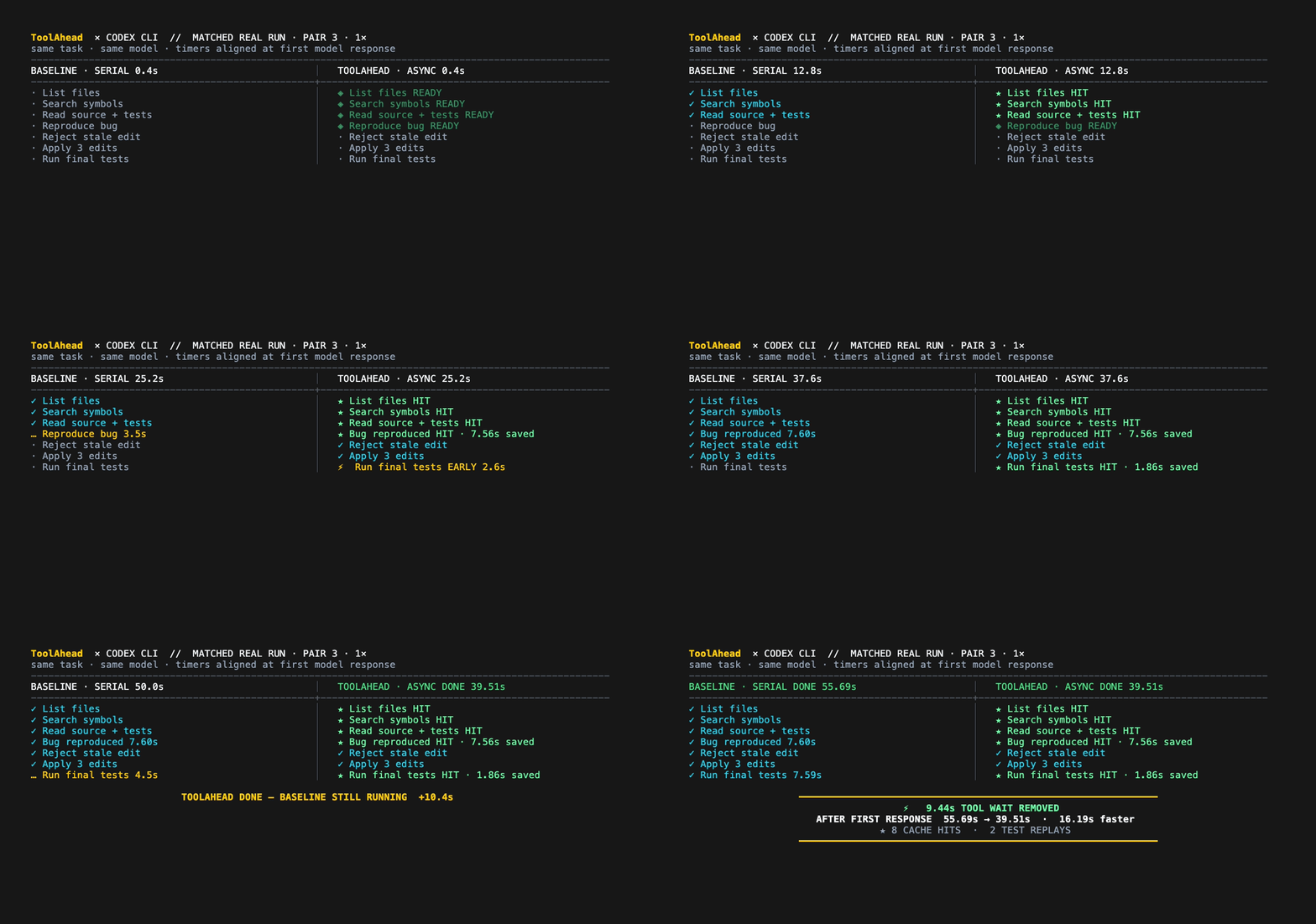
This is a 1× timeline from a matched Codex pair using the real API and separate copies of the same project. The protocol and paired Codex/Claude measurements are in BENCHMARKS.md.
Full recorded runs
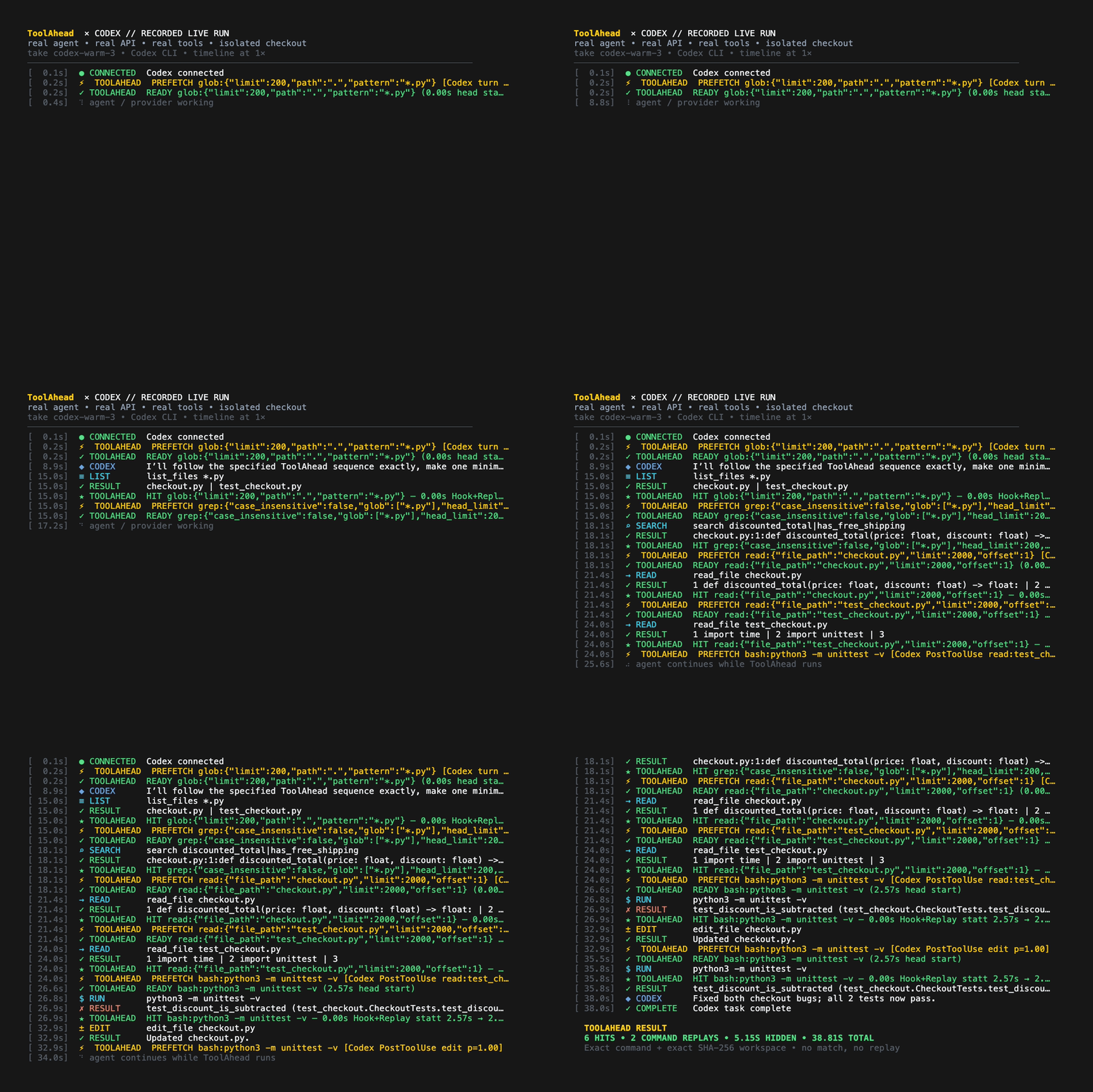
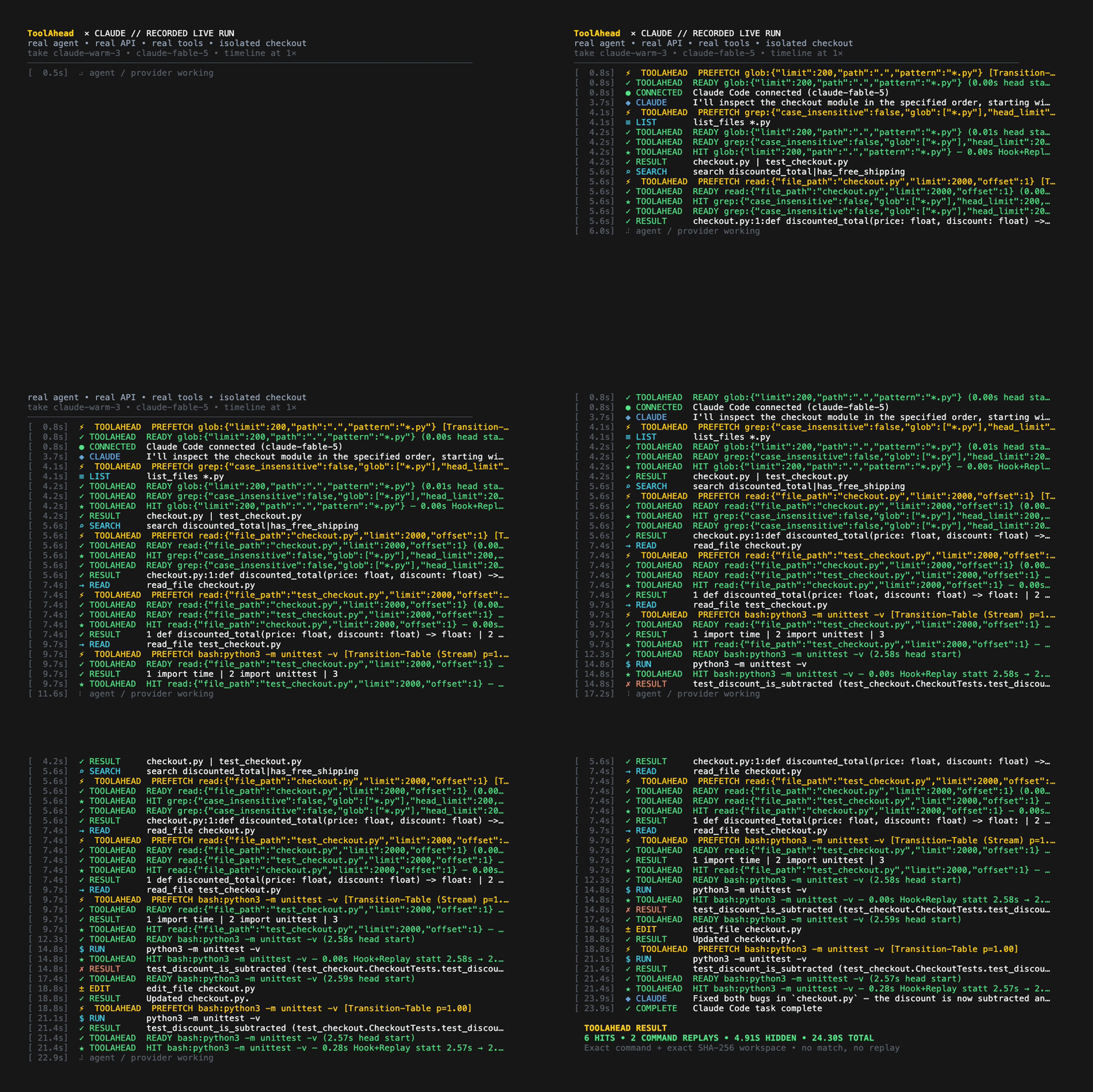
These 1× recordings show ToolAhead handling the complete workflow: list, search, read, edit, write, test, result validation, and reuse.
Codex CLI
Claude Code
Install
Once published on PyPI:
uvx toolahead --help
# or
python3 -m pip install toolahead
From a local checkout today:
git clone https://github.com/michael-ra/toolahead.git
cd toolahead
uvx --from . toolahead --help
Requirements: Python 3.11+, macOS or Linux, and an authenticated Codex CLI,
Claude Code, or Google Antigravity installation. watchdog is optional.
Quickstart
Run these commands inside the project you want to accelerate:
# Connect your agents. The default is hooks-only: ToolAhead replaces
# NOTHING — your agent keeps its native tools, and learning, service
# pre-warming, route warming, and Bash replay all ride on lifecycle hooks.
uvx toolahead init --agent both --project .
# Want Read/Search replay hits too? --replay-tools registers the ToolAhead
# MCP tools; --strict additionally hides the native analogs (maximum hits).
# Google Antigravity user? Add --agent all, or run: uvx toolahead init-antigravity

# Allow this exact test command to run ahead and be reused.
uvx toolahead allow "python3 -m pytest" --project .

# Optional: declare your dev server in toolahead.toml, then approve it once
# so it can be pre-warmed while the model reasons.
uvx toolahead trust --project .

# Start ToolAhead in the background for this workspace.
uvx toolahead serve --workspace .
Then start your agent in a second terminal.
Codex CLI:
codex
Claude Code:
ANTHROPIC_BASE_URL=http://127.0.0.1:4242 claude
Google Antigravity: open the project as usual — init-antigravity installs
both the workspace MCP server (.agents/mcp_config.json) and lifecycle hooks
(.agents/hooks.json). The hooks observe Antigravity's native tools
(run_command, view_file, replace_file_content, …), so learning, service
pre-warming, and route warming work even when the agent never touches the
ToolAhead MCP tools. Run /mcp in the prompt panel once to confirm the
toolahead server is enabled. Antigravity support is still experimental:
the CLI registers workspace MCP tools lazily and its agents cannot always
invoke them (observed on CLI 1.1.11) — which limits replay hits, not
pre-warming — and print mode loads neither MCP servers nor project context.
Measured speedups so far are from Claude Code and Codex sessions.
See live timing and cache statistics at any time:
uvx toolahead status
Rerun toolahead init after upgrading ToolAhead. It refreshes ToolAhead's
project files without changing unrelated Codex, Claude, or MCP settings.
One clear set of tools (opt-in)
The MCP tools are opt-in (--replay-tools). Everything except Read/Search
replay works without them: lifecycle hooks observe the native tools, drive
learning and pre-warming, and (on Claude Code and Codex) replay allowlisted
Bash commands transparently. Registering the ToolAhead tools adds the one
thing hooks cannot do — serving prepared file-read and search results — because
only the tool that owns a call can answer it from memory.
| MCP tool | Familiar input | Can run ahead | Behavior |
|---|---|---|---|
list_files |
pattern, path, limit |
✓ | Lists matching files |
search |
pattern, path, glob, output mode |
✓ | Searches file contents |
read_file |
file_path, offset, limit |
✓ | Reads a file with line numbers |
edit_file |
file_path, old_string, new_string, replace_all |
— | Makes an exact edit and starts the next prediction |
write_file |
file_path, content |
— | Creates or replaces a file and starts the next prediction |
run |
command, description |
✓ | Runs approved tests, builds, and linters |
The agent never sees cache wrappers or duplicate JSON. ToolAhead keeps cache
timing in hidden MCP _meta; prepared and normal calls return the same text,
errors, and exit codes.
Why --strict matters
Showing two equivalent Read tools forces the model to choose between duplicate options, wastes prompt space, and makes selection less reliable. Strict mode keeps one set:
- Claude Code's project settings hide native
Read,Grep,Glob,Edit, andWrite; the six ToolAhead MCP equivalents take their place. - Codex sees the same six tools and instructions to use them. Strict mode
redirects native
apply_patchtoedit_fileso edit→test learning stays intact. Codex's general shell remains available when needed; explicitly allowed Bash tests can still reuse prepared results. - Tool names and field conventions stay close to the native coding-agent tools. Descriptions are intentionally short to reduce the tokens sent to the model.
Omit --strict if you want to keep all native file tools visible while trying
ToolAhead. Switching back is safe: every toolahead init writes the routing
that its flags describe, so a later run without --strict restores the native
file tools and removes the strict marker along with the MCP registration.
Predictions can be wrong. Returned results cannot.
ToolAhead is free to guess what comes next, but it returns prepared work only when the requested call and current files are exact matches.
flowchart LR
    A[Previous tool or turn start] --> B[Predict next exact call]
    B --> C[Read-only worker or disposable checkout]
    A --> D[Agent keeps reasoning]
    C --> E{Exact call + fresh SHA-256 input match?}
    D --> E
    E -->|match| F[Return prepared result from RAM]
    E -->|no match| G[Execute the MCP call normally]
- List, Search, and Read results are tied to the exact request and the relevant file contents.
- Command results are tied to the exact command and a fresh hash of the whole workspace.
- Commands run ahead only in a disposable workspace copy.
- A prepared result is returned only when the real workspace still matches the copy used to create it.
- Wrong predictions, background-process failures, expired results, and timeouts automatically fall back to a normal tool execution.
- Cache entries store stdout, stderr, and exit code—not a model-generated summary.
ToolAhead learns tool sequences locally. The reliable signal is the previous tool finishing; visible commentary can offer an earlier hint when an agent provides it. Private chain-of-thought is never required.
Latest file change wins
ToolAhead does not need to guess which edit will be the last one. Every successful Edit or Write increases a simple workspace version number:
edit version 1 ── start predicted tests
edit version 2 ── stop version 1 ── restart tests on version 2
edit version 3 ── stop version 2 ── keep only the version 3 result
- A running command for an older file version receives
SIGTERMas a process group, thenSIGKILLif it does not stop promptly. - The pending command is restarted for the newest file version even when another edit arrives before the test request.
- Writes arriving within 50 ms are grouped before work starts. Configure the
window with
PREFETCH_MUTATION_DEBOUNCE_MS; set it to0to disable grouping. - Outdated results are never inserted into the current cache. Fresh SHA-256 validation remains the final replay condition.
- Failed file changes do not increase the workspace version.
In plain terms: after every successful file change, ToolAhead starts the likely next safe call. Nearby changes are grouped, and a newer change always replaces work started for an older file state.
Which commands can be reused
ToolAhead may return a prepared command result instead of running the command
again only when that exact command is listed in .prefetch-replay.json:
{
  "commands": [
    "python3 -m pytest",
    "npm test"
  ]
}
Use the CLI instead of editing the file by hand:
toolahead allow "python3 -m pytest" --project .
The allowed-command list updates without restarting ToolAhead. It rejects shell chains, pipes, redirects, substitutions, installers, and arbitrary commands; recognized test/lint families include unittest, pytest, npm/yarn tests, Go, Cargo, Make, Jest, Vitest, Ruff, ESLint, TypeScript, and mypy.
Prioritize known failures without weakening the result
Use the test runner's explicit full-suite mode when available. For pytest,
pytest --ff
runs the last failures first and then the rest of the suite;
ToolAhead can learn and reuse that exact command normally. Focused modes such
as pytest --lf or Jest --onlyFailures are useful quick checks, but ToolAhead
never substitutes their partial result for a requested full-suite result.
Pre-warming external services (optional)
ToolAhead accelerates two different things and never mixes them up:
- Result speculation prepares an answer ahead of time. It is limited to calls whose output is a pure function of the workspace files — List, Search, Read, and allowlisted test commands — because the content hash proves the result is identical.
- Pre-warming starts slow, long-lived prerequisites ahead of time — a dev server, a browser. No result is ever served from memory here; the win is purely the eliminated startup latency.
Commands whose output depends on a running service (Playwright against a dev
server, integration tests against a database) belong to the second category: a
file hash cannot prove their results equal, because server state — hot-reload
timing included — is not stored in files. Declare them in an optional
toolahead.toml at the workspace root:
[services.dev-server]
command = "npm run dev"
ready.port = 3000        # or ready.http = "http://…" / ready.command = "curl -sf …"
timeout = 30             # seconds to wait for readiness (default 30)
prewarm = "mutation"     # "mutation" (default) | "start" | "manual"
warm_routes = ["/", "auto"]  # optional: pre-request routes after every edit

[commands.e2e]
match = "npx playwright test"   # prefix match; a declared .sh script
                                # also matches ./script.sh and bash script.sh
requires = ["dev-server"]
You can also let your agent draft this file — it already knows the project's dev-server command, ports, and test entry points, and writing the file is an ordinary edit. Nothing executes from it until you review and approve the exact content once:
toolahead trust
Service commands run unsandboxed against the live workspace — they are the
environment the agent is about to test — so a cloned repository must never
start anything by merely being opened. toolahead trust records a SHA-256 of
the exact file outside the repository (mode 0600); any later change to
toolahead.toml revokes the approval automatically until you rerun it. Until
trusted, only the safe direction applies: declared external commands are still
excluded from result reuse, but no process is ever started.
To keep a service itself sandboxed, make the declared command the sandbox
wrapper: command = "docker compose up dev" runs the dev server in a
container with the workspace mounted read-only or read-write as you choose —
isolation comes from the container, and ready.port works unchanged.
With a trusted config:
- Services with
prewarm = "mutation"start right after the first successful edit — typically while the model is still reasoning about its next step — so they are warm when the test or e2e call arrives."start"launches them with the daemon,"manual"only on demand. - A command matching a
[commands.*]entry is never run ahead and never served from cache. Before it executes, ToolAhead waits — bounded by the declared timeouts — until every required service passes its readiness check: through the ToolAheadruntool, and equally for the agent's native shell via the PreToolUse hooks, which deny with an actionable reason instead of allowing a doomed run when a trusted config's service stays down. Everything else stays fail-open. warm_routesgoes one step further: after every edit, ToolAhead GETs the listed routes as soon as the service is ready. Dev servers compile routes on demand, so the request itself absorbs the rebuild — by the time the agent's browser or e2e check arrives, the page is already compiled. The"auto"entry derives the route from the edited file for Next.js (app and pages router), Nuxt, and SvelteKit — editingapp/dashboard/page.tsxwarms/dashboard. On top of the heuristic, ToolAhead learns which URLs your agent actually fetches after editing a file and warms those on the next edit too. Learning requires a real fetch — an HTTP client such ascurlorwget, either directly or inside a shell script the command executed. A URL that merely appears in output, a comment, or a file the agent only read is never learned, so it can never become an unexpected request later. What is learned lives in memory for the session only and is never written to disk: a cloned repository cannot ship a file that steers these requests. Warm requests are GET-only against the declared service origin, never follow redirects elsewhere, are never cached, and never overlap — a newer edit waits for the in-flight round and then supersedes it.toolahead trustprints the exact auto-GET targets before you approve them.- Readiness means reachable, not "has processed your latest edit": a
hot-reload server that was already running may briefly still serve the
previous build. ToolAhead never adds a wait for this — instead, when a run
starts within seconds of an edit against an already-running service, it
appends a short note to the output so the agent re-runs once instead of
concluding its change had no effect. For a strict freshness barrier, use
ready.commandwith a project-specific check (for example comparing a build ID endpoint against the sources). - Browser-based checks follow the same rule: ToolAhead warms the browser and the server, but a screenshot or page snapshot is always captured fresh — rendered output is not a pure function of the files.
Everything here is strictly opt-in: without toolahead.toml nothing starts and
nothing changes. TOOLAHEAD_ENSURE_WAIT caps how long a hook waits for
readiness (110 seconds by default, below the 120-second hook process timeout);
0 disables the wait entirely. A service whose timeout exceeds that budget
cannot be fully guaranteed — raise both values together if you have one.
Service output is logged to .toolahead/services/<name>.log, and
toolahead status shows each service's state.
Latency metrics
toolahead status separates the parts that can otherwise be confused:
| Metric | Meaning |
|---|---|
| Agent wait | Time from the previous result until the agent asks for its next tool; includes API, network, model, and reasoning time |
| Prefetch lead | How long ToolAhead had already been running the call before the agent asked for it |
| Replay wait | How much longer the prepared call still needed when the agent requested it |
| Tool wait removed | Native tool runtime minus actual replay/tool phase |
| End-to-end | Total time for the complete task; includes variable agent and API time |
| Acceptance | Prepared calls that exactly matched and were returned |
| Delivery | Prepared command results the agent actually requested and used |
This is why removing 5 seconds of tool waiting does not guarantee the complete task finishes exactly 5 seconds sooner: model and API response times vary independently.
Security model
[!WARNING] A disposable workspace copy is not a security sandbox. Allow only commands you already trust. A malicious command can still access the network or write to absolute paths outside the copy.
- Tool paths are contained inside the configured workspace; symlink escapes are rejected.
- Every command run ahead uses a fresh disposable copy, never the live checkout.
- The local daemon binds to
127.0.0.1and adds no remote telemetry. Requests carry the workspace they came from, so a daemon serving another project refuses them instead of answering for the wrong checkout. - What ToolAhead has learned about a project is stored outside it, under
~/.toolahead/. Nothing a repository ships can steer what gets executed or requested. - Declared services never start from an untrusted
toolahead.toml: approval is an explicittoolahead trustof the exact file content, stored outside the repository and revoked automatically by any change to the file. - Before returning a prepared result, ToolAhead hashes the current files again. Filesystem watchers only help it skip unnecessary hashing.
- Tests that depend on external services, databases, clocks, random values, or
environment state cannot be validated from source files alone. Declare them
under
[commands]intoolahead.toml: they are then excluded from result reuse and only their prerequisites are pre-warmed.
Limitations
- Edit and Write are intentionally not run ahead. After either finishes, ToolAhead starts the next predicted safe tool. Rapid changes are grouped, and commands running against an older file state are stopped.
- Prepared command results are limited to explicitly approved tests, builds, and linters whose output should be repeatable.
- Commands currently verify the entire workspace, which can be conservative on very large monorepos. Checking only relevant dependencies is planned.
- API and model response times can outweigh the saved tool time. Compare multiple runs with and without ToolAhead instead of relying on one attempt.
- Hosted tools such as provider-side web search cannot be run ahead by this local integration.
- Service readiness proves reachability, not that a hot-reload server has
finished rebuilding the newest edit. ToolAhead flags this window with a note
on the run output rather than adding latency;
ready.commandcan implement a strict project-specific freshness check. - Windows has not yet been validated.
Development
Build and verify the PyPI artifacts:
uv build
python3 .github/scripts/normalize_sdist.py dist/*.tar.gz
python3 .github/scripts/check_distribution.py dist/*.whl dist/*.tar.gz
uvx --from twine twine check dist/toolahead-0.2.0a2*
uvx --from dist/toolahead-0.2.0a2-py3-none-any.whl toolahead --help
Project map
src/toolahead/— installable CLI, MCP server, prediction engine, hooks, sandbox execution, replay, and telemetrydocs/assets/— the logo and README recordings.github/workflows/— package validation and trusted PyPI publishing.github/scripts/— release-archive privacy and metadata checks
Research foundations
ToolAhead is an independent implementation informed by research on speculative tool execution. It is not an official implementation or reproduction of any single paper. The closest foundations are:
- SPORK: Self-Speculative Forking to Accelerate Agentic LLM Inference and Parallelizing Tool Execution and LLM Generation (PASTE) for overlapping predicted tool execution with ongoing agent reasoning.
- Speculate with Memory for learning recurring action transitions from previous agent trajectories.
- SpecBox for speculative sandbox prewarming and isolated execution.
- AOSpec for lossless action/state verification across speculative execution.
ToolAhead combines these directions with local Codex and Claude Code hooks, Antigravity workspace MCP discovery, exact call-and-workspace matching, MCP result replay, mutation generations, and a standalone Python package. All benchmark numbers above are ToolAhead's own measurements, not results reported by those papers.
License
MIT License. See LICENSE.
Contributions are welcome; see CONTRIBUTING.md. Security reports should follow SECURITY.md.
1 maintainer

Download files
Download the file for your platform. If you're not sure which to choose, learn more about installing packages.
Source Distribution
Built Distribution
Filter files by name, interpreter, ABI, and platform.
If you're not sure about the file name format, learn more about wheel file names.
Copy a direct link to the current filters
File details
Details for the file toolahead-0.6.2.tar.gz.
File metadata
- Download URL: toolahead-0.6.2.tar.gz
- Upload date:
- Size: 99.4 kB
- Tags: Source
- Uploaded using Trusted Publishing? Yes
- Uploaded via: twine/7.0.0 CPython/3.13.14
File hashes
| Algorithm | Hash digest | |
|---|---|---|
| SHA256 |
b85316b4882f82a005d04bb1278d8b8116c12a6411d4bd4d5b52332ba29a0c21
|
|
| MD5 |
32fc7251d52491f11855bbff2595d570
|
|
| BLAKE2b-256 |
95dfefeda6a21d8b374bbd90146a4b720d887ef1dbb11d8ef58114e2d5655487
|
Provenance
The following attestation bundles were made for toolahead-0.6.2.tar.gz:
Publisher:
publish.yml on michael-ra/toolahead
-
Statement:
-
Statement type:
https://in-toto.io/Statement/v1 -
Predicate type:
https://docs.pypi.org/attestations/publish/v1 -
Subject name:
toolahead-0.6.2.tar.gz -
Subject digest:
b85316b4882f82a005d04bb1278d8b8116c12a6411d4bd4d5b52332ba29a0c21 - Sigstore transparency entry: 2382792764
- Sigstore integration time:
-
Permalink:
michael-ra/toolahead@d0bf6a5bd60ff1c7721ab120218ba0ddd32d5c96 -
Branch / Tag:
refs/tags/v0.6.2 - Owner: https://github.com/michael-ra
-
Access:
public
-
Token Issuer:
https://token.actions.githubusercontent.com -
Runner Environment:
github-hosted -
Publication workflow:
publish.yml@d0bf6a5bd60ff1c7721ab120218ba0ddd32d5c96 -
Trigger Event:
release
-
Statement type:
File details
Details for the file toolahead-0.6.2-py3-none-any.whl.
File metadata
- Download URL: toolahead-0.6.2-py3-none-any.whl
- Upload date:
- Size: 98.2 kB
- Tags: Python 3
- Uploaded using Trusted Publishing? Yes
- Uploaded via: twine/7.0.0 CPython/3.13.14
File hashes
| Algorithm | Hash digest | |
|---|---|---|
| SHA256 |
02ff475e9b25283ba608b28b3e9bf29d88ac0f7be8f9c12ff0d4314e873ab5c6
|
|
| MD5 |
59694645277ccb8b7f76e3c851d8eee5
|
|
| BLAKE2b-256 |
c434840de63dd500c1b9a46aecdc5e51e8dea800059222bcae848c3095d660c7
|
Provenance
The following attestation bundles were made for toolahead-0.6.2-py3-none-any.whl:
Publisher:
publish.yml on michael-ra/toolahead
-
Statement:
-
Statement type:
https://in-toto.io/Statement/v1 -
Predicate type:
https://docs.pypi.org/attestations/publish/v1 -
Subject name:
toolahead-0.6.2-py3-none-any.whl -
Subject digest:
02ff475e9b25283ba608b28b3e9bf29d88ac0f7be8f9c12ff0d4314e873ab5c6 - Sigstore transparency entry: 2382792877
- Sigstore integration time:
-
Permalink:
michael-ra/toolahead@d0bf6a5bd60ff1c7721ab120218ba0ddd32d5c96 -
Branch / Tag:
refs/tags/v0.6.2 - Owner: https://github.com/michael-ra
-
Access:
public
-
Token Issuer:
https://token.actions.githubusercontent.com -
Runner Environment:
github-hosted -
Publication workflow:
publish.yml@d0bf6a5bd60ff1c7721ab120218ba0ddd32d5c96 -
Trigger Event:
release
-
Statement type:







