
A Python toolsets library

Project description

toolsets
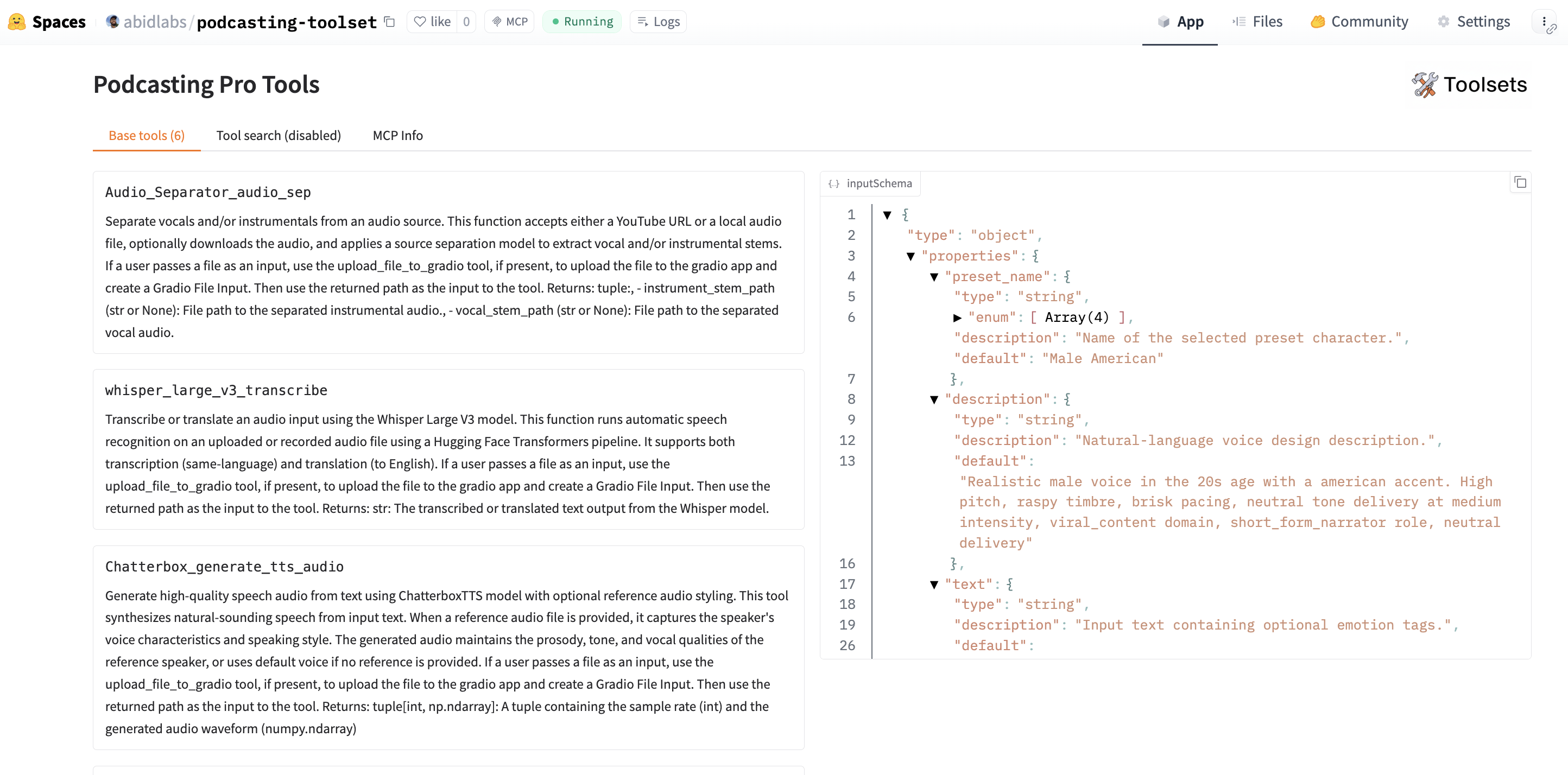
A Python library for aggregating multiple MCP (Model Context Protocol) servers into a single unified MCP server. Toolsets acts as a pass-through server that combines tools from multiple sources and provides semantic search capabilities for deferred tool loading.
Features
- MCP Server Aggregation: Combine tools from multiple Gradio Spaces and MCP servers and expose all aggregated tools through a single MCP endpoint (optional, enabled with
mcp_server=True). - Free hosting on Hugging Face Spaces: A Toolset itself is also a Gradio application (including a built-in UI for testing and exploring available tools), so you can host it for free on Hugging Face Spaces
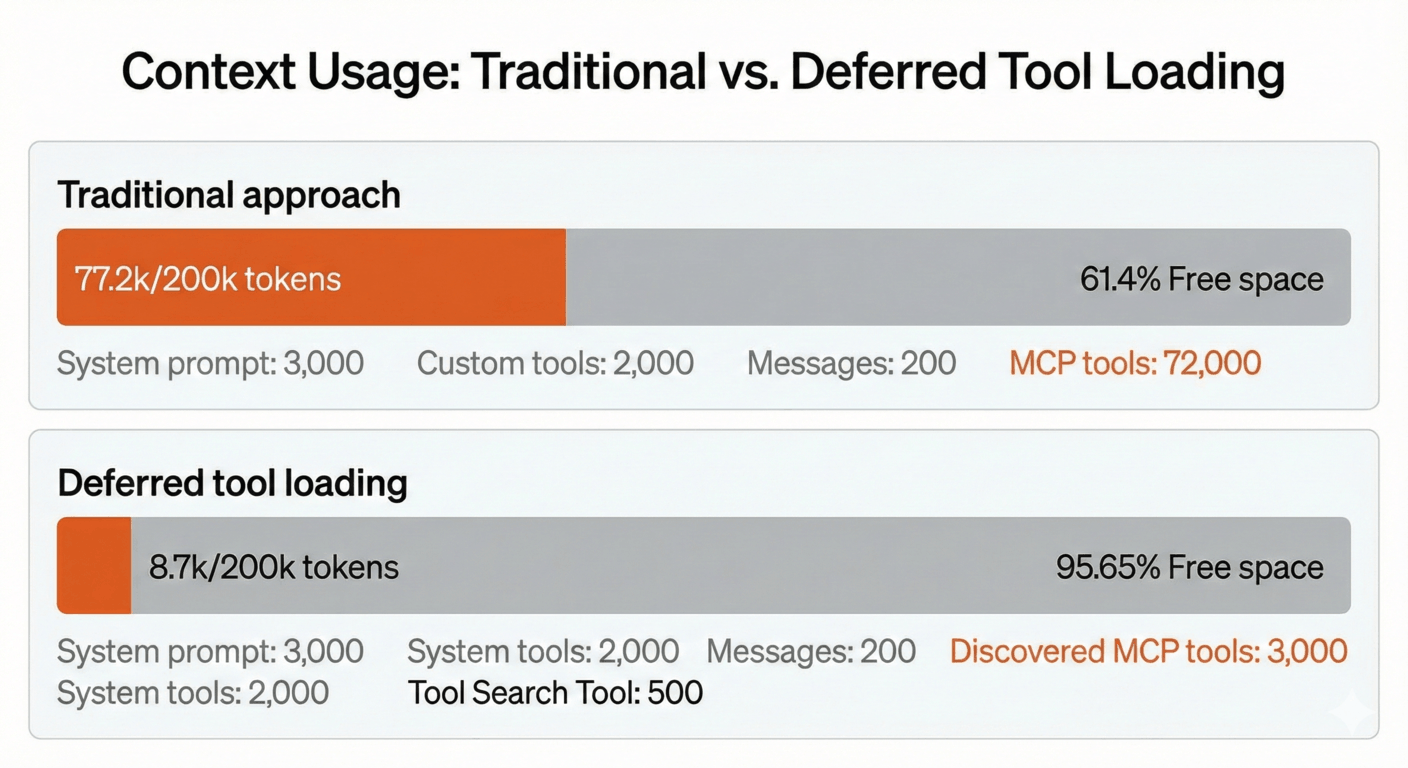
- Deferred Tool Loading: Use semantic search to discover and load tools on-demand. Like Claude's Advanced Tool Usage but for any LLM. This is useful when you have 100s of tools or more as it can save the context length of your model.
Example Toolset
Check out a live example: https://huggingface.co/spaces/abidlabs/podcasting-toolset
Create Your Own Toolset
Installation
pip install toolsets
For deferred tool loading with semantic search:
pip install toolsets[deferred]
Examples
A
from toolsets import Server, Toolset

# Create a toolset
t = Toolset("My Tools")

# Add tools from MCP servers on Spaces or arbitrary URLs
t.add(Server("gradio/mcp_tools"))
t.add(Server("username/space-name"))

# Launch UI at http://localhost:7860
# MCP server available at http://localhost:7860/gradio_api/mcp (when mcp_server=True)
t.launch(mcp_server=True)
Deferred Tool Loading
from toolsets import Server, Toolset

t = Toolset("My Tools")

# Add tools with deferred loading (enables semantic search)
t.add(Server("gradio/mcp_tools"), defer_loading=True)

# Regular tools are immediately available
t.add(Server("gradio/mcp_letter_counter_app"))

# Launch with MCP server enabled
t.launch(mcp_server=True)
When tools are added with defer_loading=True:
- Tools are not exposed in the base tools list
- Two special MCP tools are added: "Search Deferred Tools" and "Call Deferred Tool"
- A search interface is available in the Gradio UI for finding deferred tools
- Tools can be discovered using semantic search based on natural language queries
MCP Server Configuration
By default, launch() only starts the Gradio UI without the MCP server. To enable the MCP server endpoint, pass mcp_server=True:
from toolsets import Server, Toolset

t = Toolset("My Tools")
t.add(Server("gradio/mcp_tools"))

# Launch UI only (no MCP server)
t.launch()

# Launch UI with MCP server at http://localhost:7860/gradio_api/mcp
t.launch(mcp_server=True)
When mcp_server=True, the MCP server is available at /gradio_api/mcp and a configuration tab is shown in the UI with the connection details.
Custom Embedding Model
from toolsets import Server, Toolset

# Use a different sentence-transformers model
t = Toolset("My Tools", embedding_model="all-mpnet-base-v2")
t.add(Server("gradio/mcp_tools"), defer_loading=True)
t.launch(mcp_server=True)
Guiding Tool Selection with Notes
When you have multiple tools that serve similar purposes, you can add notes to guide the LLM on when to use each tool. Notes are appended to the tool description and help the model make better decisions about which tool to call.
from toolsets import Server, Toolset

t = Toolset("Podcasting Pro Tools")

t.add(Server("MohamedRashad/Audio-Separator"))
t.add(Server("hf-audio/whisper-large-v3", tools=["whisper_large_v3_transcribe"]))
t.add(Server("maya-research/maya1"), notes="Use this to generate voice samples, but not for the actual TTS since voice quality is lower.")
t.add(Server("ResembleAI/Chatterbox"), notes="Use this to generate the actual TTS, either without a voice sample or with a voice sample created with Maya1.")
t.add(Server("sanchit-gandhi/musicgen-streaming"))

t.launch(mcp_server=True)
In this example, both Maya1 and Chatterbox can generate speech, but the notes clarify their intended use:
- Maya1 is best for creating voice samples (reference audio)
- Chatterbox should be used for final TTS output, optionally using Maya1's output as a voice sample
The tool description format can be customized using the tool_description_format parameter:
# Default format includes the note
t = Toolset("My Tools")  # "[{toolset_name} Toolset] {tool_description} {note}"

# Custom format
t = Toolset("My Tools", tool_description_format="({toolset_name}) {tool_description} | Note: {note}")

# Disable formatting entirely
t = Toolset("My Tools", tool_description_format=False)
Deploying to Hugging Face Spaces
To deploy your toolset to Hugging Face Spaces:
- Go to https://huggingface.co/new-space
- Select the Gradio SDK
- Create your toolset file (e.g.,
app.py) with your toolset code - Add a
requirements.txtfile withtoolsets(and optionallytoolsets[deferred]for semantic search)
Your toolset will be available as both a Gradio UI and an MCP server endpoint.
Roadmap
Upcoming features and improvements:
- Hugging Face Token Support: Automatic token passing in headers for private and ZeroGPU spaces
- Hugging Face Data Types Integration:
- Datasets: Add Hugging Face datasets for easy RAG on documentation and structured data
- Models: Support for models with inference provider usage (e.g., Inference API, Inference Endpoints)
- Papers: Search and query capabilities for Hugging Face Papers
- Enhanced Error Handling: Better retry logic, connection pooling, and graceful degradation
- Tool Caching: Cache tool definitions and embeddings to reduce API calls and improve startup time
Contributing
We welcome contributions! Please see CONTRIBUTING.md for guidelines.
License
MIT License
Release history Release notifications | RSS feed


Download files
Download the file for your platform. If you're not sure which to choose, learn more about installing packages.
Source Distributions
Built Distribution
Filter files by name, interpreter, ABI, and platform.
If you're not sure about the file name format, learn more about wheel file names.
Copy a direct link to the current filters
File details
Details for the file toolsets-0.1.9-py3-none-any.whl.
File metadata
- Download URL: toolsets-0.1.9-py3-none-any.whl
- Upload date:
- Size: 16.7 kB
- Tags: Python 3
- Uploaded using Trusted Publishing? Yes
- Uploaded via: twine/6.2.0 CPython/3.10.12
File hashes
| Algorithm | Hash digest | |
|---|---|---|
| SHA256 |
e37d35c58ee10e088cc5a66b77f85e2d2608f03b1ba6d18ffc5f38580ba06b3e
|
|
| MD5 |
ede75371a9aa555d9cba864696a7b336
|
|
| BLAKE2b-256 |
bf88fedcff7ec582c6ca848d3ae583e3a6d38377e417649855cc6d6102337458
|
Provenance
The following attestation bundles were made for toolsets-0.1.9-py3-none-any.whl:
Publisher:
publish.yml on abidlabs/toolsets
-
Statement:
-
Statement type:
https://in-toto.io/Statement/v1 -
Predicate type:
https://docs.pypi.org/attestations/publish/v1 -
Subject name:
toolsets-0.1.9-py3-none-any.whl -
Subject digest:
e37d35c58ee10e088cc5a66b77f85e2d2608f03b1ba6d18ffc5f38580ba06b3e - Sigstore transparency entry: 823812972
- Sigstore integration time:
-
Permalink:
abidlabs/toolsets@839c722c040abadb99afbb0ab6252b6e43716738 -
Branch / Tag:
refs/heads/main - Owner: https://github.com/abidlabs
-
Access:
public
-
Token Issuer:
https://token.actions.githubusercontent.com -
Runner Environment:
github-hosted -
Publication workflow:
publish.yml@839c722c040abadb99afbb0ab6252b6e43716738 -
Trigger Event:
push
-
Statement type:






