

toolsieve


Semantic tool routing for MCP. Point it at the MCP servers you already run. It aggregates every tool they publish, then exposes exactly three tools to your client — and tells you how many tokens that saved.
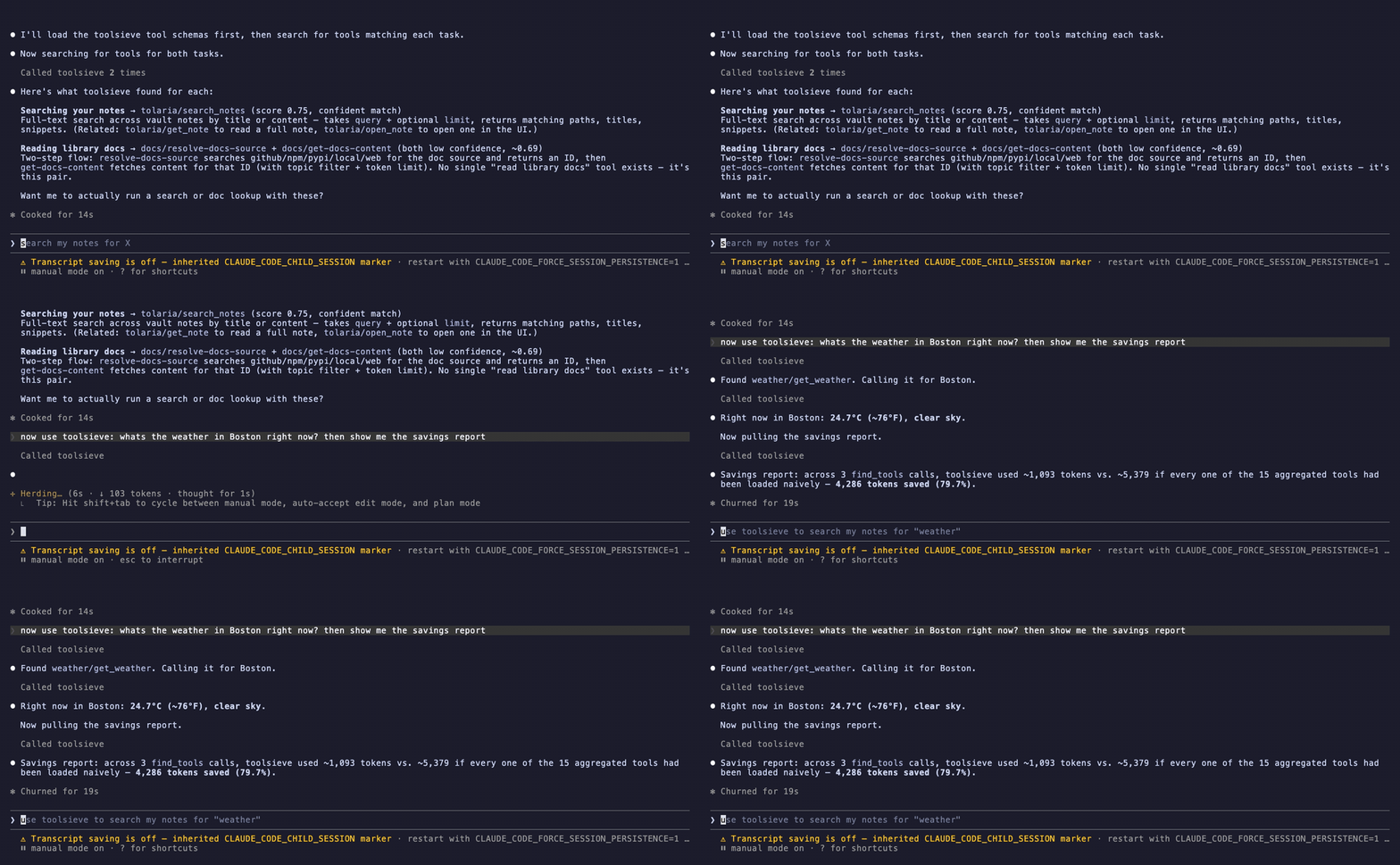
Claude Code (Sonnet) against 4 real MCP servers — 15 tools aggregated, 3 exposed. It routes "search my notes" and "read library docs" to the right tools and calls the weather tool for real. One recorded session, not the headline claim, and recorded before the v0.3 response redesign — the savings figure it shows is superseded by Benchmarks below.
Why
Every MCP server you connect dumps its full tool list — names, descriptions, and JSON schemas — into your model's context on every single request. Five servers in, you're spending thousands of tokens per call describing tools you won't use.
Existing MCP gateways and proxies solve this by filtering lexically (BM25
keyword matching) or structurally (manual allow-lists). toolsieve matches
semantically: it embeds each tool's own name and description, embeds your
query, and returns the closest matches by cosine similarity. Ask for "what's the
weather" and it finds get_weather — no keyword overlap required.
And it shows its work. Every response carries a token-savings receipt.
Benchmarks
181 tools from 25 real MCP servers (GitHub, Slack, Notion, Linear, Stripe, Supabase, Playwright, Postgres and more), 159 queries with a known correct tool.
A tool lookup costs ~558 tokens instead of the 14,418 it takes to load the catalog. The right tool arrives ready to call 69% of the time, and is at least named in the response 95% of the time — so the other 31% costs one cheap exact-name lookup, not a blind reformulation.
Savings climb fast. Finding the tool barely moves.
Both charts are on the same scale, so you can read one against the other:
  Tokens saved — climbs steeply with catalog size
     10 tools   ████████████████████████▏                  60.5%
     25 tools   ███████████████████████████████            77.7%
     50 tools   ███████████████████████████████████▊       89.5%
    100 tools   ██████████████████████████████████████     95.0%
    181 tools   ██████████████████████████████████████▉    97.3%

  Right tool visible in the response — barely moves
     10 tools   ████████████████████████████████████████    100%
     25 tools   ████████████████████████████████████████    100%
     50 tools   ████████████████████████████████████████    100%
    100 tools   ███████████████████████████████████████▌     99%
    181 tools   ██████████████████████████████████████       95%
                ├─────────┬─────────┬─────────┬─────────┤
                0%       25%       50%       75%     100%
Every find_tools response carries the names of the nearby tools, not just the
matches. That is what keeps the second chart flat: a client can see what exists,
so "the ranker put it 12th" costs one exact-name lookup, and "no such tool
exists" is answerable instead of being met with another guess.
It matters because guessing is what actually costs money. In a pre-release smoke
test against real GitHub and Context7 servers, a client hunting a plausible but
nonexistent get_repository burned four searches to make three calls. The
roster is ~6 tokens per name and removes that failure mode.
In absolute terms: at 50 tools a find_tools call carries 423 tokens instead
of 4,010. At 181, 396 instead of 14,418.
Why not just keyword matching?
Because it falls apart on the queries real users actually type:
  Right tool found, 50-tool catalog
    toolsieve   ████████████████████████████████████████    100%
    BM25        ██████████████████████████████▌              76%

  …when the query shares no wording with the tool
    toolsieve   █████████████████████████████▌               74%
    BM25        ██████████████████▉                          47%
                ├─────────┬─────────┬─────────┬─────────┤
                0%       25%       50%       75%     100%
"Remember for later that Alice works at Acme" against Create multiple new entities in the knowledge graph — not one word in common. BM25 has nothing to match on. Semantic matching lifts accuracy on queries like these from 47% to 74% — the tier that decides whether a client finds its tool or starts guessing.
What a correct answer costs
Tokens per call is the wrong meter — a response that answers cheaply but misses often just moves the cost to the next call. The honest unit is tokens per resolved lookup: one call when the schema arrives, two when only the name does, four when neither (the rate the smoke test actually observed).
  Tokens spent per resolved lookup, 181-tool catalog
    naive       ████████████████████████████████████████  14,418
    BM25        █▍                                           489
    toolsieve   █▌                                           558
                ├───────────────────────────────────────┤
                0                                  14,418
That meter also changed our mind about our own design. Judged per call, toolsieve's older v0.2 response shape looked cheaper — right up until you counted the calls its misses caused, and priced schemas at what real servers actually publish (154–269 tokens per tool, measured; this catalog is an unusually light 80). Above ~150 tokens per tool the current shape wins, by 1% at 154 and 30% at 269. Below it, the old one did.
Full per-size table, the schema-size sensitivity that settles that comparison,
difficulty breakdown, and how to reproduce:
benchmarks/RESULTS.md.
When not to use it
Under ~10 aggregated tools, don't. A find_tools response has a floor price — a
schema plus a roster — and a catalog that small is cheaper handed over whole.
toolsieve-setup --verify says so rather than reporting a win that isn't there.
Routing is also charged per lookup where loading a catalog is a one-off, so at 181 tools toolsieve is ahead for roughly the first 26 lookups of a session. Past that the up-front load is cheaper on raw tokens — though not on context window, and not on selection accuracy, which degrades past ~30–50 tools.
How it works
   your MCP client
         │  sees only: find_tools, call_tool, get_savings_report
         ▼
    ┌─────────────┐
    │  toolsieve  │  embeds each tool's name + description once
    └─────────────┘  matches your query by cosine similarity
       │    │    │
       ▼    ▼    ▼     real MCP servers — local stdio or remote HTTP/SSE,
     docs notes linear   connections held open
find_tools(query, k=3)— returns the best match with its full input schema, the runners-up as name + description, andalso_available: the names of every nearby tool, grouped by server. Plus the savings receipt.call_tool(server, tool_name, args)— proxies the real call to the server that owns it and returns the real result.get_savings_report()— running session total.
Two steps rather than one, deliberately: a router can't reliably invent valid arguments from free text. You see the real schema before you call.
Only the top match carries a schema, because schemas are most of what a response
costs. also_available is what makes that affordable: if the match is wrong, the
right tool is usually already named there, and asking for it by exact name
returns its schema directly rather than re-running the ranker. It also answers
the question a ranked list cannot — does this tool exist at all? — which is the
one that otherwise turns into three more searches.
Install
Requires Python 3.11+ and uv.
uvx toolsieve
That's it — uvx fetches and runs it, no checkout. To keep it installed:
pip install toolsieve
Contributing, or want the demo and benchmarks? Clone instead:
git clone https://github.com/TJLSmith0831/toolsieve
cd toolsieve
uv sync
Configure
Migrate an existing client config
Already have mcpServers configured in Claude Code, Claude Desktop, Cursor,
Devin Desktop (formerly Windsurf), VS Code, Codex CLI, or Devin CLI?
toolsieve-setup moves those entries behind toolsieve for you instead of
hand-copying config. Clients that support a project-scoped config get a
separate -project key, so --list shows user-level and project-level
configs as distinct targets:
uvx toolsieve-setup --list                            # discover configs across every known client
uvx toolsieve-setup --client claude-code --dry-run    # preview the migration
uvx toolsieve-setup --client claude-code --apply      # write it
uvx toolsieve-setup --verify                          # confirm the catalog is non-empty
Nothing is written without --apply. Every file the script edits is backed
up first (*.toolsieve-bak for the client config, *.json.bak for an
existing toolsieve config), and servers it doesn't recognize are left
untouched. HTTP servers with no auth headers are flagged with !, since
that's either an open server or one that authenticates with OAuth — at the
end of --apply, toolsieve asks each flagged server which it is and offers
to sign you in to the ones that need it (see
Authenticating a remote server).
Or configure it by hand:
Create ~/.toolsieve/config.json — the one place toolsieve looks unless
TOOLSIEVE_CONFIG says otherwise, whichever way you installed it. It's the same
mcpServers shape Claude Desktop and Claude Code use, so entries are usually
copy-pasteable from a config you already have:
{
  "mcpServers": {
    "docs":     { "command": "node", "args": ["/path/to/docs-mcp/dist/index.js"] },
    "notes":    { "command": "uv",   "args": ["run", "--directory", "/path/to/notes-mcp", "python", "src/index.py"] },
    "mintlify": { "url": "https://mcp.mintlify.com" },
    "linear":   { "url": "https://mcp.linear.app/mcp",
                  "headers": { "Authorization": "Bearer ${LINEAR_TOKEN}" } }
  }
}
Transport is inferred from the entry: command means a local stdio process,
url means a remote HTTP/SSE server. A URL ending in /sse uses SSE, anything
else uses Streamable HTTP. Both kinds land in one catalog — find_tools and
call_tool don't distinguish.
Edit this file while toolsieve is running and it re-aggregates automatically — no restart.
Authenticating a remote server
Put the credential in a header and reference it with ${VAR}, expanded from the
environment toolsieve runs in. It works in headers values and in the url, for
servers that want their key in a query string:
"ref": { "url": "https://api.ref.tools/mcp?apiKey=${REF_API_KEY}" }
If the variable is unset, that one server fails with an error naming it — toolsieve will not substitute an empty string and fire off an unauthenticated request, and your other servers are unaffected. Keep tokens in your shell profile or secret manager, not in this file.
OAuth servers need no configuration at all. Servers like Linear, Supabase,
Vercel and Railway hand out no static token — they authenticate through a
browser. Give them a url and nothing else:
"linear": { "url": "https://mcp.linear.app/mcp" }
Then sign in once:
toolsieve-auth
That lists the servers currently refusing you, opens a browser for the ones
you tick, and stores the result under ~/.toolsieve/oauth/ (owner-only, mode
0700). Pass a name — toolsieve-auth linear — to go straight to one, and
--force to re-authorize a server that already works, e.g. to switch
accounts.
There is nothing to declare in the config because there is nothing to guess:
an unauthenticated request to a server that needs OAuth comes back 401 with
a WWW-Authenticate header, which is the discovery mechanism the MCP
specification defines. toolsieve follows it. A server that is genuinely open
never sends one, so it just connects.
After that it stays signed in on its own — the stored refresh token is used
silently, including across restarts. If it is ever revoked, that one server
fails with a message naming the fix while the rest keep working, and
toolsieve-auth <name> puts it back — the running server picks the new token
up within a second, with no restart. The MCP server process never opens a
browser: it has no terminal to show one on, so signing in is always
something you do deliberately, from your shell.
Running on a headless box? The redirect can only return to localhost on the
machine running the command, so toolsieve-auth prints the exact
ssh -L 8765:localhost:8765 … line to forward first, then completes normally
in the browser on your own machine.
Run
As an MCP server, from any client:
{
  "mcpServers": {
    "toolsieve": {
      "command": "uvx",
      "args": ["toolsieve"]
    }
  }
}
No path, so the same entry works on any machine with uv. It reads
~/.toolsieve/config.json; add "env": { "TOOLSIEVE_CONFIG": "/some/other.json" }
to point it elsewhere. Running from a clone instead:
{
  "mcpServers": {
    "toolsieve": {
      "command": "uv",
      "args": ["run", "--directory", "/path/to/toolsieve", "python", "-m", "toolsieve"]
    }
  }
}
To check a migration worked without restarting your client:
uvx toolsieve-setup --verify
Or see it work end to end from a clone. With no config, this runs against two real stdio MCP servers the repo ships, so it works on a fresh clone with nothing else installed:
uv run python demo.py
Savings look modest on that 4-tool demo catalog — routing 3 of 4 tools can't save
much. Point TOOLSIEVE_CONFIG at your own servers to see the real number.
Claude Code
/plugin marketplace add TJLSmith0831/toolsieve
/plugin install toolsieve
The plugin reads its server list from ~/.toolsieve/config.json — a home-directory
path, so it survives plugin updates.
Configuration
| Variable | Default | Purpose |
|---|---|---|
TOOLSIEVE_CONFIG |
~/.toolsieve/config.json |
Path to the mcpServers config |
TOOLSIEVE_CONFIDENCE_THRESHOLD |
0.70 |
Below this, matches are flagged confidence: "low" |
TOOLSIEVE_LOG_LEVEL |
WARNING |
Set INFO to see aggregation and match logging |
Behavior worth knowing
Match quality depends on your downstream tools' descriptions. toolsieve embeds
what each server publishes — it does not rewrite it. A tool described as "runs the thing" will match poorly, and that's a property of the tool, not the router.
toolsieve warns at startup about tools with no description at all.
A weak match is flagged, not withheld. Measured against a real catalog,
on-topic queries score roughly 0.56–0.83 and off-topic ones 0.38–0.55 — the ranges
nearly touch, so no threshold cleanly separates them. Rather than tell you "nothing
matched" while a perfectly good tool exists, toolsieve returns its best match and
tags anything under the threshold confidence: "low". You see the score and the
schema, so you can judge. If a match is wrong, call again with
exclude=["server/tool_name"].
One server going down doesn't take toolsieve with it. A server that fails to connect is logged and skipped; the rest of the catalog still works. A call to a failed server returns an error naming that server. A missing or broken config starts toolsieve with an empty catalog rather than crashing — fix the file and it loads with no restart.
Remote servers get one retry, in both directions. A remote endpoint that doesn't answer at startup is retried once before being dropped, so a momentary blip doesn't silently cost you a whole server until you next edit the config. And because idle timeouts, proxies, and redeploys quietly kill long-lived HTTP sessions, a call that fails on a dead session reconnects and retries once before erroring. Neither applies to stdio: a bad command is deterministic, so retrying it only adds latency to a failure you're getting anyway.
The receipt's token counts are estimates; its percentage is not. Absolute
counts use ~4 chars/token, but saved_pct is exact — both sides are measured
identically, so the estimator cancels out. The benchmark uses a
real tokenizer instead, because an absolute number quoted in docs shouldn't come
from an estimate. Routing k=3 out of 3 tools saves nothing, which is why the
savings curve is reported across catalog sizes rather than as one number.
Development
uv run pytest -q
Tests run against real MCP servers over both transports — stdio subprocesses and a real HTTP server on localhost — not mocks. No network egress required.
The benchmark's scoring, baseline, and wiring tests run in that sweep too (with a fake embedder, so no model download). The full benchmark is a manual step, since it downloads a real embedding model and scores 3 methods × 5 catalog sizes × 159 queries:
uv sync --group bench
uv run --group bench python benchmarks/run_benchmark.py
uv run python benchmarks/render_results.py
Changelog
Releases follow Semantic Versioning. See CHANGELOG.md for what changed in each release.
License
1 maintainer

Metadata
1 maintainer
Release files for toolsieve 0.3.1
For a detailed explanation of source distributions (sdists) and built distributions (wheels), please see the package formats documentation.
Source distribution (sdist)
| File | Size | Uploaded | Provenance | Actions |
|---|---|---|---|---|
| toolsieve-0.3.1.tar.gz | 3.2 MB | Without provenance | Details for toolsieve-0.3.1.tar.gz |
Built distribution (wheel)
| File | Interpreter | ABI | Platform | Actions Reset |
|---|---|---|---|---|
| toolsieve-0.3.1-py3-none-any.whl | Python 3 | none | any | Details for toolsieve-0.3.1-py3-none-any.whl |
Total release size: 3.2 MB
Release files / toolsieve-0.3.1.tar.gz
| Download URL | toolsieve-0.3.1.tar.gz |
|---|---|
| Size | 3.2 MB |
| Tags | Source |
|
SHA-256 checksum How to use checksums |
79aaa8510beba0126a9d4c2af44373139d0f84fd9d0a637565c715aacc34cec3
|
|
BLAKE2b-256 checksum How to use checksums |
0b6d1d8124377abc73052a11901bf4fce7d38fc0d11383617a6edfcd384d52fe
|
| Upload date | |
|
Uploaded using Trusted Publishing? What is trusted publishing? |
Yes |
| Uploaded via |
uv/0.12.1 {"installer":{"name":"uv","version":"0.12.1","subcommand":["publish"]},"python":null,"implementation":{"name":null,"version":null},"distro":{"name":"Ubuntu","version":"24.04","id":"noble","libc":null},"system":{"name":null,"release":null},"cpu":null,"openssl_version":null,"setuptools_version":null,"rustc_version":null,"ci":true}
|
Release files / toolsieve-0.3.1-py3-none-any.whl
| Download URL | toolsieve-0.3.1-py3-none-any.whl |
|---|---|
| Size | 41.9 kB |
| Tags | Python 3 |
|
SHA-256 checksum How to use checksums |
446e67fc299274f6787f92c9dd19c72e70e4d4a92697c4edf1d7f7b64568fe9c
|
|
BLAKE2b-256 checksum How to use checksums |
79f337be76d90003f5313164540147031e5e6875b8a8dfd130eb3fdb25de5121
|
| Upload date | |
|
Uploaded using Trusted Publishing? What is trusted publishing? |
Yes |
| Uploaded via |
uv/0.12.1 {"installer":{"name":"uv","version":"0.12.1","subcommand":["publish"]},"python":null,"implementation":{"name":null,"version":null},"distro":{"name":"Ubuntu","version":"24.04","id":"noble","libc":null},"system":{"name":null,"release":null},"cpu":null,"openssl_version":null,"setuptools_version":null,"rustc_version":null,"ci":true}
|
Security for toolsieve 0.3.1
Provenance
Provenance describes where a file came from. On PyPI, provenance is shared via attestations, which provide a verifiable record of the build or publishing details. View details, limitations and caveats.
No provenance found
None of the files in this release were uploaded with provenance metadata.
A note on package security
PyPI is a repository for distributing packages, not a service for auditing them. While third-party security researchers and our staff do their best to detect and remove malicious packages, PyPI cannot guarantee the quality, security or suitability of any given package.
To learn more about protecting yourself from malicious actors, visit our package security documentation.














